












我在VMWare中安装的linux mint,刚开始简单的以为使用yubikey像使用U盘一样的方式,把Yubikey插到电脑上,然后再VMWare里直接选择连接到客户机,dmessge 里有日志显示,但 gpg --card-status 找不到。
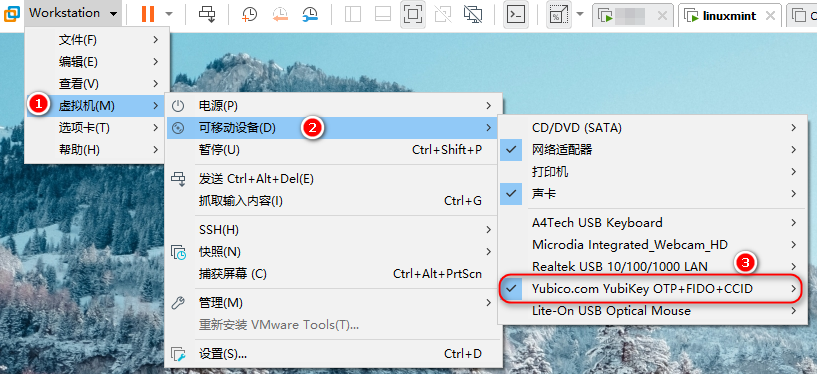
根据Yubikey的帮助文档显示,你需要把不是 Shared Yubikey 连接到客户机里,即需要选择如下图的 Yubico.com YubiKey OTP+FIDO+CCID 连接到虚拟机里。
usb.generic.allowHID = "TRUE"
usb.generic.allowLastHID = "TRUE"
usb.generic.allowCCID = "TRUE"
usb.quirks.device0 = "0x1050:0x0407 allow"
其中 usb.quirks.device0 的值要对应你的 Yubikey 的型号,上面这个是 Yubikey 4 和 5 的。
最后把虚拟机开机,选择连接即可,然后配置 gpg
# gpg --card-status
gpg: selecting card failed: Service is not running
gpg: OpenPGP card not available: Service is not running

# pkill gpg-agent

# gpg --card-status
Reader ...........: Yubico YubiKey OTP FIDO CCID
...
此内容由惯性聚合(RSS阅读器)自动聚合整理,仅供阅读参考。 原文来自 — 版权归原作者所有。