





Introducing agents, tool execution approval, DevTools, full MCP support, reranking, image editing, and more.
With over 20 million monthly downloads and adoption by teams ranging from startups to Fortune 500 companies, the AI SDK is the leading TypeScript toolkit for building AI applications. It provides a unified API, allowing you to integrate with any AI provider, and seamlessly integrates with Next.js, React, Svelte, Vue, and Node.js. The AI SDK enables you to build everything from chatbots to complex background agents.
Thomson Reuters used the AI SDK to build CoCounsel, their AI assistant for attorneys, accountants, and audit teams, with just 3 developers in 2 months. Now serving 1,300 accounting firms, they're migrating their entire codebase to the AI SDK, deprecating thousands of lines of code across 10 providers and consolidating into one composable, scalable system.
Clay used it to build Claygent, their AI web research agent that scrapes public data, connects to first-party sources via MCP servers, and helps sales teams find accounts with custom, targeted insights.
We’ve gone all in on the AI SDK. Its agentic capabilities and TypeScript-first design power our AI web research agent (Claygent) at massive scale. It's been a huge help as we build agents for sourcing, qualification, and surfacing the right accounts and prospects for our customers.
Jeff Barg, Clay

Today, we are releasing AI SDK 6, which introduces:
Upgrading from AI SDK 5? Run npx @ai-sdk/codemod v6 to migrate automatically with minimal code changes.
Link to headingAgents
AI SDK 6 introduces the Agent abstraction for building reusable agents. Define your agent once with its model, instructions, and tools, then use it across your entire application. Agents automatically integrate with the full AI SDK ecosystem, giving you type-safe UI streaming, structured outputs, and seamless framework support.
The functional approach with generateText and streamText is powerful and low-level, giving you full control regardless of scale. But when you want to reuse the same agent across different mediums (a chat UI, a background job, an API endpoint), or organize your code with tools in separate files, the inline configuration approach breaks down. You end up passing the same configuration object everywhere or building your own abstraction layer.
Link to headingToolLoopAgent
The ToolLoopAgent class provides a production-ready implementation that handles the complete tool execution loop. It calls the LLM with your prompt, executes any requested tool calls, adds results back to the conversation, and repeats until complete (for up to 20 steps by default: stopWhen: stepCountIs(20)).
import { ToolLoopAgent } from 'ai';
import { weatherTool } from '@/tools/weather';
export const weatherAgent = new ToolLoopAgent({
model: 'anthropic/claude-sonnet-4.5',
instructions: 'You are a helpful weather assistant.',
tools: {
weather: weatherTool,
},
});
const result = await weatherAgent.generate({
prompt: 'What is the weather in San Francisco?',
});
To learn more, check out the Building Agents documentation.
Link to headingCall Options
With call options, you can pass type-safe arguments when you call generate or stream on a ToolLoopAgent. For example, you can use them to inject retrieved documents for RAG, select models based on request complexity, or customize tool behavior per request.
import { ToolLoopAgent } from "ai";
import { z } from "zod";
const supportAgent = new ToolLoopAgent({
model: "anthropic/claude-sonnet-4.5",
callOptionsSchema: z.object({
userId: z.string(),
accountType: z.enum(["free", "pro", "enterprise"]),
}),
prepareCall: ({ options, ...settings }) => ({
...settings,
instructions: `You are a helpful customer support agent.
- User Account type: ${options.accountType}
- User ID: ${options.userId}`,
}),
});
const result = await supportAgent.generate({
prompt: "How do I upgrade my account?",
options: {
userId: "user_123",
accountType: "free",
},
});
To learn more, check out the Configuring Call Options documentation.
Link to headingCode Organization & UI Integration
The agent abstraction pushes you toward a clean separation of concerns and rewards you with end-to-end type safety. Define tools in dedicated files, compose them into agents, and expose them via API routes. The same definitions that power your agent logic also type your UI components.
// agents/weather-agent.ts
import { ToolLoopAgent, InferAgentUIMessage } from "ai";
import { weatherTool } from "@/tools/weather-tool";
export const weatherAgent = new ToolLoopAgent({
model: "anthropic/claude-sonnet-4.5",
instructions: "You are a helpful weather assistant.",
tools: { weather: weatherTool },
});
export type WeatherAgentUIMessage = InferAgentUIMessage<typeof weatherAgent>;
// app/api/chat/route.ts
import { createAgentUIStreamResponse } from "ai";
import { weatherAgent } from "@/agents/weather-agent";
export async function POST(request: Request) {
const { messages } = await request.json();
return createAgentUIStreamResponse({
agent: weatherAgent,
uiMessages: messages,
});
}
On the client, types flow automatically. Import the message type from your agent file, then render typed tool components by switching on the part type.
// app/page.tsx
import { useChat } from '@ai-sdk/react';
import type { WeatherAgentUIMessage } from '@/agents/weather-agent';
import { WeatherToolView } from '@/components/weather-tool-view';
export default function Chat() {
const { messages, sendMessage } = useChat<WeatherAgentUIMessage>();
return (
<div>
{messages.map((message) =>
message.parts.map((part) => {
switch (part.type) {
case 'tool-weather':
return <WeatherToolView invocation={part} />;
}
})
)}
</div>
);
}
// components/weather-tool-view.tsx
import { UIToolInvocation } from 'ai';
import { weatherTool } from '@/tools/weather-tool';
export function WeatherToolView({
invocation,
}: {
invocation: UIToolInvocation<typeof weatherTool>;
}) {
return (
<div>
Weather in {invocation.input.location} is {invocation.output?.temperature}°F
</div>
);
}
Define once, use everywhere. The same tool definition powers your agent logic, API responses, and UI components.
To learn more, check out the Agents documentation.
Link to headingCustom Agent Implementations
In AI SDK 6, Agent is an interface rather than a class. While ToolLoopAgent provides a solid default implementation for most use cases, you can implement the Agent interface to build your own agent abstractions for your needs.
One such example is Workflow DevKit, which provides DurableAgent. It makes your agents production-ready by turning them into durable, resumable workflows where each tool execution becomes a retryable, observable step.
import { getWritable } from 'workflow';
import { DurableAgent } from '@workflow/ai/agent';
import { searchFlights, bookFlight, getFlightStatus } from './tools';
export async function flightBookingWorkflow() {
'use workflow';
const flightAgent = new DurableAgent({
model: 'anthropic/claude-sonnet-4.5',
system: 'You are a flight booking assistant.',
tools: {
searchFlights,
bookFlight,
getFlightStatus,
},
});
const result = await flightAgent.generate({
prompt: 'Find me a flight from NYC to London next Friday.',
writable: getWritable(),
});
}
Learn more in the Building Durable Agents documentation.
Link to headingTool Improvements
Tools are the foundation of your agents' capabilities. An agent's ability to take meaningful actions depends entirely on how reliably it can generate valid tool inputs, how well those inputs align with your intent, how efficiently tool outputs can be represented as tokens in the conversation, and how safely those tools can execute in production environments.
AI SDK 6 improves each of these areas: tool execution approval for human-in-the-loop control, strict mode for more reliable input generation, input examples for better alignment, and toModelOutput for flexible tool outputs.
Link to headingTool Execution Approval
Building agents that can take real-world actions (deleting files, processing payments, modifying production data) requires a critical safety layer: human approval. Without it, you're blindly trusting the agent on every decision.
In AI SDK 6, you get human-in-the-loop control with a single needsApproval flag, no custom code required. See this feature in action with the Chat SDK, an open-source template for building chatbot applications.
By default, tools run automatically when the model calls them. Set needsApproval: true to require approval before execution:
import { tool } from 'ai';
import { z } from 'zod';
export const runCommand = tool({
description: 'Run a shell command',
inputSchema: z.object({
command: z.string().describe('The shell command to execute'),
}),
needsApproval: true, // Require user approval
execute: async ({ command }) => {
// Your command execution logic here
},
});
Not every tool call needs approval. A simple ls command might be fine to auto-approve, but a destructive rm -rf command should require review. You can pass a function to needsApproval to decide based on the input, and store user preferences to remember approved patterns for future calls.
import { tool } from "ai";
import { z } from "zod";
const runCommand = tool({
description: "Run a shell command",
inputSchema: z.object({
command: z.string().describe("The shell command to execute"),
}),
needsApproval: async ({ command }) => command.includes("rm -rf"),
execute: async ({ command }) => {
/* command execution logic */
},
});
Handling approval in your UI is straightforward with useChat. Check the tool invocation state, prompt the user, and return a response with addToolApprovalResponse:
import { ChatAddToolApproveResponseFunction } from 'ai';
import { runCommand } from './tools/command-tool';
export function CommandToolView({
invocation,
addToolApprovalResponse,
}: {
invocation: UIToolInvocation<typeof runCommand>;
addToolApprovalResponse: ChatAddToolApproveResponseFunction;
}) {
if (invocation.state === 'approval-requested') {
return (
<div>
<p>Run command: {invocation.input.command}?</p>
<button
onClick={() =>
addToolApprovalResponse({
id: invocation.approval.id,
approved: true,
})
}
>
Approve
</button>
<button
onClick={() =>
addToolApprovalResponse({
id: invocation.approval.id,
approved: false,
})
}
>
Deny
</button>
</div>
);
}
if (invocation.state === 'output-available') {
return <div>Output: {invocation.output}</div>;
}
// Handle other states...
}
To learn more, check out the Tool Execution Approval documentation.
Link to headingStrict Mode
When available, native strict mode from language model providers guarantees that tool call inputs match your schema exactly. However, some providers only support subsets of the JSON schema specification in strict mode. If any tool in your request uses an incompatible schema feature, the entire request fails.
AI SDK 6 makes strict mode opt-in per tool. Use strict mode for tools with compatible schemas and regular mode for others, all in the same call.
tool({
description: 'Get the weather in a location',
inputSchema: z.object({
location: z.string(),
}),
strict: true, // Enable strict validation for this tool
execute: async ({ location }) => ({
// ...
}),
});
Link to headingInput Examples
Complex tool schemas with nested objects, specific formatting requirements, or domain-specific patterns can be difficult to describe clearly through tool descriptions alone. Even with detailed per-field descriptions, models sometimes generate inputs that are technically valid but don't match your expected patterns.
Input examples show the model concrete instances of correctly structured input, clarifying expectations that are hard to express in schema descriptions:
tool({
description: 'Get the weather in a location',
inputSchema: z.object({
location: z.string().describe('The location to get the weather for'),
}),
inputExamples: [
{ input: { location: 'San Francisco' } },
{ input: { location: 'London' } },
],
execute: async ({ location }) => {
// ...
},
});
Input examples are currently only natively supported by Anthropic. For providers that don't support them, you can use addToolInputExamplesMiddleware to append the examples to the tool description. If no middleware is used and the provider doesn't support input examples, they are ignored and not sent to the provider.
Link to headingSend Custom Tool Output to the Model
By default, whatever you return from your tool's execute function is sent to the model in subsequent turns as stringified JSON. However, when tools return large text outputs (file contents, search results) or binary data (screenshots, generated images), you end up sending thousands of unnecessary tokens or awkwardly encoding images as base64 strings.
The toModelOutput function separates what your tool result from what you send to the model. Return complete data from execute function for your application logic, then use toModelOutput to control exactly what tokens go back to the model:
import { tool } from "ai";
import { z } from "zod";
const weatherTool = tool({
description: "Get the weather in a location",
inputSchema: z.object({
location: z.string().describe("The location to get the weather for"),
}),
execute: ({ location }) => ({
temperature: 72 + Math.floor(Math.random() * 21) - 10,
}),
// toModelOutput can be sync or async
toModelOutput: async ({ input, output, toolCallId }) => {
// many other options, including json, multi-part with files and images, etc.
// (support depends on provider)
// example: send tool output as a text
return {
type: "text",
value:
`The weather in ${input.location} is ${output.temperature}°F.`,
};
},
});
To learn more, check out the Tool Calling documentation.
Link to headingMCP
AI SDK 6 extends our MCP support to cover OAuth authentication, resources, prompts, and elicitation. You can now expose data through resources, create reusable prompt templates, and handle server-initiated requests for user input. It is now stable and available in the @ai-sdk/mcp package.
Link to headingHTTP Transport
To connect to a remote MCP server, you configure an HTTP transport with your server URL and authentication headers:
import { createMCPClient } from '@ai-sdk/mcp';
const mcpClient = await createMCPClient({
transport: {
type: 'http',
url: '<https://your-server.com/mcp>',
headers: { Authorization: 'Bearer my-api-key' },
},
});
const tools = await mcpClient.tools();
Link to headingOAuth Authentication
Remote MCP servers often require authentication, especially hosted services that access user data or third-party APIs. Implementing OAuth correctly means handling PKCE challenges, token refresh, dynamic client registration, and retry logic when tokens expire mid-session. Getting any of this wrong breaks your integration.
AI SDK 6 handles the complete OAuth flow for you:
import { createMCPClient, auth, OAuthClientProvider } from "@ai-sdk/mcp";
const authProvider: OAuthClientProvider = {
redirectUrl: "http://localhost:3000/callback",
clientMetadata: {
client_name: "My App",
redirect_uris: ["http://localhost:3000/callback"],
grant_types: ["authorization_code", "refresh_token"],
},
// Token and credential storage methods
tokens: async () => { /* ... */ },
saveTokens: async (tokens) => { /* ... */ },
// ... remaining OAuthClientProvider configuration
};
await auth(authProvider, { serverUrl: new URL("https://mcp.example.com") });
const client = await createMCPClient({
transport: { type: "http", url: "https://mcp.example.com", authProvider },
});
Link to headingResources and Prompts
MCP servers can expose data through resources (files, database records, API responses) that your application can discover and read. Prompts provide reusable templates from the server, complete with parameters you fill in at runtime:
// List and read resources
const resources = await mcpClient.listResources();
const resourceData = await mcpClient.readResource({
uri: "file:///example/document.txt",
});
// List and get prompts
const prompts = await mcpClient.experimental_listPrompts();
const prompt = await mcpClient.experimental_getPrompt({
name: "code_review",
arguments: { code: "function add(a, b) { return a + b; }" },
});
Link to headingElicitation Support
Sometimes an MCP server needs user input mid-operation (a confirmation, a choice between options, or additional context). Elicitation lets the server request this input while your application handles gathering it:
const mcpClient = await createMCPClient({
transport: { type: 'sse', url: '<https://your-server.com/sse>' },
capabilities: { elicitation: {} },
});
mcpClient.onElicitationRequest(ElicitationRequestSchema, async request => {
const userInput = await getInputFromUser(
request.params.message,
request.params.requestedSchema,
);
return {
action: 'accept',
content: userInput,
};
});
To learn more, check out the MCP Tools documentation.
Link to headingTool Calling with Structured Output
Previously, combining tool calling with structured output required chaining generateText and generateObject together. AI SDK 6 unifies generateObject and generateText to enable multi-step tool calling loops with structured output generation at the end.
import { Output, ToolLoopAgent, tool } from "ai";
import { z } from "zod";
const agent = new ToolLoopAgent({
model: "anthropic/claude-sonnet-4.5",
tools: {
weather: tool({
description: "Get the weather in a location",
inputSchema: z.object({ city: z.string() }),
execute: async ({ city }) => {
// ...
},
}),
},
output: Output.object({
schema: z.object({
summary: z.string(),
temperature: z.number(),
recommendation: z.string(),
}),
}),
});
const { output } = await agent.generate({
prompt: "What is the weather in San Francisco and what should I wear?",
});
Link to headingOutput Types
Structured output supports several formats. Use the Output object to specify what shape you need:
Output.object(): Generate structured objectsOutput.array(): Generate arrays of structured objectsOutput.choice(): Select from a specific set of optionsOutput.json(): Generate unstructured JSONOutput.text(): Generate plain text (default behavior)
To learn more, check out the Generating Structured Data documentation.
Link to headingDevTools
Debugging multi-step agent flows is difficult. A small change in context or input tokens at one step can meaningfully change that step's output, which changes the input to the next step, and so on. By the end, the trajectory is completely different, and tracing back to what caused it means manually logging each step and piecing together the sequence yourself.
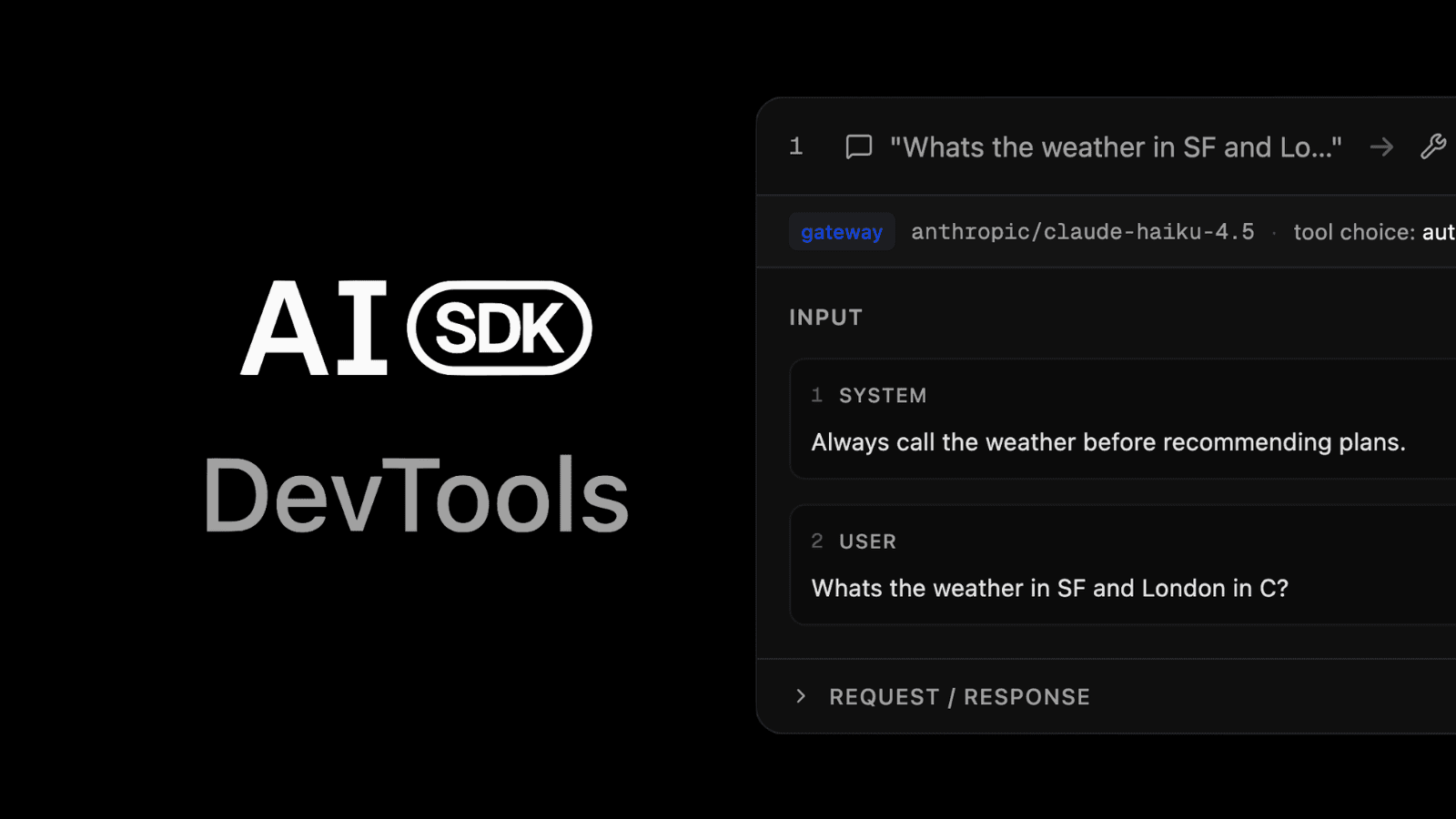
AI SDK DevTools gives you full visibility into your LLM calls and agents. Inspect each step of any call, including input, output, model configuration, token usage, timing, and raw provider requests and responses.
Link to headingSetup
To get started, wrap your model with the devToolsMiddleware:
import { wrapLanguageModel, gateway } from 'ai';
import { devToolsMiddleware } from '@ai-sdk/devtools';
const devToolsEnabledModel = wrapLanguageModel({
model: gateway('anthropic/claude-sonnet-4.5'),
middleware: devToolsMiddleware(),
});
Then use it with any AI SDK function:
import { generateText } from 'ai';
const result = await generateText({
model: devToolsEnabledModel,
prompt: 'What is love?',
});
Link to headingInspecting Your Runs
Launch the viewer with npx @ai-sdk/devtools and open http://localhost:4983 to inspect your runs. You'll be able to see:
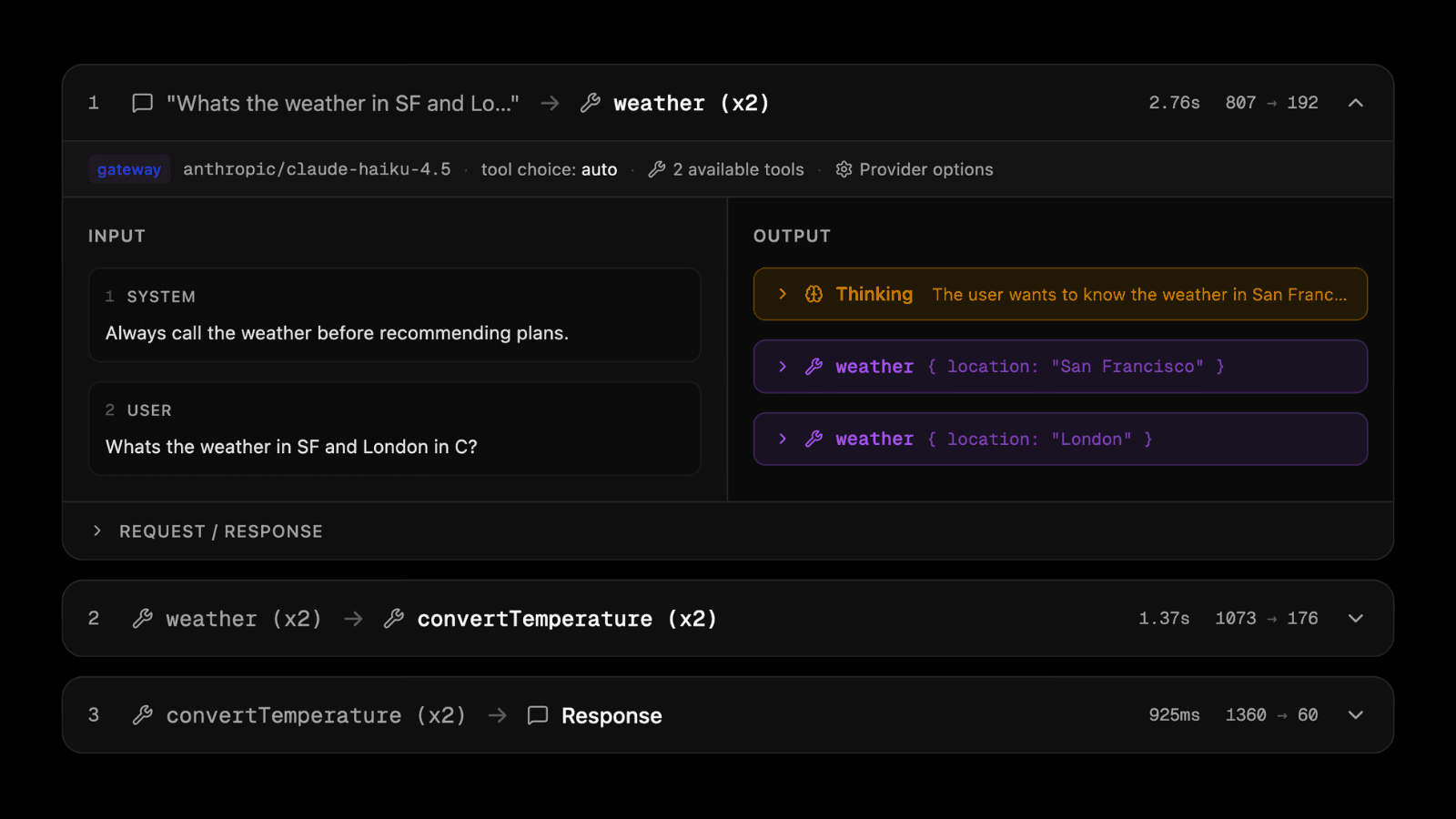
Input parameters and prompts: View the complete input sent to your LLM
Output content and tool calls: Inspect generated text and tool invocations
Token usage and timing: Monitor resource consumption and performance
Raw provider data: Access complete request and response payloads
To learn more, check out the DevTools documentation.
Link to headingReranking
Providing relevant context to a language model isn't just about retrieving everything that might be related. Models perform better with focused, highly relevant context. Reranking reorders search results based on their relevance to a specific query, letting you pass only the most relevant documents to the model.
AI SDK 6 adds native support for reranking with the new rerank function:
import { rerank } from 'ai';
import { cohere } from '@ai-sdk/cohere';
const documents = [
'sunny day at the beach',
'rainy afternoon in the city',
'snowy night in the mountains',
];
const { ranking } = await rerank({
model: cohere.reranking('rerank-v3.5'),
documents,
query: 'talk about rain',
topN: 2,
});
console.log(ranking);
// [
// { originalIndex: 1, score: 0.9, document: 'rainy afternoon in the city' },
// { originalIndex: 0, score: 0.3, document: 'sunny day at the beach' }
// ]
Link to headingStructured Document Reranking
Reranking also supports structured documents, making it ideal for searching through databases, emails, or other structured content:
import { rerank } from 'ai';
import { cohere } from '@ai-sdk/cohere';
const documents = [
{ from: 'Paul Doe', subject: 'Follow-up', text: '20% discount offer...' },
{
from: 'John McGill',
subject: 'Missing Info',
text: 'Oracle pricing: $5000/month',
},
];
const { rerankedDocuments } = await rerank({
model: cohere.reranking('rerank-v3.5'),
documents,
query: 'Which pricing did we get from Oracle?',
topN: 1,
});
The rerank function currently supports Cohere, Amazon Bedrock, and Together.ai.
To learn more, check out the Reranking documentation.
Link to headingStandard JSON Schema
AI SDK 6 adds support for any schema library that implements the Standard JSON Schema interface. Previously, the SDK required built-in converters for each schema library (Arktype, Valibot). Now, any library implementing the Standard JSON Schema V1 specification works automatically without additional SDK changes.
import { generateText, Output } from 'ai';
import { type } from 'arktype';
const result = await generateText({
model: 'anthropic/claude-sonnet-4.5',
output: Output.object({
schema: type({
recipe: {
name: 'string',
ingredients: type({ name: 'string', amount: 'string' }).array(),
steps: 'string[]',
},
}),
}),
prompt: 'Generate a lasagna recipe.',
});
To learn more, check out the Tools documentation.
Link to headingProvider Tools
AI SDK 6 expands support for provider-specific tools that leverage unique platform capabilities and model-trained functionality. These tools are designed to work with specific models or platforms (such as web search, code execution, and memory management) where providers have optimized their models for these capabilities or offer platform-specific features that aren't available elsewhere.
Link to headingAnthropic Provider Tools
Memory Tool: Store and retrieve information across conversations through a memory file directory
Tool Search (Regex): Search and select tools dynamically using regex patterns
Tool Search (BM25): Search and select tools using natural language queries
Code Execution Tool: Run code in a secure sandboxed environment with bash and file operations
import { anthropic } from "@ai-sdk/anthropic";
// Memory Tool - store and retrieve information
const memory = anthropic.tools.memory_20250818({
execute: async (action) => {
// Implement memory storage logic
// Supports: view, create, str_replace, insert, delete, rename
},
});
// Tool Search (Regex) - find tools by pattern
const toolSearchRegex = anthropic.tools.toolSearchRegex_20251119();
// Tool Search (BM25) - find tools with natural language
const toolSearchBm25 = anthropic.tools.toolSearchBm25_20251119();
// Code Execution Tool - run code in sandbox
const codeExecution = anthropic.tools.codeExecution_20250825();
AI SDK 6 also adds support for programmatic tool calling, which allows Claude to call your tools from a code execution environment, keeping intermediate results out of context. This can significantly reduce token usage and cost.
Mark tools as callable from code execution with allowedCallers, and use prepareStep to preserve the container across steps:
import {
anthropic,
forwardAnthropicContainerIdFromLastStep,
} from "@ai-sdk/anthropic";
const getWeather = tool({
description: "Get weather for a city.",
inputSchema: z.object({ city: z.string() }),
execute: async ({ city }) => ({ temp: 22 }),
providerOptions: {
anthropic: { allowedCallers: ["code_execution_20250825"] },
},
});
const result = await generateText({
model: anthropic("claude-sonnet-4-5"),
tools: {
code_execution: anthropic.tools.codeExecution_20250825(),
getWeather,
},
prepareStep: forwardAnthropicContainerIdFromLastStep,
});
To learn more, check out the Anthropic documentation.
Link to headingOpenAI Provider Tools
Shell Tool: Execute shell commands with timeout and output limits
Apply Patch Tool: Create, update, and delete files using structured diffs
MCP Tool: Connect to remote Model Context Protocol servers
import { openai } from "@ai-sdk/openai";
// Shell Tool - execute shell commands
const shell = openai.tools.shell({
execute: async ({ action }) => {
// action.commands: string[] - commands to execute
// action.timeoutMs: optional timeout
// action.maxOutputLength: optional max chars to return
},
});
// Apply Patch Tool - file operations with diffs
const applyPatch = openai.tools.applyPatch({
execute: async ({ callId, operation }) => {
// operation.type: 'create_file' | 'update_file' | 'delete_file'
// operation.path: file path
// operation.diff: diff content (for create/update)
},
});
// MCP Tool - connect to MCP servers
const mcp = openai.tools.mcp({
serverLabel: "my-mcp-server",
serverUrl: "[https://mcp.example.com](https://mcp.example.com/)",
allowedTools: ["tool1", "tool2"],
});
To learn more, check out the OpenAI documentation.
Link to headingGoogle Provider Tools
Google Maps Tool: Enable location-aware responses with Maps grounding (Gemini 2.0+)
Vertex RAG Store Tool: Retrieve context from Vertex AI RAG Engine corpora (Gemini 2.0+)
File Search Tool: Semantic and keyword search in file search stores (Gemini 2.5+)
import { google } from "@ai-sdk/google";
// Google Maps Tool - location-aware grounding
const googleMaps = google.tools.googleMaps();
// Vertex RAG Store Tool - retrieve from RAG corpora
const vertexRagStore = google.tools.vertexRagStore({
ragCorpus: "projects/{project}/locations/{location}/ragCorpora/{rag_corpus}",
topK: 5, // optional: number of contexts to retrieve
});
// File Search Tool - search in file stores
const fileSearch = google.tools.fileSearch({
fileSearchStoreNames: ["fileSearchStores/my-store-123"],
topK: 10, // optional: number of chunks to retrieve
metadataFilter: "author=John Doe", // optional: AIP-160 filter
});
To learn more, check out the Google documentation.
Link to headingxAI Provider Tools
Web Search: Search the web with domain filtering and image understanding
X Search: Search X (Twitter) posts with handle and date filtering
Code Execution: Run code in a sandboxed environment
View Image: Analyze and describe images
View X Video: Analyze X video content
import { xai } from "@ai-sdk/xai";
// Web Search Tool - search the web
const webSearch = xai.tools.webSearch({
allowedDomains: [
"[wikipedia.org](http://wikipedia.org/)",
"[github.com](http://github.com/)",
], // optional: max 5
excludedDomains: ["[example.com](http://example.com/)"], // optional: max 5
enableImageUnderstanding: true, // optional
});
// X Search Tool - search X posts
const xSearch = xai.tools.xSearch({
allowedXHandles: ["elonmusk", "xai"], // optional: max 10
fromDate: "2025-01-01", // optional
toDate: "2025-12-31", // optional
enableImageUnderstanding: true, // optional
enableVideoUnderstanding: true, // optional
});
// Code Execution Tool - run code
const codeExecution = xai.tools.codeExecution();
// View Image Tool - analyze images
const viewImage = xai.tools.viewImage();
// View X Video Tool - analyze X videos
const viewXVideo = xai.tools.viewXVideo();
To learn more, check out the xAI documentation.
Link to headingImage Editing
Image generation models are increasingly capable of more than just text-to-image generation. Many now support image-to-image operations like inpainting, outpainting, style transfer, and more.
AI SDK 6 extends generateImage to support image editing by accepting reference images alongside your text prompt:
import { generateImage } from "ai";
import { blackForestLabs } from "@ai-sdk/black-forest-labs";
const { images } = await generateImage({
model: blackForestLabs.image("flux-2-pro"),
prompt: {
text: "Edit this to make it two tanukis on a date",
images: ["https://www.example.com/tanuki.png"],
},
});

Reference images can be provided as URL strings, base64-encoded strings, Uint8Array, ArrayBuffer, or Buffer.
Note: experimental_generateImage has been promoted to stable and renamed to generateImage.
Check out the Image Generation documentation to learn more.
Link to headingRaw Finish Reason & Extended Usage
AI SDK 6 improves visibility into model responses with raw finish reasons and restructured usage information.
Link to headingRaw Finish Reason
When providers add new finish reasons that the AI SDK doesn't recognize, they previously appeared as 'other'. Now, rawFinishReason exposes the exact string from the provider, letting you handle provider-specific cases before AI SDK updates.
const { finishReason, rawFinishReason } = await generateText({
model: 'anthropic/claude-sonnet-4.5',
prompt: 'What is love?',
});
// finishReason: 'other' (mapped)
// rawFinishReason: 'end_turn' (provider-specific)
This is useful when providers have multiple finish reasons that map to a single AI SDK value, or when you need to distinguish between specific provider behaviors.
Link to headingExtended Usage Information
Usage reporting now includes detailed breakdowns for both input and output tokens:
const { usage } = await generateText({
model: 'anthropic/claude-sonnet-4.5',
prompt: 'What is love?',
});
// Input token details
usage.inputTokenDetails.noCacheTokens; // Non-cached input tokens
usage.inputTokenDetails.cacheReadTokens; // Tokens read from cache
usage.inputTokenDetails.cacheWriteTokens; // Tokens written to cache
// Output token details
usage.outputTokenDetails.textTokens; // Text generation tokens
usage.outputTokenDetails.reasoningTokens; // Reasoning tokens (where supported)
// Raw provider usage
usage.raw; // Complete provider-specific usage object
These detailed breakdowns give you the visibility you need to optimize costs and debug token usage across providers.
Link to headingLangChain Adapter Rewrite
The @ai-sdk/langchain package has been rewritten to support modern LangChain and LangGraph features. New APIs include toBaseMessages() for converting UI messages to LangChain format, toUIMessageStream() for transforming LangGraph event streams, and LangSmithDeploymentTransport for browser-side connections to LangSmith deployments. The adapter now supports tool calling with partial input streaming, reasoning blocks, and Human-in-the-Loop workflows via LangGraph interrupts.
import { toBaseMessages, toUIMessageStream } from '@ai-sdk/langchain';
import { createUIMessageStreamResponse } from 'ai';
const langchainMessages = await toBaseMessages(messages);
const stream = await graph.stream({ messages: langchainMessages });
return createUIMessageStreamResponse({
stream: toUIMessageStream(stream),
});
This release is fully backwards compatible. To learn more, check out the LangChain Adapter documentation.
Link to headingMigrating to AI SDK 6
AI SDK 6 is a major version due to the introduction of the v3 Language Model Specification that powers new capabilities like agents and tool approval. However, unlike AI SDK 5, this release is not expected to have major breaking changes for most users.
The version bump reflects improvements to the specification, not a complete redesign of the SDK. If you're using AI SDK 5, migrating to v6 should be straightforward with minimal code changes.
npx @ai-sdk/codemod upgrade v6
For a detailed overview of all changes and manual steps that might be needed, refer to our AI SDK 6 migration guide. The guide includes step-by-step instructions and examples to ensure a smooth update.
Link to headingGetting started
I’m super hyped for v6. The move from streamText to composable agents is tasteful, and so are the new APIs around type-safety, MCP, and agent preparation. The amount of care the team has put into API design is wild.
Josh, Upstash

With powerful new capabilities like the ToolLoopAgent, human-in-the-loop tool approval, stable structured outputs with tool calling, and DevTools for debugging, there's never been a better time to start building AI applications with the AI SDK.
Start a new AI project: Get up and running with our latest guides for Next.js, React, Svelte, and more. Check out our latest guides.
Explore our templates: Visit our Template Gallery for production-ready starter projects.
Migrate to v6: Use our automated codemod for a smooth transition. Our comprehensive Migration Guide covers all breaking changes.
Try DevTools: Debug your AI applications with full visibility into LLM calls. Check out the DevTools documentation.
Join the community: Share what you're building, ask questions, and connect with other developers in our GitHub Discussions.
Link to headingContributors
AI SDK 6 is the result of the combined work of our core team at Vercel (Gregor, Lars, Aayush, Josh, Nico) and our amazing community of contributors:
viktorlarsson, shaper, AVtheking, SamyPesse, firemoonai, seldo, R-Taneja, ZiuChen, gaspar09, christian-bromann, jeremyphilemon, DaniAkash, a-tokyo, rohrz4nge, EwanTauran, codicecustode, shubham-021, kkawamu1, mclenhard, gdaybrice, dyh-sjtu, blurrah, EurFelux, AryanBagade, Omcodes23, jeffcarbs, codeyogi911, zirkelc, qkdreyer, tsuzaki430, qchuchu, karthikscale3, alex-deneuvillers, kesku, yorkeccak, guy-hartstein, Und3rf10w, siwachabhi, homanp, tengis617, SalvatoreAmoroso, ericciarla, baturyilmaz, chentsulin, kovereduard, yaonyan, mwln, IdoBouskila, wangyedev, rubnogueira, Emmaccen, priyanshusaini105, dpmishler, yilinjuang, JulioPeixoto, DeJeune, BangDori, shadowssdt, efantasia, kevinjosethomas, lukehrucker, Mohammedsinanpk, danielamitay, davidsonsns, teeverc, MQ37, jephal, TimPietrusky, theishangoswami, juliettech13, shelleypham, tconley1428, goyalshivansh2805, KirschX, neallseth, jltimm, rahulbhadja, tayyab3245, cwtuan, titouv, dylan-duan-aai, bel0v, josh-williams, amyegan, samjbobb, teunlao, dylanmoz, 0xlakshan, patelvivekdev, nvie, nlaz, drew-foxall, dannyroosevelt, Diluka, AlexKer, YosefLm, YutoKitano13, SarityS, jonaslalin, tobiasbueschel, dhofheinz, ethshea, ellis-driscoll, marcbouchenoire, shin-sakata, ellispinsky, DDU1222, ci, tomsseisums, kpman, juanuicich, A404coder, tamarshe-dev, crishoj, kevint-cerebras, arjunkmrm, Barbapapazes, nimeshnayaju, lewwolfe, sergical, tomerigal, huanshenyi, horita-yuya, rbadillap, syeddhasnainn, Dhravya, jagreehal, Mintnoii, mhodgson, amardeeplakshkar, aron, TooTallNate, Junyi-99, princejoogie, iiio2, MonkeyLeeT, joshualipman123, andrewdoro, fveiraswww, HugoRCD, rockingrohit9639
Your feedback, bug reports, and pull requests on GitHub have been instrumental in shaping this release. We're excited to see what you'll build with these new capabilities.