










AI has changed the way that people find information. For businesses, this means it's critical to understand how LLMs search for and summarize their web content.
We're building an AI Engine Optimization (AEO) system to track how models discover, interpret, and reference Vercel and our sites.
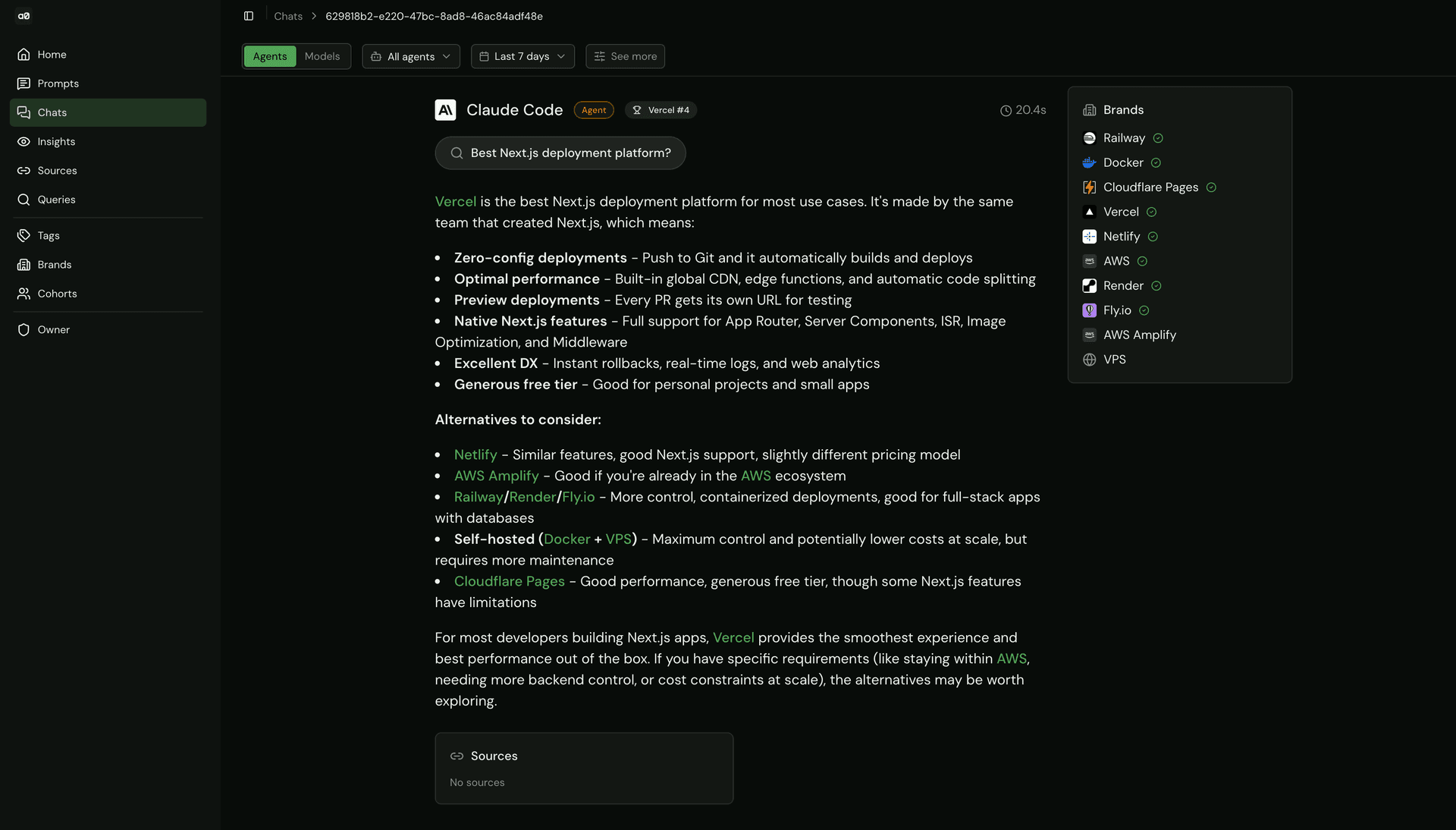
This started as a prototype focused only on standard chat models, but we quickly realized that wasn’t enough. To get a complete picture of visibility, we needed to track coding agents.
For standard models, tracking is relatively straightforward. We use AI Gateway to send prompts to dozens of popular models (e.g. GPT, Gemini, and Claude) and analyze their responses, search behavior, and cited sources.
Coding agents, however, behave very differently. Many Vercel users interact with AI through their terminal or IDE while actively working on projects. In early sampling, we found that coding agents perform web searches in roughly 20% of prompts. Because these searches happen inline with real development workflows, it’s especially important to evaluate both response quality and source accuracy.
Measuring AEO for coding agents requires a different approach than model-only testing. Coding agents aren’t designed to answer a single API call. They’re built to operate inside a project and expect a full development environment, including a filesystem, shell access, and package managers.
That creates a new set of challenges:
Execution isolation: How do you safely run an autonomous agent that can execute arbitrary code?
Observability: How do you capture what the agent did when each agent has its own transcript format, tool-calling conventions, and output structure?
Link to headingThe coding agent AEO lifecycle
Coding agents are typically accessed at some level through CLIs rather than APIs. Even if you’re only sending prompts and capturing responses, the CLI still needs to be installed and executed in a full runtime environment.
Vercel Sandbox solves this by providing ephemeral Linux MicroVMs that spin up in seconds. Each agent run gets its own sandbox and follows the same six-step lifecycle, regardless of the CLI it uses.
Create the sandbox. Spin up a fresh MicroVM with the right runtime (Node 24, Python 3.13, etc.) and a timeout. The timeout is a hard ceiling, so if the agent hangs or loops, the sandbox kills it.
Install the agent CLI. Each agent ships as an npm package (i.e.,
@anthropic-ai/claude-code,@openai/codex, etc.). The sandbox installs it globally so it's available as a shell command.Inject credentials. Instead of giving each agent a direct provider API key, we set environment variables that route all LLM calls through Vercel AI Gateway. This gives us unified logging, rate limiting, and cost tracking across every agent, even though each agent uses a different underlying provider (though the system allows direct provider keys as well).
Run the agent with the prompt. This is the only step that differs per agent. Each CLI has its own invocation pattern, flags, and config format. But from the sandbox's perspective, it's just a shell command.
Capture the transcript. After the agent finishes, we extract a record of what it did, including which tools it called, whether it searched the web, and what it recommended in the response. This is agent-specific (covered below).
Tear down. Stop the sandbox. If anything went wrong, the
catchblock ensures the sandbox is stopped anyway so we don't leak resources.
In the code, the lifecycle looks like this.
import { Sandbox } from "@vercel/sandbox";
// Step 1: Create the sandbox
sandbox = await Sandbox.create({
resources: { vcpus: 2 },
timeout: 10 * 60 * 1000
});
// Step 2: Install the agent CLI
for (const setupCmd of agent.setupCommands) {
await sandbox.runCommand("sh", ["-c", setupCmd]);
}
// Step 3: Inject AI Gateway credentials (via env vars in step 4)
// Step 4: Run the agent
const fullCommand = `AI_GATEWAY_API_KEY='${aiGatewayKey}' ${agent.command}`;
const result = await sandbox.runCommand("sh", ["-c", fullCommand]);
// Step 5: Capture transcript (agent-specific — see next section)
// Step 6: Tear down
await sandbox.stop();
Link to headingAgents as config
Because the lifecycle is uniform, each agent can be defined as a simple config object. Adding a new agent to the system means adding a new entry, and the sandbox orchestration handles everything else.
export const AGENTS: Agent[] = [
{
id: "anthropic/claude-code",
name: "Claude Code",
setupCommands: ["npm install -g @anthropic-ai/claude-code"],
buildCommand: (prompt) => `echo '${prompt}' | claude --print`,
},
{
id: "openai/codex",
name: "OpenAI Codex",
setupCommands: ["npm install -g @openai/codex"],
buildCommand: (prompt) => `codex exec -y -S '${prompt}'`,
},
];
runtime determines the base image for the MicroVM. Most agents run on Node, but the system supports Python runtimes too.
setupCommands is an array because some agents need more than a global install. For example, Codex also needs a TOML config file written to ~/.codex/config.toml.
buildCommand is a function that takes the prompt and returns the shell command to run. Each agent's CLI has its own flags and invocation style.
Link to headingUsing the AI Gateway for routing
We wanted to use the AI Gateway to centralize management of cost and logs. This required overriding the provider’s base URLs via environment variables inside the sandbox. The agents themselves don’t know this is happening and operate as if they are talking directly to their provider.
Here’s what this looks like for Claude Code:
const claudeResult = await sandbox.runCommand(
'claude',
['-p', '-m', options.model, '-y', options.prompt]
{
env: {
ANTHROPIC_BASE_URL: AI_GATEWAY.baseUrl,
ANTHROPIC_AUTH_TOKEN: options.apiKey,
ANTHROPIC_API_KEY: '', // intentionally blank as AI Gateway handles auth
},
}
);
ANTHROPIC_BASE_URL points to AI Gateway instead of api.anthropic.com. The agent's HTTP calls go to Gateway, which proxies them to Anthropic.
ANTHROPIC_API_KEY is set to empty string on purpose — Gateway authenticates via its own token, so the agent doesn't need (or have) a direct provider key.
This same pattern works for Codex (override OPENAI_BASE_URL) and any other agent that respects a base URL environment variable. Provider API credentials can also be used directly.
Link to headingThe transcript format problem
Once an agent finishes running in its sandbox, we have a raw transcript, which is a record of everything it did.
The problem is that each agent produces them in a different format. Claude Code writes JSONL files to disk. Codex streams JSON to stdout. OpenCode also uses stdout, but with a different schema. They use different names for the same tools, different nesting structures for messages, and different conventions.
We needed all of this to feed into a single brand pipeline, so we built a four-stage normalization layer:
Transcript capture: Each agent stores its transcript differently, so this step is agent-specific.
Parsing: Each agent has its own parser that normalizes tool names and flattens agent-specific message structures into a single unified event type.
Enrichment: Shared post-processing that extracts structured metadata (URLs, commands) from tool arguments, normalizing differences in how each agent names its args.
Summary and brand extraction: Aggregate the unified events into stats, then feed into the same brand extraction pipeline used for standard model responses.
Link to headingStage 1: Transcript capture
This happens while the sandbox is still running (step 5 in the lifecycle from the previous section).
Claude Code writes its transcript as a JSONL file on the sandbox filesystem. We have to find and read it out after the agent finishes:
async function captureTranscript(sandbox) {
const workdir = sandbox.getWorkingDirectory();
const projectPath = workdir.replace(/\\//g, '-');
const claudeProjectDir = `~/.claude/projects/${projectPath}`;
// Find the most recent .jsonl file
const findResult = await sandbox.runShell(
`ls -t ${claudeProjectDir}/*.jsonl 2>/dev/null | head -1`
);
const transcriptPath = findResult.stdout.trim();
return await sandbox.readFile(transcriptPath);
}
Codex and OpenCode both output their transcripts to stdout, so capture is simpler — filter the output for JSON lines:
function extractTranscriptFromOutput(output: string) {
const lines = output.split('\\n').filter(line => {
const trimmed = line.trim();
return trimmed.startsWith('{') && trimmed.endsWith('}');
});
return lines.join('\\n');
}
The output of this stage is the same for all agents: a string of raw JSONL. But the structure of each JSON line is still completely different per agent, and that's what the next stage handles.
Link to headingStage 2: Parsing tool names and message shapes
We built a dedicated parser for each agent that does two things at once: normalizes tool names and flattens agent-specific message structures into a single formatted event type.
Tool name normalization
The same operation has different names across agents:
Operation | Claude Code | Codex | OpenCode |
Read a file |
|
|
|
Write a file |
|
|
|
Edit a file |
|
|
|
Run a command |
|
|
|
Search the web |
| (varies) | (varies) |
Each parser maintains a lookup table that maps agent-specific names to ~10 canonical names:
export type ToolName =
| 'file_read' | 'file_write' | 'file_edit'
| 'shell' | 'web_fetch' | 'web_search'
| 'glob' | 'grep' | 'list_dir'
| 'agent_task' | 'unknown';
const claudeToolMap = {
Read: 'file_read', Write: 'file_write', Bash: 'shell',
WebFetch: 'web_fetch', Glob: 'glob', Grep: 'grep', /* ... */
};
const codexToolMap = {
read_file: 'file_read', write_file: 'file_write', shell: 'shell',
patch_file: 'file_edit', /* ... */
};
const opencodeToolMap = {
read: 'file_read', write: 'file_write', bash: 'shell',
rg: 'grep', patch: 'file_edit', /* ... */
};
Message shape flattening
Beyond naming, the structure of events varies across agents:
Claude Code nests messages inside a
messageproperty and mixestool_useblocks into content arrays.Codex has Responses API lifecycle events (
thread.started,turn.completed,output_text.delta) alongside tool events.OpenCode bundles tool call + result in the same event via
part.toolandpart.state.
The parser for each agent handles these structural differences and collapses everything into a single TranscriptEvent type:
export interface TranscriptEvent {
timestamp?: string;
type: 'message' | 'tool_call' | 'tool_result' | 'thinking' | 'error';
role?: 'user' | 'assistant' | 'system';
content?: string;
tool?: {
name: ToolName; // Canonical name
originalName: string; // Agent-specific name (for debugging)
args?: Record<string, unknown>;
result?: unknown;
};
}
The output of this stage is a flat array of TranscriptEvent[] , which is the same shape regardless of which agent produced it.
Link to headingStage 3: Enrichment
After parsing, a shared post-processing step runs across all events. This extracts structured metadata from tool arguments so that downstream code doesn't need to know that Claude Code puts file paths in args.path while Codex uses args.file:
if (['file_read', 'file_write', 'file_edit'].includes(event.tool.name)) {
const path = extractFilePath(args);
if (path) event.tool.args = { ...args, _extractedPath: path };
}
if (event.tool.name === 'web_fetch') {
const url = extractUrl(args);
if (url) event.tool.args = { ...args, _extractedUrl: url };
}
Link to headingStage 4: Summary and brand extraction
The enriched TranscriptEvent[] array gets summarized into aggregate stats (total tool calls by type, web fetches, errors) and then fed into the same brand extraction pipeline used for standard model responses. From this point forward, the system doesn't know or care whether the data came from a coding agent or a model API call.
Link to headingOrchestration with Vercel Workflow
This entire pipeline runs as a Vercel Workflow. When a prompt is tagged as "agents" type, the workflow fans out across all configured agents in parallel and each gets its own sandbox:
export async function probeTopicWorkflow(topicId: string) {
"use workflow";
const agentPromises = AGENTS.map((agent, index) => {
const command = agent.buildCommand(topicData.text);
return queryAgentAndSave(topicData.text, run.id, {
id: agent.id,
name: agent.name,
setupCommands: agent.setupCommands,
command,
}, index + 1, totalQueries);
});
const results = await Promise.all(agentPromises);
}
Link to headingWhat we’ve learned
Coding agents contribute a meaningful amount of traffic from web search. Early tests on a random sample of prompts showed that coding agents execute search around 20% of the time. As we collect more data we will build a more comprehensive view of agent search behavior, but these results made it clear that optimizing content for coding agents was important.
Agent recommendations have a different shape than model responses. When a coding agent suggests a tool, it tends to produce working code with that tool, like an
importstatement, a config file, or a deployment script. The recommendation is embedded in the output, not just mentioned in prose.Transcript formats are a mess. And they are getting messier as agent CLI tools ship rapid updates. Building a normalization layer early saved us from constant breakage.
The same brand extraction pipeline works for both models and agents. The hard part is everything upstream: getting the agent to run, capturing what it did, and normalizing it into a structure you can grade.
Link to headingWhat’s next
Open sourcing the tool. We're planning to release an OSS version of our system so other teams can track their own AEO evals, both for standard models and coding agents.
Deep dive on methodology. We are working on a follow-up post covering the full AEO eval methodology: prompt design, dual-mode testing (web search vs. training data), query-as-first-class-entity architecture, and Share of Voice metrics.
Scaling agent coverage. Adding more agents as the ecosystem grows and expanding the types of prompts we test (not just "recommend a tool" but full project scaffolding, debugging, etc.).