最近做了一个比较有意思的需求,实现的比较有意思。
需求
- 用户上传一个 docx 文件,文档中有占位符若干,识别为文档模板。
- 用户在前端可以将标签拖拽到模板上,替代占位符。
- 后端根据标签,获取标签内容,生成 pdf 文档并打上水印。
需求实现的难点
- 模板文件来自业务方,财务,执行等角色,不可能使用类似 (freemark、velocity、Thymeleaf) 技术常用的模板标记语言。
- 文档在上传后需要解析,生成 html 供前端拖拽标签,同时渲染的最终文档是 pdf 。由于生成的 pdf 是正式文件,必须要求格式严格保证。
- 前端如果直接使用富文本编辑器,目前开源没有比较满意的实现,同时自主开发富文本需要极高技术含量。所以不考虑富文本编辑器的可能。
1. 对 docx 文档格式的转换
一顿google以后发现了 StackOverflow 上的这个回答:Converting docx into pdf in java 使用如下的 jar 包:
1
2
3
4
5
6
7
| Apache POI 3.15
org.apache.poi.xwpf.converter.core-1.0.6.jar
org.apache.poi.xwpf.converter.pdf-1.0.6.jar
fr.opensagres.xdocreport.itext.extension-2.0.0.jar
itext-2.1.7.jar
ooxml-schemas-1.3.jar
|
实际上写了一个 Demo 测试以后发现,这套组合以及年久失修,对于复杂的 docx 文档都不能友好支持,代码不严谨,不时有 Nullpoint 的异常抛出,还有莫名的jar包冲突的错误,最致命的一个问题是,不能严格保证格式。复杂的序号会出现各种问题。 pass。
第二种思路,使用 LibreOffice, LibreOffice 提供了一套 api 可以提供给 java 程序调用。
所以使用 jodconverter 来调用 LibreOffice。之前网上搜到的教程早就已经过时。jodconverter 早就推出了 4.2 版本。最靠谱的文档还是直接看官方提供的wiki。
2. 渲染模板
第一种思路,将 docx 装换为 html 的纯文本格式,再使用 Java 现有的模板引擎(freemark,velocity)渲染内容。但是 docx 文件装换为 html 还是会有极大的格式损失。 pass。
第二种思路。直接操作 docx 文档在 docx 文档中直接将占位符替换为内容。这样保证了格式不会损失,但是没有现成的模板引擎可以支持 docx 的渲染。需要自己实现。
3. 水印
这个相对比较简单,直接使用 itextpdf 免费版就能解决问题。需要注意中文的问题字体,下文会逐步讲解。
关键技术实现
jodconverter + libreoffice 的使用
jodconverter 已经提供了一套完整的spring-boot解决方案,只需要在 pom.xml中增加如下配置:
1
2
3
4
5
6
7
8
9
10
11
| <dependency>
<groupId>org.jodconverter</groupId>
<artifactId>jodconverter-local</artifactId>
<version>4.2.0</version>
</dependenc>
<dependency>
<groupId>org.jodconverter</groupId>
<artifactId>jodconverter-spring-boot-starter</artifactId>
<version>4.2.0</version>
</dependency>
|
增加配置类:
1
2
3
4
5
6
7
8
9
10
11
12
13
|
@Configuration
public class ApplicationConfig {
    @Autowired
    private OfficeManager officeManager;
    @Bean
    public DocumentConverter documentConverter(){
        return LocalConverter.builder()
                .officeManager(officeManager)
                .build();
    }
}
|
在配置文件 application.properties 中添加:
1
2
3
4
|
jodconverter.local.office-home=/Applications/LibreOffice.app/Contents

jodconverter.local.enabled=true
|
直接使用:
1
2
3
4
5
6
7
8
9
10
11
12
13
14
15
16
17
| @Autowired
private DocumentConverter documentConverter;
private byte[] docxToPDF(InputStream inputStream) {
try (ByteArrayOutputStream byteArrayOutputStream = new ByteArrayOutputStream()) {
documentConverter
.convert(inputStream)
.as(DefaultDocumentFormatRegistry.DOCX)
.to(byteArrayOutputStream)
.as(DefaultDocumentFormatRegistry.PDF)
.execute();
return byteArrayOutputStream.toByteArray();
} catch (OfficeException | IOException e) {
log.error("convert pdf error");
}
return null;
}
|
就将 docx 转换为 pdf。注意流需要关闭,防止内存泄漏。
模板的渲染
直接看代码:
1
2
3
4
5
6
7
8
9
10
11
12
13
14
15
16
17
18
19
20
21
22
23
24
25
26
27
28
29
30
31
32
33
34
35
36
37
38
39
40
41
42
43
44
45
46
47
48
49
50
51
52
53
54
55
56
57
58
59
60
61
62
63
64
65
66
67
68
69
70
71
72
73
74
75
76
77
78
79
80
81
82
83
84
85
86
87
88
|
@Service
public class OfficeService{


    private static final Pattern SymbolPattern = Pattern.compile("\\{(.+?)\\}", Pattern.CASE_INSENSITIVE);

    public byte[] replaceSymbol(InputStream inputStream,Map<String,String> symbolMap) throws IOException {
        XWPFDocument doc = new XWPFDocument(inputStream)
        replaceSymbolInPara(doc,symbolMap);
        replaceInTable(doc,symbolMap)
        try(ByteArrayOutputStream os = new ByteArrayOutputStream()) {
            doc.write(os);
            return os.toByteArray();
        }finally {
            inputStream.close();
        }
    }


    private int replaceSymbolInPara(XWPFDocument doc,Map<String,String> symbolMap){
        XWPFParagraph para;
        Iterator<XWPFParagraph> iterator = doc.getParagraphsIterator();
        while(iterator.hasNext()){
            para = iterator.next();
            replaceInPara(para,symbolMap);
        }
    }


    private void replaceInPara(XWPFParagraph para,Map<String,String> symbolMap) {

        List<XWPFRun> runs;
        if (symbolMatcher(para.getParagraphText()).find()) {
            String text = para.getParagraphText();
            Matcher matcher3 = SymbolPattern.matcher(text);
            while (matcher3.find()) {
                String group = matcher3.group(1);
                String symbol = symbolMap.get(group);
                if (StringUtils.isBlank(symbol)) {
                    symbol = " ";
                }
                text = matcher3.replaceFirst(symbol);
                matcher3 = SymbolPattern.matcher(text);
            }
            runs = para.getRuns();
            String fontFamily = runs.get(0).getFontFamily();
            int fontSize = runs.get(0).getFontSize();
            XWPFRun xwpfRun = para.insertNewRun(0);
            xwpfRun.setFontFamily(fontFamily);
            xwpfRun.setText(text);
            if(fontSize > 0) {
                xwpfRun.setFontSize(fontSize);
            }
            int max = runs.size();
            for (int i = 1; i < max; i++) {
                para.removeRun(1);
            }

        }
    }


    private void replaceInTable(XWPFDocument doc,Map<String,String> symbolMap) {
        Iterator<XWPFTable> iterator = doc.getTablesIterator();
        XWPFTable table;
        List<XWPFTableRow> rows;
        List<XWPFTableCell> cells;
        List<XWPFParagraph> paras;
        while (iterator.hasNext()) {
            table = iterator.next();
            rows = table.getRows();
            for (XWPFTableRow row : rows) {
                cells = row.getTableCells();
                for (XWPFTableCell cell : cells) {
                    paras = cell.getParagraphs();
                    for (XWPFParagraph para : paras) {
                        replaceInPara(para,symbolMap);
                    }
                }
            }
        }
    }

    private Matcher symbolMatcher(String str){
        return SymbolPattern.matcher(str);
    }
}
|
这里需要特别注意:
- 在解析的文档中,
para.getParagraphText()指的是获取段落,para.getRuns()应该指的是获取词。但是问题来了,获取到的 runs 的划分是一个谜。目前我也没有找到规律,很有可能我们的占位符被划分到了多个run中,我们并不是简单的针对 run 做正则表达的替换,而要先把所有的 runs 组合起来再进行正则替换。
- 在调用
para.insertNewRun()的时候 run 并不会保持字体样式和字体大小需要手动获取并设置。
由于以上两个蜜汁实现,所以就写了一坨蜜汁代码才能保证正则替换和格式正确。
test 方法:
1
2
3
4
5
6
7
8
9
10
11
12
13
14
15
16
| @Test
public void replaceSymbol() throws IOException {
File file = new File("symbol.docx");
InputStream inputStream = new FileInputStream(file);
File outputFile = new File("out.docx");
FileOutputStream outputStream = new FileOutputStream(outputFile);
Map<String,String> map = new HashMap<>();
map.put("tableName","水果价目表");
map.put("name","苹果");
map.put("price","1.5/斤");
byte[] bytes = office.replaceSymbol(inputStream, map, );
outputStream.write(bytes);
}
|
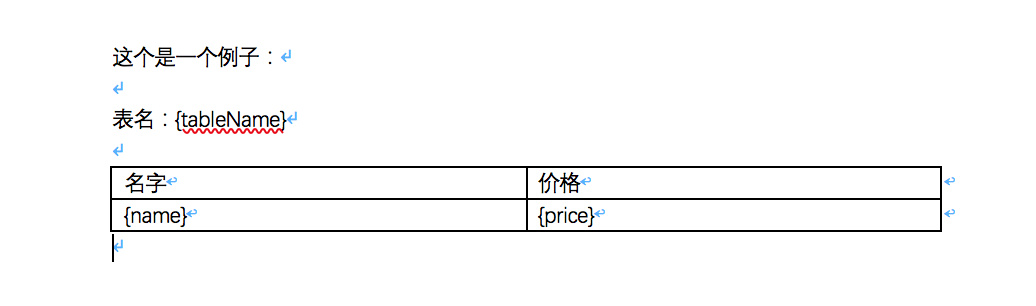
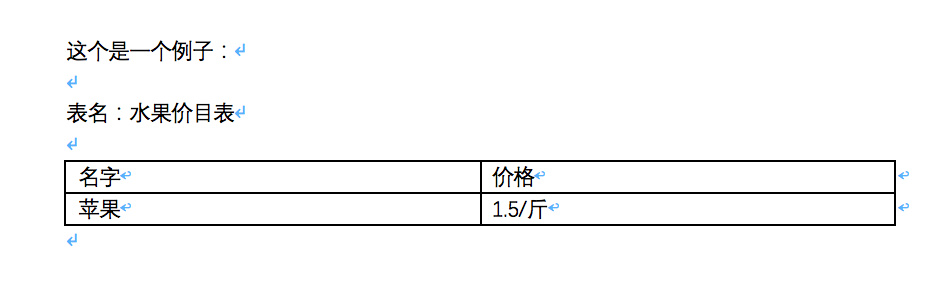
replaceSymbol() 方法接受两个参数,一个是输入的docx文件数据流,另一个是占位符和内容的map。
这个方法使用前:
使用后:
增加水印
pom.xml需要增加:
1
2
3
4
5
6
|
<dependency>
    <groupId>com.itextpdf</groupId>
    <artifactId>itextpdf</artifactId>
    <version>5.5.13</version>
</dependency>
|
增加水印的代码:
1
2
3
4
5
6
7
8
9
10
11
12
13
14
15
16
17
18
19
20
21
22
23
24
25
26
27
28
29
30
31
32
33
34
35
36
37
38
39
40
41
| public byte[] addWatermark(InputStream inputStream,String watermark) throws IOException, DocumentException {
PdfReader reader = new PdfReader(inputStream);
try(ByteArrayOutputStream os = new ByteArrayOutputStream()) {
PdfStamper stamper = new PdfStamper(reader, os);
int total = reader.getNumberOfPages() + 1;
PdfContentByte content;
BaseFont baseFont = BaseFont.createFont("simsun.ttf", BaseFont.IDENTITY_H, BaseFont.NOT_EMBEDDED);
for (int i = 1; i < total; i++) {
content = stamper.getUnderContent(i);
content.beginText();
content.setColorFill(new BaseColor(244, 244, 244));
content.setFontAndSize(baseFont, 50);
content.setTextMatrix(400, 780);
for (int x = 0; x < 5; x++) {
for (int y = 0; y < 5; y++) {
content.showTextAlignedKerned(Element.ALIGN_CENTER,
watermark,
(100f + x * 350),
(40.0f + y * 150),
30);
}
}
content.endText();
}
stamper.close();
return os.toByteArray();
}finally {
reader.close();
}
}
|
字体
- 使用文档的时候,字体也同样重要,如果你使用了 libreOffice 没有的字体,比如宋体。需要把字体文件
xxx.ttf
1
2
| cp xxx.ttc /usr/share/fonts
fc-cache -fv
|
itextpdf 不支持汉字,需要提供额外的字体:
1
2
3
4
5
|
String fontPath = "simsun.ttf"

BaseFont baseFont = BaseFont.createFont(fontPath, BaseFont.IDENTITY_H, BaseFont.NOT_EMBEDDED);
|
后记
整个需求挺有意思,但是在查询的时候发现中文文档的质量实在堪忧,要么极度过时,要么就是大家互相抄袭。
查询一个项目的技术文档,最好的路径应该如下:
项目官网 Getting Started == github demo > StackOverflow >> CSDN >> 百度知道
欢迎关注我的微信公众号