

惯性聚合 高效追踪和阅读你感兴趣的博客、新闻、科技资讯
阅读原文 在惯性聚合中打开

推荐订阅源

P
Proofpoint News Feed
Microsoft Azure Blog
Jina AI
Jina AI
博客园_首页
宝玉的分享
宝玉的分享
The Cloudflare Blog
钛媒体:引领未来商业与生活新知
钛媒体:引领未来商业与生活新知
量子位
T
Tailwind CSS Blog
雷峰网
雷峰网
Blog — PlanetScale
Blog — PlanetScale
Last Week in AI
Last Week in AI
奇客Solidot–传递最新科技情报
奇客Solidot–传递最新科技情报
Hugging Face - Blog
Hugging Face - Blog
月光博客
月光博客
罗磊的独立博客
F
Fortinet All Blogs
酷 壳 – CoolShell
酷 壳 – CoolShell
Stack Overflow Blog
Stack Overflow Blog
J
Java Code Geeks
V
V2EX
OSCHINA 社区最新新闻
OSCHINA 社区最新新闻
The GitHub Blog
The GitHub Blog
Apple Machine Learning Research
博客园 - 聂微东
U
Unit 42
freeCodeCamp Programming Tutorials: Python, JavaScript, Git & More
Cyber Security Advisories - MS-ISAC
D
Docker
阮一峰的网络日志
阮一峰的网络日志
I
InfoQ
Simon Willison's Weblog
D
DataBreaches.Net
Threat Intelligence Blog | Flashpoint
I
Intezer
Scott Helme
Scott Helme
B
Blog
M
MIT News - Artificial intelligence
K
Kaspersky official blog
H
Help Net Security
V
Vulnerabilities – Threatpost
C
CXSECURITY Database RSS Feed - CXSecurity.com
Engineering at Meta
Engineering at Meta
博客园 - 【当耐特】
L
Lohrmann on Cybersecurity
P
Privacy & Cybersecurity Law Blog
Project Zero
Project Zero
The Hacker News
The Hacker News
B
Blog RSS Feed
T
Tor Project blog

江边的旱鸭子

Unpacking the Data Structure of Manus Session Qwen2.5 vs. GPT-4o - Unlocking Coding Potential with Cline From Research to Product: Customer Insights on Prompt flow 2023大阪东京走马观花五日流水账(下) 2023大阪东京走马观花五日流水账(中) 2023大阪东京走马观花五日流水账(上) 2022年我想练的歌单 蔡剑爵士吉他课程二年级笔记 2020云南游记(下) 2020云南游记(中) 2020云南游记(上) Jazz guitar foundations 吉他保养简记 音乐基础速查笔记 开车有三宝 Getting started with AAD integration in JavaScript 邂逅爵士乐——记在台湾的一段美好经历 2021 微软内推,已协助超过十余位候选人拿到 offer 三星Note9与米10Pro拍照对比
Hands-on linear regression for machine learning
John Chou · 2020-11-24 · via 江边的旱鸭子

Goal

This is the sharing session for my team, the goal is to quick ramp up the essential knowledges for linear regression case to experience how machine learning works during 1 hour. This sharing will recap basic important concepts, introduce runtime environments, and go through the codes on Notebooks of Azure Machine Learning Studio platform.

Recap of basic concepts

Do not worry about these theories if you can’t catch up, just take it as an intro.

Steps of machine learning

  1. Get familiar with dataset, do preprocessing works.
  2. Define the model, like linear model or neural network.
  3. Define the goodness/cost of model, metrics can be error, cross entropy, etc.
  4. Calculate the best function by optimization algorithms.

Linear model

Let’s start with the simplest linear model , you can also try more complex model if you get trouble in underfitting.

Question: How to initialize parameters?

Generalization

The model’s ability to adapt properly to new, previously unseen data, drawn from the same distribution as the one used to create the model.

Goodness of fit, https://bit.ly/2JhniSc

  • Underfitting: model is too simple to learn the underlying structure of the data (large bias)
  • Overfitting: model is too complex relative to the amount and noisiness of the training data (large variance)

Solutions: References and resources, or Underfitting and Overfitting in machine learning and how to deal with it.

Loss/Cost function

There is a dataset for training, it looks like: , , …, . The error of should be , we can add all errors of data to define our loss function:

Obviously the smaller loss, the better model. So our target function should be:

Average value would be better than total sum, then we get the actual function that needs to be computed:

Not big deal, just minimize the mean square error of our trivial linear model.

Vectorized form

You may have heard “feature” before, for each of data , if the number of its features is , then the actual model should be:

Kind of verbose right? Let’s use to represent all feature weights to as well as the bias term , which called before. Same way, use to represent all the feature values to with is equal to 1. Then we can transform linear regression model to the vectorized form:

Thus our loss function of vectorized form is:

Notice that actually is -dimensional matrix.

In addition, deep learning depends on matrix calculations especially, it will take advantage of GPU to speed up model training.

Closed-form solution

As we already know the values of and , it’s easy to calculate the by Normal Equation:

Check out this online course video (about 16min) from Andrew Ng to learn more.

Yes we’re done. Our introduction is here 🤣🤣🤣 .

Question: How to deal with complex models? How about computation burden?

Gradient Descent

Gradient Descent is a generic optimization algorithm capable of finding optimal solution to a wide range of problems.

Gradient descent is a first-order iterative optimization algorithm for finding a local minimum of a differentiable function.

Our loss function is differentiable indeed, so we can use it to find the local minimum (also the global minimum in this case). Let’s get it by one chart.
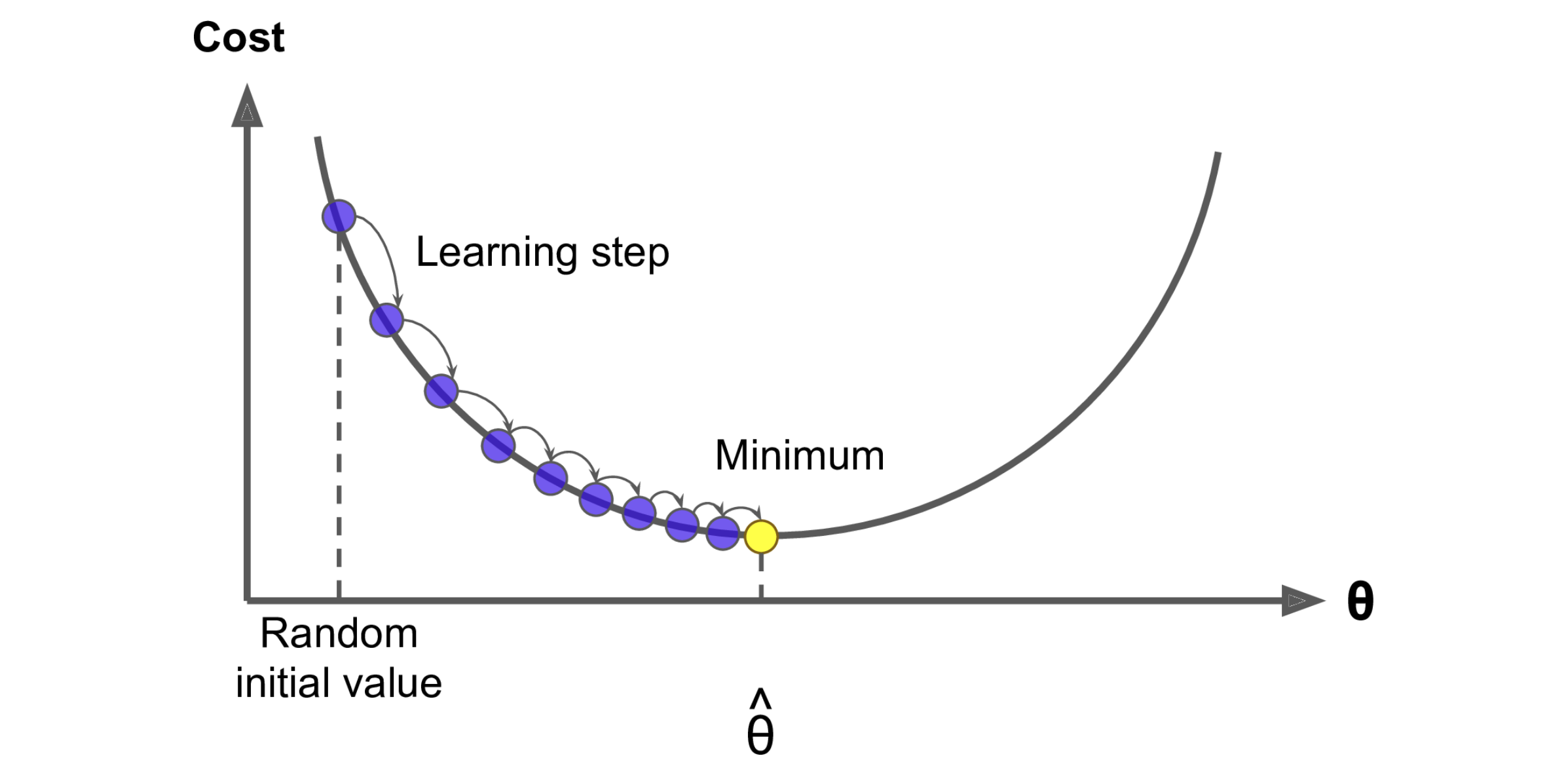
Gradient Descent, Hands-On Machine Learning by Aurélien Géron

So here is the last equation in this post (I promise, typing these LaTeX expressions really wore me out 🥲 ), the gradient of our loss function:

Question: disadvantages of gradient descent?
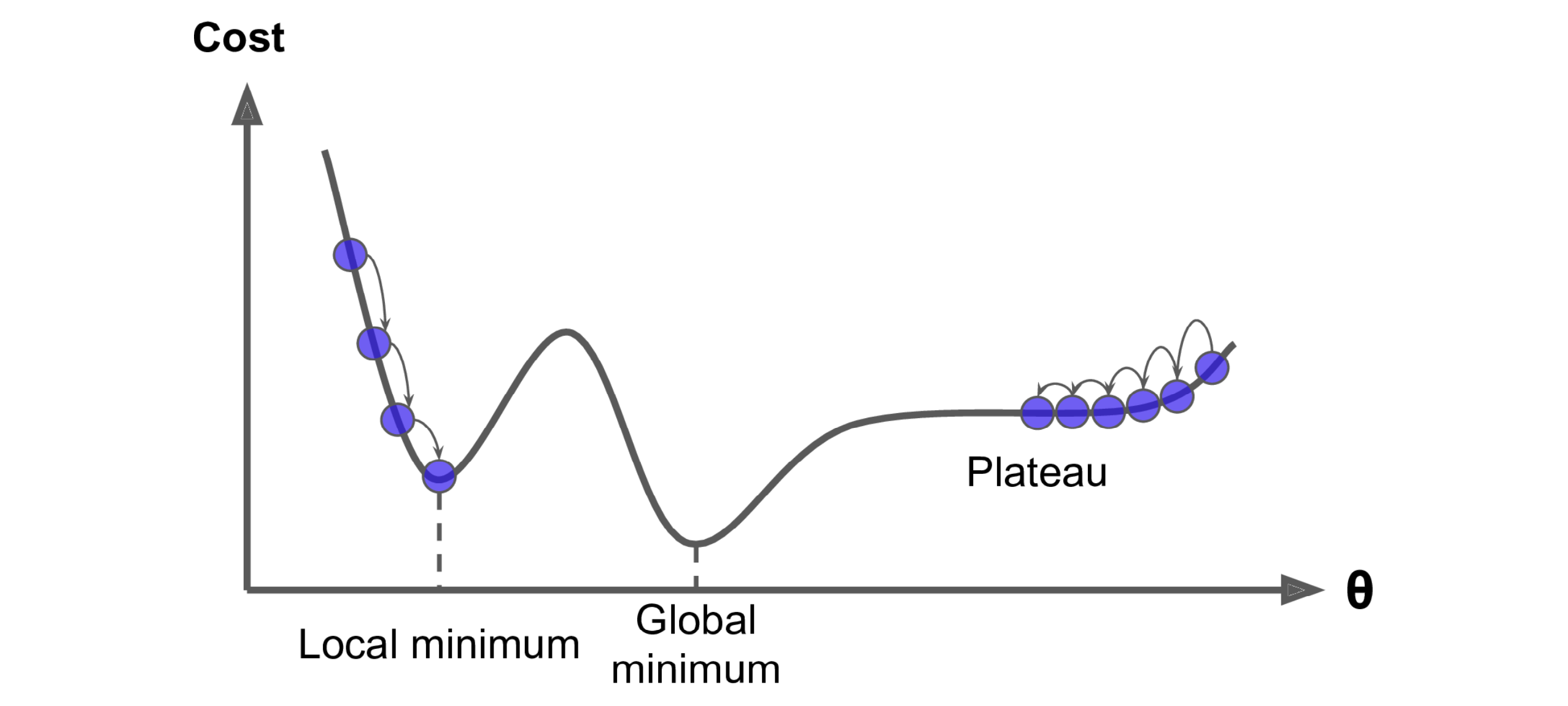
Gradient Descent pitfalls, Hands-On Machine Learning by Aurélien Géron

Variants optimizers

  • SGD, Stochastic gradient descent
  • Adam
  • Mini-batch gradient descent
  • Adagrad

Training tips

Probably it’s enough for us to dig into the code, so the recap should be stopped here. At last, giving this tips section for some practical training techniques.
  • Hyperparameters tuning/optimization, like pick a good learning rate
  • L2 (Ridge) regularization
  • Early stopping
  • Feature engineering
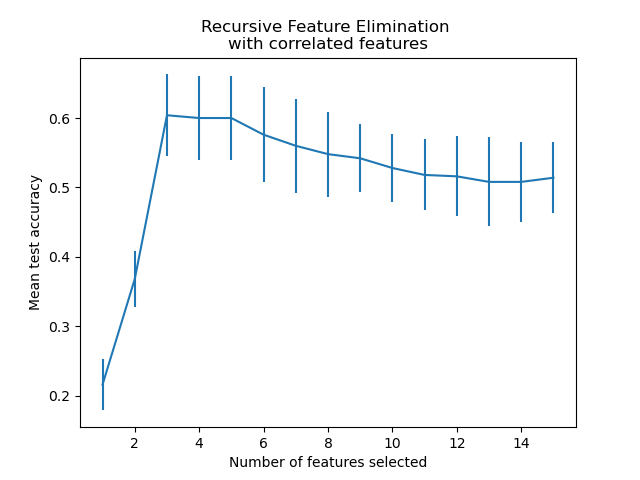
    • Feature selection by recursive feature elimination and cross-validation (RFECV)
      Recursive feature elimination with cross-validation, https://scikit-learn.org
    • Feature scaling like normalization
    • Data correction for dirty part
    • Defining and removing outliers
    • Update model to make it fits dataset better like add high order term for most important feature, or even you can use a neural network if you want 😏
  • Leveraging K-fold cross validation to split data and evaluate model performance

Runtime environments

Local

I highly recommend using Conda to run your Python code even on Unix-like OS, and Miniconda is good to get start.

Conda as a package manager helps you find and install packages. If you need a package that requires a different version of Python, you do not need to switch to a different environment manager, because conda is also an environment manager. With just a few commands, you can set up a totally separate environment to run that different version of Python, while continuing to run your usual version of Python in your normal environment.

Cloud

It’s cloud computing era, we can write and save our code on the cloud and run it at anytime with any web client. Two cloud platforms will be introduced here, I suggest you try both of them and enjoy your experiment.

More specifically, these two products are all based on Jupyter Notebook, which provides flexible Python runtime and Markdown document feature, it’s easy to run code snippet just like on the local terminal.

Notebooks of Azure Machine Learning Studio

Here is a brief introduction of Notebooks of AML Studio, the advantages of this product are:
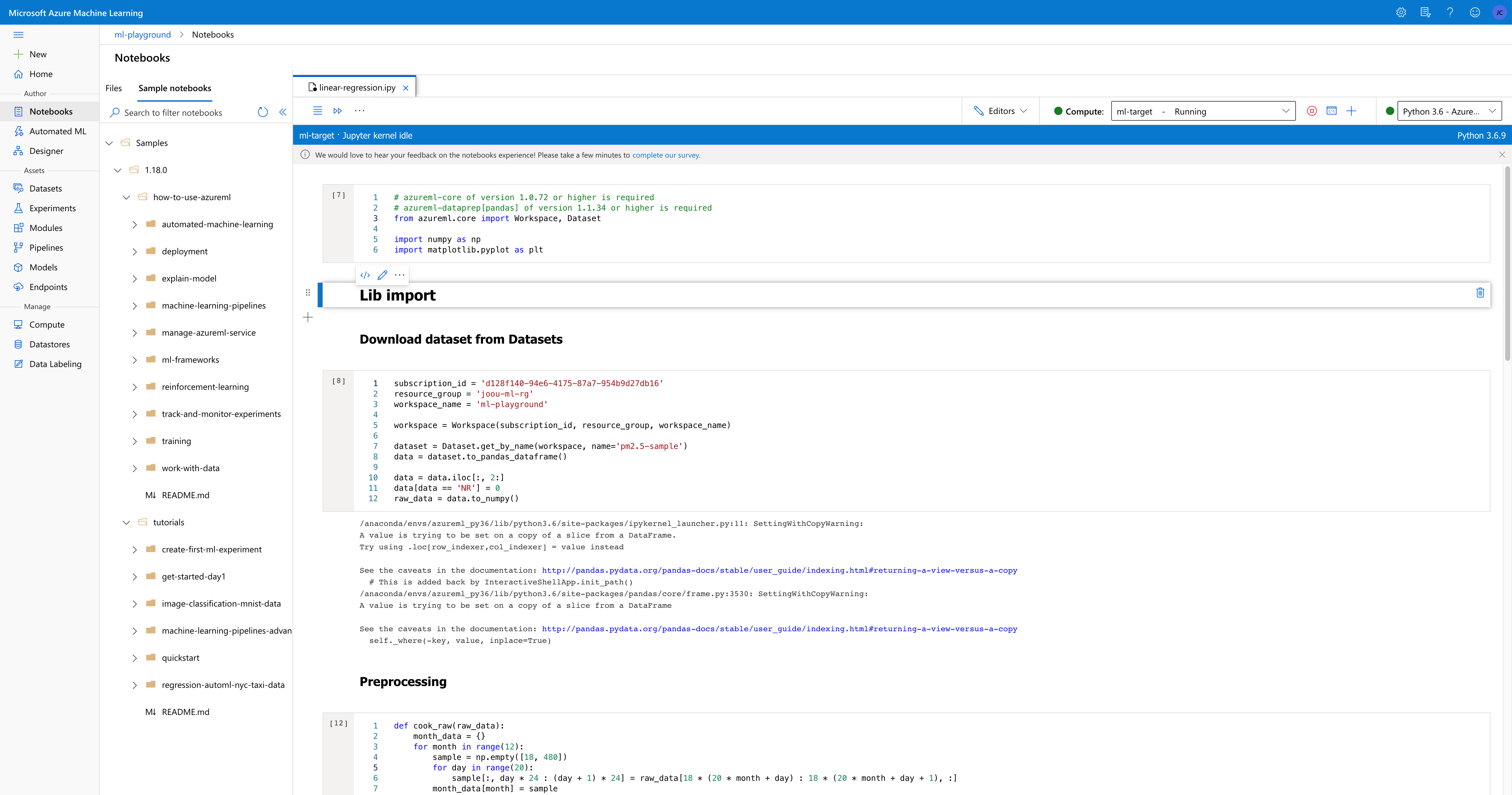
  • IntelliSense and Monaco Editor adopted from Visual Studio Code are great.
  • Rich sample notebooks are provided, and the tab view allows user to open several documents with several file types in one page.
  • An one-stop platform for user to develop their machine learning project, you can take it as cloud IDE (Integrated Development Environment). For example, user can manager their huge datasets by Datasets, and then consume them in Notebooks.

UI of Notebooks of AML Studio

Google Colaboratory

You can open ipynb file on Google Drive by this product, there are also several advantages:
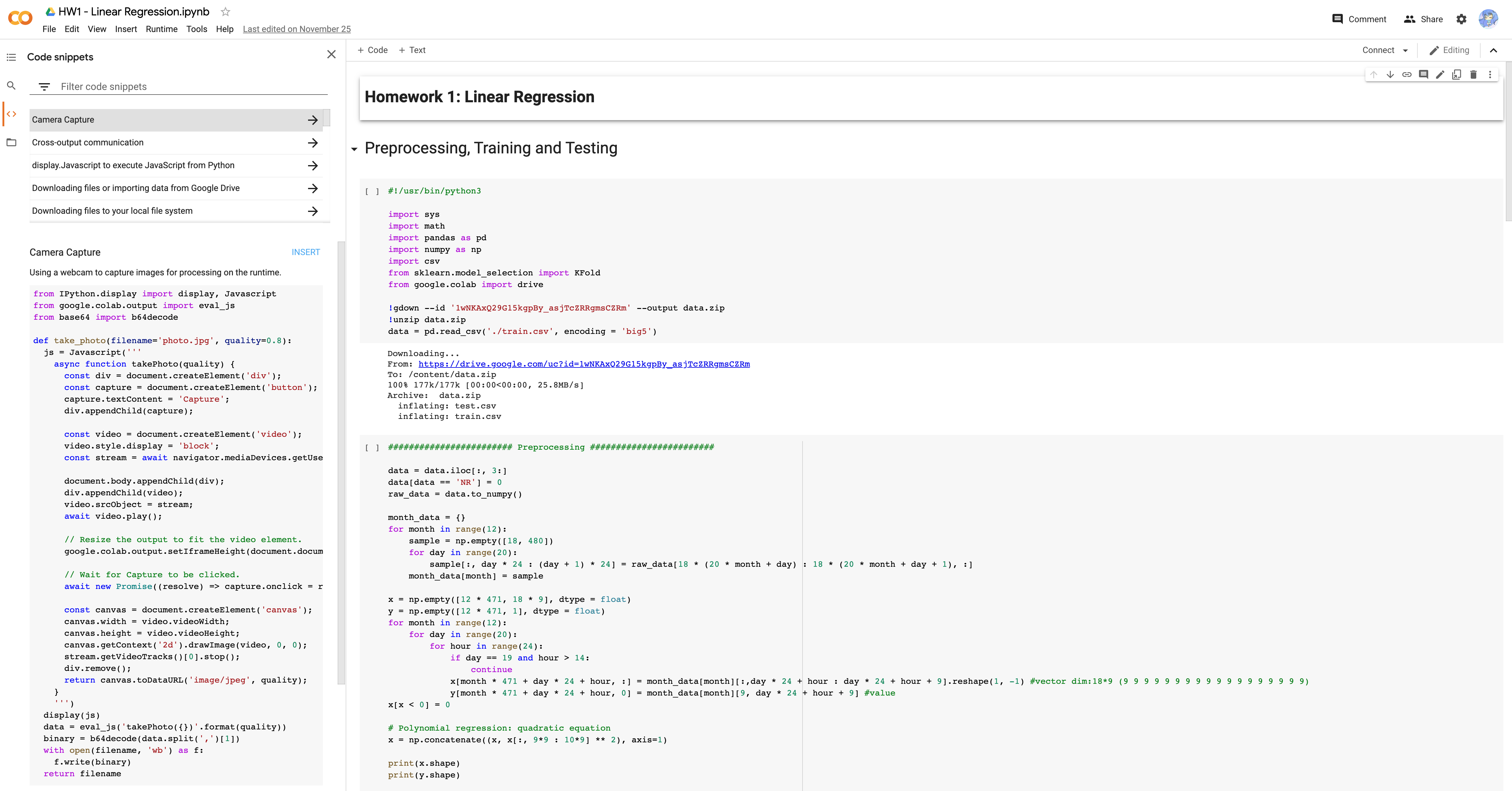
  • Cleaner and larger workspace.
  • “Code snippets” feature is interesting, but not smart enough (like intelligent recommendation), nor rich code exmaples.
  • It will create compute target or VM (virtual machine) for the user automatically.
  • Download dataset from Google Drive, comment and share are easily.

UI of Google Colab

Code snippets

You can check sample code on Google Colab here, and codes below will has slight differences.

Target

To predict the PM2.5 value of first ten hour by other nine hours data.

Data preprocessing

Original data structure looks like this:

00:00 01:00 23:00
Feature 1 of day 1
Feature 2 of day 1
Feature 17 of day 1
Feature 18 of day 1
Feature 1 of day 2
Feature 2 of day 2

24 columns represent 24 hours, 18 features with every first 20 days of month in one year, we have rows.
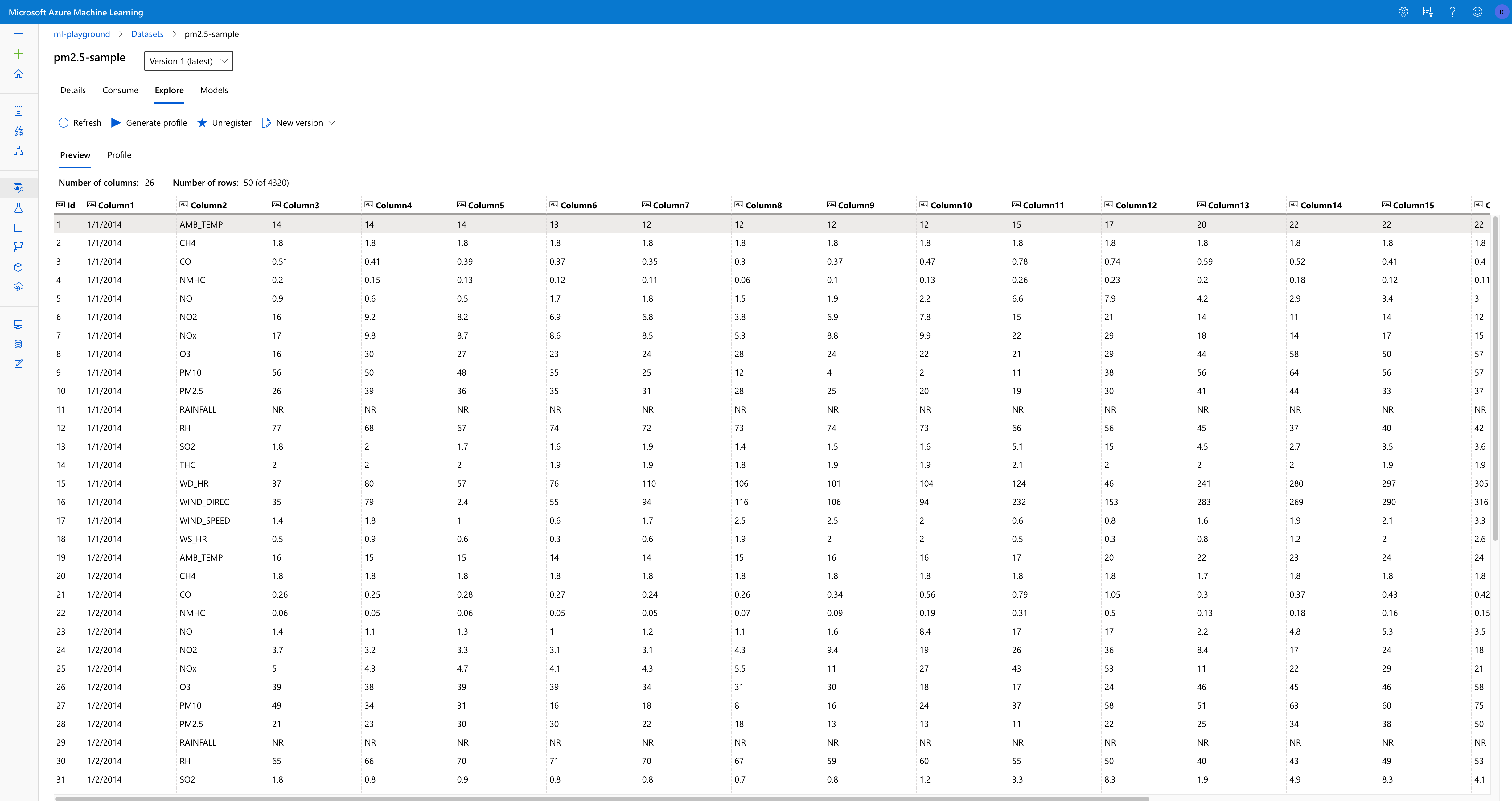
Dataset preview in AML Studio

Our target data structure of will be:

Feature 1 of 1st hour Feature 1 of 2nd hour Feature 1 of 9th hour Feature 2 of 1st hour Feature 18 of 9th hour
10th hour of day 1
11st hour of day 1
24th hour of day 1
1st hour of day 2

Number of columns should be , and rows should be .

Preprocessing

You may wonder why variable is capital and variable is lower-case, just Google matrix notation.

1
2
3
4
5
6
7
8
9
10
11
12
13
14
15
16
17
18
19
20
21
22
23
24
25
26
27
28
29
30

data = data.iloc[:, 3:]

data[data == 'NR'] = 0
raw_data = data.to_numpy()

def cook_raw(raw_data):
month_data = {}
for month in range(12):
sample = np.empty([18, 480])
for day in range(20):
sample[:, day * 24 : (day + 1) * 24] = raw_data[18 * (20 * month + day) : 18 * (20 * month + day + 1), :]
month_data[month] = sample

X = np.empty([12 * 471, 18 * 9], dtype = float)
y = np.empty([12 * 471, 1], dtype = float)
for month in range(12):
for day in range(20):
for hour in range(24):
if day == 19 and hour > 14:
continue

X[month * 471 + day * 24 + hour, :] = month_data[month][:,day * 24 + hour : day * 24 + hour + 9].reshape(1, -1)

y[month * 471 + day * 24 + hour, 0] = month_data[month][9, day * 24 + hour + 9]
X[X < 0] = 0

return X, y

X, y = cook_raw(raw_data=raw_data)

Feature engineering by adding quadratice equation

1
2
3


X = np.concatenate((X, X[:, 9*9 : 10*9] ** 2), axis=1)

Normalization

1
2
3
4
5
6
7
8
9
10
11
12
13
14

def _normalization(X):

mean_x = np.mean(X, axis = 0)
std_x = np.std(X, axis = 0)

for i in range(len(X)):

for j in range(len(X[0])):
if std_x[j] != 0:
X[i][j] = (X[i][j] - mean_x[j]) / std_x[j]
return X

X = _normalization(X)

Feature engineering by pruning unimportant features

1
2
3
4
5
6
7
8
9
10
11
12
13

def prune(X):
delete_cols = []

remove_idx = [6, 10]
for i in remove_idx:
delete_cols.extend(range(i * 9 + 1, (i + 1) * 9 + 1))

res = np.delete(X, delete_cols, 1)
return res


X_pruned = prune(np.concatenate((np.ones([12 * 471, 1]), X), axis = 1).astype(float))

Split training data into training set and validation set

1
2
3
4
X_train_set = X[: math.floor(len(x) * 0.8), :]
y_train_set = y[: math.floor(len(y) * 0.8), :]
X_validation = X[math.floor(len(x) * 0.8): , :]
y_validation = y[math.floor(len(y) * 0.8): , :]

Training and prediction

Rough training

1
2
3
4
5
6
7
8
9
10
11
12
13
14
15
16
17
18
19
20
21
22
23
24
25

def eval_loss(X, y, w):
return np.sqrt(np.sum(np.power(X @ w - y, 2))/X.shape[0])


def train(X, y, w = 0, reg = 1, iter = 8000):
dim = X.shape[1]
if type(w) == int:
w = np.zeros([dim, 1])

learning_rate = 1.6
adagrad = np.zeros([dim, 1])
eps = 0.0000000001
for t in range(iter):
loss = eval_loss(X, y, w)
if(t%500==0):
print('#' + str(t) + ":" + str(loss))

gradient = 2 * (X.T @ (X @ w - y)) + 2 * reg * w

adagrad += gradient ** 2
w = w - learning_rate * gradient / np.sqrt(adagrad + eps)
return w

w = train(X_train_set, y_train_set)

Validate training

1
eval_loss(X_validation, y_validation, w)

Training again and remove outliers

1
2
3
4
5
6
7
8
9
10
11
12
13
w = train(X = X_pruned, y = y, w = w)

outliers = []
for i in range(X_pruned.shape[0]):
if np.absolute(X_pruned[i] @ w - y[i]) > 10:
outliers.append(i)


X_pruned = np.delete(X_pruned, outliers, 0)
y = np.delete(y, outliers, 0)

w = train(X = X_pruned, y = y, w = w)
print('\nFinal loss on full training dataset: {}'.format(eval_loss(X_pruned, y, w)))

Review

Compare the Steps of machine learning section with each code snippets below and rethink the whole flow, you may have an overview about machine learning now 👍 .
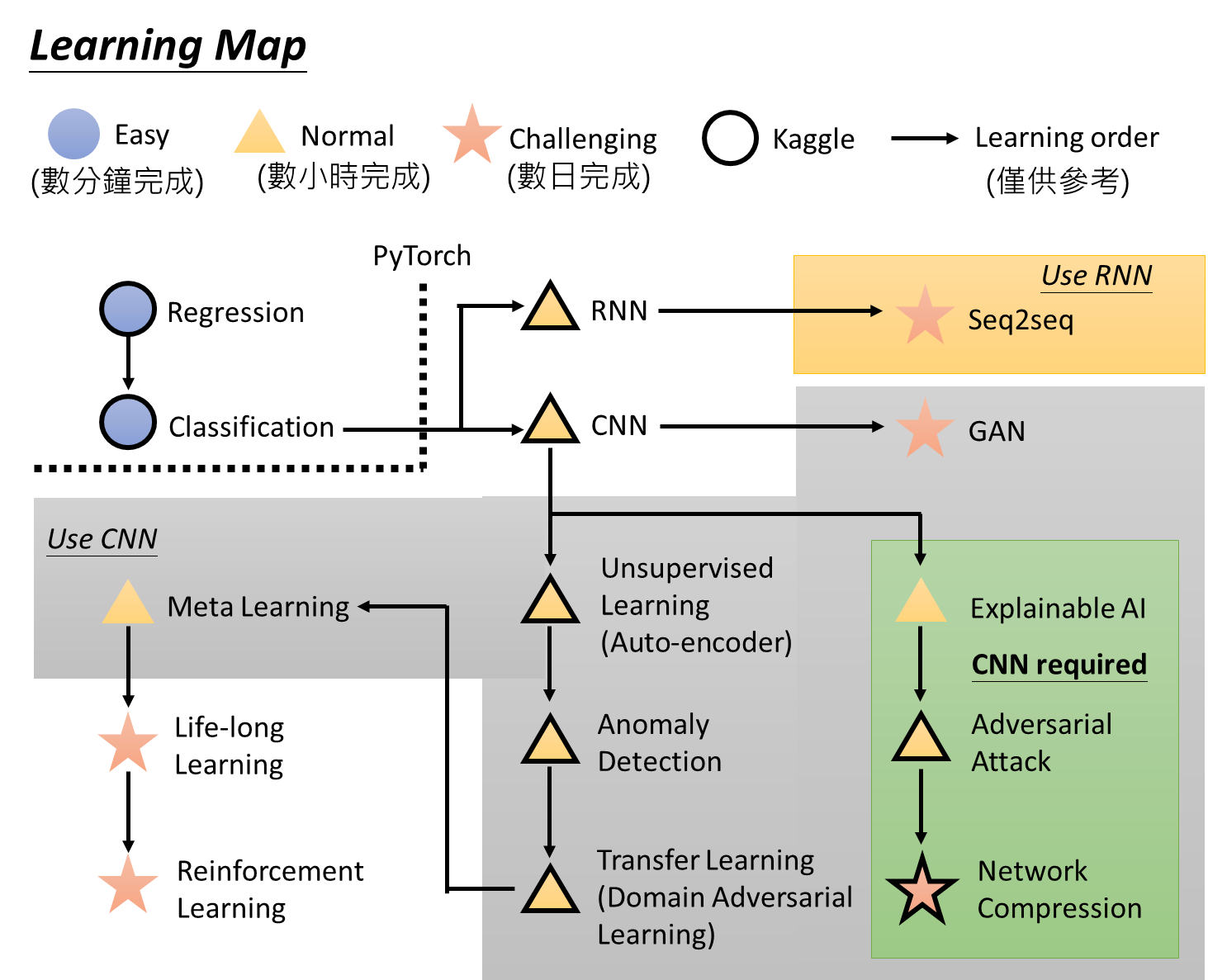
Going further

  • Enjoy the References and resources
  • Try assignments in the referred book and courses
    Learning map, https://bit.ly/3mf7jCU

References and resources