惯性聚合 高效追踪和阅读你感兴趣的博客、新闻、科技资讯
阅读原文 在惯性聚合中打开

推荐订阅源

让小产品的独立变现更简单 - ezindie.com
Microsoft Azure Blog
大猫的无限游戏
大猫的无限游戏
月光博客
月光博客
V
V2EX
PCI Perspectives
PCI Perspectives
Latest news
Latest news
博客园 - 三生石上(FineUI控件)
C
CERT Recently Published Vulnerability Notes
W
WeLiveSecurity
Last Week in AI
Last Week in AI
奇客Solidot–传递最新科技情报
奇客Solidot–传递最新科技情报
P
Palo Alto Networks Blog
T
The Exploit Database - CXSecurity.com
K
KPMG report finds enterprise disconnect between AI and its ROI | CIO
cs.AI updates on arXiv.org
WordPress大学
WordPress大学
V
Vulnerabilities – Threatpost
H
Heimdal Security Blog
Attack and Defense Labs
cs.CV updates on arXiv.org
Hacker News: Ask HN
Hacker News: Ask HN
博客园 - 叶小钗
V
Visual Studio Blog
Jina AI
Jina AI
P
Proofpoint News Feed
罗磊的独立博客
SecWiki News
SecWiki News
J
Java Code Geeks
freeCodeCamp Programming Tutorials: Python, JavaScript, Git & More
L
LINUX DO - 热门话题
Security Archives - TechRepublic
The Hacker News
The Hacker News
Hugging Face - Blog
Hugging Face - Blog
N
News and Events Feed by Topic
NISL@THU
NISL@THU
T
Tailwind CSS Blog
T
Tenable Blog
Recent Commits to openclaw:main
Recent Announcements
H
Hacker News: Front Page
Exploit-DB.com RSS Feed
T
Tor Project blog
宝玉的分享
宝玉的分享
Help Net Security
Help Net Security
S
Security Affairs
Microsoft Security Blog
Google DeepMind News
F
Fortinet All Blogs
G
GRAHAM CLULEY

博客园 - SamDragon

如何通过LangChain实现记忆功能的总结 基于LangChain的Ai应用开发平台 .net CPU和内存爆高的分析与处理01 前端导出Excel和打印介绍 ApiTemplate:.net后端项目模板完善与总结 Jenkins之Nunit的应用 jenkins发布application且并运行 Jenkins基础系统之完整的.net项目编译 Jenkins基础系统之更换镜像源 记一次业余项目的敏捷开发实践 奉上简单的.Net后端开发模板 C#之委托如此简单 cordova环境搭建 Linux实现免密码登录 Autofac 应用于IIS托管的WEB程序,注册程序集被回收的问题 通过Thrift实现C#与Hbase交流 OpenLayer实现路径运动 对SVN的落地与实践总结 Jenkins配置从节点
ElasticSearch安装及运行的坑
SamDragon · 2019-07-21 · via 博客园 - SamDragon

一、确认centos系统是为64位的,x86的不可以安装

1. 下载elasticsearch包

2. 用 tar -zxvf 解压包

3. 增加一个elk用户,elasticsearch7不可用root用户运行

4. 新建用户必须要用 chown -R 用户名 文件夹:进行权限分配
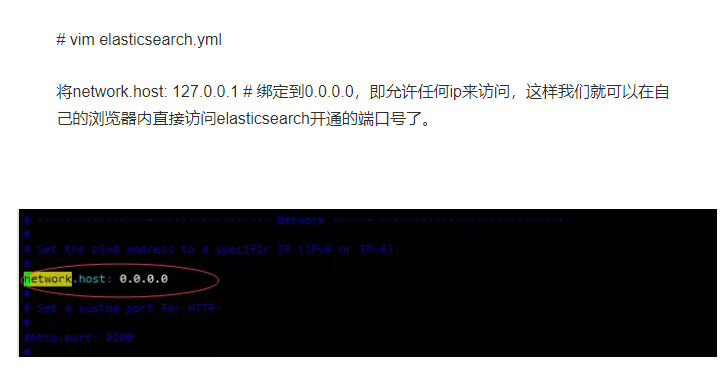
二、配置实现外网访问

clipboard

三、处理三个系统配置

1、max file descriptors [4096] for elasticsearch process is too low, increase to at least [65536]

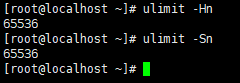
  每个进程最大同时打开文件数太小,可通过下面2个命令查看当前数量

ulimit -Hn ulimit -Sn

  修改/etc/security/limits.conf文件,增加配置,用户退出后重新登录生效

* soft nofile 65536 * hard nofile 65536
48-776330364

2、max number of threads [3818] for user [es] is too low, increase to at least [4096]

  问题同上,最大线程个数太低。修改配置文件/etc/security/limits.conf,增加配置

soft    nproc           4096
hard    nproc           4096

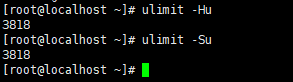
  可通过命令查看

ulimit -Hu ulimit -Su
6-1676615485

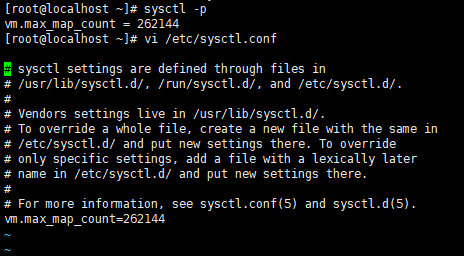
3、max virtual memory areas vm.max_map_count [65530] is too low, increase to at least [262144]

  修改/etc/sysctl.conf文件,增加配置vm.max_map_count=262144

vi /etc/sysctl.conf

sysctl -p

  执行命令sysctl -p生效
26-366544473

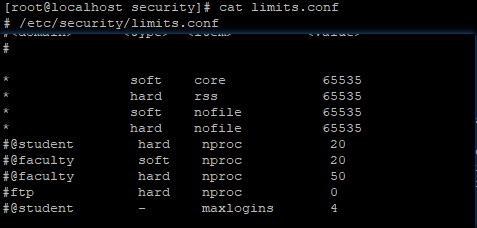
正确的limits.conf

clipboard

四、处理bootstrap checks failed问题

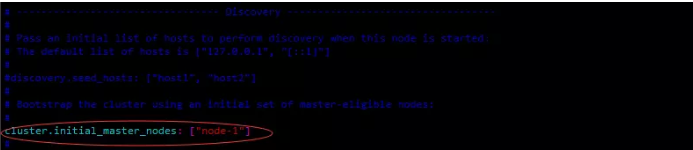
[1]: the default discovery settings are unsuitable for production use; at least one of [discovery.seed_hosts, discovery.seed_providers, cluster.initial_master_nodes] must be configured

这时候继续编辑elasticsearch.yml文件,将 #cluster.initial_master_nodes: ["node-1", "node-2"] 修改为 cluster.initial_master_nodes: ["node-1"],
clipboard

另一种解决办法:

报错:ERROR: bootstrap checks failed

      解决:在elasticsearch.yml中配置bootstrap.system_call_filter为false,要在Memory下面:

                 bootstrap.memory_lock: false

                 bootstrap.system_call_filter: false