







在.NET中,对于ASP.NET,有MVC;对于WPF、SILVERLIGHT,有MVVM。然而在桌面开发领域,似乎微软并没有推出什么强力的框架。但笔者在写程序的时候很不喜欢把代码全部混杂在一个类中。这个问题很容易解决,一种是使用现成的对平台没有依赖性的MVC框架,比如PureMVC,当然学习一个框架需要一些时间,另一种方法就是自己做一个小框架,恐怕称之为框架都有些太夸大了。
首先需要确定的是这个小框架要实现的功能。MVC虽然经典,但是View层的数据获取需要从Model直接获取,而View的操作行为则是需要通过Controller来更新Model。也就是说在View与Model通信过程中,Controller负责那些变更状态的事情。然而MVC中比较严重的问题是View需要引用Model,这就导致了View层对Model的依赖。主动MVC与被动MVC都存在这样的问题。(见Figure 1 主动MVC、Figure 2 被动MVC)而MVP则不存在这样的问题,但是在MVP中Presenter承担了更多的事情。在Presenter中,大致有两种信息,一种是改变Model状态的控制信息,一种是改变View显示的状态信息。对于特定的策略,如Presenter是主动的询问Model发现变更后通知View,还是Model通过Observer模式通知Presenter,Presenter再去通知View改变内容这类的事情,则可以具体到每个特定的Presenter中来实现。(见Figure 3 MVP模式)

Figure 1 主动MVC
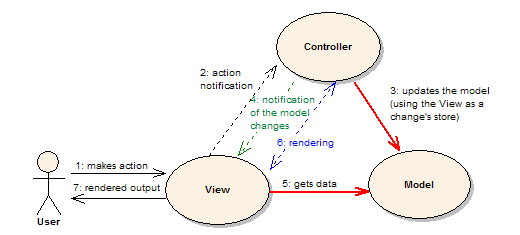
Figure 2 被动MVC

Figure 3 MVP模式
MVP具体到.NET中来,在其中使用的Observer模式自然可以用事件实现。笔者认为虽然一个Presenter有可能会存在需要多个视图以及多个Model的情况,但是大多情况下,一个Presenter仅仅关注一个Model。对于View,情况则比较复杂,通常为了将某一类Model的信息显示出来,我们会为其专门定制一个View,但是,我们还需要输出许多信息,看上去我们是需要向其他的View发送信息。但是,如果我们为每一个View都做一个Presenter,一个Model的话,我们只需要在当前Presenter引用那个View所对应的Model,发送相应信息就好了。所以,笔者的原则就是,不要让更新不属于当前Presenter的View,而是通过该Presenter引用Model实现其他信息的输出。
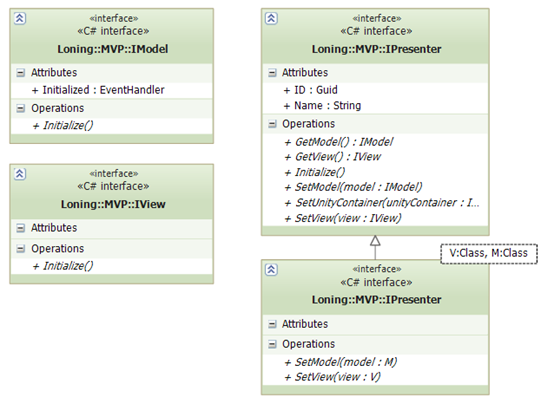
Figure 4 框架接口
public interface IView
    {
        void Initialize();
    }
	public interface IModel
    {
        void Initialize();
        event EventHandler Initialized;
    }
	public interface IPresenter
    {
        void SetView(IView view);
        void SetModel(IModel model);
        void SetUnityContainer(IUnityContainer unityContainer);
        void Initialize();
        string Name { get; }
        Guid ID { get; }
        IView GetView();
        IModel GetModel();
    }
    public interface IPresenter<V, M> : IPresenter
        where V : IView
        where M : IModel
    {
        void SetView(V view);
        void SetModel(M model);
    }
以上是笔者设计的接口。Model与View的初始化有时需要一定的时间,我们可以把这些方法封装起来,便于今后控制。然后在Presenter中提供了一些基本方法,如更改获取View及Model,以及一个初始化方法,该初始化方法的默认实现是会初始化View后初始化Model。
在设计过程中,笔者认为有大量的Presenter方法是需要重用的,因此就写了一个抽象的基类实现一些方法,在开发过程中,又引入了IUnityContainer,因此实现了两个版本。BasePresenter不会自动注入View与Model,而Presenter会自动注入。
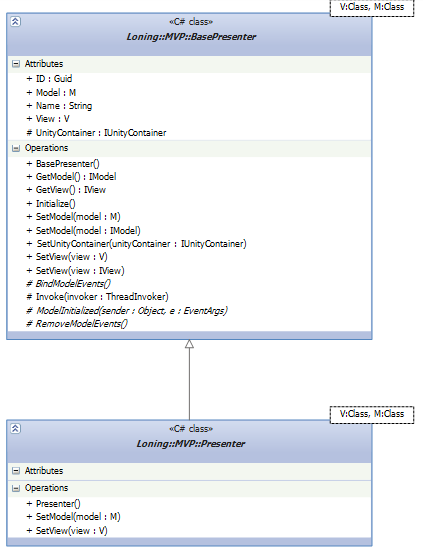
Figure 5 Presenter基类
在实现BasePresenter的过程中,使用了模板方法将几个最常用的方法定义出来,如在添加Model的时候绑定Model的事件,移除Model的时候移除绑定Model的事件。还有就是在Model初始化完成的时候,也经常需要Presenter去做一些事情,也定义了出来。
为了便于标识与更友好的显示名称,也加入了相关的属性来标识。
public abstract class BasePresenter<V, M> : IPresenter<V, M>
        where V : IView
        where M : IModel
    {

        public BasePresenter()
        {
            var type = this.GetType();
            var assembly = type.Assembly;
            try
            {
                ResourceManager rm = new ResourceManager(assembly.GetName().Name + ".TextResource", assembly);

                Name = rm.GetString(type.Name);
            }
            catch
            {
            }
            finally
            {
                if (Name == null)
                    Name = type.Name;
            }
            ID = Guid.NewGuid();
        }
        public IView GetView()
        {
            return this.View;
        }
        public IModel GetModel()
        {
            return this.Model;
        }
        public V View { get; private set; }
        public M Model { get; private set; }
        public string Name { get; protected set; }
        public Guid ID { get; protected set; }
        protected IUnityContainer UnityContainer { get; private set; }
        public delegate void ThreadInvoker();

        protected virtual void Invoke(ThreadInvoker invoker)
        {
            invoker.BeginInvoke(null, null);
        }
        /// <summary>
        /// Remove the model events bound to the Presenter
        /// Note:The Initialized event.
        /// </summary>
        protected abstract void BindModelEvents();

        /// <summary>
        /// Remove the model events bound to the Presenter
        /// Note:The Initialized event.
        /// </summary>
        protected abstract void RemoveModelEvents();


        #region IPresenter<V,M> 成员

        public virtual void SetView(V view)
        {
            this.View = view;
        }

        public virtual void SetModel(M model)
        {
            if (this.Model != null)
            {
                Model.Initialized -= new EventHandler(ModelInitialized);
                RemoveModelEvents();
            }
            this.Model = model;
            Model.Initialized += new EventHandler(ModelInitialized);
            BindModelEvents();
        }

        public void SetView(IView view)
        {
            SetView((V)view);
        }

        public void SetModel(IModel model)
        {
            SetModel((M)model);
        }

        public virtual void Initialize()
        {
            View.Initialize();
            Model.Initialize();
        }


        /// <summary>
        ///
        /// </summary>
        /// <param name="sender"></param>
        /// <param name="e"></param>
        protected abstract void ModelInitialized(object sender, EventArgs e);

        [InjectionMethod]
        public void SetUnityContainer(IUnityContainer unityContainer)
        {
            this.UnityContainer = unityContainer;
        }

        #endregion
}
通过一些这样的定义,我们就已经实现了一个简易的MVP框架。下面来说说这个框架怎么用。
这个框架比较好的一点就是比较适合懒人用,因为消息通知都是基于.net的方法或者事件来实现的,所以IDE都能直接认。
我们现在要实现一个累加器,Model的实现很容易。有一个方法来进行累加,有一个属性来提供当前数字,还有一个事件来通知累加的数已经改变了。
public interface IHelloMvpModel : IModel
    {
        void Plus();
        int GetNumber { get; }
        event EventHandler NumberChanged;
    }
    public class HelloMvpModel : IHelloMvpModel
    {
        private int _Number;
        public void Plus()
        {
            ++_Number;
            if (NumberChanged != null)
                NumberChanged(this, EventArgs.Empty);
        }

        public int GetNumber
        {
            get { return _Number; }
        }

        public void Initialize()
        {
            if (Initialized != null)
                Initialized(this, EventArgs.Empty);
        }

        public event EventHandler Initialized;


        public event EventHandler NumberChanged;
    }
而View层就更简单了,接收用户操作与显示数据。
public interface IHelloMvpView : IView
    {
        void SetNumber(int number);
        event EventHandler ChangeNumberRequested;
    }
public partial class HelloMvpView : Form,IHelloMvpView
    {
        public HelloMvpView()
        {
            InitializeComponent();
        }

        public void SetNumber(int number)
        {
            Invoke((MethodInvoker)delegate()
            {
                this.Text = number.ToString();
            });
            //throw new NotImplementedException();
        }

        public void Initialize()
        {

            //throw new NotImplementedException();
        }


        public event EventHandler ChangeNumberRequested;

        private void button1_Click(object sender, EventArgs e)
        {
            if (ChangeNumberRequested != null)
                ChangeNumberRequested(this, EventArgs.Empty);
        }
    }
在主程序,我们这样来进行调用。
    static void Main()
        {
            Application.EnableVisualStyles();
            Application.SetCompatibleTextRenderingDefault(false);

            IUnityContainer container = new UnityContainer();
            container.RegisterInstance(container);
            container.RegisterType<IHelloMvpModel, HelloMvpModel>();
            container.RegisterType<IHelloMvpView, HelloMvpView>();

            var p = container.Resolve<HelloMvpPresenter>();
            p.Initialize();
            Application.Run((Form) p.View);
        }
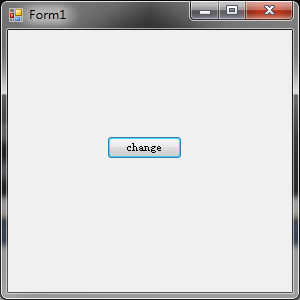
Figure 6 运行截图
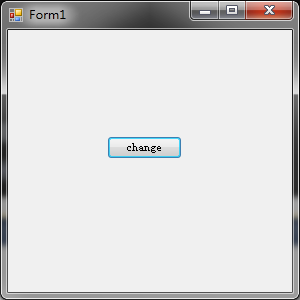
Figure 7 点击按钮后
虽然实现起来比较繁杂,但是对比较大的程序来说,有这样一套框架可以很好的帮助开发者,使得混杂在一起的数据更加的清晰。笔者现在已经通过这样的框架实现了一些实用的程序 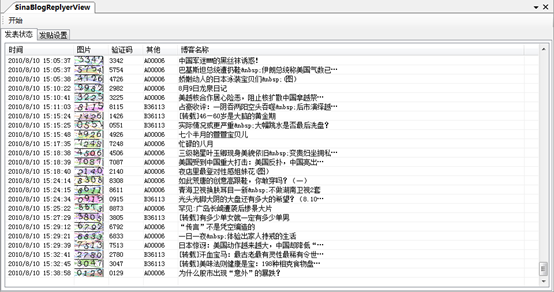
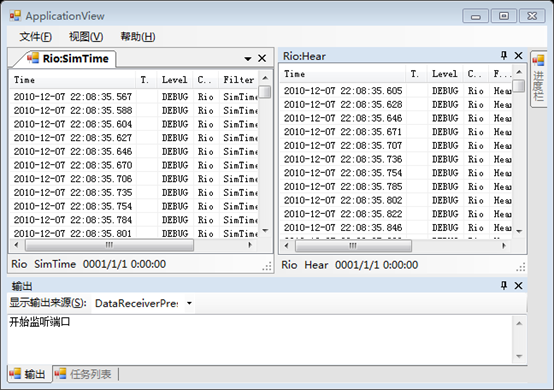
这篇文章大概就完了,可能有时间会再写一篇用该框架实现一些通用ToolWindow的实现,在程序源码中的Loning.MvpWinform项目中。写这个小框架大概一年前写的,现在想来IPresenter似乎没什么意义,大概也就是在初始化的时候多态一下,对View与Model的单一限制似乎也不好,在开发过程中有时也会感到很麻烦。但是比较可以肯定的是开发的时候,思维会比较清晰。如果大家有时间看这篇文章,欢迎指出不足之处。
程序源码: http://www.wiisio.com/LoningLibrary.7z
参考文章:MVP模式与MVC模式 http://www.uml.org.cn/sjms/201006244.asp 部分图摘自本篇文章
作者:马昊伯
本文版权归作者和博客园共有,欢迎转载,但未经作者同意必须保留此段声明,否则保留追究法律责任的权利。
此内容由惯性聚合(RSS阅读器)自动聚合整理,仅供阅读参考。 原文来自 — 版权归原作者所有。