



我的两款日语学习产品「50音起源」「捧读」都是多平台产品,在开发「50音起源」的时候,我选择了平台 Native 技术,虽然有一定的维护成本,但初期觉得工作量还好,不过后来慢慢懒了起来,就逐渐有了放羊的心。
因此当「捧读」在开发的时候,我尝试用 Flutter 解决这个问题,但是上线后又很不幸的发现, Flutter 对 Apple 的技术栈支持并不积极,比如 Catalyst 不能使用,还有一些小性能问题,所以最后「捧读」的 iOS 版本又用 UIKit 重写了。
最近给 Android 版本的「50音起源」做更新的时候,尝试用 Jectpack Compose 写了一个「设置」界面,感觉还不错,声明式,状态化,实时预览,开发效率很高,它即不基于旧的 Android UI Toolkit,没有历史遗留问题,很好的解决了 Android 上以往痛苦无比的 UI 开发过程,也不像 SwiftUI 那样绑定到了系统中,开发者可以自行更新 App 使用的 Jetpack Compose 版本。
所以这段时间,Jectpack Compose 极速拉升了我对 Android 开发的好感。关于它的诸多理念,可以观看官方 19 年的 Session
我在做跨平台开发时,通常有下面几个痛点
如果把这三点考虑进去,最好的方式就是使用原生 UI Toolkit,在数据层上做跨平台。但以往 Android UI 开发工作别繁琐,导致我后来宁愿 Flutter 也不要用 Android 自己的 UI Toolkit.
但现在有了 Jetpack Compose 这种好用的 Toolkit,我可以下个决心只做数据层跨平台了。
那选什么语言呢?
Go Mobile 好像可以,Rust 也有这方面的愿景,但我还是最喜欢写得舒服的 Swift。
可 Swift 显而易见是不适合跑 Android 上的,那 Kotlin 呢?
Kotlin 不仅和 Swift 语法相近,还从官方立场就做了跨平台的完善支持,最近 Swift Package Manager 支持了 XCFramework Bundle 这意味着,只要 Kotlin Native 能编译出不同 Apple 架构的 Framework,就可以轻松的打包成一个 Swift Package 进行跨平台使用以及分发了。
嗅到了「有戏」的味道后,决定试试搞了有些年头的 Kotlin Native。
Kotlin Native 的跨平台可以说是巨全无比了
简而言之,Kotlin 虽然可以跑在 JVM 上,也能调用 Java 代码,但 Kotlin 并不是 Java,借助于 LLVM,Pure Kotlin Code 可以编译成平台代码,实现无 VM 跨平台。
它编译出的可以是 executable,也可以是 library,当然还可以是 Apple framework.
我完全不担心 Kotlin Native 在 Android 上的使用问题,因此主要想得出的结论是和 Swift 一起用怎么样。
一个典型的使用场景就是用 Kotlin Native 写一个 API SDK,由 SDK 负责请求 API 并解析 JSON,并返回一个反序列化后的对象给 Swift.
首先我们需要一个 API.
在网上找了会,我发现 NASA 有一个 Astronomy Picture of the Day 的 API 很有意思,你可以访问这个 Astronomy Picture of the Day 页面查看.
NASA 提供的 API URL 是这样的
https://api.nasa.gov/planetary/apod?api_key={API_KEY}你可以到 https://api.nasa.gov/ 申请自己的 API_KEY.
接下来就是创建一个 Kotlin Native 项目,我使用的是 IntelliJ IDEA。
File -> New -> Project
像下图这样选择 Mobile Library
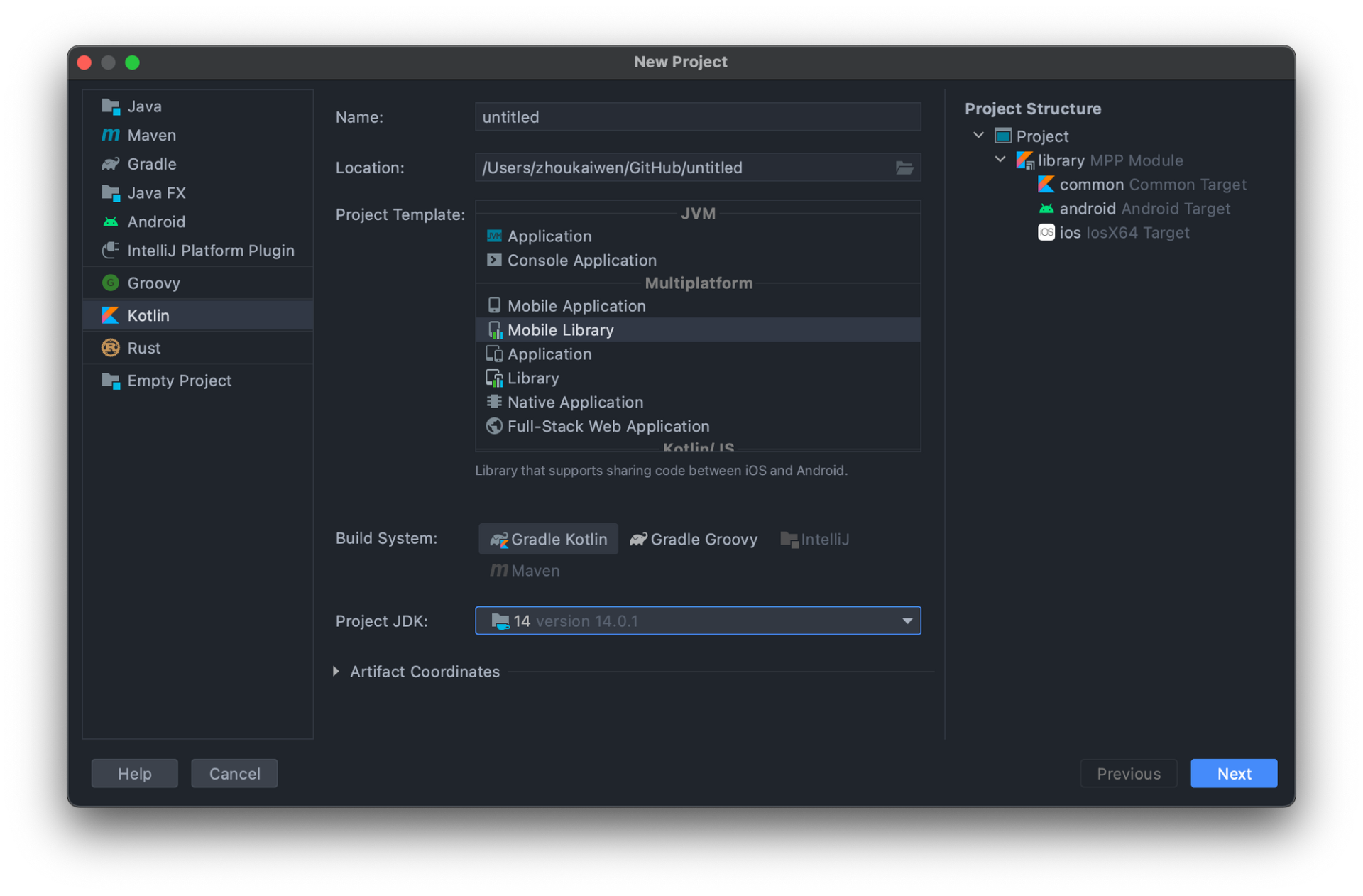
默认会创建三个 target
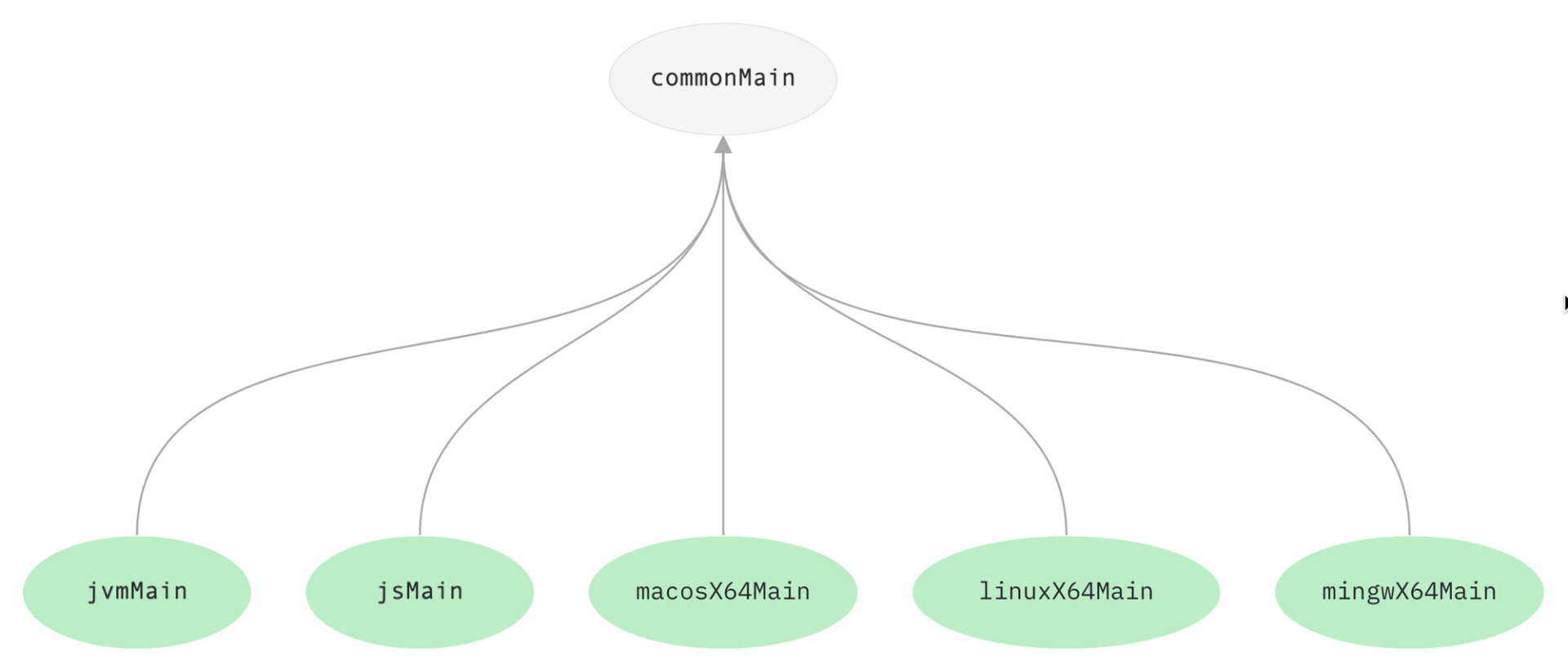
继续简而言之,common 里的代码是通用代码,理论上 SDK 最核心的逻辑就应该放在这里面,而 android 和 ios 可以使用 shortcuts 的特性,继承 common,并可以使用自属平台接口.
用法从 Greeting 类的 Platfrom 变量的传递上就可以看出来。
commonMain/kotlin/me.zhoukaiwen.library/Greeting.kt
class Greeting {
    fun greeting(): String {
        return "Hello, ${Platform().platform}!"
    }
}
iosMain/kotlin/me.zhoukaiwen.library/Platform.kt
import platform.UIKit.UIDevice

actual class Platform actual constructor() {
    actual val platform: String = UIDevice.currentDevice.systemName() + " " + UIDevice.currentDevice.systemVersion
}
如果你现在直接按下 Build,完成后,就可以在项目目录的 build/bin/ios 文件夹里找到编译好的 Framework,开箱即用.
现在你可以到我的 repo kotlin-native-library-demo 上去下载已经完工的项目
首先是需要配置 build.gradle.kts 把序列化和网络请求库 Ktor 的依赖给加上,重点步骤是下面这几个
// 配置 serialization plugin
// https://ktor.io/docs/json.html#kotlinx_dependency
// https://github.com/Kotlin/kotlinx.serialization#setup
// https://kotlinlang.org/docs/mpp-discover-project.html#multiplatform-plugin
plugins {
    kotlin("plugin.serialization") version "1.5.10"
}

kotlin {
  // 配置 target
  // https://kotlinlang.org/docs/mpp-discover-project.html#targets
  val macos = macosX64("macos")
  val ios = iosX64("ios")
  val iosArm64 = iosArm64("iosArm64")

  // https://kotlinlang.org/docs/mpp-discover-project.html#source-sets
  sourceSets {
    val commonMain by getting {
                dependencies {
                // 添加 ktor core 到 common
                // https://ktor.io/docs/http-client-multiplatform.html#add-dependencies
                // https://kotlinlang.org/docs/mpp-add-dependencies.html
                    implementation("io.ktor:ktor-client-core:$ktorVersion")
                    implementation("io.ktor:ktor-client-serialization:$ktorVersion")
                }
            }

    val iosMain by getting {
        dependsOn(commonMain)
        dependencies {
            // 添加 ktor for ios
            implementation("io.ktor:ktor-client-ios:$ktorVersion")
        }
    }

    val macosMain by getting {
        dependsOn(commonMain)
        dependencies {
            // 添加 ktor for macOS
            implementation("io.ktor:ktor-client-curl:$ktorVersion")
        }
    }

    // 配置每个 target 编译出来的 Framework 名称
    // https://kotlinlang.org/docs/mpp-build-native-binaries.html#declare-binaries
    configure(listOf(ios, iosArm64, macos)) {
        // listOf(RELEASE) 是指 Build 时只编译 Release 版本
        binaries.framework(listOf(RELEASE)) {
            baseName = "HappyNasa"
        }
    }
  }
}关于这个文件的结构说明,可以参考官方文档 Discover Project 以及 Build final native binaries
接下来就可以编写请求逻辑了
commonMain/kotlin/me.zhoukaiwen.library/Nasa.kt
@Serializable
@SerialName("APOD")
data class APOD(val date: String,
                val explanation: String,
                val hdurl: String,
                val media_type: String,
                val service_version: String,
                val title: String,
                val url: String)

class NASA(private val apiKey: String) {

    val NASAEntryPoint.fullPath: String
        get() {
            return nasaBaseURL + this.path
        }

    private val client = HttpClient() {
        install(JsonFeature) {
            serializer = KotlinxSerializer()
        }
    }

    private val nasaBaseURL: String = "https://api.nasa.gov"

    enum class NASAEntryPoint(val path: String) {
        APOD( "/planetary/apod")

    }

    suspend fun getAPOD(): APOD? {
        val response: HttpResponse =  client.get(NASAEntryPoint.APOD.fullPath) {
            parameter("api_key", apiKey)
        }

        return try {
            val apod: APOD = response.receive()
            apod
        } catch (e: NoTransformationFoundException) {
            null
        }
    }
}
现在按下 Build,我们就可以在 build/bin 下找到 ios iosArm64 macos 这三个平台的 Framework.
首先是使用 xcodebuild 合并 Framework 成一个 xcframework.
xcodebuild -create-xcframework -framework ./lib/iosArm64/releaseFramework/HappyNasa.framework -framework ./lib/ios/releaseFramework/HappyNasa.framework -framework ./lib/macos/releaseFramework/HappyNasa.framework -output ./happy_lib.xcframework随后就是新建我们的 Swift Package 项目了,创建的教程就略过吧,你可以直接到 Github 下载已经完工的项目 kotlin_native_swift_package_demo_lib
配置 Package.swift
import PackageDescription

let package = Package(
    name: "kotlin_demo_lib",
    products: [
        .library(
            name: "kotlin_demo_lib",
            targets: ["kotlin_demo_lib", "HappyNasa"]),
    ],
    targets: [
        .target(
            name: "kotlin_demo_lib",
            dependencies: []),
        .binaryTarget(
                    name: "HappyNasa",
                    path: "Sources/happy_lib.xcframework"),
        .testTarget(
            name: "kotlin_demo_libTests",
            dependencies: ["kotlin_demo_lib"]),
    ]
)
主要的操作就是增加 binaryTarget,参考官方文档的 Declare a Binary Target in the Package Manifest 即可。
新建一个 Xcode 的 Swift 项目,加入我们刚刚完工的 Swift Package 的引用,你可以在我的 repo kotlin_native_ios_demo 这里下载完工的项目。
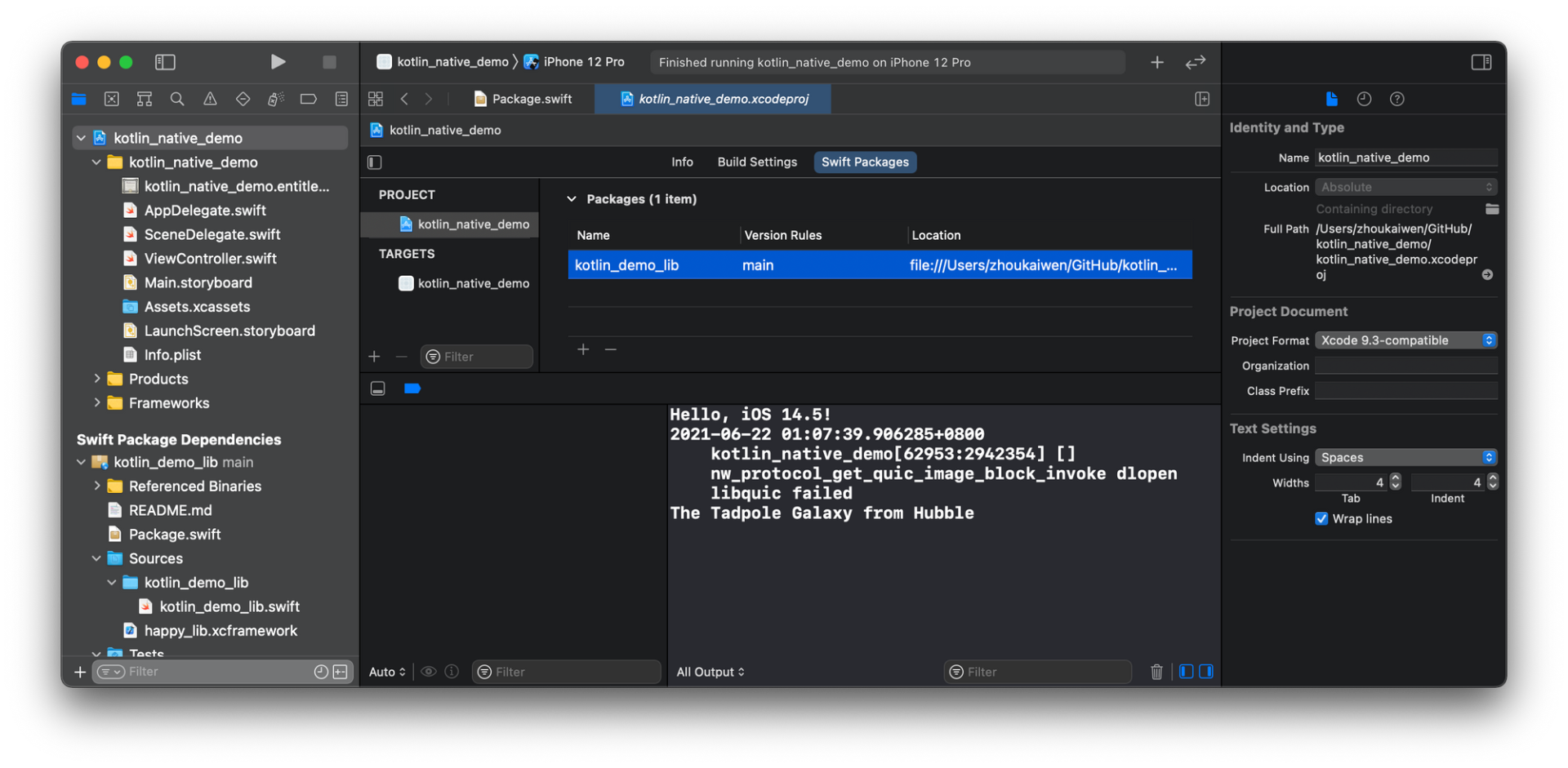
需要注意的是我引用的是本地地址,如果你直接 clone 了我的项目,那么请重新添加 Swift Pakcage 的依赖。
ViewController.swift
import UIKit
import kotlin_demo_lib
import HappyNasa

class ViewController: UIViewController {

    override func viewDidLoad() {
        super.viewDidLoad()

        let a = Greeting().greeting()
        print(a)

        let nasaClient = NASA.init(apiKey: "{API_KEY}")
        nasaClient.getAPOD { apod, error in
            if let apod = apod {
                print(apod.title)
            } else {
                print("Get apod failed")
            }
        }
    }
}
使用起来感觉还是蛮优雅的,Kotlin 的 suspend 函数被翻译成了 Swift 的 completion handler. 在 Kotlin 中定义的对象 APOD 也可以正常访问属性。
Kotlin Native 看起来是个很不错的跨平台方案,既有高级语言的特性,又能很完美的针对多平台进行编译。
当然,目前还是有美中不足的部分的,Catalyst 和 Apple Silicon 的架构支持还在进行中,根据官方的issue KT-40442 KT-45302 Kotlin 1.5.30 发布的时候,我们应该就可用上了。
但我还有一个梦想,有一天 Swift 可以像 Kotlin 这样十分方便的跑在各种平台上。
Kotlin-Multiplatform-Libraries Interoperability with C Kotlin/Native as an Apple framework – tutorial
此内容由惯性聚合(RSS阅读器)自动聚合整理,仅供阅读参考。 原文来自 — 版权归原作者所有。