


惯性聚合 高效追踪和阅读你感兴趣的博客、新闻、科技资讯
阅读原文 在惯性聚合中打开

推荐订阅源

量子位
aimingoo的专栏
aimingoo的专栏
C
CXSECURITY Database RSS Feed - CXSecurity.com
Stack Overflow Blog
Stack Overflow Blog
C
CERT Recently Published Vulnerability Notes
T
Tailwind CSS Blog
腾讯CDC
罗磊的独立博客
Security Latest
Security Latest
K
Kaspersky official blog
A
Arctic Wolf
博客园 - Franky
D
Docker
博客园 - 司徒正美
GbyAI
GbyAI
T
Tenable Blog
Engineering at Meta
Engineering at Meta
A
About on SuperTechFans
H
Help Net Security
Threat Intelligence Blog | Flashpoint
L
Lohrmann on Cybersecurity
小众软件
小众软件
V
V2EX
T
Threatpost
T
Threat Research - Cisco Blogs
T
The Exploit Database - CXSecurity.com
P
Palo Alto Networks Blog
P
Privacy & Cybersecurity Law Blog
S
Securelist
Google DeepMind News
I
Intezer
The Register - Security
NISL@THU
NISL@THU
L
LINUX DO - 热门话题
C
Cisco Blogs
AWS News Blog
AWS News Blog
MyScale Blog
MyScale Blog
S
Schneier on Security
Scott Helme
Scott Helme
T
The Blog of Author Tim Ferriss
G
Google Developers Blog
Project Zero
Project Zero
Cyberwarzone
Cyberwarzone
CTFtime.org: upcoming CTF events
钛媒体:引领未来商业与生活新知
钛媒体:引领未来商业与生活新知
I
InfoQ
Cisco Talos Blog
Cisco Talos Blog
Know Your Adversary
Know Your Adversary
L
LangChain Blog
P
Proofpoint News Feed

博客园 - 马伟

通过xrdp实现远程桌面连接Windows Azure linux虚拟机 使用VNC远程连接Windows Azure Linux虚拟机 设置Windows Azure Linux虚拟机中的root账户 使用Windows Azure PowerShell远程管理Windows Azure虚拟机 将SQL Azure数据库备份到本地SQL Server 2012 asp.net MVC3 “System.Web.Mvc.ModelClientValidationRule”问题 Session的生命周期 在ASP.NET中以编程方式设置母版页 ASP.NET自定义输出缓存提供程序 ASP.NET缓存依赖--自定义缓存依赖 ASP.NET缓存依赖--SQL Server 2005与SQL Server 2008缓存依赖 QueryExtender控件之CustomExpression QueryExtender控件之OrderByExpression QueryExtender控件之RangeExpression QueryExtender控件之SearchExpession <<易学C#>>全书目录 用C#编程合并多个WORD文档 fckeditor编辑器上传文件出现invalid Request问题解决 荣获2009年“微软最有影响力开发者”
QueryExtender控件之PropertyExpression
马伟 · 2010-11-09 · via 博客园 - 马伟

2010-11-09 21:30  马伟  阅读(469)  评论()    收藏  举报

本文部分摘自《ASP.NET4权威指南》

相对于其他表达式类,PropertyExpression 类比较简单,它将列的属性值与指定的值进行比较。它为每个参数的值和 IQueryable 数据对象的相应属性创建一个相等(==)比较。如果提供多个参数,将使用逻辑 AND 运算符组合这些参数,包含空值的参数不添加到 Where 子句中。

下面的示例程序演示了如何在ASP.NET4数据库的Employee数据表的EmployeeName列中,搜索员工姓名等于SearchTextBox文本框中指定的值的员工信息。从LinqDataSource 控件返回的结果显示在 GridView 控件中。如代码清单10-5所示:

代码清单10-5PropertyExpressionTest.aspx

代码

<form id="form1" runat="server">
搜索员工姓名:
<asp:TextBox ID="SearchTextBox" runat="server" />
<asp:Button ID="Button1" runat="server" Text="搜索" />
<br />
<br />
<asp:LinqDataSource ID="LinqDataSource1" 
TableName
="Employees" runat="server"
 ContextTypeName
="_10_2.EmployeesDataContext"
 EntityTypeName
="" Select="new (employeeid, employeename,
 department, address, email, workdate)">
</asp:LinqDataSource>
<asp:QueryExtender ID="QueryExtender1" runat="server"
 TargetControlID
="LinqDataSource1">
    
<asp:PropertyExpression>
        
<asp:ControlParameter ControlID="SearchTextBox"
 Name
="employeename" />
    
</asp:PropertyExpression>
</asp:QueryExtender>
<asp:GridView ID="GridView1" runat="server" Width="100%"
 DataSourceID
="LinqDataSource1"
 AllowPaging
="True" AutoGenerateColumns="False" 
DataKeyNames
="employeeid">
    
<Columns>
        
<asp:BoundField DataField="employeeid" HeaderText="编号"
 ReadOnly
="True" SortExpression="employeeid" />
        
<asp:BoundField DataField="employeename" HeaderText="姓名"
 SortExpression
="employeename" />
        
<asp:BoundField DataField="department" HeaderText="部门"
 SortExpression
="department" />
        
<asp:BoundField DataField="address" HeaderText="住址"
 SortExpression
="address" />
        
<asp:BoundField DataField="email" HeaderText="邮箱"
 SortExpression
="email" />
        
<asp:BoundField DataField="workdate" HeaderText="工作时间"
 SortExpression
="workdate" />
    
</Columns>
</asp:GridView>
</form>

示例运行结果图10-24所示:
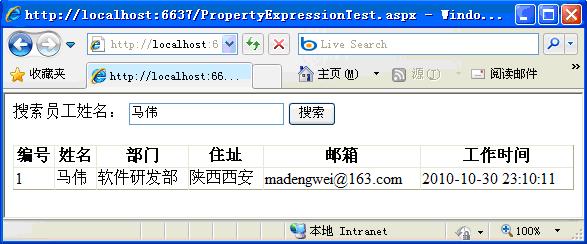
10-24:示例运行结果

本文部分摘自《ASP.NET4权威指南》