



惯性聚合 高效追踪和阅读你感兴趣的博客、新闻、科技资讯
阅读原文 在惯性聚合中打开

推荐订阅源

The GitHub Blog
The GitHub Blog
K
Kaspersky official blog
Stack Overflow Blog
Stack Overflow Blog
Blog — PlanetScale
Blog — PlanetScale
Recorded Future
Recorded Future
Engineering at Meta
Engineering at Meta
U
Unit 42
D
Docker
I
InfoQ
D
DataBreaches.Net
Google DeepMind News
N
Netflix TechBlog - Medium
C
Check Point Blog
The Cloudflare Blog
美团技术团队
V
Vulnerabilities – Threatpost
博客园_首页
T
Threat Research - Cisco Blogs
Google DeepMind News
Attack and Defense Labs
A
Arctic Wolf
IT之家
IT之家
让小产品的独立变现更简单 - ezindie.com
Exploit-DB.com RSS Feed
T
Troy Hunt's Blog
cs.CL updates on arXiv.org
人人都是产品经理
人人都是产品经理
C
Cyber Attacks, Cyber Crime and Cyber Security
钛媒体:引领未来商业与生活新知
钛媒体:引领未来商业与生活新知
Security Archives - TechRepublic
S
Schneier on Security
Apple Machine Learning Research
MyScale Blog
MyScale Blog
P
Privacy International News Feed
云风的 BLOG
云风的 BLOG
Recent Commits to openclaw:main
T
The Blog of Author Tim Ferriss
GbyAI
GbyAI
The Last Watchdog
The Last Watchdog
D
Darknet – Hacking Tools, Hacker News & Cyber Security
aimingoo的专栏
aimingoo的专栏
P
Proofpoint News Feed
The Register - Security
博客园 - 三生石上(FineUI控件)
Forbes - Security
Forbes - Security
NISL@THU
NISL@THU
Y
Y Combinator Blog
T
Threatpost
Microsoft Azure Blog
L
Lohrmann on Cybersecurity

博客园 - chinese_submarine

QT项目性能调优小记 Windows下HG服务器的搭建 svn+tp-link+花生壳搭建外网服务器 udev介绍 极大极小博弈树的简洁(附Tic-Tac-Toe源码) 程序优化小记 Beating the Average------为什么要学习Lisp[转] 巧用qmake工具生成专业的makefile 从QDataStream向QByteArray中写入数据时的注意点(QT) 如何保持GUI的响应流畅(QT平台) 也谈线程同步变量 windows7到期的问题 简述FPS的计算方法 QT中的View Model模型系列一 从农夫养牛问题推广到斐波那契数列 TimeZoneChange事件的捕获 浏览器扩展系列————透明浏览器窗口的实现 浏览器扩展系列————异步可插入协议(pluggable protocol)的实现 浏览器扩展系列————给MSTHML添加内置脚本对象【包括自定义事件】
QT中拖拽的实现(附示例代码)
chinese_submarine · 2010-10-10 · via 博客园 - chinese_submarine

QT中的Drag and Drop的详细介绍参见:http://doc.qt.nokia.com/4.0/dnd.html

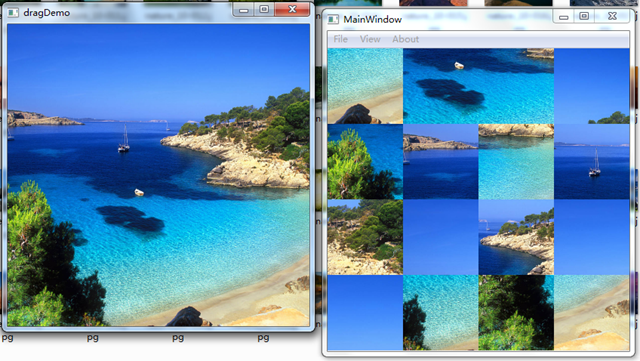
下面主要介绍一下Drag and Drop的Demo(下载),先附上一份效果图:
未命名图片

这是一个拼图的Demo,左边是原图,右边是打散的图,拖动小方格可以实现不同的方格内的图片交换,此外程序还支持手动拖入原图片。

代码中主要的类是一个DragWidget

它实现了以下几个方法。

  • void dragEnterEvent(QDragEnterEvent *dragEvent);
    void dragLeaveEvent(QDragLeaveEvent *dragEvent);
    void dragMoveEvent(QDragMoveEvent *dragEvent);
    void dropEvent(QDropEvent *dragEvent);
    void mousePressEvent(QMouseEvent *mouseEvent);

Drag执行的流程是:

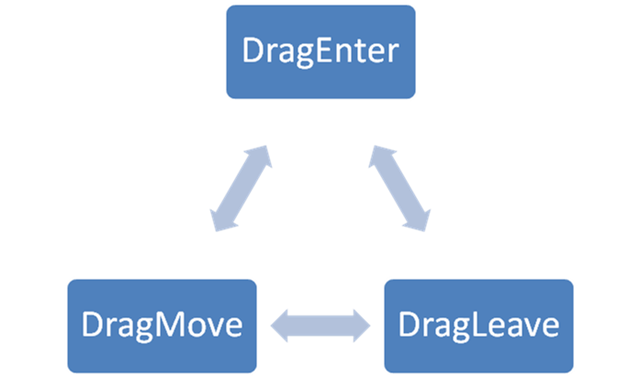
Drag是从drag->exec()开始的,此时将开启进入一个新的事件循环,然后在拖动的过程中会在下面三个事件中交替:
DragCircle

其中DragEnter是有拖动进入该Widget时触发的,对应的DragLeave则是拖动离开时触发的,而DragMove就是鼠标拖动的时候触发的。

最后当鼠标释放的时候将触发dragEvent,此时将决定拖拽的结果。

回头看一下Drag的触发,和大多数系统一样,一个Drag可能是从控件外触发的,即将外部的数据拖入,也可以是从控件内部触发,即手动生成一个QDrag对象。在示例代码中,这两种方式都会有接触。

再聊聊拖动的机制,其实拖动就是将一处的数据移动或者复制到另外一处,在QT中拖动所承载的数据使用QMimeData表示的,它可以用来表示许多Mime Type的集合。一个Mime Type即有format和data两部分组成,format即指示了如何解析对应的data。更详细的定义可以参考:http://en.wikipedia.org/wiki/MIME

最后简单地介绍一些重要的代码片段

DragWidget中使用三个数组来表示对于的数据:

QList<QPixmap> mImgList;   //image per block
QList<QRect>   mPieceList; //position per block
QList<QPoint>  mPosList;   //correct per image

void mousePressEvent(QMouseEvent *mouseEvent);

QPoint point = mPosList[find];
QPixmap image = mImgList[find];
QRect rect = mHighlightRect;
mPieceList.removeAt(find);//.remove(mHighlightRect);
mImgList.removeAt(find);
mPosList.removeAt(find);
if (checkMatch(rect, point))
     --mInPlace;
QByteArray data;
QDataStream stream(&data, QIODevice::WriteOnly);
stream << image << point;
QDrag* drag = new QDrag(this);
QMimeData* mimeData = new QMimeData;
mimeData->setData("application/x-dragitemdata", data);
drag->setMimeData(mimeData);
drag->setPixmap(image);
drag->setHotSpot(mouseEvent->pos() - mHighlightRect.topLeft());
if (0 == drag->exec(Qt::MoveAction)){

在mousePress的时候开启一个Drag,定义一个自己的Mime Type->“application/x-dragitemdata”,将需要的数据打包进去。

void dropEvent(QDropEvent *dragEvent);

if (dragEvent->mimeData()->hasFormat("application/x-dragitemdata"))
    {
        QRect targetRect = targetBlock(dragEvent->pos());
        QByteArray data = dragEvent->mimeData()->data("application/x-dragitemdata");
        QDataStream stream(data);
        QPixmap image;
        QPoint point;
        stream >> image >> point;
        mImgList.append(image);
        mPieceList.append(targetRect);
        mPosList.append(point);
        if (checkMatch(targetRect, point))
            ++mInPlace;

在drop消息中对数据进行解包,并判断是否放置到了合适的位置。

posted on 2010-10-10 18:22  chinese_submarine  阅读(20628)  评论()    收藏  举报