惯性聚合 高效追踪和阅读你感兴趣的博客、新闻、科技资讯
阅读原文 在惯性聚合中打开

推荐订阅源

W
WeLiveSecurity
The GitHub Blog
The GitHub Blog
Engineering at Meta
Engineering at Meta
Microsoft Azure Blog
The Register - Security
Stack Overflow Blog
Stack Overflow Blog
博客园 - 三生石上(FineUI控件)
T
Threat Research - Cisco Blogs
S
SegmentFault 最新的问题
V2EX - 技术
V2EX - 技术
Hacker News: Ask HN
Hacker News: Ask HN
K
KPMG report finds enterprise disconnect between AI and its ROI | CIO
P
Proofpoint News Feed
J
Java Code Geeks
Microsoft Security Blog
M
MIT News - Artificial intelligence
AI
AI
cs.CL updates on arXiv.org
P
Proofpoint News Feed
Hacker News - Newest:
Hacker News - Newest: "LLM"
B
Blog
N
News and Events Feed by Topic
N
News | PayPal Newsroom
Google DeepMind News
酷 壳 – CoolShell
酷 壳 – CoolShell
freeCodeCamp Programming Tutorials: Python, JavaScript, Git & More
WordPress大学
WordPress大学
C
Cybersecurity and Infrastructure Security Agency CISA
Cyber Security Advisories - MS-ISAC
博客园 - 【当耐特】
U
Unit 42
腾讯CDC
Threat Intelligence Blog | Flashpoint
The Cloudflare Blog
H
Help Net Security
Recent Announcements
P
Privacy & Cybersecurity Law Blog
IT之家
IT之家
钛媒体:引领未来商业与生活新知
钛媒体:引领未来商业与生活新知
Security Archives - TechRepublic
L
LINUX DO - 热门话题
Martin Fowler
Martin Fowler
MongoDB | Blog
MongoDB | Blog
cs.CV updates on arXiv.org
H
Heimdal Security Blog
博客园 - 聂微东
S
Securelist
大猫的无限游戏
大猫的无限游戏
Cloudbric
Cloudbric
Cisco Talos Blog
Cisco Talos Blog

博客园 - 生鱼片

Gitlab安装过程 SharePoint 2013即SharePoint 15的一些新特性 关于虚机克隆模板导致无法添加域用户的问题 http header Content-type SharePoint 2010 文档库中直接打开文档 使用SymbolResolver在Activity内访问宿主环境信息 增加一个Export to Spreadsheet的链接 WF4:自定义跟踪参考者 WF4:ETW跟踪参与者 WF4集合Collection相关活动用法 SharePoint 2010 BI (1):Chart WebPart 微软WebMatrix介绍 使用Sharepoint 2007中的webservice操作列表 - 生鱼片 - 博客园 SharePoint中CAML使用的一些总结 使用SharePoint Designer 2010 创建 外部内容类型 WF4:同步执行工作流 - 生鱼片 - 博客园 SharePoint 2010中托管元数据 SharePoint 2010中的客户端模型 SharePoint 2010中的Content Query WebPart
SharePoint 2010 BI(2):使用Visio Service
生鱼片 · 2011-01-18 · via 博客园 - 生鱼片

在SharePoint 2010企业版中提供的Visio Graphics Service是Visio service 以及Visio文件Web显示WebPart的基础,利用该服务我们在浏览器中直接显示visio文件的内容和相关特性

1.设置Visio Service服务

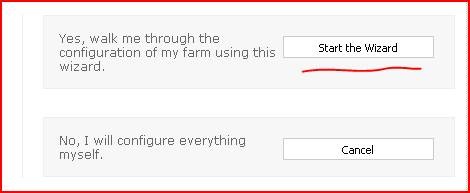
打开sharepoint管理中心,Configuration Wizards—Farm Configuration

clip_image002

点击Start the Wizard

clip_image004

确保Visio Graphics Service被选中

clip_image006

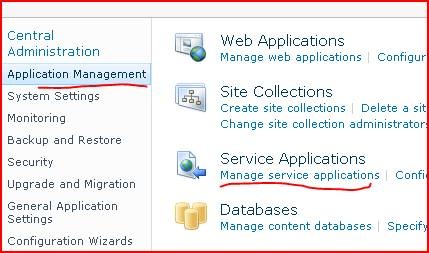
点击Application Management—Service Applications---Manage Service Applications
clip_image008

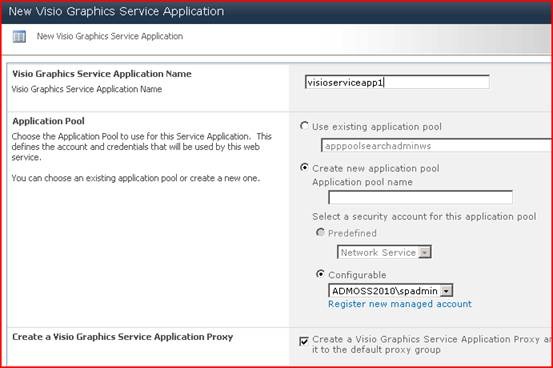
点击New—Visio Graphics Service

clip_image010

输入名字

clip_image012

2.使用Visio Service

SharePoint  Server企业版网站功能(SharePoint Server Enterprise Site features)

打开visio 2010,随便新建一个文档,然后保存为.vdw格式,这种格式的可以发布到sharepoint中,该格式的是用XAML来描述的。

clip_image014

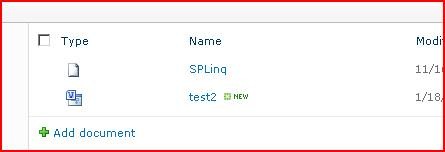
要确保网站的SharePoint  Server企业版网站功能(SharePoint Server Enterprise Site features)是激活的,然后我们将该文件上传到sharepoint的文档库中,如下图:
clip_image016

然后点击上传后的文档,就可以在浏览器中查看了,在浏览器中是使用silverlight技术展示的,如果你的客户端没有安装silverlight,会使用PNG来展示,sharepoint服务器中是不需要安装visio 2010的

clip_image018

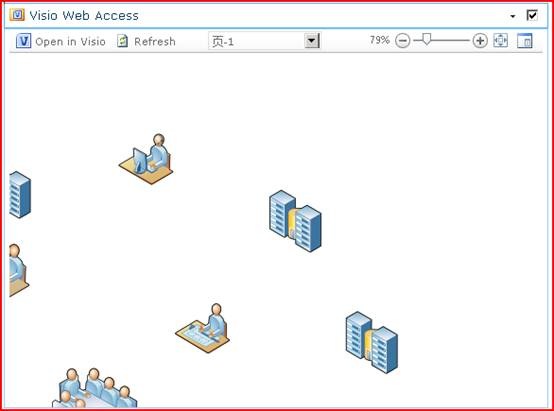
你还可以使用Visio Web Access WebPart来呈现visio文件,如下图
clip_image020