



惯性聚合 高效追踪和阅读你感兴趣的博客、新闻、科技资讯
阅读原文 在惯性聚合中打开

推荐订阅源

D
Darknet – Hacking Tools, Hacker News & Cyber Security
V
Vulnerabilities – Threatpost
Cloudbric
Cloudbric
G
GRAHAM CLULEY
S
Securelist
Schneier on Security
Help Net Security
Help Net Security
Exploit-DB.com RSS Feed
Project Zero
Project Zero
Spread Privacy
Spread Privacy
P
Privacy International News Feed
C
Cyber Attacks, Cyber Crime and Cyber Security
Cisco Talos Blog
Cisco Talos Blog
T
Tailwind CSS Blog
博客园_首页
有赞技术团队
有赞技术团队
Simon Willison's Weblog
Stack Overflow Blog
Stack Overflow Blog
K
KPMG report finds enterprise disconnect between AI and its ROI | CIO
Latest news
Latest news
T
Tor Project blog
钛媒体:引领未来商业与生活新知
钛媒体:引领未来商业与生活新知
Attack and Defense Labs
www.infosecurity-magazine.com
O
OpenAI News
J
Java Code Geeks
T
Tenable Blog
K
Kaspersky official blog
AWS News Blog
AWS News Blog
S
Security @ Cisco Blogs
The GitHub Blog
The GitHub Blog
T
Threatpost
月光博客
月光博客
H
Heimdal Security Blog
Security Latest
Security Latest
The Hacker News
The Hacker News
Y
Y Combinator Blog
A
Arctic Wolf
Apple Machine Learning Research
C
Cisco Blogs
美团技术团队
Microsoft Security Blog
Hugging Face - Blog
Hugging Face - Blog
T
The Blog of Author Tim Ferriss
C
CERT Recently Published Vulnerability Notes
D
Docker
Google Online Security Blog
D
DataBreaches.Net
V
Visual Studio Blog
H
Help Net Security

博客园 - 生鱼片

Gitlab安装过程 SharePoint 2013即SharePoint 15的一些新特性 关于虚机克隆模板导致无法添加域用户的问题 http header Content-type SharePoint 2010 文档库中直接打开文档 使用SymbolResolver在Activity内访问宿主环境信息 增加一个Export to Spreadsheet的链接 WF4:自定义跟踪参考者 WF4:ETW跟踪参与者 WF4集合Collection相关活动用法 SharePoint 2010 BI(2):使用Visio Service SharePoint 2010 BI (1):Chart WebPart 微软WebMatrix介绍 使用Sharepoint 2007中的webservice操作列表 - 生鱼片 - 博客园 SharePoint中CAML使用的一些总结 使用SharePoint Designer 2010 创建 外部内容类型 SharePoint 2010中托管元数据 SharePoint 2010中的客户端模型 SharePoint 2010中的Content Query WebPart
WF4:同步执行工作流 - 生鱼片 - 博客园
生鱼片 · 2011-01-08 · via 博客园 - 生鱼片

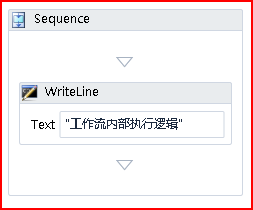
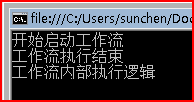
1.在WF4中当我们使用WorkflowApplication来执行工作流的时候,工作流会以异步的方式执行,我们可以简单的写个例子来证明,工作流设置如下:
image

宿主如下:

WorkflowApplication wfApp = new WorkflowApplication(new Workflow1());

            Console.WriteLine("开始启动工作流");
            wfApp.Run();
            Console.WriteLine("工作流执行结束");

执行结果如下:
image

2.每个工作流实例会新建一个线程来异步执行,以前我们一般都会使用信号量来控制以达到同步的效果,这我在以前的很多文章中有写到,但这并不是真正的不同执行,在WF4中我们可以通过设置WorkflowApplication的SynchronizationContext属性来工作流同步执行,我们首先要增加一个类,如下:

class SynchronousSynchronizationContext : SynchronizationContext
    {
        public override void Post(SendOrPostCallback d, object state)
        { d(state); }
    }

我们重写了SynchronizationContext的Post方法,如果你反编译该基类的Post方法你就可以看出是通过线程池来实现的 post是从线程池新启动一个线程执行,如下:

public virtual void Post(SendOrPostCallback d, Object state)

{

    ThreadPool.QueueUserWorkItem(new WaitCallback(d), state);

}

我们只需要在工作流设置添加一行代码既可:

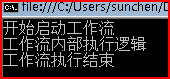
wfApp.SynchronizationContext = new SynchronousSynchronizationContext();

结果就不一样了,如下:
image

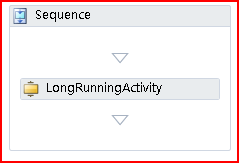
3.我们来看下Long running的workflow,首先自定义一个Activity,如下:

using System;
using System.Collections.Generic;
using System.Linq;
using System.Text;
using System.Activities;

namespace CaryWFAppTest1
{

    public sealed class LongRunningActivity : NativeActivity
    {
        protected override bool CanInduceIdle
        {
            get { return true; }
        }
        protected override void Execute(NativeActivityContext context)
        {
            Console.WriteLine("执行LongRunning逻辑,等待完成...");
            context.CreateBookmark("激活", CompletedCallBack);
        }

        private void CompletedCallBack(NativeActivityContext context, Bookmark bookmark, object value)
        {
            Console.WriteLine("LongRunning逻辑执行完成");
        }
    }
}

工作流设计如下:
image

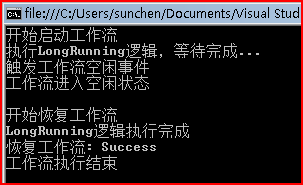
宿主代码如下:

WorkflowApplication wfApp = new WorkflowApplication(new Workflow1());
           wfApp.SynchronizationContext = new SynchronousSynchronizationContext();

           wfApp.Idle = e => Console.WriteLine("触发工作流空闲事件");
           Console.WriteLine("开始启动工作流");
           wfApp.Run();
           Console.WriteLine("工作流进入空闲状态");
           Console.WriteLine();
           Console.WriteLine("开始恢复工作流");
           Console.WriteLine("恢复工作流: {0}", wfApp.ResumeBookmark("激活", null));
           Console.WriteLine("工作流执行结束");

           Console.ReadLine();

执行结果如下:
image