惯性聚合 高效追踪和阅读你感兴趣的博客、新闻、科技资讯
阅读原文 在惯性聚合中打开

推荐订阅源

WordPress大学
WordPress大学
The GitHub Blog
The GitHub Blog
F
Fortinet All Blogs
Cloudbric
Cloudbric
P
Palo Alto Networks Blog
T
Threatpost
T
Tor Project blog
T
Tenable Blog
AWS News Blog
AWS News Blog
Project Zero
Project Zero
L
LangChain Blog
Cyberwarzone
Cyberwarzone
Engineering at Meta
Engineering at Meta
雷峰网
雷峰网
C
CERT Recently Published Vulnerability Notes
钛媒体:引领未来商业与生活新知
钛媒体:引领未来商业与生活新知
Security Latest
Security Latest
云风的 BLOG
云风的 BLOG
I
Intezer
cs.CL updates on arXiv.org
P
Proofpoint News Feed
A
Arctic Wolf
Cyber Security Advisories - MS-ISAC
Google DeepMind News
V
Vulnerabilities – Threatpost
C
Cybersecurity and Infrastructure Security Agency CISA
MongoDB | Blog
MongoDB | Blog
aimingoo的专栏
aimingoo的专栏
K
Kaspersky official blog
Jina AI
Jina AI
N
News | PayPal Newsroom
T
The Blog of Author Tim Ferriss
D
DataBreaches.Net
A
About on SuperTechFans
博客园 - 三生石上(FineUI控件)
博客园 - 【当耐特】
Hugging Face - Blog
Hugging Face - Blog
Recorded Future
Recorded Future
cs.AI updates on arXiv.org
S
Secure Thoughts
TaoSecurity Blog
TaoSecurity Blog
P
Privacy & Cybersecurity Law Blog
P
Proofpoint News Feed
MyScale Blog
MyScale Blog
IT之家
IT之家
Forbes - Security
Forbes - Security
The Hacker News
The Hacker News
Last Week in AI
Last Week in AI
T
Threat Research - Cisco Blogs
Y
Y Combinator Blog

博客园 - 生鱼片

Gitlab安装过程 SharePoint 2013即SharePoint 15的一些新特性 关于虚机克隆模板导致无法添加域用户的问题 http header Content-type SharePoint 2010 文档库中直接打开文档 使用SymbolResolver在Activity内访问宿主环境信息 增加一个Export to Spreadsheet的链接 WF4:自定义跟踪参考者 WF4:ETW跟踪参与者 WF4集合Collection相关活动用法 SharePoint 2010 BI(2):使用Visio Service SharePoint 2010 BI (1):Chart WebPart 微软WebMatrix介绍 使用Sharepoint 2007中的webservice操作列表 - 生鱼片 - 博客园 SharePoint中CAML使用的一些总结 使用SharePoint Designer 2010 创建 外部内容类型 WF4:同步执行工作流 - 生鱼片 - 博客园 SharePoint 2010中的客户端模型 SharePoint 2010中的Content Query WebPart
SharePoint 2010中托管元数据
生鱼片 · 2011-01-07 · via 博客园 - 生鱼片

1.介绍

托管元数据是一个集中管理的术语的分层集合,您可以定义这些术语,然后将其用作 Microsoft SharePoint Server 2010 中项目的属性。使用托管元数据有下面几个好处:

统一术语:托管元数据可促使更加一致地使用术语,以及更加一致地使用添加到 SharePoint Server 项目中的托管关键字。我们可以根据企业的需要预定义术语,并仅允许授权用户添加新术语。还可以禁止用户向项目中添加他们自己的托管关键字,并要求他们使用现有托管关键字。这样使企业信息的元数据更加准确和统一标准
更佳的搜索结果:这些托管的元数据可以更好的支持搜索。
动态:可以动态同步和更新。

2.配置托管元数据服务

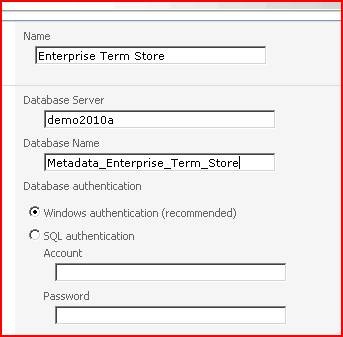
Manage Service Applications-> In the Ribbon, click New | Managed Metadata Service.
clip_image002

clip_image004

Click on to completed

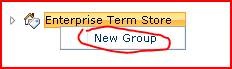
Manage service applications----In the Ribbon click Manage:
clip_image006

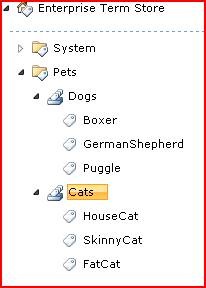
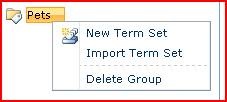
New Group后输入Pets,然后再点击Pets的dropdown选择New Term Set
clip_image008

最后完成效果下图:

clip_image010

可以右击下面的link,将sample的导入文件保存到本地
clip_image012

新建一个Group,然后导入上图中保存的sample file

clip_image014

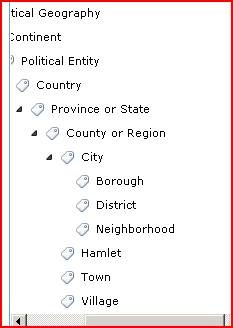
导入后效果:

clip_image016

3.使用托管元数据

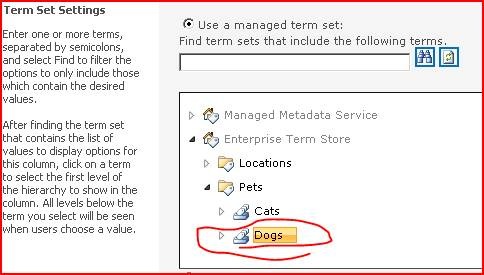
要使用MetaData,我们在我们的站点的文档库中新增加一个Column,type为Managed Metadata,并且选中Dogs

clip_image018

clip_image020

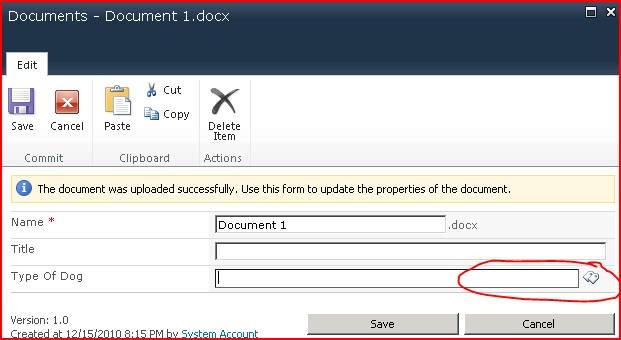
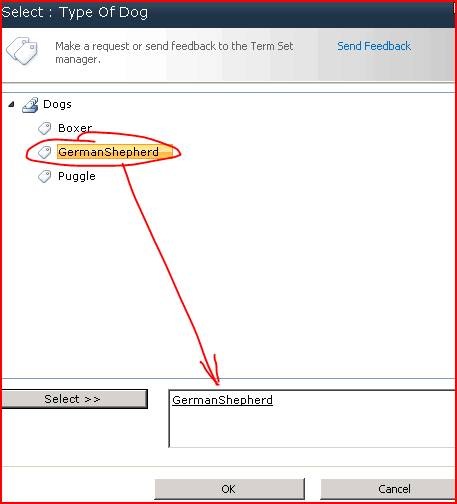
然后我们在upload document的时候,可以选择:

clip_image022

clip_image024