





惯性聚合 高效追踪和阅读你感兴趣的博客、新闻、科技资讯
阅读原文 在惯性聚合中打开

推荐订阅源

cs.CV updates on arXiv.org
博客园 - 【当耐特】
OSCHINA 社区最新新闻
OSCHINA 社区最新新闻
L
LangChain Blog
雷峰网
雷峰网
WordPress大学
WordPress大学
S
Security Affairs
腾讯CDC
freeCodeCamp Programming Tutorials: Python, JavaScript, Git & More
Recent Commits to openclaw:main
Hacker News: Ask HN
Hacker News: Ask HN
T
Tailwind CSS Blog
SecWiki News
SecWiki News
罗磊的独立博客
The Last Watchdog
The Last Watchdog
博客园 - 三生石上(FineUI控件)
N
Netflix TechBlog - Medium
Hugging Face - Blog
Hugging Face - Blog
T
Tor Project blog
V
Vulnerabilities – Threatpost
Microsoft Azure Blog
cs.AI updates on arXiv.org
奇客Solidot–传递最新科技情报
奇客Solidot–传递最新科技情报
GbyAI
GbyAI
M
MIT News - Artificial intelligence
Help Net Security
Help Net Security
MongoDB | Blog
MongoDB | Blog
AWS News Blog
AWS News Blog
L
LINUX DO - 热门话题
P
Palo Alto Networks Blog
Threat Intelligence Blog | Flashpoint
Simon Willison's Weblog
博客园 - Franky
Security Latest
Security Latest
G
GRAHAM CLULEY
C
CERT Recently Published Vulnerability Notes
H
Heimdal Security Blog
Recent Announcements
Apple Machine Learning Research
W
WeLiveSecurity
The Cloudflare Blog
B
Blog RSS Feed
B
Blog
Vercel News
Vercel News
T
Threatpost
小众软件
小众软件
H
Help Net Security
Jina AI
Jina AI
T
Threat Research - Cisco Blogs
Google DeepMind News

博客园 - -Enchant

《单例模式》你需要注意的问题 系统框架整理 Extjs prompt 显示密码框 Python网页抓取、模拟登录 单点登录(SSO)的一点思考 Jquery以JSON方式调用WebService WCF初探 关于抓取百度搜索内容 iPhone开发环境搭建(备忘) SMTP/POP3命令简介(转) C/S模式下 简单的定时任务功能 Asp.net MVC2学习笔记索引 Oracle 调优 Oracle常见错误 @OutputCache指令参数 关于ACL权限控制【ASP.NET MVC2】 c#递归生成XML ASP.NET MVC2 Ajax返回JSON 引用类型的对象复制(浅复制和深复制)
Linux上搭建Asp.net MVC3环境(CentOS + Nginx + Mono)
-Enchant · 2012-10-08 · via 博客园 - -Enchant
MVC3运行目标环境
  • Linux:CentOS6.2
  • Nginx:1.2
  • Mono:2.11.4
  • xsp:2.10.2.0

 安装步骤:

1、下载程序源码(大家可以进入官网下载)

2、编译源码并安装

  •  这里将下载回来的3个源码包编译并安装,安装过程中如果提醒缺少组件,大家自己安装即可。
  • 一些需要主要使用的组件,通过yum来安装:

    yum install gcc gcc-c++ glibc glibc-devel glib2

  • 编译安装Nginx:

    tar -zxvf nginx-1.2.4.tar.gz
    cd nginx-1.2.4/
    ./configure
    make && make install

  •  编译安装Mono:

    tar -jxvf mono-2.11.4.tar.bz2
    cd mono-2.11.4/
    ./configure --prefix=/opt/mono-2.11
    make 

    make install

    echo export PKG_CONFIG_PATH=/opt/mono/lib/pkgconfig:$PKG_CONFIG_PATH>>~/.bash_profile
    echo export LD_LIBRARY_PATH=/opt/mono/lib:$LD_LIBRARY_PATH>>~/.bash_profile
    echo export PATH=/opt/mono/bin:$PATH>>~/.bash_profile
    source ~/.bash_profile 

  • 安装xsp:

    tar -jxvf xsp-2.10.2.tar.bz2
    cd xsp-2.10.2/
    ./configure --prefix=/opt/mono-2.11

    make && make install

 4、配置Nginx

  •  添加fastcgi参数:

    vi /usr/local/nginx/conf/fastcgi_params

    --添加2行
    fastcgi_param  PATH_INFO          "";
    fastcgi_param  SCRIPT_FILENAME    $document_root$fastcgi_script_name;

  •  添加Nginx服务器,监听9999端口:

    vi /usr/local/nginx/conf/nginx.conf

    --添加一个服务器
    server{
            listen 9999;
            server_name netserver;
            location /{
                    root  html/end;
                    index index.html;
                    fastcgi_index /Home;
                    fastcgi_pass 127.0.0.1:9900;
                    include /usr/local/nginx/conf/fastcgi_params;
            }
    }

 5、上传MVC3 Web程序(名称:MvcTest)

  • 使用VS2010新建一个MVC3 Web程序,将以下引用dll复制本地

    System.Data.dll
    System.Web.ApplicationServices.dll
    System.Web.DynamicData.dll
    System.Web.Helpers.dll
    System.Web.Mvc.dll
    System.Web.Routing.dll
    System.Web.WebPages.Deployment.dll
    System.Web.WebPages.dll
    System.Web.WebPages.Razor.dll

  •  手工将System.Web.Razor.dll复制到bin目录下

    dll所在目录 C:\Program Files\Microsoft ASP.NET\ASP.NET Web Pages\v1.0\Assemblies

  •  上传程序到Nginx的Web目录里(如不存在目录则创建)

    /usr/local/nginx/html/end/

 6、测试MVC程序是否正常执行

  • 进入MvcTest目录

    cd /usr/local/nginx/html/end/MvcTest

  •  运行xsp4

    xsp4

    Listening on address: 0.0.0.0
    Root directory: /usr/local/nginx/html/end/MvcTest
    Listening on port: 8080 (non-secure)
    Hit Return to stop the server.

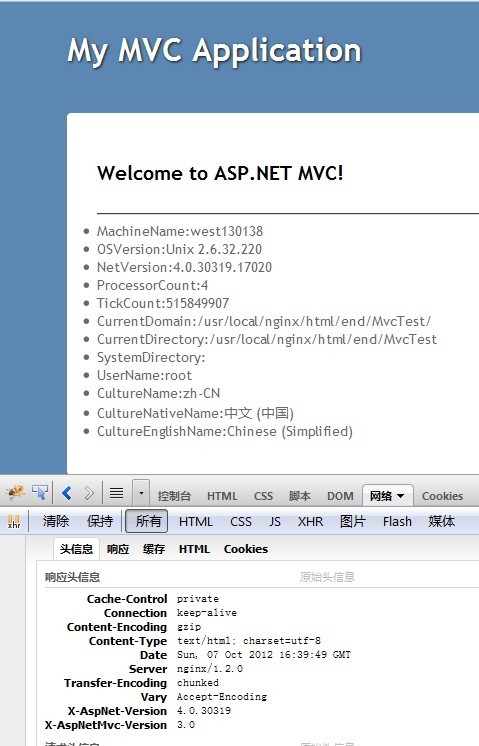
  •  使用浏览器通过8080端口测试访问,如果正常运行,恭喜你!如果出现错误,需要解决错误后才能接着往下配置。(面列了一些常见错误及解决方法)

 7、启动Nginx、fastcgi_server

  •  启动Nginx

    /usr/local/nginx/sbin/nginx

  •  启动fastcgi_server

    fastcgi-mono-server4 /applications=/:/usr/local/nginx/html/end/MvcTest/ /socket=tcp:127.0.0.1:9900 /printlog=True

  •  fastcgi_server后台运行方法(后台长时间运行)

    nohup fastcgi-mono-server4 /applications=/:/usr/local/nginx/html/end/MvcTest/ /socket=tcp:127.0.0.1:9900 /printlog=True &

 8、所有问题解决以后就可以正常运行基本的MVC3程序了,欢呼吧~~
 

常见错误及解决:

  •  xsp4启动时报错

    解决方法:移除程序bin目录下System.Web.dll

  • 页面显示BadGateway,后台报错 System.TypeInitializationException: An exception was thrown by the type initializer for Mono.WebServer.FastCgi.WorkerRequest

    --解决方法:在/opt/mono-2.11/bin 下新建prefix.sh,并运行

    #!/bin/bash

    # Your mono directory


    PREFIX=/opt/mono-2.11
    FILES=(
           'fastcgi-mono-server4'
           'xsp4')

    cd $PREFIX/lib/mono/4.0

    for file in "$FILES"
    do
       cp "$file.exe" ../4.5
    done

    cd $PREFIX/bin

    for file in "$FILES"
    do
      sed -ie 's|mono/4.0|mono/4.5|g' $file
    done

  • 页面报参数不能为空:System.ArgumentNullException Argument cannot be null. Parameter name: key;

    System.Resources.MissingManifestResourceException: Could not find any
    resources appropriate for the specified culture or the neutral
    culture.  Make sure "System.Web.Mvc.Resources.MvcResources.resources"
    was correctly embedded or linked into assembly "System.Web.Mvc" at
    compile time, or that all the satellite assemblies required are
    loadable and fully signed.

    --解决方法:修改Web.config,在system.web节点下添加
    <globalization uiCulture="en" culture="en-US" />

使用数据库报错:

System.InvalidProgramException: Invalid IL code in System.Data.Common.DbPr
oviderFactories:GetFactory (string): method body is empty.

--解决方法:将bin下的System.Data.dll 删掉