







我最近勤快地连自己都有些不可思议。昨天有朋友在上一篇文章里留言,批评Windows Phone 7暂时没有支持中文版的问题。凡事都有个过程,在中文版出来前,咱们想自己想点办法吧。Silverlight for Windows Phone那边就不管了,肯定会有人想出办法来的。如何让Windows Phone 7游戏显示中文?把说“贴图”的那个人拖出去打死!因为XNA 4.0中支持中文的办法倒是现成的,这与XNA字体支持的方式有很大关系。
示例代码下载地址:
https://files.cnblogs.com/aawolf/XNA_aawolf_SIP_Chinese.rar
我们先来看一下XNA中如何绘制字体,MSDN上的描述很好:
http://msdn.microsoft.com/en-us/library/bb447673.aspx
关于字体授权的问题咱们就不纠结了,提醒一句,使用某种字体前首先确认是否能够使用、再分发。绘制字体的第一步是,创建Sprite Font字体。XNA中使用的字体文件叫做Sprite Font,文件扩展名为.spritefont,XNA支持从.ttf将字体转换为.spritefont。
首先,我们在VS 2010的Solution Explorer中找到WindowsPhoneGame1Content项目,右键菜单点击“Add”-“New Folder”,将新文件夹命名为Font,然后在Font上右键点击,选择“Add”-“New Item”,然后在对话框中选择创建“Sprite Font”,将字体文件命名为StartFont。

在Solution Explorer中双击StartFont.spritefont文件,我们会打开一个XML文件,我们省去XML注释部分:
<?xml version="1.0" encoding="utf-8"?> <XnaContent xmlns:Graphics="Microsoft.Xna.Framework.Content.Pipeline.Graphics"> <Asset Type="Graphics:FontDescription"> <FontName>Kootenay</FontName> <Size>30</Size> <Spacing>0</Spacing> <UseKerning>true</UseKerning> <Style>Regular</Style> <CharacterRegions> <CharacterRegion> <Start> </Start> <End>~</End> </CharacterRegion> </CharacterRegions> </Asset> </XnaContent>
按照XML的注释,我们可以很容易的了解每一项的功能,只看高亮部分:FontName,字体的名称;Size,字体的大小;Style,指定字体是否为粗体、斜体等;CharacterRegion,字体区间,目前的设置为只显示ASCII字体。这一点也是非常适合游戏开发的,游戏没有必要提供完整的字符集支持。
接下来就是绘制代码了,首先在类中增加SpriteFont的变量:
    public class Game1 : Microsoft.Xna.Framework.Game
    {
        GraphicsDeviceManager graphics;
        SpriteBatch spriteBatch;
        SpriteFont StartFont;
        SpriteFont YaheiFont;
        static string Text = "";
我们还增加了一个Text,可以用这个变量从SIP软键盘中获取用户输入的字符串。然后是LoadContent函数:
        /// </summary>
        protected override void LoadContent()
        {
            // Create a new SpriteBatch, which can be used to draw textures.
            spriteBatch = new SpriteBatch(GraphicsDevice);

            // TODO: use this.Content to load your game content here
            StartFont = Content.Load<SpriteFont>(@"Font\StartFont");
            YaheiFont = Content.Load<SpriteFont>(@"Font\Yahei");
        }
请大家注意字体文件的路径:将Content资源放到另外一个DLL里可以方便游戏替换资源,而路径方面,只需要将Folder指定对就可以了。这里顺便把中文微软雅黑字体也加了上了。因为要获取SIP的输入,所以还要修改 Update方法:
        protected override void Update(GameTime gameTime)
        {
            // Allows the game to exit
            if (GamePad.GetState(PlayerIndex.One).Buttons.Back == ButtonState.Pressed)
                this.Exit();

            // TODO: Add your update logic here
            if (Text == "" && !Guide.IsVisible)
                Guide.BeginShowKeyboardInput(PlayerIndex.One,
                        "Here's your Keyboard", "Type something...",
                        "",
                        new AsyncCallback(GetTypedChars),
                        null);

            base.Update(gameTime);
        }

        private static void GetTypedChars(IAsyncResult asynchronousResult)
        {
            Text = Guide.EndShowKeyboardInput(asynchronousResult);
            Debug.WriteLine(Text);
        }
我们修改了update方法,只有Text为空时,SIP才会弹出,SIP部分的代码上次已经说过了。最后一部分就是绘制Draw函数了:
        protected override void Draw(GameTime gameTime)
        {
            GraphicsDevice.Clear(Color.White);

            // TODO: Add your drawing code here
            spriteBatch.Begin();

            spriteBatch.DrawString(StartFont, Text, new Vector2(10, 10), Color.Black);
            //spriteBatch.DrawString(StartFont, "中国", new Vector2(10, 50), Color.Black);

            spriteBatch.End();

            base.Draw(gameTime);
        }
运行程序,会首先实现一个输入法对话框,输入”Hello,xna”之后,会显示下面的界面:

大家注意到,我将第二个绘制“中国”的DrawString注释掉了,如果不注释掉会怎么样呢?产生一个Exception,因为我们Sprite Font的CharacterRegion只包含了ASCII字符,所以,中文字体显然超过了字符范围。
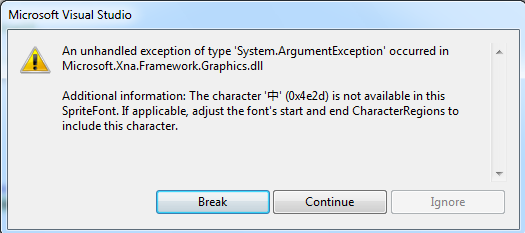
MSDN上的另一篇文章描述了这个问题:
http://msdn.microsoft.com/en-us/library/bb447751.aspx
我们可以Font Description Processor来添加对于指定字符的支持,而不需要扩大CharacterRegions,让很多无用的字符也被增加到字体文件中来。
首先,我们在Solution Explorer中找到游戏的Project,在本例中,就是WindowsPhoneGame1,右键菜单“Add”-“New Item”,选择“Text File”,命名为messages.txt。双击打开messages.txt,在里边添加游戏中要支持的所有中文字符。因为要使用File.ReadAllText,所以确保文本文件是以’\r’或’\n’结尾。
接下来要创建一个新的Content Processor Project,在Solution Explorer中选择Solution,右键点击”Add”-“New Project”,选择”Content Pipeline Extension Library(4.0)”,命名为FontProcessor。下面是ContentProcessor1.cs中修改后的所有代码:
using System;
using System.Collections.Generic;
using System.Linq;
using Microsoft.Xna.Framework;
using Microsoft.Xna.Framework.Graphics;
using Microsoft.Xna.Framework.Content.Pipeline;
using Microsoft.Xna.Framework.Content.Pipeline.Graphics;
using Microsoft.Xna.Framework.Content.Pipeline.Processors;
using System.IO;
using System.ComponentModel;

namespace FontProcessor
{
    /// <summary>
    /// This class will be instantiated by the XNA Framework Content Pipeline
    /// to apply custom processing to content data, converting an object of
    /// type TInput to TOutput. The input and output types may be the same if
    /// the processor wishes to alter data without changing its type.
    ///
    /// This should be part of a Content Pipeline Extension Library project.
    ///
    /// TODO: change the ContentProcessor attribute to specify the correct
    /// display name for this processor.
    /// </summary>
    [ContentProcessor(DisplayName = "FontProcessor.ContentProcessor1")]
    public class ContentProcessor1 : FontDescriptionProcessor
    {
        public override SpriteFontContent Process(FontDescription input, ContentProcessorContext context)
        {
            string fullPath = Path.GetFullPath(MessageFile);

            context.AddDependency(fullPath);

            string letters = File.ReadAllText(fullPath, System.Text.Encoding.UTF8);

            foreach (char c in letters)
            {
                input.Characters.Add(c);
            }

            return base.Process(input, context);
        }

        [DefaultValue("messages.txt")]
        [DisplayName("Message File")]
        [Description("The characters in this file will be automatically added to the font.")]
        public string MessageFile
        {
            get { return messageFile; }
            set { messageFile = value; }
        }
        private string messageFile = @"..\WindowsPhoneGame1\messages.txt";
    }
}
首先,增加两个引用,用于读取文件:
using System.IO;
using System.ComponentModel;
然后增加MessageFile的属性:
        [DefaultValue("messages.txt")]
        [DisplayName("Message File")]
        [Description("The characters in this file will be automatically added to the font.")]
        public string MessageFile
        {
            get { return messageFile; }
            set { messageFile = value; }
        }
        private string messageFile = @"..\WindowsPhoneGame1\messages.txt";
请注意其中的文件路径,因为文件包含在WindowsPhoneGame1的目录中,而本工程位于FontProcessor目录中,所以我们要修改其路径,否则会出现文件无法找到的编译错误。因为FontProcessor是在编译时使用的,所以Excepiton都是以编译错误展现出来的。
我们还需要将ContentProcessor1的基类ContentProcessor替换为FontDescriptionProcessor。为messages.txt注册Content Pipeline,增加依赖关系,告诉Content Pipeline,如果messages.txt变化,则字体需要重新编译。最后是读取这个文件,为其中的每一个字符增加字体的支持。另外,确保你的messages.txt文件,采用了UTF-8的编码方式。
完成这些之后,我们要首先编译一下FontProcessor,然后在Solution Explorer中,右键点击WindowsPhoneGame1Content的References目录,选择“Add references”,在Project Tab页中,选择FontProcessor。接下来,在Solution Explorer中,右键点击Project Dependencies,将FontProcessor前的CheckBox选中。
然后,创建一个新的Sprite Font字体,叫做YaheiFont,字体名称为“Microsoft Yahei”,选中yahei.spritefont,在属性页中的Content Processor项中,将“Sprite Font Description - XNA Framework”切换为“FontProcessor.ContentProcessor1”。
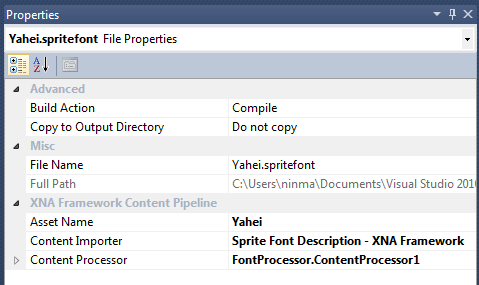
最后,在游戏中增加雅黑字体,将Game中的绘制函数改为:
        protected override void Draw(GameTime gameTime)
        {
            GraphicsDevice.Clear(Color.White);

            // TODO: Add your drawing code here
            spriteBatch.Begin();

            spriteBatch.DrawString(StartFont, Text, new Vector2(10, 10), Color.Black);
            spriteBatch.DrawString(YaheiFont, "中国", new Vector2(10, 50), Color.Black);

            spriteBatch.End();

            base.Draw(gameTime);
        }
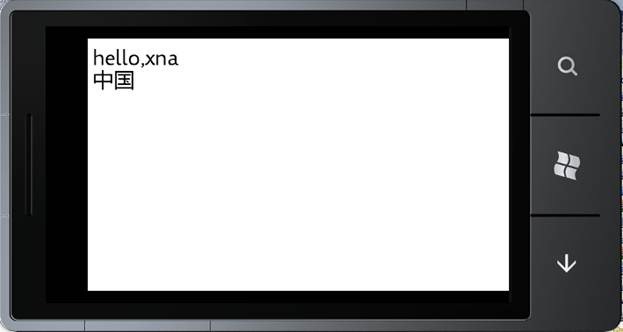
最后的效果就是:(向***保证,这不是贴图!)
马宁的Windows Phone 7开发教程(1)——Windows Phone开发工具初体验
马宁的Windows Phone 7开发教程(2)——Windows Phone XNA 4.0 3D游戏开发
马宁的Windows Phone 7开发教程(3)——XNA下使用MessageBox和软键盘
此内容由惯性聚合(RSS阅读器)自动聚合整理,仅供阅读参考。 原文来自 — 版权归原作者所有。