








作者:马宁
示例代码下载地址:
写这篇BLOG完全是因为看了MSDN上的这篇文章:
http://msdn.microsoft.com/en-us/magazine/ff960707.aspx
Windows Phone 7的开发工具不支持动态语言,所以IronRuby支持Windows Phone 7就显得格外重要了。刚看这篇文章的时候,还闹了个笑话,看了一遍代码,一句都不认识,心想难道语言换到.NET上,变化怎么这么大?仔细一看,原来是Ruby,而不是Python ^_^,小蟒蛇这次落后了。以前用Python写过自动化测试脚本,没接触过Ruby,所以,把Ruby看成Python了。
不支持动态语言,一直是Windows Mobile编程的痛,这次终于有搞头了。终于可以动态改变程序的逻辑了,光这一点就给我们提供了无限的想象空间。Windows Phone上的F#也快了吧?^_^
言归正传,这次我完全是照葫芦画瓢,只是将自己尝试中的一些关键点写出来,让大家少走弯路。更多信息大家可以参考Shay Friedman的BLOG:http://ironshay.com/
首先,我们要下载IronRuby for Windows Phone版本(.NET 3.5):
http://ironruby.codeplex.com/releases/view/43540#DownloadId=133276
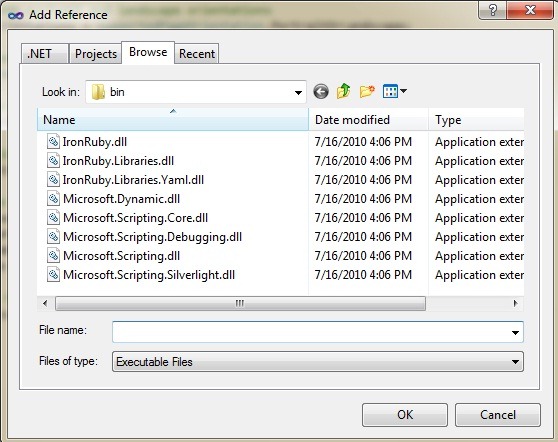
然后,在Visual Studio 2010中创建一个Silverlight for Windows Phone 7的工程,工程名叫做“IronRubyWP7”,然后选择“Project”菜单的“Add Reference”选项,在弹出的对话框中,选择“Browse”标签,我们可以找到解压后的IronRuby目录,将\silverlight\bin中的DLL文件加入到工程中来:
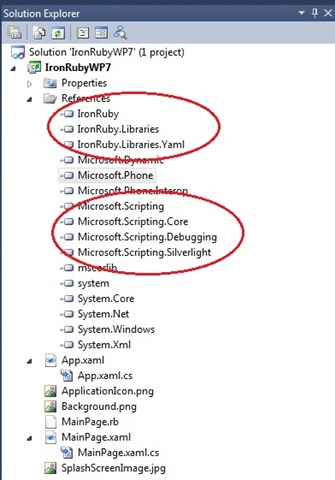
在忽略一些警告提示之后,程序集将被加入到工程中。我们可以在Solution Explorer中看到刚被加入的程序集:
接下来,我们在工程中添加一个文本文件,在Solution Explorer中选中IronRubyWP7,右键,“Add”-“New Item”,在对话框中选择“Text File”,将文件名改为“MainPage.rb”。
选中MainPage.rb文件,在属性中将“Build Action”设置为“Embedded Resource”。

我们打开MainPage.rb文件,输入下面的Ruby代码:
# Include namespaces for ease of use

include System::Windows::Media

include System::Windows::Controls

# Set the titles

Phone.find_name("ApplicationTitle").text = "aawolf.cnblogs.com"

Phone.find_name("PageTitle").text = "IronRuby& WP7"

# Create a new text block

textBlock = TextBlock.new

textBlock.text = "IronRuby is running on Windows Phone 7!"

textBlock.foreground = SolidColorBrush.new(Colors.Green)

textBlock.font_size = 48

textBlock.text_wrapping = System::Windows::TextWrapping.Wrap

# Add the text block to the page

Phone.find_name("ContentPanel").children.add(textBlock)
请注意,我修改了最后一行的容器控件名称,原示例中的名称是“ContentGrid”,但是Silverlight for Windows Phone向导默认创建的XAML文件中容器类名称是“ContentPanel”。这里会引起一个运行期错误,因为IronRuby不能Debug,所以第一次调试起来比较痛苦。
接下来,我们要打开MainPage.xaml.cs文件,将IronRuby初始化代码,加入到MainPage类的构造函数中:
    public partial class MainPage : PhoneApplicationPage
    {
        // Constructor
        public MainPage()
        {
            InitializeComponent();

            // Allow both portrait and landscape orientations
            SupportedOrientations = SupportedPageOrientation.PortraitOrLandscape;

            // Create an IronRuby engine and prevent compilation
            ScriptEngine engine = Ruby.CreateEngine();

            // Load the System.Windows.Media assembly to the IronRuby context
            engine.Runtime.LoadAssembly(typeof(Color).Assembly);

            // Add a global constant named Phone, which will allow access to this class
            engine.Runtime.Globals.SetVariable("Phone", this);

            // Read the IronRuby code
            Assembly execAssembly = Assembly.GetExecutingAssembly();
            Stream codeFile =
              execAssembly.GetManifestResourceStream("IronRubyWP7.MainPage.rb");
            string code = new StreamReader(codeFile).ReadToEnd();

            // Execute the IronRuby code
            engine.Execute(code);
        }
    }
请大家注意InitializeComponent方法的位置,在初始化IronRuby运行时之前,一定要先完成控件初始化的工作,这是我血和泪的教训。另外一个需要注意的地方,就是读取Ruby文件的路径。我们似乎也可以通过HttpRequest获取一个Stream是吧?笑而不语 ^_^
最后运行的效果是这样子的,整个开发过程历时两小时:

马宁的Windows Phone 7开发教程(1)——Windows Phone开发工具初体验
马宁的Windows Phone 7开发教程(2)——Windows Phone XNA 4.0 3D游戏开发
马宁的Windows Phone 7开发教程(3)——XNA下使用MessageBox和软键盘
马宁的Windows Phone 7开发教程(4)——XNA显示中文字体
此内容由惯性聚合(RSS阅读器)自动聚合整理,仅供阅读参考。 原文来自 — 版权归原作者所有。