



惯性聚合 高效追踪和阅读你感兴趣的博客、新闻、科技资讯
阅读原文 在惯性聚合中打开

推荐订阅源

WordPress大学
WordPress大学
Microsoft Azure Blog
MongoDB | Blog
MongoDB | Blog
小众软件
小众软件
Apple Machine Learning Research
O
OpenAI News
酷 壳 – CoolShell
酷 壳 – CoolShell
The GitHub Blog
The GitHub Blog
CTFtime.org: upcoming CTF events
Exploit-DB.com RSS Feed
博客园 - 聂微东
Engineering at Meta
Engineering at Meta
W
WeLiveSecurity
Hacker News: Ask HN
Hacker News: Ask HN
大猫的无限游戏
大猫的无限游戏
Vercel News
Vercel News
D
Docker
F
Full Disclosure
AI
AI
罗磊的独立博客
博客园 - 【当耐特】
U
Unit 42
S
SegmentFault 最新的问题
Stack Overflow Blog
Stack Overflow Blog
cs.AI updates on arXiv.org
P
Palo Alto Networks Blog
博客园_首页
H
Help Net Security
量子位
月光博客
月光博客
Threat Intelligence Blog | Flashpoint
K
KPMG report finds enterprise disconnect between AI and its ROI | CIO
博客园 - 司徒正美
F
Fortinet All Blogs
D
DataBreaches.Net
B
Blog RSS Feed
Webroot Blog
Webroot Blog
TaoSecurity Blog
TaoSecurity Blog
S
Secure Thoughts
爱范儿
爱范儿
I
InfoQ
钛媒体:引领未来商业与生活新知
钛媒体:引领未来商业与生活新知
www.infosecurity-magazine.com
Attack and Defense Labs
Application and Cybersecurity Blog
C
CERT Recently Published Vulnerability Notes
Martin Fowler
Martin Fowler
Blog — PlanetScale
Blog — PlanetScale
让小产品的独立变现更简单 - ezindie.com
S
Securelist

Palo Alto Networks Blog

Announcing the General Availability of Prisma AIRS AI Gateway Palo Alto Networks and AT&T - Delivering Quantum-Resilient SASE Fabric What It Takes to Secure Claude Cowork Across the AI Enterprise It Might Feel Like We’ve Been Here Before, But We Haven’t A Defining Moment in Identity Security New Executive Order Accelerates Post-Quantum Readiness Amid the Cryptographic Reset Built to Last: What Stonehenge Teaches us About IT Architecture & Cyber Resilience Expanding Our Footprint: Local Cloud Availability for Prisma AIRS in Japan The Invisible CEO of Crisis: Breaking the Cycle of CISO Burnout Securing the Agentic AI Frontier: Palo Alto Networks and Databricks Deliver a New Standard for AI Security Securing Canada’s Digital Future: Why PBMM Matters Beyond Government Beyond Human Oversight: Adapting to the Frontier AI Era Shifting from Data Hoarding to Active Defense: Navigating the New Era of OMB M-26-14 European Digital Sovereignty Starts With Trust How AI and Evasion Demand a Radical Shift in Network Threat Prevention Reinventing Security for the Agentic NVIDIA AI Factory A 4X Gartner Magic Quadrant for EPP Leader. Built for the Agentic Era. Securing and Governing AI Agents At Scale Through A Unified AI Gateway The “Why” Behind NextWave’s New Requirements Beyond the Frontier — Expanding the Ecosystem for Autonomous Defense Defender's Guide to the Frontier AI Impact on Cybersecurity: May 2026 Update From WarGames to Cyberwar Idira — Our Journey to Democratize Privilege Controls A New Era of Security: Frontier AI Defense Nutanix and Palo Alto Networks Integrate for Robust Model Trust 39 Seconds — That's How Long It Takes to Lose Your Data Enhancing AI-Driven Defense with Anthropic’s Claude Opus 4.7 Unit 42 Expands Frontier AI Defense with Armadin Partnership Palo Alto Networks and Google Cloud Scaling AI Agents with Confidence Palo Alto Networks Joins DNS-OARC as a Platinum Member The AI Ecosystem Edge — Introducing Our Frontier AI Alliance Defender's Guide to the Frontier AI Impact on Cybersecurity Introducing Unit 42 Frontier AI Defense Securing the UK’s Digital Future Announcing ADEM Universal Agent Palo Alto Networks at Nutanix .NEXT 2026 Closing the Gap by Enhancing Visibility and Mitigating Risks Five Browser and AI Security Questions Keeping CxOs up at Night Securing the Era of Agentic AI with Prisma SASE The Cryptographic Reset Has Begun Prisma Browser for Business — A Secure Workspace for Small Business Securing the Enterprise AI Ecosystem with ServiceNow and Prisma AIRS How NextWave’s Evolution Drives Shared Success Announcing Prisma AIRS Availability in Singapore Region How the National Cyber Strategy Secures Our Digital Way of Life
The Dangerous Momentum of Autodownload Phishing
Roni Yehanov · 2026-05-06 · via Palo Alto Networks Blog

Modern phishing campaigns are no longer trying to convince users. They are trying to outrun them. By forcing an automatic progression from click to download, attackers eliminate the moment of hesitation entirely by forcing files to download instantly using trusted cloud platforms like Dropbox and Google Drive.

Detecting when these legitimate SaaS auto-download features are being weaponized is an immense challenge for traditional defenses. This is exactly where Cortex® Email Security steps in. By combining deep static analysis with advanced behavioral intelligence, the module can distinguish in this attack between a benign file share and a malicious, forced-momentum trigger.

This technical detection is vital because while the autodownload method is the primary cause of infection, its effectiveness relies on a clever strategy, using a wide range of changing social engineering lures. By alternating between lures like 'Invoices' or 'Quotes,' attackers rotate their themes to catch a wider variety of victims. This strategy allows attackers to convert trusted email links into rapid, dangerous file executions that effectively evade standard security measures.

How Forced Momentum Drives Auto-Downloads

The core of this attack leverages the infrastructure of real SaaS providers to eliminate the user's preview buffer. Typically, cloud sharing directs users to a webpage for file examination. In this campaign, however, forced-download parameters (such as ?dl=1 on Dropbox) are used instead. To ensure the victim executes the file once it lands on their machine, attackers hide the danger behind "visual anchors." By using double extensions like PDF and .EXE, the threat actor exploits default settings in certain operating systems that hide known extensions. The user's eyes stop at the familiar ".PDF" or ".ZIP," leading them to believe the file is a harmless document rather than a malicious executable.

When the targeted victim clicks the link in the email, it triggers an immediate file download in the browser, effectively bypassing any intermediary steps.
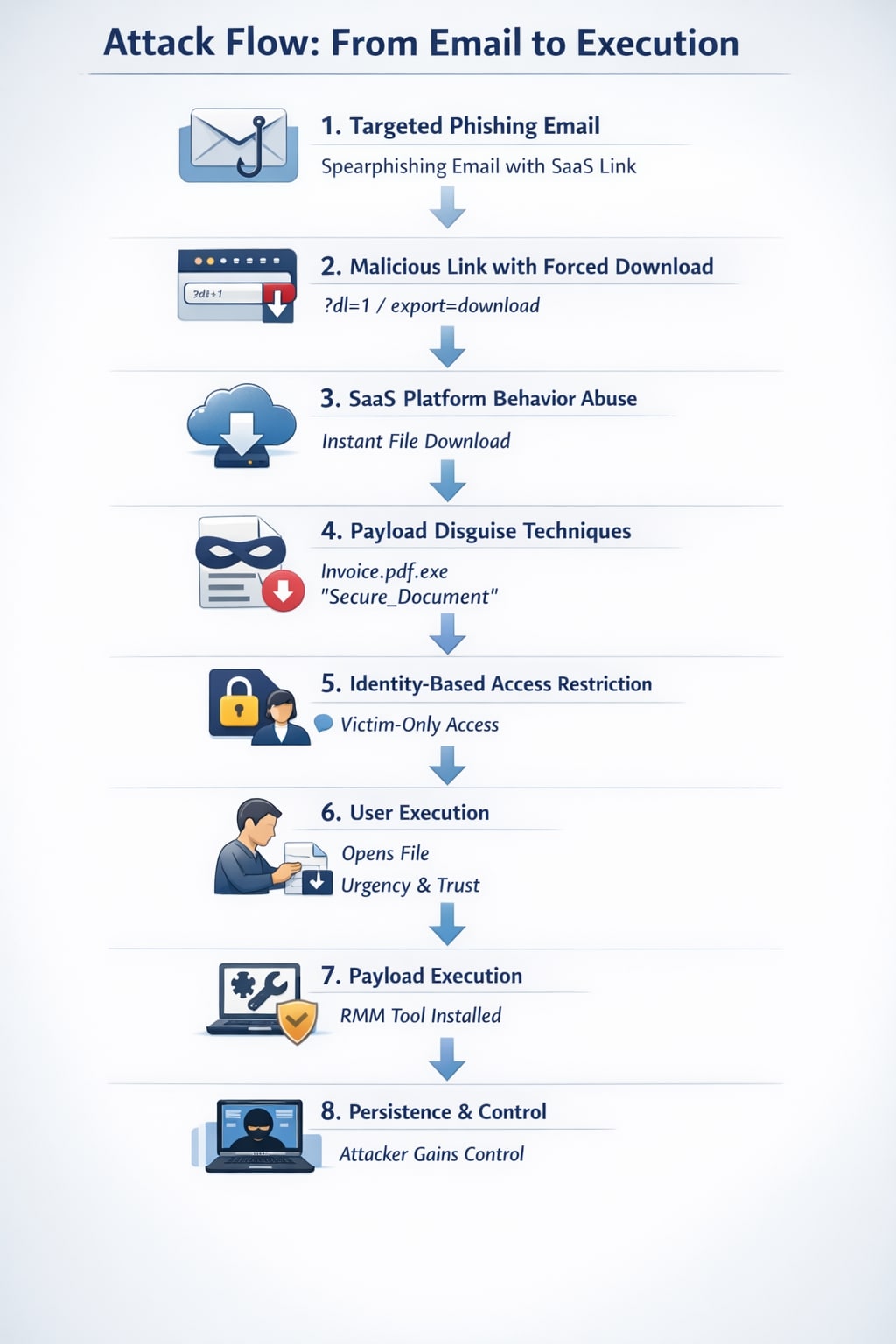
Attack Flow: From Email to Execution

  • The Bait: A highly personalized email arrives, using a trusted cloud link (like Dropbox) to lower the victim's guard.
  • The Trap: Clicking the link skips the usual "preview" screen and instantly drops a file onto the victim's computer.
  • The Disguise: The file is cleverly named to look like a safe PDF or document, hiding its true identity as a harmful program.
  • The Lock: In many cases, the attacker ensures only the intended victim can open the file, preventing security tools from scanning it first.
  • The Takeover: Once the victim opens the file, the attacker gains remote access to the system.

Attack flow chart, from email to execution.

Multi-step attack flow, starting from targeted phishing email, to bypass security and establish persistence.

The Library of Lures Strategy

To fuel the autodownload machine, attackers employ a flexible strategy by switching between various social engineering themes. This spear phishing campaign targets specific inboxes, such as "Orders," to exploit professional routines. Some common lures found in this campaign include:

  • Financial Urgency Fake "Invoices" or "Receipts" that induce anxiety. These often set close-day payment deadlines, pressuring recipients to click quickly.
  • Business Operations – "Quote Requests" or "Purchase Orders" that exploit professional habits.
  • Deceptive Naming – Concealing the download as a safe document, using display text like "invoice.pdf" in the email body to hide the underlying Dropbox URL.

Government Domain Impersonation

Attackers often leverage high-authority lures designed to paralyze a user's critical thinking. In one sophisticated wave, we observed threats impersonating a government entity by exploiting the high-reputation, official government domain. By borrowing the reputational authority associated with official infrastructure, the attacker successfully maneuvered an "Unidentified Payment Notice" past standard "Untrusted Sender" filters. To the recipient, the email carries the weight of a sanctioned document. Fearing legal or financial ramifications, they feel a heightened sense of urgency to click "View Invoice" to resolve the issue immediately.

Employee Impersonation

When government authority isn’t the angle, attackers shift to impersonating internal staff. In one case, the sender’s display name was spoofed to match a real employee in the target organization. Attackers rely on a “Momentum of Trust” tied to familiar names to overwhelm user judgment. Even when a generic Gmail address is used, users, especially those on mobile devices, rarely pause to check the underlying headers.

Internal Trust Amplification ("Human Relay")

The most effective aspect of this campaign occurs through Internal Laundering, where the threat shifts from external suspicion to a trusted internal message. This was observed when a Finance Department employee received a "Quote Analysis" file and, believing it to be a valid inquiry, mistakenly forwarded the link to the Procurement department.

At that stage, the attack no longer depended on deception, it propagated through trusted human workflows. These various tactics illustrate the sophistication and adaptability of phishing campaigns and highlight the importance of vigilance in email security.

How We Uncovered a Single Threat Actor

Although the lures appeared diverse, a deeper technical analysis revealed that they were all orchestrated by a single, coordinated threat actor.

By mapping the campaign, we uncovered a significant pattern: Each autodownload link pointed to a different file hash to evade signature detection, but all unique executables were ultimately associated with the same parent installer hash.

The file was identified as a specific Remote Monitoring and Management (RMM) executable, an administrative software used to manage computers remotely. Because RMM tools are legitimate, they often trigger fewer alerts than traditional Trojans. This allows the attacker to maintain persistent access under the guise of “authorized” system activity.

How Cortex Email Security Addresses the Threat

To defend against a campaign that emphasizes speed and rotation, behavioral analysis is essential.

The Cortex® Email Security Module addresses this threat:

  • Advanced URL Analysis – Detection of forced-download parameters, combined with delivery of high-risk files via URLs.
  • Deep Metadata Correlation Correlating sender identity with behavioral anomalies to flag threats that traditional scanners might overlook.
  • LLM-Based Intent Analysis Classifying phishing themes (invoice, payment, quote) despite variation.

The security engine triggers an alert by synthesizing LLM analysis with real-time email telemetry, global threat intelligence and behavioral signals.

Securing the Click

The combination of autodownload links and rotating lures is crafted to exploit user momentum and the "psychology of trust."

This campaign represents a shift from deception to acceleration. Attackers no longer need perfect lures, they only need to remove friction. Defenders must evolve accordingly, focusing not only on what a link is, but on what it forces a user to do.

Palo Alto Networks Cortex Advanced Email Security was built for this evolution. By moving beyond static file analysis to identify the behavioral "red flags" of autodownloads and forced-momentum URLs, we provide the visibility needed to stop these attacks before they reach the device.

The module examines email metadata, content, and behavior to uncover hidden malicious intent and sophisticated impersonation, including AI-crafted threats. By assigning precise risk scores to every detection, the system filters out the noise, allowing analysts to move past alert fatigue and focus on the most critical threats first.

Indicators of compromise discovered during this research are detailed on Unit 42’s GitHib instance.


FAQs

  1. Why is the "Auto-Download" parameter so effective? It removes the "moment of doubt." By bypassing the preview page, the attacker forces the file onto the computer instantly, prompting the user to "Open" it out of habit.
  2. How does the use of rotating lures benefit the attacker? It maximizes both psychological and technical success. People have different "blind spots" (e.g., finance professionals are likely to click on invoices), and variety increases the chances of finding a template that can bypass specific customers' security filters.
  3. Why might a sandbox fail to catch the malicious file? Because the link was "Identity-Bound." To the scanner, the link appeared to lead to a harmless error page (cloaking), resulting in a false negative.

Cloaking involves showing different content to security scanners than what is presented to the victim. By using Identity-Bound access, the file only reveals itself to the intended target.