惯性聚合 高效追踪和阅读你感兴趣的博客、新闻、科技资讯
阅读原文 在惯性聚合中打开

推荐订阅源

TaoSecurity Blog
TaoSecurity Blog
Jina AI
Jina AI
雷峰网
雷峰网
月光博客
月光博客
The GitHub Blog
The GitHub Blog
WordPress大学
WordPress大学
B
Blog RSS Feed
美团技术团队
C
CXSECURITY Database RSS Feed - CXSecurity.com
小众软件
小众软件
Security Latest
Security Latest
Microsoft Azure Blog
Threat Intelligence Blog | Flashpoint
C
Cybersecurity and Infrastructure Security Agency CISA
Last Week in AI
Last Week in AI
A
Arctic Wolf
Latest news
Latest news
Attack and Defense Labs
I
Intezer
F
Fortinet All Blogs
罗磊的独立博客
MongoDB | Blog
MongoDB | Blog
Webroot Blog
Webroot Blog
S
Secure Thoughts
Help Net Security
Help Net Security
Apple Machine Learning Research
博客园_首页
V
Visual Studio Blog
P
Proofpoint News Feed
博客园 - 【当耐特】
P
Privacy International News Feed
V
Vulnerabilities – Threatpost
Stack Overflow Blog
Stack Overflow Blog
Know Your Adversary
Know Your Adversary
云风的 BLOG
云风的 BLOG
Hacker News: Ask HN
Hacker News: Ask HN
L
LINUX DO - 最新话题
H
Help Net Security
爱范儿
爱范儿
酷 壳 – CoolShell
酷 壳 – CoolShell
S
SegmentFault 最新的问题
Forbes - Security
Forbes - Security
T
Tailwind CSS Blog
量子位
奇客Solidot–传递最新科技情报
奇客Solidot–传递最新科技情报
T
Tenable Blog
Cloudbric
Cloudbric
N
News and Events Feed by Topic
cs.AI updates on arXiv.org
Hugging Face - Blog
Hugging Face - Blog

博客园 - 新房客

iOS中判断Apple Pencil力度与手触摸 Electron,VUEJS3,Vite,TypesSript 开发环境配置 网上设置的跨域基本都失效了,新的设置方式 从模型坐标到屏幕坐标 群晖中使用Docker安装备份升级Gitlab vscode Typescript自动修复引入类时,引号设置 基于nodejs的阿里云DDNS服务,支持多网卡绑定 WebGL与Canvas的显存与内存使用分析 基于nodejs的游戏服务器 typescript 中 d.ts module 与 namespace 区别 使用vs code与microsoft edge调试webpack项目 解决Jenkins无法编译Egret5.0项目的问题 筛选git最后一次文件列表 推荐一个不错的plist拆解工具,untp - 新房客 - 博客园 vs code(egret wing) php配置与调试 关于 typings install 的使用 angular 引入 component 报错 angular2 环境配置 html5 js跨域
安卓2022.3.11环境配置
新房客 · 2023-08-16 · via 博客园 - 新房客

好久没搞android,一些基础配置忘得差不多了,这里慢慢回忆补充下。

window:

  1. Android IDE 需要FQ。
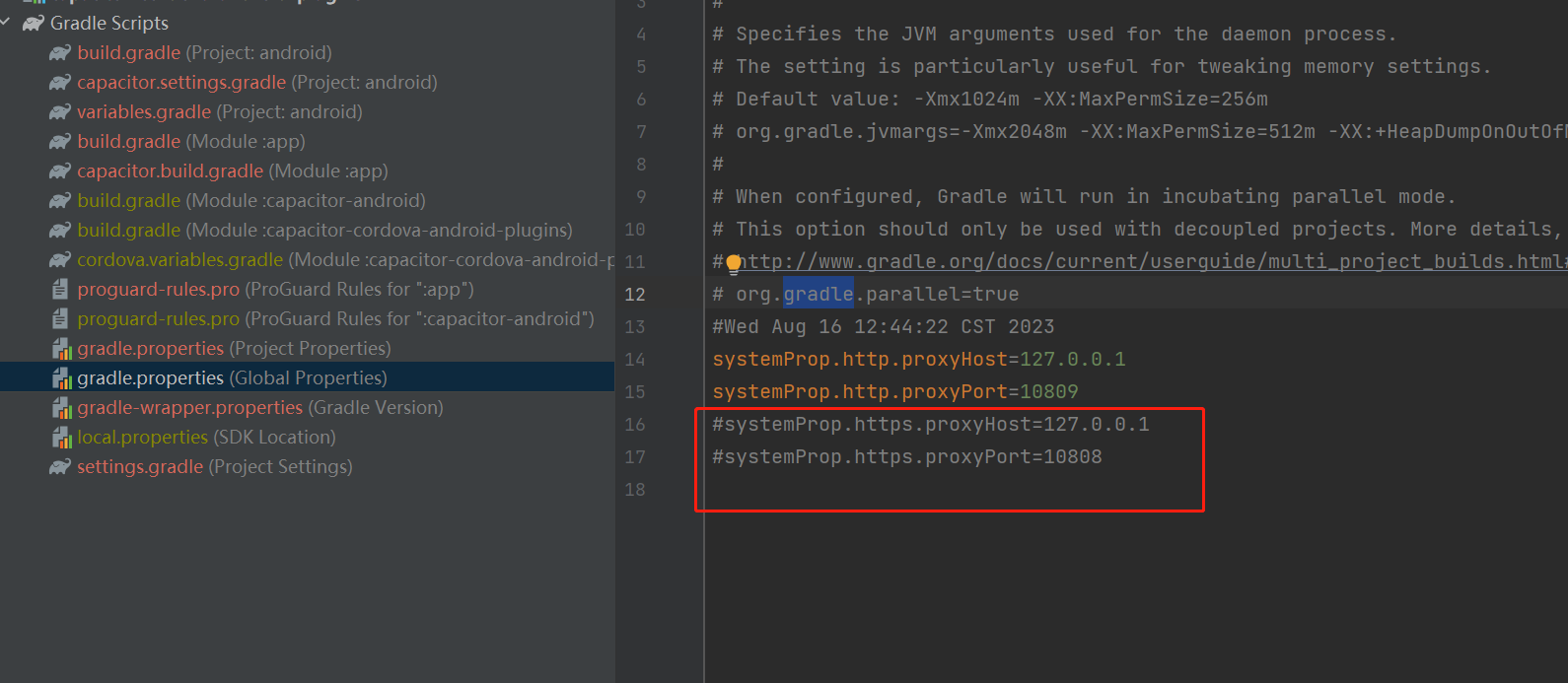
  2. gradle 更新失败,一般是代理配置错误。需要修改代理,位置为:gradle/gradle.properties. 一般代理不支持HTTPS,屏蔽即可。
  3. [可选]安装Java SDK , https://www.oracle.com/cn/java/technologies/downloads/
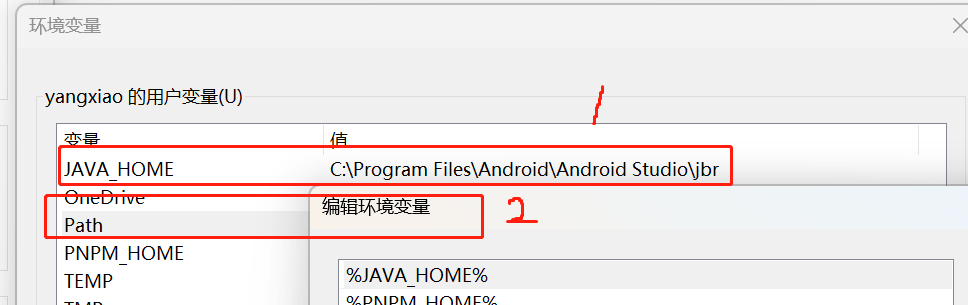
  4. 配置Java HOME环境变量。我没有安装JavaSDK使用的IDE的,所以路径为:C:\Program Files\Android\Android Studio\jbr

posted @ 2023-08-16 14:01  新房客  阅读(59)  评论(0)    收藏  举报