





如果说TimeLine,GanttPanel,TreeGrid是甘特图控件的三个核心部件,那么Gantt则是这三个部件之间行为和数据的协调者,Gantt统一了这三个部件的接口,提供了更简洁的开发能力。
架构提要:
功能:

设计:
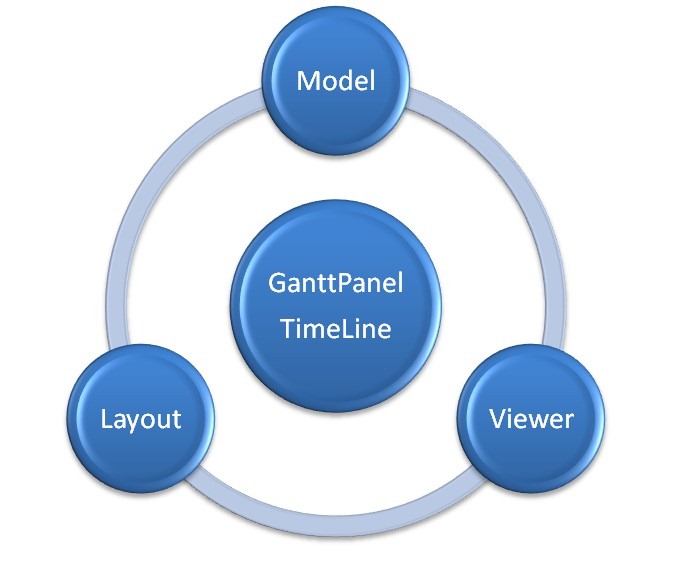
在*.Gantt.Core 程序集中,可以发现大量的以Layout和Descriptor作为结尾的命名类,这些类构件了GanttPanel和TimeLine的计算模型和数据模型。
TimeLineViewer和TaskEntryViewer分别作为TimeLine和GanttPanel的视图层。Viewer类会调用Renderer进行渲染。
1. 语法
1.1. XAML
2. 备注
2.1. 设置数据源
甘特图控件目前仅支持特定的数据源格式: ObservableCollection<ITaskDescriptor>。其中ITaskDescriptor是单任务信息的数据接口,详细信息参考Class Library中内容。
因此,面对来自不同类型数据源的任务信息,开发者必须编写解析类或方法,将XML,JSON等类型的数据转化为甘特图指定的数据源类型。
除初始化设定数据源外,甘特图控件允许分步加载数据,这是通过OnRequestData事件响应来实现的。
激发OnRequestData事件的条件时,展开当前任务,任务的ITaskDescriptor.EnableExpand=true,但ITaskDescriptor.Children.Count = 0;
示例代码如下:
1) 事件处理函数逻辑
1: ObservableCollection<ITaskDescriptor> Gantt_OnRequestData(object sender, V2TEK.Silverlight.Charts.TreeGridHelper.RequestDataArgs args)
2: {
3: return GetSimWCFData();
4: }
5:
6: public ObservableCollection<ITaskDescriptor> GetSimWCFData()
7: {
8: return new ObservableCollection<ITaskDescriptor>
9: {
  10:         new SimpleTaskDescriptor{ TaskName="--------Sub Task 1", StartDate= DateTime.Now.AddMonths(4), EndDate=DateTime.Now.AddMonths(5), PercentComplete=25f,

 TimeBaseLine=new SimpleTimeImpl{ StartDate=DateTime.Now.AddMonths(1), EndDate=DateTime.Now.AddMonths(10)} },
11: new SimpleTaskDescriptor{ TaskName="--------Sub Task 2", StartDate= DateTime.Now.AddMonths(2), EndDate=DateTime.Now.AddMonths(3), PercentComplete=50f },
12: new SimpleTaskDescriptor{ TaskName="--------Sub Task 3", StartDate= DateTime.Now.AddMonths(3), EndDate=DateTime.Now.AddMonths(5), PercentComplete=75f },
13: new SimpleTaskDescriptor{ TaskName="--------Sub Task 4", StartDate= DateTime.Now.AddMonths(5), EndDate=DateTime.Now.AddMonths(10), PercentComplete=100f }
14: };
15: }
2.2. 导航
导航指从指定任务的开始时间,或指定时间开始绘制甘特图,免于使用滚动条搜寻。
1) 导航到指定任务
NavigateTo(ITaskDescriptor task)
2) 导航到选中任务
NavigateToSeleteItem()
3) 导航到当前时间
NavigateToCurrentDate()
4) 导航到指定时间
NavigateToDate(DateTime date)
2.3. 放大/缩小
根据TimeLine中定义的时间轴分级缩放机制逐级放大或缩小,提供了三个接口:
1) ZoomOut()
放大到下一级
2) ZoomIn()
缩小至上一级
3) ZoomToIndex(int index)
缩放至指定级别, Index即Dictionary<IDateTimeDescriptor, int>的索引。
此外,Gantt允许设置TimeLineSummaryDescriptors和TimeLineDetailDescriptors属性值。
1) TimeLineSummaryDescriptors是上层时间轴的缩放分级定义。
2) TimeLineDetailDescriptors是下层时间轴的缩放分级定义。
2.4. 布局
除了通过以上接口更新Gantt的布局外,还可以通过下面的接口实现更为细致的布局更新。
Gantt提供了诸如XPosition,YPosition,GanttViewPortHeight,GanttViewPortWidth等布局的设定接口。在修改了这些布局属性值后,须调用Update方法。当然,也可以分别调用GanttPanel.Update(), TreeGrid.Update, TimeLine.Update, 前提是开发者能够确定需要更新那个子控件的布局。
此内容由惯性聚合(RSS阅读器)自动聚合整理,仅供阅读参考。 原文来自 — 版权归原作者所有。