惯性聚合 高效追踪和阅读你感兴趣的博客、新闻、科技资讯
阅读原文 在惯性聚合中打开

推荐订阅源

L
LINUX DO - 热门话题
Stack Overflow Blog
Stack Overflow Blog
B
Blog
WordPress大学
WordPress大学
Project Zero
Project Zero
P
Palo Alto Networks Blog
阮一峰的网络日志
阮一峰的网络日志
博客园 - 司徒正美
有赞技术团队
有赞技术团队
S
SegmentFault 最新的问题
freeCodeCamp Programming Tutorials: Python, JavaScript, Git & More
小众软件
小众软件
T
Tailwind CSS Blog
Forbes - Security
Forbes - Security
F
Full Disclosure
SecWiki News
SecWiki News
钛媒体:引领未来商业与生活新知
钛媒体:引领未来商业与生活新知
Hacker News: Ask HN
Hacker News: Ask HN
C
Check Point Blog
Microsoft Security Blog
Threat Intelligence Blog | Flashpoint
F
Fortinet All Blogs
Cisco Talos Blog
Cisco Talos Blog
G
Google Developers Blog
J
Java Code Geeks
Google DeepMind News
人人都是产品经理
人人都是产品经理
CTFtime.org: upcoming CTF events
Recorded Future
Recorded Future
O
OpenAI News
Spread Privacy
Spread Privacy
MongoDB | Blog
MongoDB | Blog
H
Hackread – Cybersecurity News, Data Breaches, AI and More
C
Cybersecurity and Infrastructure Security Agency CISA
S
Securelist
V
Vulnerabilities – Threatpost
Y
Y Combinator Blog
IT之家
IT之家
U
Unit 42
腾讯CDC
S
Security Affairs
C
Cisco Blogs
Schneier on Security
The Last Watchdog
The Last Watchdog
B
Blog RSS Feed
宝玉的分享
宝玉的分享
cs.AI updates on arXiv.org
S
Security @ Cisco Blogs
Cyberwarzone
Cyberwarzone
T
The Blog of Author Tim Ferriss

博客园 - 名可真难起

CSOM创建Content Type并指定GUID SharePoint还原大体积内容数据库报空间错误的解决办法 SharePoint 2013: Knockout JS + Rest Service展示List数据 SharePoint 2013—创建Master Page 通过SPWeb.EnsureUser将SPUser添加到网站 如何在页面中使用sharepoint中的富文本编辑器控件 通过编程的方式给列表项添加附件 SharePoint 2010 Visual Web Part发布后找不到文件的错误 SharePoint 2010通过Web Service读取和修改Excel文件 SharePoint 2010中Metadata Service 解决SharePoint2010中Excel刷新出错的问题 SharePoint 2007搜索网站开启匿名访问 SharePoint 2010: 取得浏览最多的网站 在Windows 7中如何用另一个用户运行程序 不仅仅是土豆 SharePoint 2010运行环境 最近比较懒 SharePoint 2010 Development Stack SharePoint 2010 Visual Web Part Demo--展示网站中的List.
如何在ActionResult中返回XML类型 - 名可真难起 - 博客园
名可真难起 · 2009-12-04 · via 博客园 - 名可真难起

非常简单,请直接看代码:

public ActionResult Index()
{
    //返回一个XML类型
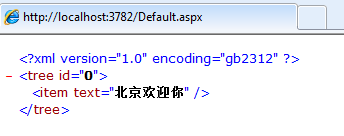
    string xmlString = "<?xml version=\"1.0\" encoding=\"gb2312\" ?><tree id=\"0\"><item text=\"北京欢迎你\"/></tree>";
    return this.Content(xmlString, "text/xml");
}

注意事项:如果想在XML正常显示汉字,则编码要用gb2312。

效果如下图:

image

致力于SharePoint开发. QQ:28748451.