





更复杂些的滤波算子一般是先利用高斯滤波来平滑,然后计算其1阶和2阶微分。由于它们滤除高频和低频,因此称为带通滤波器(band-pass filters)。
在介绍具体的带通滤波器前,先介绍必备的图像微分知识。
连续函数,其微分可表达为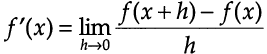 ,或
,或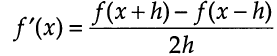 (1.1)
(1.1)
对于离散情况(图像),其导数必须用差分方差来近似,有
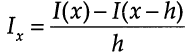 ,前向差分 forward differencing (1.2)
 ,中心差分 central differencing (1.3)
1)前向差分的Matlab实现
function dimg = mipforwarddiff(img,direction)
% MIPFORWARDDIFF     Finite difference calculations
%
%   DIMG = MIPFORWARDDIFF(IMG,DIRECTION)
%
%  Calculates the forward-difference for a given direction
%  IMG       : input image
%  DIRECTION : 'dx' or 'dy'
%  DIMG      : resultant image
%
%   See also MIPCENTRALDIFF MIPBACKWARDDIFF MIPSECONDDERIV
%   MIPSECONDPARTIALDERIV

%   Omer Demirkaya, Musa Asyali, Prasana Shaoo, ... 9/1/06
%   Medical Image Processing Toolbox

imgPad = padarray(img,[1 1],'symmetric','both');%将原图像的边界扩展
[row,col] = size(imgPad);
dimg = zeros(row,col);
switch (direction)
case 'dx',
   dimg(:,1:col-1) = imgPad(:,2:col)-imgPad(:,1:col-1);%x方向差分计算,
case 'dy',
   dimg(1:row-1,:) = imgPad(2:row,:)-imgPad(1:row-1,:);
otherwise, disp('Direction is unknown');
end;
dimg = dimg(2:end-1,2:end-1);
2)中心差分的Matlab实现
function dimg = mipcentraldiff(img,direction)
% MIPCENTRALDIFF     Finite difference calculations
%
%   DIMG = MIPCENTRALDIFF(IMG,DIRECTION)
%
%  Calculates the central-difference for a given direction
%  IMG       : input image
%  DIRECTION : 'dx' or 'dy'
%  DIMG      : resultant image
%
%   See also MIPFORWARDDIFF MIPBACKWARDDIFF MIPSECONDDERIV
%   MIPSECONDPARTIALDERIV

%   Omer Demirkaya, Musa Asyali, Prasana Shaoo, ... 9/1/06
%   Medical Image Processing Toolbox

img = padarray(img,[1 1],'symmetric','both');
[row,col] = size(img);
dimg = zeros(row,col);
switch (direction)
    case 'dx',
        dimg(:,2:col-1) = (img(:,3:col)-img(:,1:col-2))/2;
    case 'dy',
        dimg(2:row-1,:) = (img(3:row,:)-img(1:row-2,:))/2;
    otherwise,
        disp('Direction is unknown');
end
dimg = dimg(2:end-1,2:end-1);
实例:技术图像x方向导数
I = imread('coins.png'); figure; imshow(I);
Id = mipforwarddiff(I,'dx'); figure, imshow(Id); 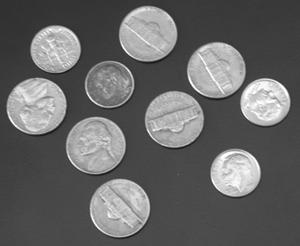

原图像 x方向1阶导数
图像I的梯度定义为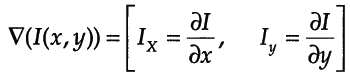 ,其幅值为
,其幅值为 。出于计算性能考虑,幅值也可用
 来近似。
来近似。
Matlab函数
1)gradient:梯度计算
2)quiver:以箭头形状绘制梯度。注意放大下面最右侧图可看到箭头,由于这里计算横竖两个方向的梯度,因此箭头方向都是水平或垂直的。
实例:仍采用上面的原始图像
I = double(imread('coins.png'));
[dx,dy]=gradient(I);
magnitudeI=sqrt(dx.^2+dy.^2);
figure;imagesc(magnitudeI);colormap(gray);%梯度幅值
hold on;quiver(dx,dy);%叠加梯度方向 
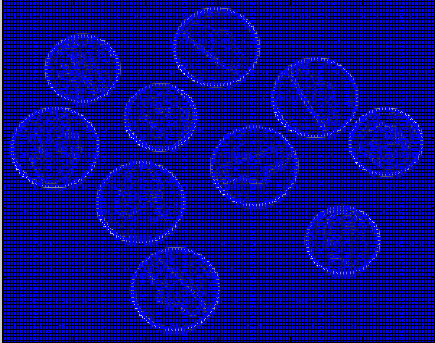
梯度幅值 梯度幅值+梯度方向
对于一维函数,其二阶导数 ,即
,即 。它的差分函数为
 (3.1)
(3.1)
拉普拉斯算子是n维欧式空间的一个二阶微分算子。它定义为两个梯度向量算子的内积
 (3.2)
(3.2)
其在二维空间上的公式为: 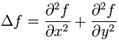 (3.3)
(3.3)
对于1维离散情况,其二阶导数变为二阶差分
1)首先,其一阶差分为

2)因此,二阶差分为

3)因此,1维拉普拉斯运算可以通过1维卷积核
实现
对于2维离散情况(图像),拉普拉斯算子是2个维上二阶差分的和(见式3.3),其公式为:
 (3.4)
(3.4)
上式对应的卷积核为
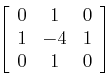
常用的拉普拉斯核有:
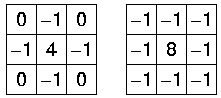
拉普拉斯算子会突出像素值快速变化的区域,因此常用于边缘检测。
Matlab里有两个函数
1)del2
计算公式:
,

2)fspecial:图像处理中一般利用Matlab函数fspecial
h = fspecial('laplacian', alpha) returns a 3-by-3 filter approximating the shape of the two-dimensional Laplacian operator.
The parameter alpha controls the shape of the Laplacian and must be in the range 0.0 to 1.0. The default value for alpha is 0.2.
http://fourier.eng.hmc.edu/e161/lectures/gradient/node8.html (非常清晰的Laplacian Operator介绍,本文的主要参考)
此内容由惯性聚合(RSS阅读器)自动聚合整理,仅供阅读参考。 原文来自 — 版权归原作者所有。


