



惯性聚合 高效追踪和阅读你感兴趣的博客、新闻、科技资讯
阅读原文 在惯性聚合中打开

推荐订阅源

S
Secure Thoughts
S
Securelist
P
Proofpoint News Feed
D
DataBreaches.Net
Cisco Talos Blog
Cisco Talos Blog
C
CXSECURITY Database RSS Feed - CXSecurity.com
Project Zero
Project Zero
A
About on SuperTechFans
罗磊的独立博客
WordPress大学
WordPress大学
月光博客
月光博客
Latest news
Latest news
C
Cyber Attacks, Cyber Crime and Cyber Security
GbyAI
GbyAI
cs.AI updates on arXiv.org
博客园 - 三生石上(FineUI控件)
F
Fortinet All Blogs
W
WeLiveSecurity
Attack and Defense Labs
V
Visual Studio Blog
Blog — PlanetScale
Blog — PlanetScale
CTFtime.org: upcoming CTF events
P
Privacy International News Feed
AI
AI
博客园 - 司徒正美
freeCodeCamp Programming Tutorials: Python, JavaScript, Git & More
www.infosecurity-magazine.com
Stack Overflow Blog
Stack Overflow Blog
M
MIT News - Artificial intelligence
Help Net Security
Help Net Security
T
Tor Project blog
V
Vulnerabilities – Threatpost
C
Cisco Blogs
I
Intezer
Threat Intelligence Blog | Flashpoint
MyScale Blog
MyScale Blog
雷峰网
雷峰网
MongoDB | Blog
MongoDB | Blog
Forbes - Security
Forbes - Security
V
V2EX
Apple Machine Learning Research
T
Threat Research - Cisco Blogs
B
Blog RSS Feed
博客园 - 叶小钗
N
News and Events Feed by Topic
钛媒体:引领未来商业与生活新知
钛媒体:引领未来商业与生活新知
Simon Willison's Weblog
C
CERT Recently Published Vulnerability Notes
让小产品的独立变现更简单 - ezindie.com
N
News and Events Feed by Topic

博客园 - 田老师

休息,考完了MCSD 如何用命令行将我的Phonegap环境更新到最新版本? 【新年福利】《正则表达式30分钟入门》APP版本发布 Cowboxer不能输入中文的解决方案 SharePoint Designer 报错“ Value does not fall within the expected range” Hyper-v 虚拟机时间与主机同步 【转载】C# 读取Excel文件代码的几种片段收集 【最新】判断是否为移动号码的正则表达式 使用.net调用java的Web Services Visual Studio中“生成”与“重新生成”的区别(The difference between "build" and "rebuild") 招商银行网上银行对账失败,总提示Communication Failed 《ASP.NET MVC Music Store Tutorial》在Visual Studio 2008简体中文环境下的代码修订 SQL Server Management Studio Express 无法连接 SQL Compact Edition(或新建数据库文件)的问题 试用SQL SERVER 2008 R2 SQL Server 2005无法启动服务 在VirtualBox中安装QuickTestProfessional10 最新、可靠的用于验证手机号码和移动号码的正则表达式 - 田老师 - 博客园 如何在重构时,批量重命名程序集的命名空间 Visual Studio 2010试用手记
defer属性导致引用JQuery的页面报“浏览器无法打开网站xxx,操作被中止”错误
田老师 · 2010-04-26 · via 博客园 - 田老师

在一个aspx页面中使用了JQuery,但当IE6浏览器打开这个页面的时候会报“Internet Explorer cannot open the Internet site http://localhost:9001/Index.aspx. Operation aborted”的错误,然后就不能正常浏览此页面。如果使用IE7或者IE8就没有此问题。
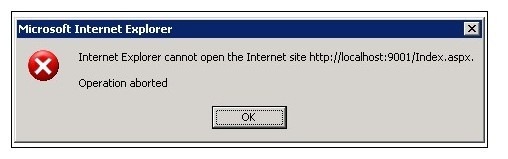
Operationaborted

将所有的js脚本都使用“<!-- -->”标记注释掉(这样虽然会导致问题,但至少可以浏览此页面)。逐个检查后发现了问题所在:

<script src="Jquery/DatePicker/WdatePicker.js" type="text/javascript"></script>

是这行语句引起的问题,注释此行后页面就能正常浏览了。

查询发现是引用的js脚本操作了某个尚未载入的页面元素,这样就很好解决问题,为<script>脚本添加”defer”属性之后,页面可以正常浏览了。

<script defer="defer" src="Jquery/DatePicker/WdatePicker.js" type="text/javascript"></script>

参考资料:

……

Script中的Defer属性
如果你是一个对系统性能比较关心和在意的人,我想你应该会对Script脚本中的defer属性感兴趣的。
script中的defer属性默认情况下是false的。按照DHTML编程宝典中的描述,对于Defer属性是这样写的:
Using the attribute at design time can improve the download performance of a page because the browser does not need to parse and execute the script and can continue downloading and parsing the page instead.
也就是说:如果是编写脚本的时候加入defer属性,那么浏览器在下载脚本的时候就不必立即对其进行处理,而是继续对页面进行下载和解析,这样会提高下载的性能。
这样的情况有很多种。比如你定义了很多javascript变量,或者在引用文件(.inc)中写了很多的脚本需要处理,那不妨在这些脚本中加入defer属性,对性能的提高肯定有所帮助。
举例如下:
<script language="javascript" defer>
var object = new Object();
....
</script>
因为defer属性默认是为false的,那么在这里<script language="javascript" defer>显式声明defer属性后等同于<script language="javascript" defer=true>
声明了defer属性之后,需要判断是否有别的变量引用了defer脚本块中的变量,否则的话会导致脚本错误的产生。