

惯性聚合 高效追踪和阅读你感兴趣的博客、新闻、科技资讯
阅读原文 在惯性聚合中打开

推荐订阅源

博客园_首页
Exploit-DB.com RSS Feed
P
Proofpoint News Feed
G
Google Developers Blog
B
Blog
Engineering at Meta
Engineering at Meta
阮一峰的网络日志
阮一峰的网络日志
The Register - Security
奇客Solidot–传递最新科技情报
奇客Solidot–传递最新科技情报
博客园 - 叶小钗
The Cloudflare Blog
The Hacker News
The Hacker News
D
Darknet – Hacking Tools, Hacker News & Cyber Security
C
CXSECURITY Database RSS Feed - CXSecurity.com
雷峰网
雷峰网
F
Fortinet All Blogs
钛媒体:引领未来商业与生活新知
钛媒体:引领未来商业与生活新知
H
Hackread – Cybersecurity News, Data Breaches, AI and More
酷 壳 – CoolShell
酷 壳 – CoolShell
Last Week in AI
Last Week in AI
T
Threat Research - Cisco Blogs
A
About on SuperTechFans
量子位
Recorded Future
Recorded Future
博客园 - 三生石上(FineUI控件)
H
Help Net Security
Help Net Security
Help Net Security
P
Palo Alto Networks Blog
cs.CV updates on arXiv.org
T
Troy Hunt's Blog
W
WeLiveSecurity
V
Vulnerabilities – Threatpost
T
The Exploit Database - CXSecurity.com
Know Your Adversary
Know Your Adversary
Apple Machine Learning Research
Scott Helme
Scott Helme
N
News | PayPal Newsroom
AWS News Blog
AWS News Blog
D
DataBreaches.Net
Blog — PlanetScale
Blog — PlanetScale
MongoDB | Blog
MongoDB | Blog
B
Blog RSS Feed
腾讯CDC
J
Java Code Geeks
Microsoft Azure Blog
TaoSecurity Blog
TaoSecurity Blog
GbyAI
GbyAI
Y
Y Combinator Blog
Hacker News - Newest:
Hacker News - Newest: "LLM"
D
Docker

博客园 - ZhaoYG

大家好,本人现有信息系统项目管理师、系统分析师证书,诚寻挂靠 VB 输入超出文件尾(错误62)(转) asp.net 2.0 下集成OCX 全过程 我很欣慰,Vista下终于能用rose了 新版勘验图发布 赞! 勘验图系统(GDI+绘图) 转:在自己的工具条中使用ArcGIS Engine提供的命令和工具 解决NHibernate 中与 SQL2005 关键字有冲突的问题 在C#中使用代理的方式触发事件(转) IT人士长期出差 系统分析员、系统架构师、项目经理的区别(转) 潮湿的天气,潮湿的心情 一个项目经理的个人体会 数据库视图定义及其相关操作 windows mobile实现商品销售的例子 全国计算机与软件技术资格(水平)考试的英文名称 庆祝自己通过系分考试,分发资料 Windows系列操作系统对进程间通信的支持――管道与邮路 VC++中 PostMessage和SendMessage的区别
Web应用程序中(VS2005+SP1)添加App_Code(转)
ZhaoYG · 2008-07-01 · via 博客园 - ZhaoYG

Web应用程序中(VS2005+SP1)添加App_Code

在Web应用程序中不能通过右键项目-〉”添加“-〉”添加ASP.NET文件夹“方式添加 。因为Web应用程序中App_Code就不存在 。
不过可以通过手动的方式创建,添加一个文件夹命名为App_Code就可以了。这样子创建的和在网站中创建的App_Code的在外观上一样的。
先不要高兴,没有这么简单的。
你在App_Code创建类时,会发现没有智能提示。在页面后台引用时,会抱错,说不存在。
解决的办法就是选中你的类文件,在属性中”高级“中的”生成操作“默认”内容“要改为编译就可以了。
到这就可以了。
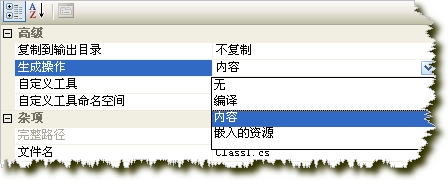
也可以为Web应用程序项目中添加"App_LocalResources",在这个文件夹下添加类也是可以的,就不需要添加App_Code文件夹了。
你还可以随便建个文件夹,或者根本就不用文件夹直接添加了类,只要修改了类高级属性的”生成操作“改为”编译“就可以