


惯性聚合 高效追踪和阅读你感兴趣的博客、新闻、科技资讯
阅读原文 在惯性聚合中打开

推荐订阅源

T
Tenable Blog
Last Week in AI
Last Week in AI
P
Proofpoint News Feed
Engineering at Meta
Engineering at Meta
H
Help Net Security
F
Fortinet All Blogs
MyScale Blog
MyScale Blog
宝玉的分享
宝玉的分享
让小产品的独立变现更简单 - ezindie.com
博客园 - 司徒正美
量子位
N
Netflix TechBlog - Medium
Apple Machine Learning Research
小众软件
小众软件
Recorded Future
Recorded Future
博客园 - 三生石上(FineUI控件)
Vercel News
Vercel News
aimingoo的专栏
aimingoo的专栏
I
InfoQ
Microsoft Security Blog
Scott Helme
Scott Helme
The Last Watchdog
The Last Watchdog
cs.AI updates on arXiv.org
IT之家
IT之家
AI
AI
WordPress大学
WordPress大学
Security Archives - TechRepublic
Google Online Security Blog
U
Unit 42
V2EX - 技术
V2EX - 技术
MongoDB | Blog
MongoDB | Blog
Schneier on Security
博客园 - Franky
H
Heimdal Security Blog
奇客Solidot–传递最新科技情报
奇客Solidot–传递最新科技情报
Jina AI
Jina AI
W
WeLiveSecurity
P
Privacy & Cybersecurity Law Blog
Cloudbric
Cloudbric
B
Blog RSS Feed
N
News | PayPal Newsroom
S
Securelist
Threat Intelligence Blog | Flashpoint
I
Intezer
Hacker News - Newest:
Hacker News - Newest: "LLM"
CTFtime.org: upcoming CTF events
博客园_首页
罗磊的独立博客
H
Hackread – Cybersecurity News, Data Breaches, AI and More
雷峰网
雷峰网

博客园 - Edison Zhu

Zhuanzai: change Asp.net Themes dynamicly (Setting An ASP.NET Theme in the PreInit Event Handler) zhuanzai: AJAX: How to create a "Processing" modal window using UpdateProgress and ModalPopup ASP.net AJAX controls - Edison Zhu [转载] 微软SQL Server事务隔离级别实例简介 [转载] Moving table to a different filegroup in SQL 2005 [转载] SQL SERVER – 2005 – Database Table Partitioning Tutorial – How to Horizontal Partition Database Table [转载] SQL SERVER – 2005 – Introduction to Partitioning 转载:.NET Programming Standards and Naming Conventions [引]:聚集索引与非聚集索引 Trouble Shooting: can not access Excel file using excel control C#中小数点后保留两位小数,四舍五入的函数及使用方法 关于锁 IE7下关闭窗口不弹出提示窗口方法 [转]ASP.NET如何在客户端调用服务端代码 [转]谈谈Cookie存取和IE页面缓存的问题 Operate File [转] 客户端的JavaScript脚本中获取服务器端控件的值 及ID BULK INSERT Temporary Tables [转]调用.NET XML Web Services返回数据集合
转:Manage Web.config from XML File by using configSource attribute ASP.Net 2.0
Edison Zhu · 2010-05-01 · via 博客园 - Edison Zhu

original article: http://www.codeproject.com/KB/aspnet/Manage_Webconfig.aspx 
Screenshot - coolcode.gif

Introduction

The configSource attribute was firstly introduced in .NET framework 2.0 to support external configuration files.

After upload website to online server, I need to manage the Website setting from Web.Config, therefore, I save the appSettings, connectionStrings and all settings are needed to manage in Separate XML files, to ease to manage and organize.

This can be done by using configSource attribute,the configSource attribute was firstly introduced in .NET framework 2.0 to support external configuration files. This attribute can be added to any configuration section to specify a an external file for that section. Using an external configuration source can be useful in many scenarios. For instance, you could place a section into an external configSource if you need an easy method to swap settings for the section depending on the environment.

Using the code

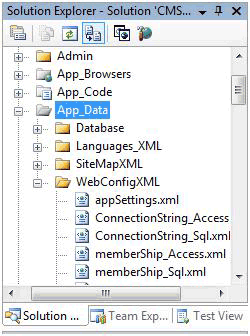
First create XML file For Each web.Config section like appSettings.xml, ConnectionString.xml �, and set the file in App_Data Folder to protect.

Copy the each section from web.config and set in XML file as following example: (appSettings.xml)

<?xml version="1.0" standalone="yes"?>
<appSettings>
  <add key="EnableErrorPage" value="false" />
  <add key="RequiredLogin" value="false" />
  <add key="PublicationsEmail" value="email@domain.com" />
  <add key="AdminFromEmail" value="email@domain.com " />
  <add key="AdminToEmail" value="email@domain.com " />
  <add key="SupportEmail" value="email@domain.com" />
</appSettings>

In the Web.config change the appSettings tags to

<appSettings configSource="App_Data\WebConfigXML\appSettings.xml"/>

The configSource attribute must be a relative physical path.

Repeat this for each web.config Section (connectionStrings, smtp,�).

Now you can manage the XML file from secure page by using Gridview control to edit and update the values.

Conclusion

The web.config file is smaller and hence easier to read, and you don't need a complete web.config file for each environment, and help me to manage the website setting.