





源代码下载:https://files.cnblogs.com/nickong/SLWCFOraSample.rar
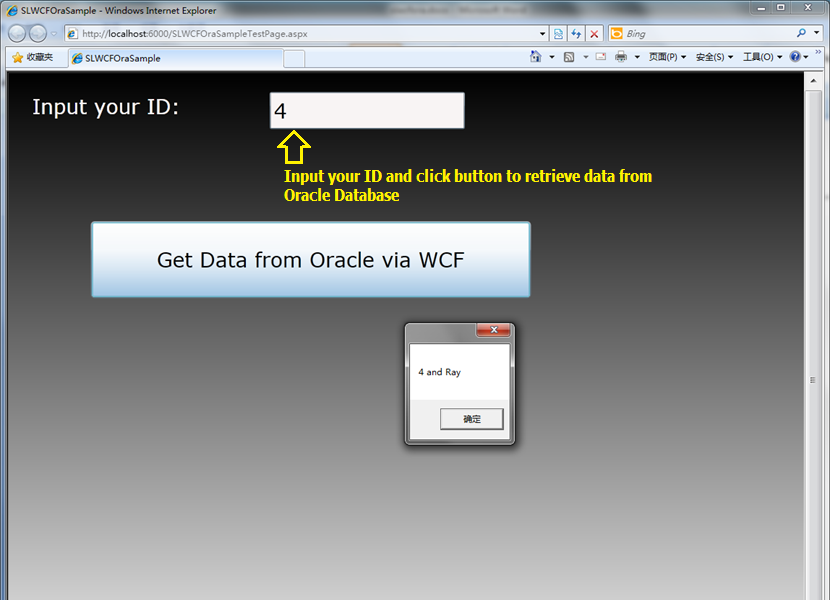
Introduction
This is a very simple sample about how to access Oracle Database in Silverlight . I used to google the internet and search the Codeproject to get some basic ideals about how to get data from Oracle Database then display in Silverlight application. there is no useful sample for me. it confuse me for a long time. I browse all MSND fourm and find some fragmentary post about how to do this job in Silverlight, but there is still no sample code for me to download, so i started my own sample.
Note: VS2008 and Silverlight 3 and Oracle Client is required in this sample
Using the code
How to use the sample code ? 3 steps needed.
Step 1: Add a sample table named "TBL_TEST" in to your Oracle Database with two fields named "MYID" and "MYRECORD". I have prepared some script for you .
CREATE TABLE TBL_TEST
(
MYID NUMBER(20),
MYRECORD VARCHAR2(50 BYTE)
)
Insert into TBL_TEST(MYID, MYRECORD)Values(1, 'Hello');
Insert into TBL_TEST(MYID, MYRECORD)Values(2, 'I');
Insert into TBL_TEST(MYID, MYRECORD)Values(3, 'am');
Insert into TBL_TEST(MYID, MYRECORD)Values(4, 'Ray');
COMMIT;
Step 2: Modify the Oracle Connection string in WCF code behind file MyOracleDBTest.svc.cs , replace Data source , username and password .
String oracleConnString = "Data Source=ORASID;User Id=USER;Password=PASSWORD;";
Step 3: if you use Visual Studio 2008 , just press F7, compile then press Ctrl + F5 see the sample. good luck !
Step by Step to Build your own project
Step 1: Open VS2008,then Create a new SL project
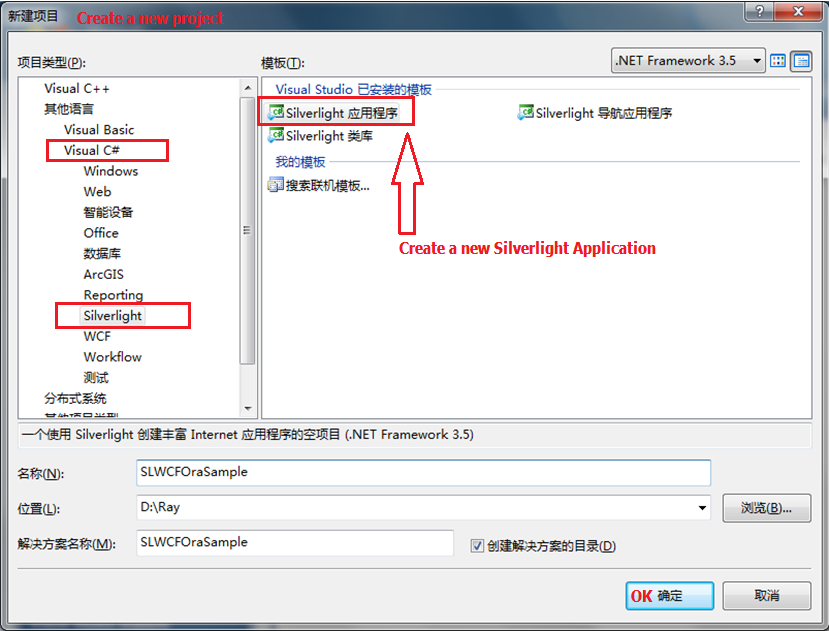
you can also create your Project in Microsoft Expression Blend 3 , so you can easily build a xmal with better User interface. in this sample , i use a gradient color as the background.
Step2 : Add Silverlight enabled WCF Services into your project.
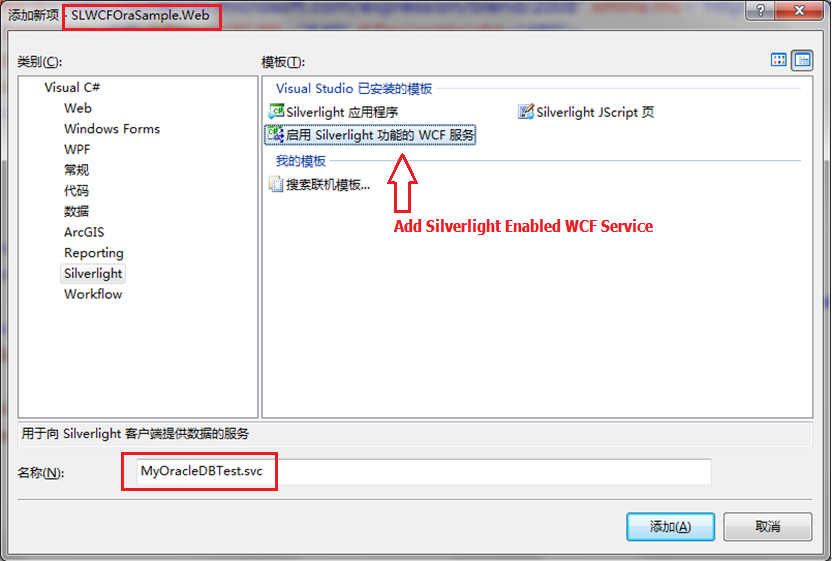
click "Add" button to add new WCF Services named MyOracleDBTest into the SLWCFOraSample.Web project, you will find the svc file added into your project manager .
Step 3: Create Oracle table and build Data Model for it
copy the script into your oracle Client tools, (TOAD 9.1 in this picture) and create the test Oracle Table and insert some data into TBL_TEST table.
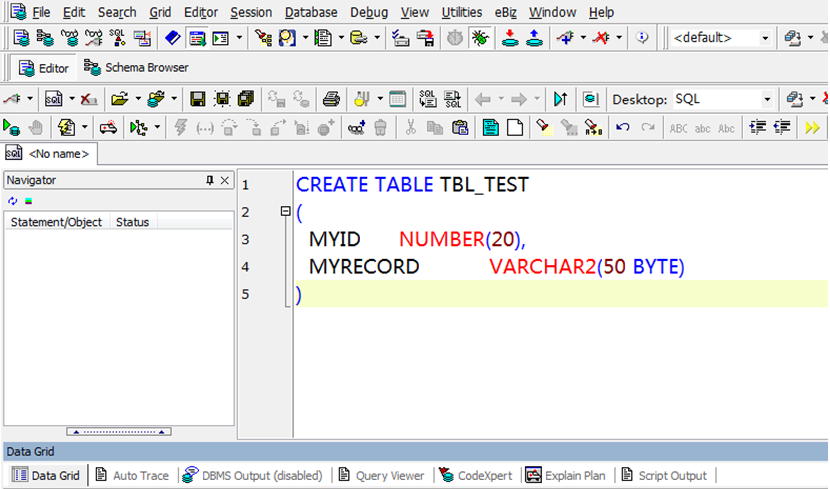 Sample data in table TBL_TEST.
Step 4: Add new DB model to return data from oracle DB. Create a new project then add it into the solution .
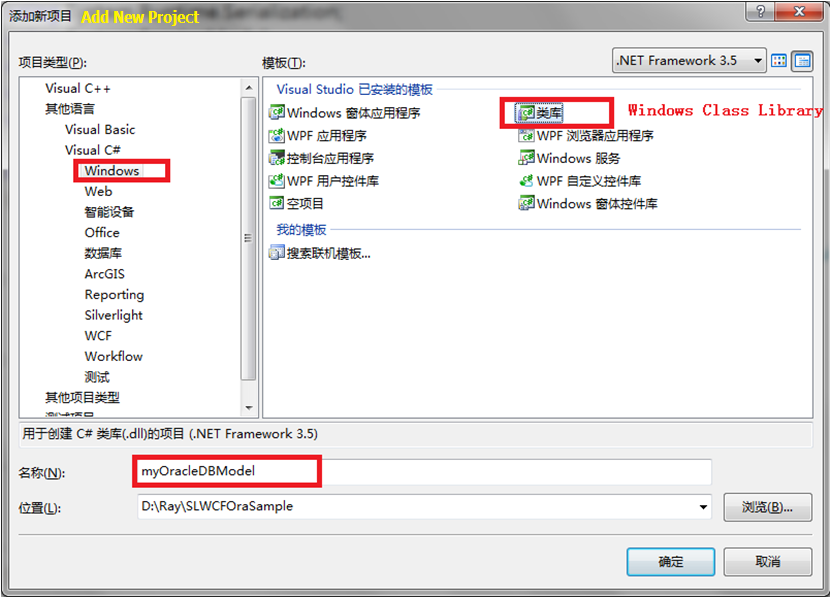 this is a common Windows Class library. here we name it myOracleDBModel
Step 5: Rename the class file name to the table name in your Oracle DB. highly recommend you name your DB model in that way, this will make your code more readable.
then implement class TBL_TEST with code below :
public class TBL_TEST
{
private Int32 m_iMyID;
private String m_sMyRecord;
[DataMember]
public Int32 MYID
{
get { return m_iMyID; }
set { m_iMyID = value; }
}
[DataMember]
public String MYRECORD
{
get { return m_sMyRecord; }
set { m_sMyRecord = value; }
}
}
Build myOracleDBModel project after all code prepared.
Step 6:Then, add DB Model reference to Project SLWCFOraSample.Web
then add code and reference file into SVC code behind file :
the public interface DoWork is generated by project wizard, remove this function and replace with our own code :
public List<TBL_TEST> GetDatabyName(Int32 pInParam)
{
String oracleSql;
List<TBL_TEST> returnlist = new List<TBL_TEST>();
//Get your Customer Data from Oracle DB, if you use DataSet, get the DataSet,
//Create Customer Object for each row in your DataTable
String oracleConnString = "Data Source=xxxx;User Id=xxxx;Password=xxxx;";
OracleConnection cnn = new OracleConnection(oracleConnString);
cnn.Open();
//pass your SQL filter paramenter here
oracleSql = "SELECT * FROM TBL_TEST WHERE MYID=" + pInParam;
//oracleSql = "SELECT * FROM TBL_TEST";
OracleCommand cmd = new OracleCommand(oracleSql, cnn);
OracleDataAdapter da = new OracleDataAdapter(cmd);
DataSet ds = new DataSet();
da.Fill(ds, "TBL_TEST");
foreach (DataRow dr in ds.Tables["TBL_TEST"].Rows)
{
returnlist.Add(new TBL_TEST
{
MYID = Convert.ToInt32(dr["MYID"]),
MYRECORD = dr["MYRECORD"].ToString()
});
}
return returnlist;
}
Step 7: Add Services Reference to your silverlight project .
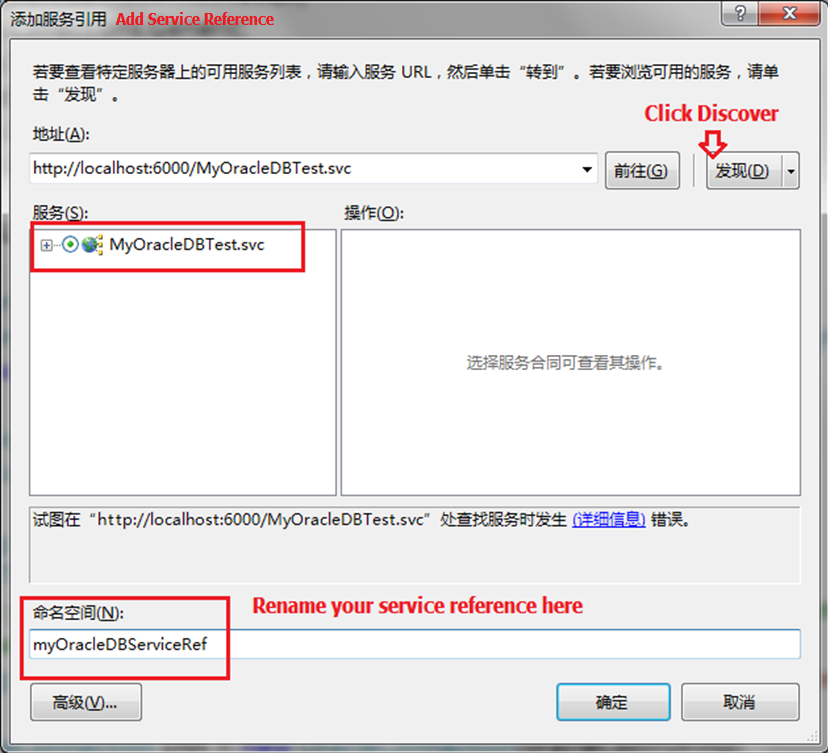
the click to expand the tree view of MyOracleDBTest.svc
Note: Before you add your Service Reference, please rebuild your .Web project which contain the SilverLight project. If you don’t compile you web project, when you add you services reference into your project, system will return an error : “Error occurs when try to find services in Http://localhost:6000/MyOracleDBTest.svc ”
Click OK button to add a new Services Reference into your project.
You will find there are two new files added into your Silverlight project. Double click on ServiceReferences.ClientConfig , you will find the endpoint address of our services file.
Step 8: Modify your XMAL page
Add a button contrl and a textbox contrl into your xmal page file . (details in the sample code )
Step 9: Implement the Button_Click event . add new using into your MainPage.xaml.cs
using SLWCFOraSample.myOracleDBServiceRef;
private void myButton_Click(object sender, RoutedEventArgs e)
{
SLWCFOraSample.myOracleDBServiceRef.MyOracleDBTestClient client = new SLWCFOraSample.myOracleDBServiceRef.MyOracleDBTestClient();
//Pass your parameter , pass id 4 will return string "Ray"
client.GetDatabyNameAsync(Convert.ToInt32(myText.Text.ToString()));
client.GetDatabyNameCompleted += new EventHandler<GetDatabyNameCompletedEventArgs>(client_GetDatabyNameCompleted);
//Close the connection, when you get the error connection timeout , acctually, the connections limited to 10 for each client.
client.CloseAsync();
}
private void client_GetDatabyNameCompleted(object sender, GetDatabyNameCompletedEventArgs e)
{
//We need a collection object to receive the return list form WCF
//We can only use the class defined in Web Service to create client instance
System.Collections.ObjectModel.ObservableCollection<myOracleDBServiceRef.TBL_TEST> temp =
new ObservableCollection<myOracleDBServiceRef.TBL_TEST>();
temp = e.Result;
for (int i = 0; i < temp.Count; i++)
{
MessageBox.Show(temp[i].MYID.ToString() + " and " + temp[i].MYRECORD.ToString());
}
}
OK , all we need to do in button click event is new a client instance of services, then call the service interface then implement the complete event.
as far as i know , WCF can not return a dataset object , so we have to use list object to get return data. more information , you can get here from ADO.NET team blog. http://blogs.msdn.com/adonet/archive/2009/05/26/dataset-and-silverlight.aspx
after adding all these code into your project, you can compile your silverlight project , maybe F7 to compile the whole solution, then press Ctrl + F5 to see the result .
Points of Interest
When i deploy my WCF web services to my Windows 2003 Server . I found i have to change the endpoint address and recompile the whole solution . if anyone has questions about how to deploy this services into the LAN server. you may post your question under this post. i will give that answer ASAP.
good luck !
此内容由惯性聚合(RSS阅读器)自动聚合整理,仅供阅读参考。 原文来自 — 版权归原作者所有。