


惯性聚合 高效追踪和阅读你感兴趣的博客、新闻、科技资讯
阅读原文 在惯性聚合中打开

推荐订阅源

W
WeLiveSecurity
T
Tenable Blog
Project Zero
Project Zero
C
Cybersecurity and Infrastructure Security Agency CISA
T
The Exploit Database - CXSecurity.com
P
Palo Alto Networks Blog
S
Schneier on Security
Scott Helme
Scott Helme
S
Securelist
Know Your Adversary
Know Your Adversary
Vercel News
Vercel News
IT之家
IT之家
V
V2EX
F
Fortinet All Blogs
Simon Willison's Weblog
K
Kaspersky official blog
博客园_首页
T
Tailwind CSS Blog
The GitHub Blog
The GitHub Blog
Spread Privacy
Spread Privacy
Microsoft Security Blog
Cisco Talos Blog
Cisco Talos Blog
The Register - Security
有赞技术团队
有赞技术团队
cs.CL updates on arXiv.org
Cyberwarzone
Cyberwarzone
Google DeepMind News
The Hacker News
The Hacker News
L
LINUX DO - 热门话题
Hugging Face - Blog
Hugging Face - Blog
博客园 - 三生石上(FineUI控件)
A
Arctic Wolf
Cyber Security Advisories - MS-ISAC
C
CXSECURITY Database RSS Feed - CXSecurity.com
让小产品的独立变现更简单 - ezindie.com
T
Threat Research - Cisco Blogs
P
Proofpoint News Feed
钛媒体:引领未来商业与生活新知
钛媒体:引领未来商业与生活新知
P
Privacy & Cybersecurity Law Blog
D
Darknet – Hacking Tools, Hacker News & Cyber Security
C
CERT Recently Published Vulnerability Notes
S
SegmentFault 最新的问题
AWS News Blog
AWS News Blog
freeCodeCamp Programming Tutorials: Python, JavaScript, Git & More
罗磊的独立博客
Apple Machine Learning Research
P
Proofpoint News Feed
The Cloudflare Blog
OSCHINA 社区最新新闻
OSCHINA 社区最新新闻
V
Vulnerabilities – Threatpost

博客园 - 在天空飞翔

asp net core 跨平台初体验 获取图片的主色调 U盘启动安装 window server 2003 简单的中文姓名生成器 WebBrowser - 想说爱你不容易 表白 天涯宝盒-天涯看贴脚本-只看楼主-自动翻页 使用 asp.net 编写的一些大中型的网站 PrecompiledApp.config 的惨剧 [音乐] the dream catcher csv 文件的读取 扩展DataGridView 的功能(四) 三八节快乐 将MP3文件嵌入到exe中并播放 [音乐] 下个路口见 雷人的面试 发现不明飞行物 扩展 DataGridView 的功能(三) 扩展 DataGridView 的功能(二)
扩展 DataGridView 的功能(五)
在天空飞翔 · 2012-08-29 · via 博客园 - 在天空飞翔

文章最后有代码下载

DataGridView 的功能还是很强大的,每个cell都可以设置单独的style,可以打造出非常漂亮的效果。

但是如何让同一个 cell 里的文字设置不同的 style 呢, 比如像下图这样
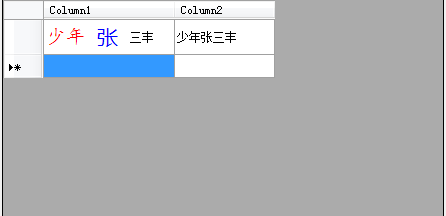
 

有了前面的基础,相信扩展这个功能还是比较简单的, 总体来说就是重写 Cell 的 Paint 方法,想怎么画就怎么画

但是如何表示这种富文本的结构呢?想了一会,还是觉得用 html 标签来表示就行了。

上图中得文本用 html 标签来表示就变成了

string text = "<font color=\"red\" name=\"楷体\" size=\"14\">少年</font><font color=\"blue\" name=\"微软雅黑\" size=\"16\">张</font>三丰";

然后写一个简单的 html parser 解析它就行了。

主要代码如下 

void PaintText(Graphics g, Rectangle rect, string text, bool selected, DataGridViewCellStyle cell_style)
        {
            Document = parser.parse_text(text);
            Point pt = rect.Location;
            foreach (var node in Document.Nodes)
            {
                Font font = get_node_font(node, cell_style);
                Color clr = get_node_color(node, selected, cell_style);
                Size size = TextRenderer.MeasureText(node.InnerText, font);
                pt.Y = rect.Top + (rect.Height - size.Height) / 2;
                using (Brush bru = new SolidBrush(clr))
                {
                    g.DrawString(node.InnerText, font, bru, pt);
                }
                pt.X += size.Width;
            }
        }

        Font get_node_font(DOMNode node, DataGridViewCellStyle cell_style)
        {
            Font font = cell_style.Font;
            if (node.Name == "font" && node.Attributes.ContainsKey("name") && node.Attributes.ContainsKey("size"))
            {
                float font_size = cell_style.Font.Size;
                float.TryParse(node.Attributes["size"], out font_size);
                font = new Font(node.Attributes["name"], font_size);
            }
            return font;
        }

        Color get_node_color(DOMNode node, bool selected, DataGridViewCellStyle cell_style)
        {
            Color clr = selected ? cell_style.SelectionForeColor : cell_style.ForeColor;
            if (node.Name == "font" && node.Attributes.ContainsKey("color"))
            {
                clr = ColorTranslator.FromHtml(node.Attributes["color"]);
                if (selected)
                    clr = Color.FromArgb(~(clr.ToArgb()&0x00FFFFFF));
            }
            return clr;

        } 

代码下载