


惯性聚合 高效追踪和阅读你感兴趣的博客、新闻、科技资讯
阅读原文 在惯性聚合中打开

推荐订阅源

S
Security Affairs
freeCodeCamp Programming Tutorials: Python, JavaScript, Git & More
CTFtime.org: upcoming CTF events
Jina AI
Jina AI
P
Palo Alto Networks Blog
GbyAI
GbyAI
大猫的无限游戏
大猫的无限游戏
A
Arctic Wolf
Hugging Face - Blog
Hugging Face - Blog
小众软件
小众软件
Y
Y Combinator Blog
T
The Blog of Author Tim Ferriss
Blog — PlanetScale
Blog — PlanetScale
S
Schneier on Security
V
Vulnerabilities – Threatpost
C
Cybersecurity and Infrastructure Security Agency CISA
雷峰网
雷峰网
T
Tenable Blog
人人都是产品经理
人人都是产品经理
T
Tor Project blog
C
Cyber Attacks, Cyber Crime and Cyber Security
AWS News Blog
AWS News Blog
Microsoft Security Blog
J
Java Code Geeks
Scott Helme
Scott Helme
SecWiki News
SecWiki News
C
CERT Recently Published Vulnerability Notes
Recorded Future
Recorded Future
I
InfoQ
Security Archives - TechRepublic
Help Net Security
Help Net Security
Cloudbric
Cloudbric
C
Check Point Blog
Engineering at Meta
Engineering at Meta
TaoSecurity Blog
TaoSecurity Blog
B
Blog
Cyber Security Advisories - MS-ISAC
博客园_首页
N
News and Events Feed by Topic
云风的 BLOG
云风的 BLOG
MyScale Blog
MyScale Blog
腾讯CDC
量子位
Application and Cybersecurity Blog
K
Kaspersky official blog
Vercel News
Vercel News
F
Full Disclosure
T
Troy Hunt's Blog
Forbes - Security
Forbes - Security
S
Security @ Cisco Blogs

博客园 - 在天空飞翔

asp net core 跨平台初体验 获取图片的主色调 U盘启动安装 window server 2003 简单的中文姓名生成器 扩展 DataGridView 的功能(五) WebBrowser - 想说爱你不容易 表白 天涯宝盒-天涯看贴脚本-只看楼主-自动翻页 使用 asp.net 编写的一些大中型的网站 PrecompiledApp.config 的惨剧 [音乐] the dream catcher csv 文件的读取 扩展DataGridView 的功能(四) 三八节快乐 将MP3文件嵌入到exe中并播放 [音乐] 下个路口见 雷人的面试 发现不明飞行物 扩展 DataGridView 的功能(三)
扩展 DataGridView 的功能(二)
在天空飞翔 · 2008-09-28 · via 博客园 - 在天空飞翔

二、加入可以输入文字的 DataGridViewComboBoxCell

DataGridView 的功能确实很强大,要实现在 grid 中加入 ComboBox , 只需要将grid列的类型改为 DataGridViewComboBoxColumn 即可

DataGridViewComboBoxColumn 也是从 DataGridViewColumn 中继承过来的

public class DataGridViewComboBoxColumn : DataGridViewColumn

在 Combobox  中加入选项值也是很简单的,不在赘述。

但系统自带的 DataGridViewComboBoxColumn 有个致命的缺点,就是它的 DropDownStyle 默认是 ComboBoxStyle.DropDownList,也就是

说下拉列表只能选择,不能输入文字,这样就极其不爽了,所以我们现在就要来扩展这个功能

定义新的 columns类, 当然要继承自DataGridViewComboBoxColumn 

    /// <summary>
    
/// 可修改 DropDownStyle 的 DataGridViewComboBoxColumn
    
/// </summary>

    public class DataGridViewComboBoxColumnEx : DataGridViewComboBoxColumn 

这个类只需要添加了一个属性

DropDownStyle 属性

因为主要的功能都是在 DataGridViewEx 中实现的, 呵呵

回到 DataGridViewEx 中, 重写 OnEditingControlShowing 方法,看字面意思就知道,这个方法是在 grid 的任何“编辑控件”显示时调用

看到这个我想大家都明白了, 我们只要在 ComboBox 控件显示出来时修改它的样式即可

        protected override void OnEditingControlShowing(DataGridViewEditingControlShowingEventArgs e)
        {
            
if (CurrentCell != null && CurrentCell.OwningColumn is DataGridViewComboBoxColumnEx)
            {
                DataGridViewComboBoxColumnEx col 
= CurrentCell.OwningColumn as DataGridViewComboBoxColumnEx;
                
//修改组合框的样式
                if (col.DropDownStyle != ComboBoxStyle.DropDownList)
                {
                    ComboBox combo 
= e.Control as ComboBox;
                    combo.DropDownStyle 
= col.DropDownStyle;
                    combo.Leave 
+= new EventHandler(combo_Leave);
                }
            }
            
base.OnEditingControlShowing(e);

        }

上面可以看到, 修改了样式后,还需要为 ComboBox 控件绑定一个事件,这是为了能在 ComboBox 失去焦点时更新 Cell 的值

        /// <summary>
        
/// 当焦点离开时,需要将新输入的值加入到组合框的 Items 列表中
        
/// </summary>
        
/// <param name="sender"></param>
        
/// <param name="e"></param>
        void combo_Leave(object sender, EventArgs e)
        {
            ComboBox combo 
= sender as ComboBox;
            combo.Leave 
-= new EventHandler(combo_Leave);
            
if (CurrentCell != null && CurrentCell.OwningColumn is DataGridViewComboBoxColumnEx)
            {
                DataGridViewComboBoxColumnEx col 
= CurrentCell.OwningColumn as DataGridViewComboBoxColumnEx;
                
//一定要将新输入的值加入到组合框的值列表中
                
//否则下一步给单元格赋值的时候会报错(因为值不在组合框的值列表中)
                col.Items.Add(combo.Text);
                CurrentCell.Value 
= combo.Text;
            }

        }

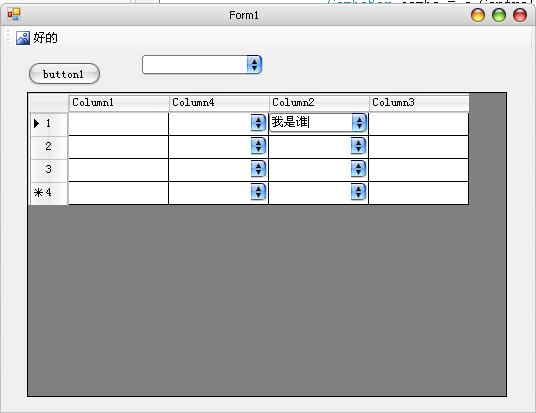
OK了, 很简单, 所有的工作都完成了, 只需要创建一个 DataGridViewComboBoxColumnEx 列,并将 DropDownStyle 属性设置为 DropDown,

就可以在 ComboBox 中输入文字了

效果图

 代码下载