
惯性聚合 高效追踪和阅读你感兴趣的博客、新闻、科技资讯
阅读原文 在惯性聚合中打开

推荐订阅源

酷 壳 – CoolShell
酷 壳 – CoolShell
T
Threatpost
Latest news
Latest news
N
News | PayPal Newsroom
Threat Intelligence Blog | Flashpoint
Help Net Security
Help Net Security
D
Darknet – Hacking Tools, Hacker News & Cyber Security
AI
AI
Simon Willison's Weblog
TaoSecurity Blog
TaoSecurity Blog
The Last Watchdog
The Last Watchdog
L
LINUX DO - 热门话题
Google DeepMind News
T
Threat Research - Cisco Blogs
O
OpenAI News
钛媒体:引领未来商业与生活新知
钛媒体:引领未来商业与生活新知
T
The Exploit Database - CXSecurity.com
NISL@THU
NISL@THU
Application and Cybersecurity Blog
S
Securelist
小众软件
小众软件
cs.CL updates on arXiv.org
Martin Fowler
Martin Fowler
S
SegmentFault 最新的问题
Cisco Talos Blog
Cisco Talos Blog
云风的 BLOG
云风的 BLOG
AWS News Blog
AWS News Blog
GbyAI
GbyAI
N
News and Events Feed by Topic
cs.CV updates on arXiv.org
美团技术团队
Engineering at Meta
Engineering at Meta
A
About on SuperTechFans
博客园 - 三生石上(FineUI控件)
S
Schneier on Security
博客园 - 聂微东
V2EX - 技术
V2EX - 技术
T
Troy Hunt's Blog
SecWiki News
SecWiki News
S
Secure Thoughts
B
Blog RSS Feed
Hugging Face - Blog
Hugging Face - Blog
WordPress大学
WordPress大学
腾讯CDC
H
Heimdal Security Blog
Exploit-DB.com RSS Feed
Apple Machine Learning Research
月光博客
月光博客
www.infosecurity-magazine.com
P
Privacy International News Feed

博客园 - 一一九九

Introduce to MEF (Study)- one 【wpf】AnimatedTabControl 如何显示内容 [wpf]设置Application的ICO Error: does not contain a static 'Main' method suitable for an entry point [wpf] Can you outline a story-driven process with Concordion? Your First Concordion.Net Project (Part 5)-Running Specs with Gallio Your First Concordion.Net Project (Part 3)-Adding Specifications Your First Concordion.Net Project (Part 2)-Setting Up Visual Studio Your First Concordion.NET Project (Part 1)-What is Concordion.Net? [Specification by Example][ch5 Deriving scope from goals]-[读书笔记]-[4] [Specification by Example][ch5 Deriving scope from goals]-[读书笔记]-[3] [Specification by Example][ch5 Deriving scope from goals]-[读书笔记]-[2] [Specification by Example][ch5 Deriving scope from goals]-[读书笔记]-[1] [Specification by Example][ch4 Initiation the changes]-[读书笔记] [Specification by Example][ch3 Living documentation]-[读书笔记] [Specification by Example][ch2 key process patterns]-[读书笔记] [Specification by Example][ch1 key benefits]-[读书笔记] Binding Resource
Your First Concordion.Net Project (Part 4)-More Specifications!
一一九九 · 2012-01-16 · via 博客园 - 一一九九

2012-01-16 16:44  一一九九  阅读(256)  评论()    收藏  举报

http://living-in-concordion.blogspot.com/2009/05/your-first-concordionnet-project-part-4.html

在之前完成的Specification Document(Calculator.html)中,我们放置了一个到Operations.html的链接。现在我们来完成它。添加.html和对应的Class文件,然后设置.html文件的属性以及Class的Fixture。
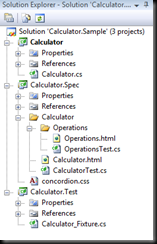
Calculator.Sample_thumb

完成之后额Operatons.html应该如下所示:

Calculator.Sample.8_thumb1

现在我们有一个描述了不同操作的文档了。让我们来添加更多的Sepcifications: 一个进行四则运算,另外一个进行三角函数运算。完成后内容大体如下所示:
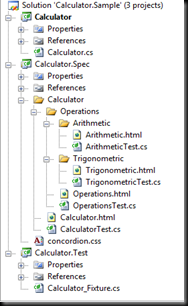
Calculator.Sample.9_thumb1

记得设置.html和.cs文件的属性。

Arithmetic Operations


让我们为我们的Spec添加一些基本的算术运算操作: 加减乘除。现在我们在Spec中添加一些特殊的脚本。

下面是一些片段:

<h3>Example - Multiplication</h3>
<p>
    The result of <b concordion:set="#firstOperand">2</b> * <b concordion:set="#secondOperand">2</b>
    the result will be:
    <b concordion:assertEquals="Multiplication(#firstOperand, #secondOperand)">4</b>
</p>

最终输出的HTML文件如下所示:

Calculator.Sample.10_thumb[1]

可以看到源代码是在项目中,相关的条目是通过标签 concordion:set和concordion:assertEquals属性来设置的。Concordion:set用来设置FixtureClass中的公共属性或者字段的值, AssertEquals检查期望的数值和在Concordion:assertEquals中定义的函数返回的值是否一致。是Concordion:assertEquals最终呈现为Red或者Green。

Creating the fixture


现在我们已经有了Spec,我们需要一些在Fixture中的代码来支撑。注意如下的代码是会失败的。TDD实践遵循红绿重构的方法论来做的。代码如下:

[ConcordionTest]
public class ArithmeticTest
{
    public long firstOperand;
    public long secondOperand;

    public long Addition(long first, long second)
    {
        return -1;
    }

    public long Subtraction(long first, long second)
    {
        return -1;
    }

    public long Multiplication(long first, long second)
    {
        return -1;
    }

    public long Division(long first, long second)
    {
        return -1;
    }
}

We should now have a complete fixture that should be able to run, albeit with some errors!

Next time we will work on how to run your project with Gallio and produce some results so that we can refactor the above code and turn it into something more meaningful!