




2012-01-16 14:08 一一九九 阅读(272) 评论() 收藏 举报
http://living-in-concordion.blogspot.com/2009/05/your-first-concordionnet-project-part-3.html
同任何TDD或者BDD类似的,我们应该首先编写我们的Test或者Specifications。
首先,我们搭建一下我们的Specification 程序集。 Calculator.Spec.
我们将David的最初的Concordion中的Style”Steal“过来。这个Style简单,整洁,可读性好。你可以把它多到你的Calculator.Spec程序集的顶层目录。需要将这个文件的BuildAction修改为 Embedded Resource, 将Copy to Output Folder Action 设置为Copy Always。这会保证Style file将会一直在你的输出目录下。大体如下所示:
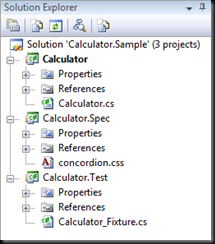
接下来我们需要一个目录来输出文档。我们可以建立一个顶层的文件夹来作为Fixtures的入口。我们在Calculator.Spec项目中建立一个名为Calculator的文件夹。在这个文件夹中我们放入两个文件: Calculator.html和CalculatorTest.cs. Calculator.html将是我们的Html Specification,CalculatorTest.Cs 是我们为Calculator.html建立的Fixture Class.注意这里的命名规范。Fixture名字是Specification加上单词“Test".大体如下所示:

接下来要做的是完善Specification Html文件。可以从Concordion.net的Specificatons中复制过来。需要将VS默认生成的Doctype和HTML标签替换为如下的声明:
<html xmlns:concordion="http://www.concordion.org/2007/concordion">
这个标签声明了concordion 元素需要的所有的XML命名空间。
Note: while I intend for Calculator.html to be a specification that doesn’t actually check anything I am still declaring the xml namespace. This is because it is required by Concordion.
注意: Calculator我们要用做的Spec,但是不做任何在XML 命名空间中声明的检查。这是Concordion要求的。
现在我们在我们的HTML中添加一个对Style的引用:
<link href="../concordion.css" rel="stylesheet" type="text/css" />
然后我们开始添加一些文本。我们添加一些关于Calculator的说明,再添加一些“Further Details”的引用链接。组中Calculator.html页面如下所示。

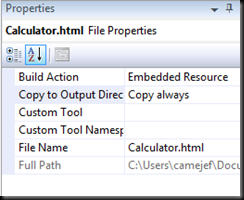
然后将BuildAction修改为 Embedded Resource, 将Copy to Output Folder Action 设置为Copy Always。
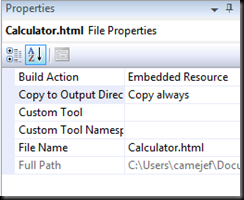
IMPORTANT: You should set those two properties on every html specification file you write! If you do not then they will not copy tot he output folder and Concordion.Net will not be able to find them.
首先创建一个Lib目录,将Concordion.net程序集放进去,然后再项目中添加引用。
接着对CalculatorTest.cs进行一些修改,以便Concordion.net能够找到这些类。
最终类大体上如下所示:
using Concordion.Integration;
namespace Calculator.Spec.Calculator
{
   [ConcordionTest]
   public class CalculatorTest
   {
   }
}
Concordion需要一些措施才能够将Specification和Fixture类连接起来。Concordion.net做的方式是基于类的命名空间。假如一个类的fully-qualified 的名字是Calculator.Spec.Calculator.CalculatorTest那么Concordion.net会在路径Calculator\Spec\Calculator中找Calculator.html 文件。
既然我们将Spec嵌入到资源,而且会被复制到输出目录,那么我们可以修改一下命名空间,以便Concordion.net能够将Fixture和Specification连接起来。可以将命名空间缩短如下:
using Concordion.Integration;
namespace Calculator
{
   [ConcordionTest]
   public class CalculatorTest
   {
   }
}
注意命名空间缩短为Calculator,所以Concordion.net将会根据文件名找来HTML。Next we will look at how to add some real specifications … that actually run tests!
jeremygrayMay 31, 2009 02:05 PM
Looking great so far, but two niggles:Reply
1. Copy Always can cause workstation builds in the IDE to do unnecessary work, slowing things down for the developer. If this is an issue with the description above, I would suggest changing it (copying when newer should do the trick). If this is a Concordion .net issue, I would suggest fixing it. (You may also wish to change the need to both embed AND copy to the output folder, as your runner should really only need one or the other.)
2. The requirement to change the namespace, as described in the "One last thing" section, breaks every .net coding standard I have encountered at a client site. I would highly suggest fixing this behavior by changing Concordion .net to account for the assembly name/type namespace convention appearing at the beginning of the test class's full type name and search for the spec html location on a relative basis from there.
Otherwise, it is definitely shaping up very nicely, and I am looking forward to having an opportunity to test this out on a client project!
JeffreyJun 1, 2009 07:35 AM
@jeremy: see latest dev build of Concordion on the TeamCity server. Concordion now reads the .html files as embedded resources so it removes the need to change the namespaces (I felt it clunky too, but it was part of the evolution) and no need to copy the .html to the output directory as they are embedded directly in the assembly.Reply
I will update this post accordingly in the near future.
p.s. thanks for your feedback thus far, it's great to see someone is looking seriously at it. I hope to hear more from you!
此内容由惯性聚合(RSS阅读器)自动聚合整理,仅供阅读参考。 原文来自 — 版权归原作者所有。
