




from scipy.optimize import fsolve
import numpy as np

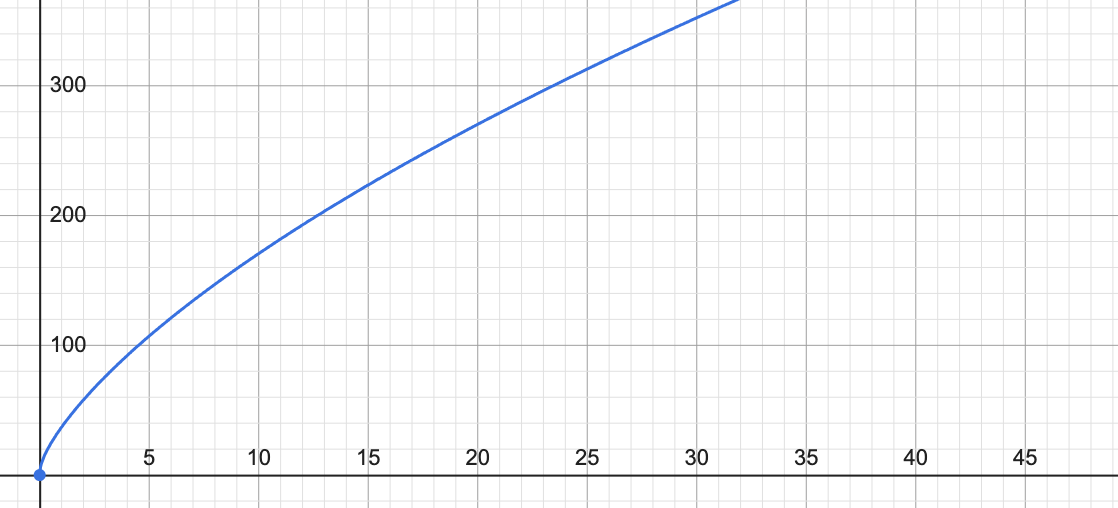
#y = (10 ln(x+1)+30)x^0.5
def inverse_function(y_val):
"""
Approximate the inverse of the function y = (10 * ln(x + 1) + 30) * x**0.5.
This function takes a y value and returns the corresponding x value.
"""
# Define the function to solve
def equation(x):
return (10 * np.log(x + 1) + 30) * np.sqrt(x) - y_val

# Initial guess for x, can be adjusted based on the range of expected x values
initial_guess = 1

# Solve for x
x_val = fsolve(equation, initial_guess)

return x_val[0]

# Example usage 12,295 10119
y_example = 12295
x_result = inverse_function(y_example)
print(x_result)
function inverseFunction(y) {
    // Define the function y = (10 * ln(x + 1) + 30) * sqrt(x)
    function f(x) {
        return (10 * Math.log(x + 1) + 30) * Math.sqrt(x);
    }

    // Set the initial bounds for x
    let lowerBound = 0;
    let upperBound = 10000000; // You can adjust this upper bound as needed
    let x;
    let tolerance = 1e-5; // Tolerance for the approximation

    // Binary search to find the inverse
    while (upperBound - lowerBound > tolerance) {
        x = (lowerBound + upperBound) / 2;
        let yCalc = f(x);

        if (Math.abs(yCalc - y) < tolerance) {
            break;
        } else if (yCalc < y) {
            lowerBound = x;
        } else {
            upperBound = x;
        }
    }

    return x;
}

// Example usage 12295 10119
let y = 12295;
let x = inverseFunction(y);
console.log(`The value of x for y = ${y} is approximately: ${x}`);
Function InverseFunction(y As Double) As Double
    Dim x As Double
    Dim x0 As Double
    Dim diff As Double
    Const EPSILON As Double = 1E-06    ' 定义收敛精度
    Dim f As Double, df As Double

    x = 1 ' 初始猜测值
    Do
        x0 = x
        ' 计算当前x的函数值和导数值
        f = (10 * Log(x + 1) + 30) * Sqr(x) - y
        df = (10 / (x + 1) + 30 / (2 * Sqr(x))) * Sqr(x) + (10 * Log(x + 1) + 30) * 0.5 / Sqr(x)

        ' 使用牛顿-拉夫森方法更新x值
        x = x - f / df

        ' 检查是否已经足够接近
        diff = Abs(x - x0)
    Loop While diff > EPSILON

    InverseFunction = x
End Function
在EXCEL中引用:
Alt + F11 打开VBA编辑器。InverseFunction 函数代码复制并粘贴到新创建的模块中。Ctrl + S),然后关闭VBA编辑器。一旦你完成了这些步骤,你就可以在任何Excel工作表中像调用Excel内置函数一样调用 InverseFunction 函数了。这里是如何操作的:
直接在单元格中调用:点击你想要显示结果的单元格,输入公式 =InverseFunction(Y值),其中 Y值 是你希望用来求对应 X 的 Y 的值。
使用单元格引用:你也可以引用包含 Y 值的单元格。例如,如果单元格 A1 包含值 12295,则在另一个单元格中输入 =InverseFunction(A1) 将会返回相应的 X 值。
此内容由惯性聚合(RSS阅读器)自动聚合整理,仅供阅读参考。 原文来自 — 版权归原作者所有。