前面写了几篇关于线程、BackGroundWorker等一下文章,现在主要对这些文章进行一个总结,写一篇关键异步窗体的,来实现操作的进度。
对于大型作业来说,循环处理是一件极其耗时的事情,如果都在Application的主线程中去执行,用户的界面感觉就如同死机一般,但是如果添加了进度窗体(ProcessWindow)来说,就不同了,程序会显示出一个新的窗体,而且给用户的效果是非常好的。
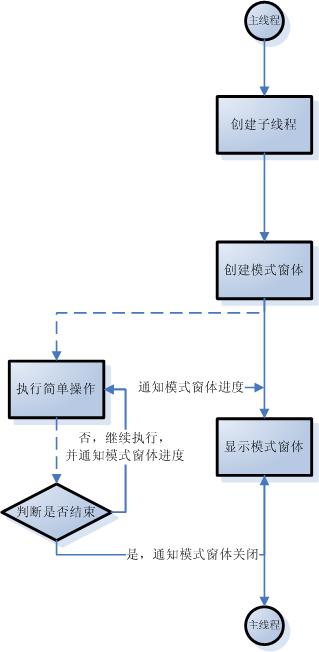
闲话少说,首先讲一下简单的原理:一般处理这样的事情都是一种模式,就是使用多线程或者使用微软封装好的线程控件(BackgroundWorker)去处理。原理都是一样的,就是在主线程中创建一个新的线程,我们成为子线程,子线程和主线程是并行工作的,主线程显示一个模式窗体,显示给用户看,子线程则去处理我们复杂的作业,并且提示主线程显示的模式窗体进度。知道子线程处理完一切作业,则通知模式窗体关闭或者进行其他的处理,流程图如下:
这是简单的流程,下面是代码的实现:
首先创建一个项目,名叫ProgressWindowForm,然后创建一个窗体名称叫做ProgressWindowForm,首先设置这个窗体不能最大化和关闭,在窗体上添加一个Progressbar、一个Label和Cancel按钮,代码如下:
#region 委托
/// <summary>
/// 设置显示值的委托
/// </summary>
/// <param name="text"></param>
public delegate void SetTextInvoker(String text);/// <summary>
/// 进度显示的委托
/// </summary>
/// <param name="val"></param>
public delegate void IncrementInvoker(int val);/// <summary>
/// 跳转到
/// </summary>
/// <param name="val"></param>
public delegate void StepToInvoker(int val);/// <summary>
/// 设置ProgressBar的范围
/// </summary>
/// <param name="minimum"></param>
/// <param name="maximum"></param>
public delegate void RangeInvoker(int minimum, int maximum);
#endregion#region 私有变量
/// <summary>
/// tilte
/// </summary>
private String title = "";/// <summary>
/// 初始线程
/// </summary>
private System.Threading.ManualResetEvent initResetEvent = new System.Threading.ManualResetEvent(false);/// <summary>
/// 停止线程
/// </summary>
private System.Threading.ManualResetEvent abortResetEvent = new System.Threading.ManualResetEvent(false);/// <summary>
/// 是否关闭
/// </summary>
private bool requiresClose = true;
#endregion#region 方法
/// <summary>
/// 开始进程
/// </summary>
/// <param name="minimum">progressbar的最大值</param>
/// <param name="maximum">progressbar的最大值</param>
public void BeginThread(int minimum, int maximum)
{
initResetEvent.WaitOne();
Invoke(new RangeInvoker(DoBegin), new object[] { minimum, maximum });
}/// <summary>
/// 开始进程
/// </summary>
public void BeginThread()
{
initResetEvent.WaitOne();
Invoke(new MethodInvoker(DoBegin));
}/// <summary>
/// 设置范围
/// </summary>
/// <param name="minimum">最小值</param>
/// <param name="maximum">最大值</param>
public void SetProgressRange(int minimum, int maximum)
{
initResetEvent.WaitOne();
Invoke(new RangeInvoker(DoSetRange), new object[] { minimum, maximum });
}/// <summary>
/// 设置显示值
/// </summary>
/// <param name="text">显示值</param>
public void SetDisplayText(String text)
{
Invoke(new SetTextInvoker(DoSetText), new object[] { text });
}/// <summary>
/// 增加显示值
/// </summary>
/// <param name="val">增加值</param>
public void Increment(int val)
{
Invoke(new IncrementInvoker(DoIncrement), new object[] { val });
}/// <summary>
/// 跳到摸个进度
/// </summary>
/// <param name="val"></param>
public void StepTo(int val)
{
Invoke(new StepToInvoker(DoStepTo), new object[] { val });
}/// <summary>
/// 是否停止
/// </summary>
public bool IsAborting
{
get
{
return abortResetEvent.WaitOne(0, false);
}
}/// <summary>
/// 结束进程
/// </summary>
public void End()
{
if (requiresClose)
{
Invoke(new MethodInvoker(DoEnd));
}
}
#endregion#region 私有方法
private void DoSetText(String text)
{
label.Text = text;
}private void DoIncrement(int val)
{
progressBar.Increment(val);
UpdateStatusText();
}private void DoStepTo(int val)
{
progressBar.Value = val;
UpdateStatusText();
}private void DoBegin(int minimum, int maximum)
{
DoBegin();
DoSetRange(minimum, maximum);
}private void DoBegin()
{
cancelButton.Enabled = true;
}private void DoSetRange(int minimum, int maximum)
{
progressBar.Minimum = minimum;
progressBar.Maximum = maximum;
progressBar.Value = minimum;
title = Text;
}private void DoEnd()
{
Close();
}private void UpdateStatusText()
{
Text = title + String.Format(" - {0}% 已完成", (progressBar.Value * 100) / (progressBar.Maximum - progressBar.Minimum));
}/// <summary>
/// 强制停止进程
/// </summary>
private void AbortWork()
{
abortResetEvent.Set();
}
#endregion/// <summary>
/// Raises the <see cref="E:System.Windows.Forms.Form.Load"/> event.
/// </summary>
/// <param name="e">An <see cref="T:System.EventArgs"/> that contains the event data.</param>
protected override void OnLoad(EventArgs e)
{
base.OnLoad(e);
initResetEvent.Set();
}
就这些,很简单的实现。
测试代码如下:
/// <summary>
/// Handles the Click event of the buttonTest control.
/// </summary>
/// <param name="sender">The source of the event.</param>
/// <param name="e">The <see cref="System.EventArgs"/> instance containing the event data.</param>
private void buttonTest_Click(object sender, EventArgs e)
{
ProgressWindowForm progressWindowForm = new ProgressWindowForm();
progressWindowForm.Text = "测试工作";
System.Threading.ThreadPool.QueueUserWorkItem(new System.Threading.WaitCallback(DoSomeWork), progressWindowForm);
progressWindowForm.ShowDialog();
}/// <summary>
/// Does some work.
/// </summary>
/// <param name="status">The status.</param>
private void DoSomeWork(object status)
{
ProgressWindowForm progressWindowForm = status as ProgressWindowForm;
try
{
progressWindowForm.BeginThread(0, 1000);
for (int i = 0; i < 1000; ++i)
{
progressWindowForm.SetDisplayText(String.Format("处理第{0}条 .", i));
progressWindowForm.StepTo(i);
if (progressWindowForm.IsAborting)
{
return;
}
System.Threading.Thread.Sleep(100);
if (progressWindowForm.IsAborting)
{
return;
}
}
}
catch (Exception exception)
{
MessageBox.Show(exception.Message + Environment.NewLine + exception.StackTrace);
}
finally
{
if (progressWindowForm != null)
{
progressWindowForm.End();
}
}
}
示例代码下载 :ProgressWindow源代码
此内容由惯性聚合(RSS阅读器)自动聚合整理,仅供阅读参考。 原文来自 — 版权归原作者所有。