


惯性聚合 高效追踪和阅读你感兴趣的博客、新闻、科技资讯
阅读原文 在惯性聚合中打开

推荐订阅源

Cloudbric
Cloudbric
E
Exploit-DB.com RSS Feed
SecWiki News
SecWiki News
Forbes - Security
Forbes - Security
N
News | PayPal Newsroom
S
Security @ Cisco Blogs
Schneier on Security
V
V2EX - 技术
S
Secure Thoughts
W
WeLiveSecurity
Google DeepMind News
C
CERT Recently Published Vulnerability Notes
NISL@THU
NISL@THU
S
Securelist
S
Security Archives - TechRepublic
Know Your Adversary
Know Your Adversary
V
Vulnerabilities – Threatpost
Security Latest
Security Latest
Recent Commits to openclaw:main
G
GRAHAM CLULEY
H
Hacker News: Front Page
Microsoft Azure Blog
I
Intezer
Google Online Security Blog
美团技术团队
阮一峰的网络日志
阮一峰的网络日志
T
The Exploit Database - CXSecurity.com
钛媒体:引领未来商业与生活新知
钛媒体:引领未来商业与生活新知
Webroot Blog
Webroot Blog
Jina AI
Jina AI
Engineering at Meta
Engineering at Meta
P
Proofpoint News Feed
The Cloudflare Blog
I
InfoQ
L
LangChain Blog
U
Unit 42
P
Proofpoint News Feed
S
Schneier on Security
S
Security Affairs
Y
Y Combinator Blog
T
Tenable Blog
N
News and Events Feed by Topic
MyScale Blog
MyScale Blog
量子位
Google DeepMind News
Cyberwarzone
Cyberwarzone
博客园 - 聂微东
D
Darknet – Hacking Tools, Hacker News & Cyber Security
GbyAI
GbyAI
AWS News Blog
AWS News Blog

博客园 - MrZhangYang

Win10下python3和python2同时安装并解决pip共存问题 Running ROS on Windows 10 Roomblock: a Platform for Learning ROS Navigation With Roomba, Raspberry Pi and RPLIDAR(转) Understand:高效代码静态分析神器详解(转) Install rapyuta client on Ubuntu14.04 Install rapyuta client on Raspberry Pi Installing ROS Indigo on the Raspberry Pi Shrinking images on Linux How to emulate a Raspberry Pi on your PC Remastersys打包你自己的ubuntu成iso文件 Install rapyuta Robot Cloud Engine on Ubuntu14.04 Install rapyuta Robot Cloud Engine on Ubuntu12.04 怎样下载youtube的字幕 国内老版本ubuntu更新源地址以及sources.list的配置方法 配置 ROS 的 apt 源 大堆文字不如几张图片-论信息传递的方式以NodeMCU入门为例 - MrZhangYang 3D打印机如何添加自动调平功能 给创客的十条建议 RAMPS1.4 3d打印控制板接线与测试
VMware下ubuntu与Windows实现文件共享的方法
MrZhangYang · 2017-09-27 · via 博客园 - MrZhangYang

最近安装caffe需要将Windows下文件拷贝到ubuntu16.04下,就进行了共享文件夹的设置,期间遇到一些困难,记录下来,方便以后遇到此类问题不再困惑。

(记录只为更好的分享)

言归正传:

1、首先需要在ubuntu下安装vmware-tools来实现文件共享,却发现虚拟机那里显示为灰色的,无法安装vmware-tools,在共享文件夹那里设置好共享的文件夹也没有用,/mnt目录下什么都没有。

2、接下来就使用另一个方法开始安装vmware-tools:

 (1) 挂载镜像文件: 虚拟机->设置->硬件->CD/DVD.右边“连接”下面选择“使用IOS镜像文件”,浏览选择虚拟机包目录下面linux.iso (注意是虚拟机VMware的安装目录)
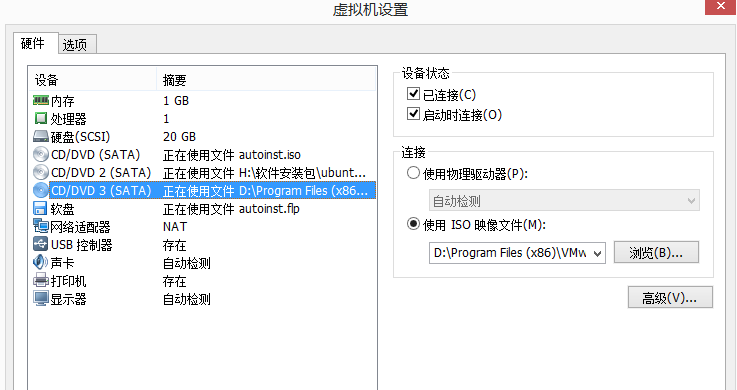
(2)添加好后启动ubuntu,打开光盘文件,可以看到vmware-tools的安装包压缩文件,如下图。
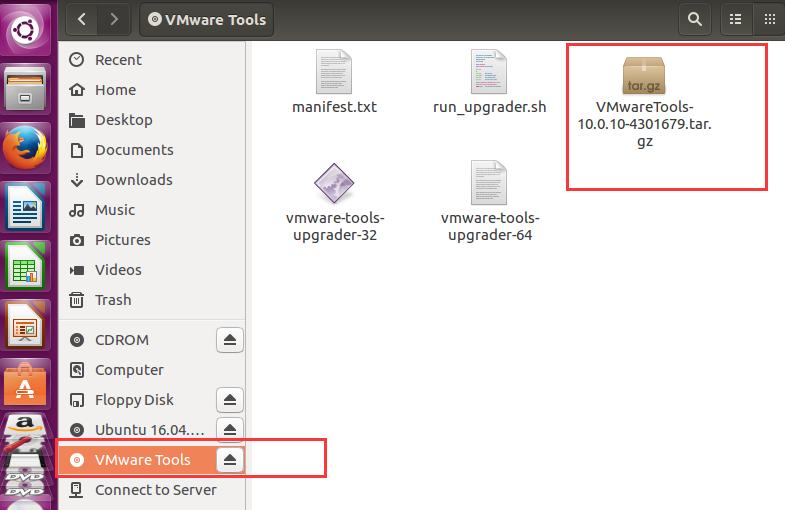
这里我遇到的问题是以前VMware的版本是10.0,进行接下来的操作会报很多错误,经过查阅资料,是10.0版本的虚拟机有bug,所以我将VMware的版本升为12.0,然后重新挂载vmware-tools光盘。

3、打开光盘文件,文件夹中有名字为VMwareTools......tar.gz的压缩包,点击上面的解压缩按钮"extract",浏览选择需要解压到的目录,这里选择的的是home/documents目录,开始解压。

     在下图上方选择目录


4、打开终端界面,输入cd命令到 documents/vmware-tools-distrib 回车,再输入

     回车,以后可能需要输入 yes或者no等选择,我,我们只需要一直回车就可以完成安装。之后重启虚拟机就行。(重启的命令是:reboot)

5、设置共享文件夹:(执行操作前先关闭虚拟机,不然会报未知错误)

                       打开虚拟机-设置-选项,之后启用共享文件夹即可。
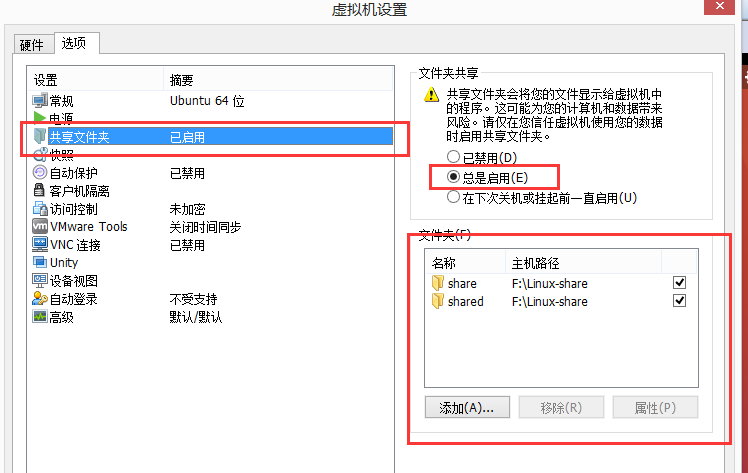
6、启动ubuntu,现在再看/mnt目录,已经存在文件夹hgfs,而且里面有共享文件夹。

完成所有操作。

-------------------------------------------------------------------------------------

有人会遇到找不到hgfs文件夹的问题,经过查阅资料,将解决方案罗列出来供参考:

http://blog.csdn.net/tankaro/article/details/20464253

http://www.cnblogs.com/jiu0821/p/5946062.html

http://blog.sina.com.cn/s/blog_77bf45a901017x4a.html