惯性聚合 高效追踪和阅读你感兴趣的博客、新闻、科技资讯
阅读原文 在惯性聚合中打开

推荐订阅源

W
WeLiveSecurity
T
The Exploit Database - CXSecurity.com
C
CXSECURITY Database RSS Feed - CXSecurity.com
S
Security @ Cisco Blogs
T
Threat Research - Cisco Blogs
TaoSecurity Blog
TaoSecurity Blog
Recent Commits to openclaw:main
cs.AI updates on arXiv.org
腾讯CDC
Exploit-DB.com RSS Feed
OSCHINA 社区最新新闻
OSCHINA 社区最新新闻
T
The Blog of Author Tim Ferriss
Microsoft Azure Blog
罗磊的独立博客
F
Full Disclosure
博客园 - 【当耐特】
C
CERT Recently Published Vulnerability Notes
Engineering at Meta
Engineering at Meta
Application and Cybersecurity Blog
T
Threatpost
I
Intezer
V2EX - 技术
V2EX - 技术
H
Hackread – Cybersecurity News, Data Breaches, AI and More
The Hacker News
The Hacker News
小众软件
小众软件
Google DeepMind News
T
Tailwind CSS Blog
D
Darknet – Hacking Tools, Hacker News & Cyber Security
B
Blog RSS Feed
Microsoft Security Blog
N
News | PayPal Newsroom
MyScale Blog
MyScale Blog
AI
AI
Vercel News
Vercel News
Spread Privacy
Spread Privacy
美团技术团队
CTFtime.org: upcoming CTF events
The GitHub Blog
The GitHub Blog
V
Vulnerabilities – Threatpost
Schneier on Security
Cyberwarzone
Cyberwarzone
G
GRAHAM CLULEY
Help Net Security
Help Net Security
Hacker News: Ask HN
Hacker News: Ask HN
Google DeepMind News
MongoDB | Blog
MongoDB | Blog
L
LINUX DO - 热门话题
U
Unit 42
L
LangChain Blog
Recent Announcements

博客园 - cdboy

.Net8新特性 EF Core 中原生SQL、存储过程、视图的使用 EF Core DBFirst 和Code First小结 软件自动发布自动化之配置文件修改 Windows Service插件服务开源 Linq通用分页数据查询方法 .Net 通用配置文件读取方法 Asp.net 主题中CSS文件的缓存问题 Asp .net 4.0 中ViewStatus 使用 RssTookit使用小结 Windows Live Writer 分享到插件 Windows Resx资源文件编辑工具 IIS 7 中设置文件上传大小限制设置方法 多语言资源文件帮助 转帖:正则表达式的与或非 vs2010使用PostSharp 1.5 window service 插件服务插件开发 插件式服务架构 多语言资源工具之制作类库资源文件
Logstash日志搜集
cdboy · 2015-12-06 · via 博客园 - cdboy

软件准备:

logstash-2.1.0.zip

elasticsearch-2.1.0.zip

kibana-4.3.0-windows.zip

Redis-x64-2.8.2104.msi

下载地址:http://pan.baidu.com/s/1jHyw9Qe

安装软件

1、安装Redis,根据向导直接安装

2、解压logstash-2.1.0.zip到两个目录:logstash logstashagent

3、解压kibana-4.3.0-windows.zip 到目录:kibana,同时修改bin目录下脚本:
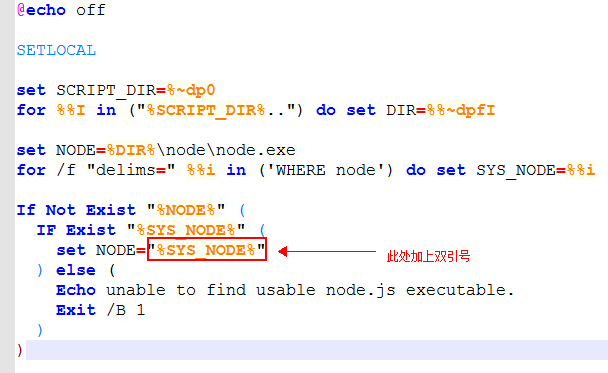
     image

4、elasticsearch-2.1.0.zip 解压到目录:elasticsearch

解压后的目录结构如下:

image

准备相关脚本:

1、启动服务脚本start.bat

image

此脚本用于启动:es kibana Logstash server

其中logsrash-server.conf内容如下:

input{
redis{
host=>"127.0.0.1"
key=>"logstash"
data_type=>"list"
}
}
output{
elasticsearch {
hosts=>"127.0.0.1:9200"
}
}

2、logstash agent启动脚本startagent.bat,内容如下:

image

其中logsrash-agent.conf内容如下:

image

完成以上配置后,就可以启动批处理命令

设置kibana,打开http://localhost:5601/
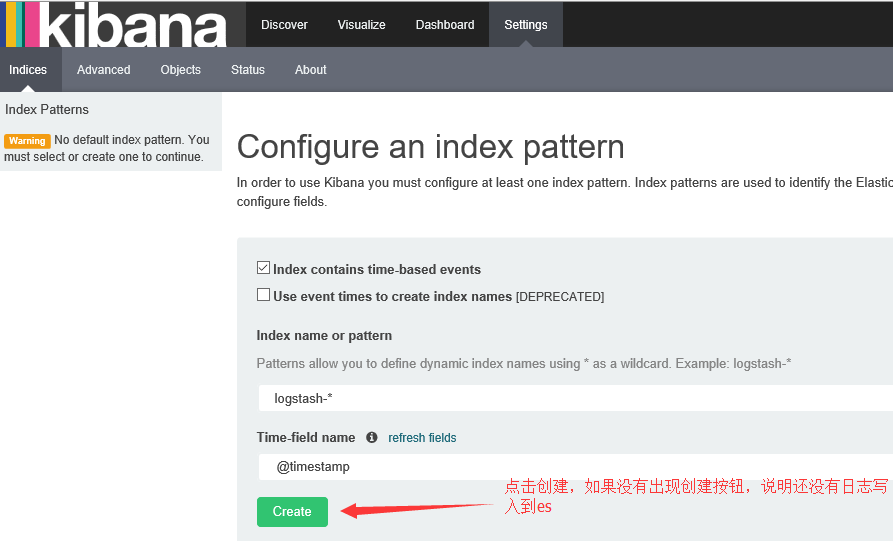
image

image

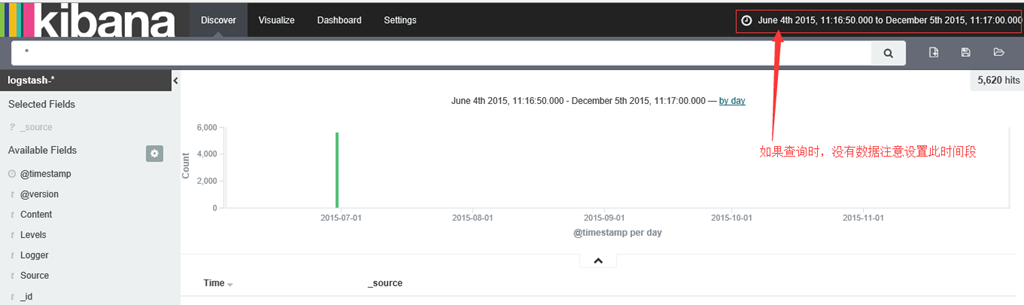
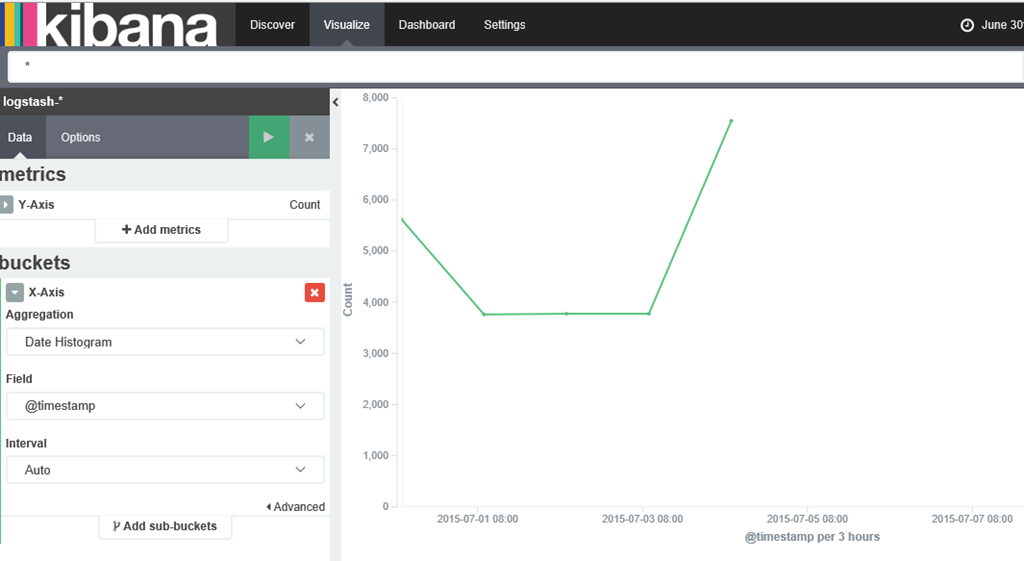
数据分析:

image

参考:

https://www.elastic.co/guide/en/logstash/current/plugins-inputs-file.html

https://www.elastic.co/guide/en/logstash/current/plugins-filters-date.html

https://www.elastic.co/guide/en/logstash/current/plugins-filters-grok.html

https://www.elastic.co/guide/en/logstash/current/plugins-codecs-multiline.html

http://www.cnblogs.com/vovlie/p/4227027.html

http://www.cnblogs.com/shantu/p/4598875.html

http://www.cnblogs.com/yxwkf/p/4753778.html