


惯性聚合 高效追踪和阅读你感兴趣的博客、新闻、科技资讯
阅读原文 在惯性聚合中打开

推荐订阅源

C
Cisco Blogs
Cyberwarzone
Cyberwarzone
Exploit-DB.com RSS Feed
SecWiki News
SecWiki News
Martin Fowler
Martin Fowler
T
Tor Project blog
N
Netflix TechBlog - Medium
C
Cybersecurity and Infrastructure Security Agency CISA
V
Vulnerabilities – Threatpost
V
Visual Studio Blog
GbyAI
GbyAI
PCI Perspectives
PCI Perspectives
D
DataBreaches.Net
Jina AI
Jina AI
H
Heimdal Security Blog
云风的 BLOG
云风的 BLOG
P
Privacy International News Feed
A
About on SuperTechFans
J
Java Code Geeks
美团技术团队
H
Hackread – Cybersecurity News, Data Breaches, AI and More
N
News | PayPal Newsroom
有赞技术团队
有赞技术团队
MyScale Blog
MyScale Blog
博客园 - 司徒正美
C
Check Point Blog
T
Threat Research - Cisco Blogs
Attack and Defense Labs
宝玉的分享
宝玉的分享
AI
AI
Simon Willison's Weblog
C
Cyber Attacks, Cyber Crime and Cyber Security
I
Intezer
P
Proofpoint News Feed
Blog — PlanetScale
Blog — PlanetScale
Apple Machine Learning Research
Hugging Face - Blog
Hugging Face - Blog
The Last Watchdog
The Last Watchdog
freeCodeCamp Programming Tutorials: Python, JavaScript, Git & More
Vercel News
Vercel News
I
InfoQ
阮一峰的网络日志
阮一峰的网络日志
Cisco Talos Blog
Cisco Talos Blog
W
WeLiveSecurity
Hacker News: Ask HN
Hacker News: Ask HN
Recent Commits to openclaw:main
奇客Solidot–传递最新科技情报
奇客Solidot–传递最新科技情报
D
Docker
博客园 - Franky
Security Archives - TechRepublic

博客园 - 蝗虫的大腿

IOS UITest 初始化 ViewController wp8.1 sdk preview 预览版 windows phone 网络开发三部曲(一)各种包的各种抓法 Windows phone UI虚拟化和数据虚拟化(二) Windows phone UI虚拟化和数据虚拟化(一) wp8 longlistselector 动态加载datatemplate windows phone 设计时 数据源 xna 触控操作 备忘 windows phone 在代码中生成ApplicationBar WP8多分辨率解决方案 wp8 模拟器启动失败的解决方法。 Xap 包装失败。未将对象引用设置到对象的实例。 解决办法 wp7 中Panorama控件 title 字体大小 样式的设置 不同服务器数据库之间的数据操作 jquery UI dialog 和 asp.net 控件 出错 失效 - 蝗虫的大腿 在sql server 中执行带参数的存储过程及计算运行时间 对于 抽象类 接口 的理解 http错误列表 常用的js正则表达式 - 蝗虫的大腿 - 博客园
LongListSelector 控件 在 wp7 和wp8中的不同之处
蝗虫的大腿 · 2014-01-08 · via 博客园 - 蝗虫的大腿

众所周知,wp8中的LongListSelector集成到了Rom中。

性能得到了提升,一些api也发生了变化。

在这里总结一下,作为分享,也作为备忘。

参考文献 Windows Phone 8 XAML LongListSelector

1.首先能一眼看出来的,就是滑动时可以固定的,分组header了。

 这个原来我们都是放一个textblock在那个位置,滑动时根据可视区域所在的项目,然后赋给textblock值。
 现在省事多了。
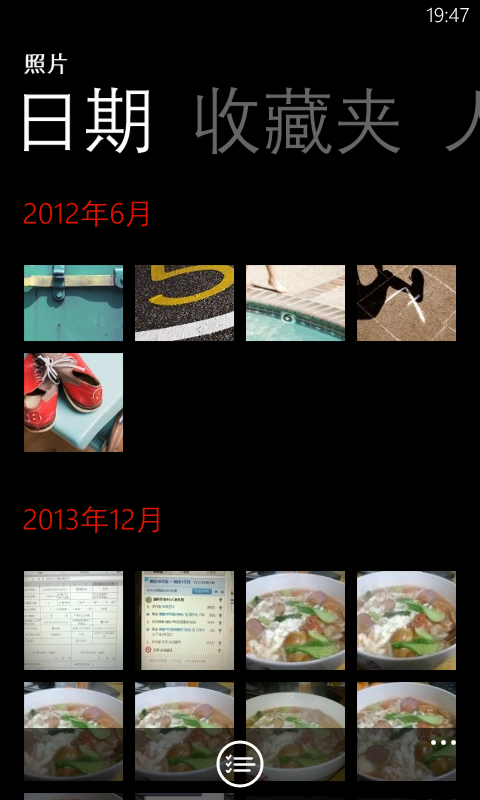
2. 还有原来很费事才能实现的网格模式。现在通过layoutmode设置了。

 3. 原来的分组模板变成了JumpListStyle,由模板变成了样式,刚开始这块弄得有点晕,这让编辑变得有些不方便了。
为了方便记录下编辑好的样式,以后直接拷贝就好了。

 1 <phone:PhoneApplicationPage.Resources>
 2  <phone: JumpListItemBackgroundConverter x:Key="BackgroundConverter"/>
 3        <phone:JumpListItemForegroundConverter x:Key="ForegroundConverter"/>
 4 
 5         <Style x:Key="JumpListStyle" TargetType="phone:LongListSelector">
 6             <Setter Property="LayoutMode" Value="List" />
 7             <Setter Property="Margin" Value="12,12,0,0"/>
 8             <Setter Property="ItemTemplate">
 9                 <Setter.Value>
10                     <DataTemplate>
11                         <Border Background="{Binding Converter={StaticResource BackgroundConverter}}" 
12                             Width="470" 
13                             Height="70" 
14                             Margin="6">
15                             <TextBlock Text="{Binding Key}"
16                                 Foreground="{Binding Converter= {StaticResource ForegroundConverter}}"
17                               Font Family="{StaticResource PhoneFontFamilySemiBold}"
18                                   FontSize="28"
19                                 Padding="2"
20                                 VerticalAlignment="Bottom"/>
21                         </Border>
22                     </DataTemplate>
23                 </Setter.Value>
24             </Setter>
25         </Style>
26 </phone:PhoneApplicationPage.Resources>

View Code

这里有一点值得注意的是 JumpListItemBackgroundConverter and JumpListItemForegroundConverter
如果想设置可点击或不可点击的样式,可以用Disabled="Bisque" Enabled="Aqua"像下面这样

<phone:JumpListItemBackgroundConverter Disabled="Bisque" Enabled="Aqua" x:Key="BackgroundConverter"/><phone:JumpListItemForegroundConverter Disabled="Azure" Enabled="BlueViolet" x:Key="ForegroundConverter"/>

4.下面是官方给的一些属性,方法,和事件的变化。

从Windows Phone Toolkit 7.1的属性中

删除了

  • BufferSize
  • IsBouncy
  • IsScrolling
  • MaximumFlickVelocity
  • ShowListFooter/ShowListHeader

修改了

Windows Phone Toolkit 7.1

Windows Phone 8 ROM SDK

DisplayAllGroups

Display all groups in the list whether or not they have items. Default is true.

HideEmptyGroups

Hide all groups in the list without items. Default is false.
分组下没有项的话隐藏分组

GroupItemTemplate

JumpListStyle

IsFlatList

Gets or sets whether the list is flat instead of a group hierarchy. Default is true.

IsGroupingEnabled

Gets or sets whether the list is flat instead of a group hierarchy. Default is false. 分组展示需要开启此属性

新增部分

  • GridCellSize
  • LayoutMode LongListSelectorLayoutMode { List, Grid };
  • ManipulationState
public enum ManipulationState
{
    Idle, // nothing is manipulating or animating
    Manipulating, // Gesture is being recognized, finger is down and any delta is received, drag/pan or flick
    Animating //No Gesture is currently happening, but there is some animation happening, like scroll animation or compression animation
} 

从Windows Phone Toolkit 7.1的方法中

删除了

  • AnimateTo(object item)
  • CloseGroupView()
  • DisplayGroupView()
  • GetItemsInView()
  • GetItemsWithContainers(bool onlyItemsInView, bool getContainers)
  • ScrollToGroup(object group)

从Windows Phone Toolkit 7.1的事件中

删除了

  • StretchingBottom
  • StretchingCompleted
  • StretchingTop

修改了

Windows Phone Toolkit 7.1

Windows Phone 8 ROM SDK

ScrollingCompleted

ScrollingStarted

ManipulationStateChanged

(coupled with ManipulationState property)两者合二为一了

Link/Unlink

ItemRealized/ ItemUnrealized

With EventArgs including ItemKind

C#

  1. publicclassItemRealizationEventArgs : EventArgs
  2. {
  3.     ///<summary>
  4.     /// The ContentPresenter which is displaying the item.
  5.     ///</summary>
  6.     publicContentPresenter Container { get; }
  7.  
  8.     ///<summary>
  9.     /// Gets the kind of item that is realized
  10.     ///</summary>
  11.     publicLongListSelectorItemKind ItemKind { get; }
  12.  
  13. }
  14. ///<summary>
  15. /// Different kinds of items that exists in LongListSelector
  16. ///</summary>

可以看到,其实变化挺大的。

wp 8 sdk中的LLS性能 明显要比之前提高了不少。

当然 panorama,和pivot的性能也有了很大的提高,尤其是panorama的数据加载。

最后微软建议我们用longlistselector代替ListBox(这种说法几乎到处可见)

那么到底LLS比ListBox好在那里呢?请关注我的下篇文章。