惯性聚合 高效追踪和阅读你感兴趣的博客、新闻、科技资讯
阅读原文 在惯性聚合中打开

推荐订阅源

Forbes - Security
Forbes - Security
A
Arctic Wolf
M
MIT News - Artificial intelligence
T
Threat Research - Cisco Blogs
T
The Exploit Database - CXSecurity.com
C
CERT Recently Published Vulnerability Notes
NISL@THU
NISL@THU
L
Lohrmann on Cybersecurity
Martin Fowler
Martin Fowler
A
About on SuperTechFans
P
Palo Alto Networks Blog
Project Zero
Project Zero
The GitHub Blog
The GitHub Blog
WordPress大学
WordPress大学
Blog — PlanetScale
Blog — PlanetScale
博客园_首页
大猫的无限游戏
大猫的无限游戏
Cisco Talos Blog
Cisco Talos Blog
P
Proofpoint News Feed
D
DataBreaches.Net
Cyberwarzone
Cyberwarzone
T
Tor Project blog
IT之家
IT之家
P
Proofpoint News Feed
Help Net Security
Help Net Security
S
Securelist
Threat Intelligence Blog | Flashpoint
C
CXSECURITY Database RSS Feed - CXSecurity.com
Microsoft Azure Blog
V2EX - 技术
V2EX - 技术
K
Kaspersky official blog
Hugging Face - Blog
Hugging Face - Blog
MongoDB | Blog
MongoDB | Blog
B
Blog
N
News and Events Feed by Topic
The Cloudflare Blog
S
Schneier on Security
P
Privacy & Cybersecurity Law Blog
T
The Blog of Author Tim Ferriss
Recorded Future
Recorded Future
Last Week in AI
Last Week in AI
The Last Watchdog
The Last Watchdog
Hacker News - Newest:
Hacker News - Newest: "LLM"
L
LangChain Blog
I
InfoQ
F
Full Disclosure
The Register - Security
阮一峰的网络日志
阮一峰的网络日志
H
Hacker News: Front Page
V
V2EX

博客园 - 蝗虫的大腿

IOS UITest 初始化 ViewController wp8.1 sdk preview 预览版 windows phone 网络开发三部曲(一)各种包的各种抓法 Windows phone UI虚拟化和数据虚拟化(二) LongListSelector 控件 在 wp7 和wp8中的不同之处 wp8 longlistselector 动态加载datatemplate windows phone 设计时 数据源 xna 触控操作 备忘 windows phone 在代码中生成ApplicationBar WP8多分辨率解决方案 wp8 模拟器启动失败的解决方法。 Xap 包装失败。未将对象引用设置到对象的实例。 解决办法 wp7 中Panorama控件 title 字体大小 样式的设置 不同服务器数据库之间的数据操作 jquery UI dialog 和 asp.net 控件 出错 失效 - 蝗虫的大腿 在sql server 中执行带参数的存储过程及计算运行时间 对于 抽象类 接口 的理解 http错误列表 常用的js正则表达式 - 蝗虫的大腿 - 博客园
Windows phone UI虚拟化和数据虚拟化(一)
蝗虫的大腿 · 2014-01-17 · via 博客园 - 蝗虫的大腿

今天和大家分享一些关于windows phone ui虚拟化和数据虚拟化的一些知识。

也顺便回答我上一篇【LongListSelector 控件 在 wp7 和wp8中的不同之处】里,留下的那个问题,微软为什么推荐使用longlistselector.
如果不是新人,那么对于"虚拟化"这个词应该不陌生。

"虚拟化"简单来说,就是在数据量很大的时候,我们只加载与可视区域(如手机屏幕)相应的少量数据。

我们先来看一下UI虚拟化。

一:Windows phone UI虚拟化

对于wp的ui虚拟化,其实我们并不需要花太多心思,因为系统自带且用的最多的listbox 和longlistselector。

已经是帮我们实现了虚拟化。我们只需要注意别把美好的虚拟化破坏掉就好了。

1.首先,演示一下虚拟化。

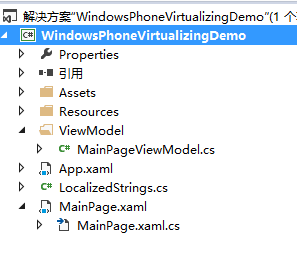
MainPageViewMode.cs

public class MainPageViewModel

{

//省略

public MainPageViewModel()

{ //我们模拟1000条商品数据

listProduct = new List<Product>(1000);

for (int i = 0; i < 1000; i++)

{

listProduct.Add(new Product { Id = i, Name = "产品-" + rnd.Next(1000, 10000).ToString(), Category = "" });

} } }

Mainpage.xaml

<DataTemplate x:Key="LBDataTemplate">

<Grid Loaded="Grid_Loaded" d:DesignWidth="411.045" d:DesignHeight="78.209">

<TextBlock HorizontalAlignment="Left" Margin="10,17,0,25" TextWrapping="Wrap" Foreground="Black"

Text="{Binding Name}" Height="36" Width="197" FontSize="30"/>

</Grid>

</DataTemplate>

<ListBox Background="AliceBlue" ItemsSource="{Binding ListProduct}" x:Name="listbox" Grid.Row="1" ItemTemplate="{StaticResource LBDataTemplate}" />

Loaded="Grid_Loaded" 此事件触发说明模板被加载。这里我们用的是ListBox控件

MainPage.cs

MainPageViewModel vm;

public MainPage()

{

InitializeComponent();

vm= new MainPageViewModel();

LayoutRoot.DataContext = vm;

}

private void Grid_Loaded(object sender, RoutedEventArgs e)

{

vm.LoadItemCounter++;//界面上item被渲染的数目

}
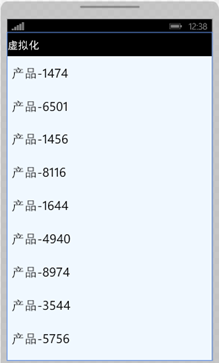
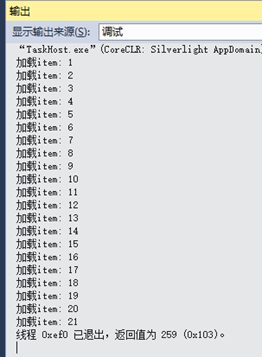
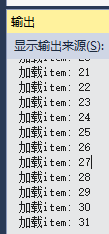
我们看到我们绑定的数据源有1000条数据,页面加载后item只渲染了21个。看似是有这样一个规律的 可视区域数目*2+3

随着我们滑动列表,Item也在不断被渲染。

嗯哪,这就是所谓的UI虚拟化了。

2.常见的破坏虚拟化的场景

很多时候,我们在编辑模板的时候,会破坏掉虚拟化。看下面

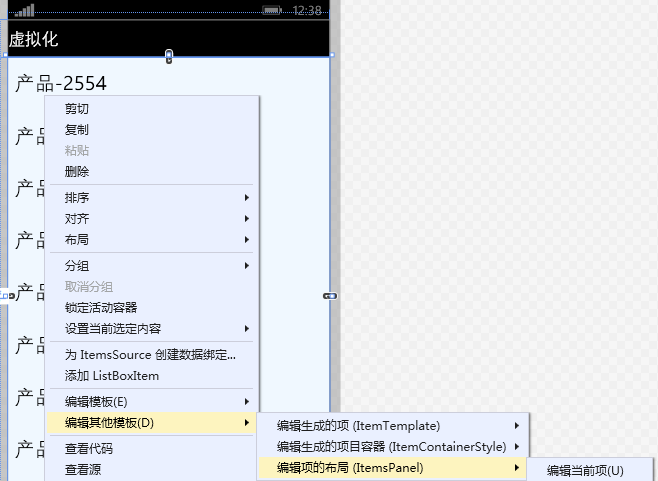
当我们编辑ListBox的ItemsPanel的时候,工具帮我们自动生成了下面的代码。

<ItemsPanelTemplate x:Key="ItemsPanelTemplate">

<StackPanel/>

</ItemsPanelTemplate>
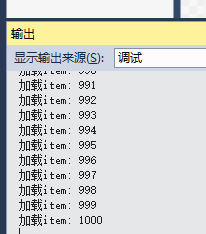
这时候我们再次运行

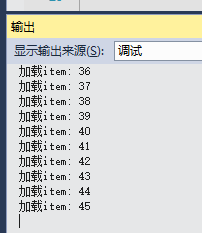
WoW ! 这次页面一加载,ListBox就在不停地渲染Item.直至全部!

为什么会产生这种情况?

因为实现listbox的关键是默认的容器 VirtualizingStackPanel 通过工具编辑变成了StackPanel

改回VirtualizingStackPanel

<ItemsPanelTemplate x:Key="ItemsPanelTemplate">

<VirtualizingStackPanel/>

</ItemsPanelTemplate>
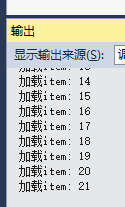
呼! 星星又亮了!

好,到这里们我己经掌握了,什么是UI虚拟化,如何避免常见的破坏UI虚拟化的场景。

以及如何判断我们对控件更改后,节操和虚拟化还在不在。

妈妈再也不用担心我们不小心破坏虚拟化了!

下面我们来看一下LonglistSelector

还是上面的例子。我们把<ListBox 换成 <phone:LongListSelector 去掉ItemsPanel="{StaticResource ItemsPanelTemplate}"

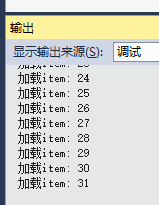
还是虚拟化,只不过默认生成的item数不一样了。

那么为什么微软官方推荐我们用longlistselector代替ListBox呢?

我们继续滑动。

看输出!

什么!!!还是31,没反应?!!!

是的,Longlistselector的 DataTemplate得到了复用。我们的item的datatemplate不会再渲染新的了。

打完,收功!

东西有点多,分两篇吧,下一篇是对性能提升更有用处的数据虚拟化。

附件Demo