









Partner Engineer, Google Cloud



What if your load balancer could stop attacks before your web application even sees them?
Google Cloud Service Extensions now enables real-time traffic inspection directly within the load balancer pipeline, and when combined with Fastly's Next-Gen WAF, organizations can achieve enterprise-grade security without sacrificing performance.
In this post, we'll explore how this powerful integration works and why it matters for modern cloud architectures, and walk through a practical deployment that you can implement today.
Real-World Impact: Performance Meets Protection
Let's look at what this means in practice with a realistic scenario:
The Setup: An e-commerce platform running on Google Kubernetes Engine (GKE) serving 10,000 requests per second across multiple regions.
The Challenge: Protecting against credential stuffing attacks, SQL injection, and bot traffic while maintaining sub-200ms response times.
The Solution: Deploy the Next-Gen WAF as a Service Extension callout, enabling:
Zero-latency security decisions at the load balancer level
Automatic scaling with your existing GKE infrastructure
Regional deployment for optimal performance
Fail-open configuration to maintain availability during agent maintenance
How Fastly's Next-Gen WAF Works with Google Cloud Service Extensions
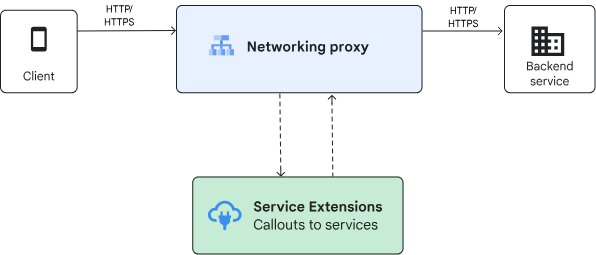
Google Cloud Service Extensions offers two ways to insert custom logic: plugins and callouts.
Callouts let you use Cloud Load Balancing to make Envoy gRPC calls to Google Cloud services and user-managed services during data processing.
Fastly’s Next-Gen WAF can run as general-purpose gRPC server on user-managed compute VMs, on GKE Pods on GKE Multi-Cloud, or on on-premises environments.
Implementation Deep Dive: From Zero to Protected
The integration leverages Envoy's external processing protocol (ExtProc) via gRPC, enabling the WAF to inspect and act on traffic at critical stages:
1. REQUEST_HEADERS: Analyze incoming request headers against threat intelligence
2. REQUEST_BODY: Stream and inspect payload data for malicious content
3. RESPONSE_HEADERS: Monitor outbound responses for data leakage
This granular inspection capability means threats are identified and blocked before they ever reach your application backend.
Deployment from scratch involves creating and configuring an application load balancer that supports extensions.
To deploy a callout backend service using the Next-Gen WAF agent, one can use our ready made docker image. In the terminal snippets below, we’ll create a VM instance to house, configure and deploy the Next-Gen WAF agent in the load balancers network.
More detailed information can be found on Fastly’s documentation site.
gcloud compute instances create callouts-vm \
 --zone=$ZONE \
 --network=lb-network \
 --subnet=backend-subnet \
 --machine-type=e2-medium \
 --image-family=cos-stable \
 --image-project=cos-cloud \
 --tags=allow-ssh,load-balanced-backend \
 --metadata-from-file=startup-script=startup-script-tls.sh
#!/bin/bash
# Create certificate directory
mkdir -p /etc/ssl/certs/sigsci
# Generate self-signed certificates for the gRPC service
openssl req -x509 -newkey rsa:4096 \
-keyout /etc/ssl/certs/sigsci/key.pem \
-out /etc/ssl/certs/sigsci/cert.pem \
-days 365 -nodes \
-subj "/C=US/ST=CA/L=SF/O=Fastly/CN=ext11.com"
# Set proper permissions for the sigsci user inside the container
chmod 644 /etc/ssl/certs/sigsci/key.pem
chmod 644 /etc/ssl/certs/sigsci/cert.pem
# Start Signal Sciences agent with TLS configuration
docker run -d \
--name sigsci-agent \
--restart unless-stopped \
-p 443:443 \
-v /etc/ssl/certs/sigsci:/etc/ssl/certs/sigsci:ro \
-e SIGSCI_ACCESSKEYID=<YOUR ACCESS KEY> \
-e SIGSCI_SECRETACCESSKEY=<YOUR SECRET KEY> \
-e SIGSCI_ENVOY_GRPC_ADDRESS=0.0.0.0:443 \
-e SIGSCI_ENVOY_EXTPROC_ENABLED=true \
-e SIGSCI_ENVOY_GRPC_CERT=/etc/ssl/certs/sigsci/cert.pem \
-e SIGSCI_ENVOY_GRPC_KEY=/etc/ssl/certs/sigsci/key.pem \
-e SIGSCI_DEBUG_LOG_VERBOSITY=3 \
signalsciences/sigsci-agent:latest
# Log startup completion
echo "Signal Sciences agent with TLS started at $(date)" >> /var/log/startup.logReady to Deploy?
The integration of Fastly's Next-Gen WAF with Google Cloud Service Extensions offers a compelling path forward for organizations serious about cloud security. The combination of real-time threat protection, cloud-native deployment, and enterprise-scale performance makes this architecture suitable for the most demanding production environments.
The future of web application security is here, and it's deeply integrated with your cloud infrastructure. Time to make the move.
Want to learn more? Check out our comprehensive setup guide for detailed implementation steps and troubleshooting tips.