



惯性聚合 高效追踪和阅读你感兴趣的博客、新闻、科技资讯
阅读原文 在惯性聚合中打开

推荐订阅源

Y
Y Combinator Blog
美团技术团队
H
Hacker News: Front Page
Spread Privacy
Spread Privacy
Threat Intelligence Blog | Flashpoint
T
Tenable Blog
Simon Willison's Weblog
T
The Exploit Database - CXSecurity.com
Cisco Talos Blog
Cisco Talos Blog
A
Arctic Wolf
C
CXSECURITY Database RSS Feed - CXSecurity.com
Application and Cybersecurity Blog
A
About on SuperTechFans
F
Fortinet All Blogs
量子位
GbyAI
GbyAI
CTFtime.org: upcoming CTF events
The Hacker News
The Hacker News
AWS News Blog
AWS News Blog
Forbes - Security
Forbes - Security
Help Net Security
Help Net Security
I
InfoQ
有赞技术团队
有赞技术团队
W
WeLiveSecurity
Google DeepMind News
Engineering at Meta
Engineering at Meta
cs.CV updates on arXiv.org
S
Secure Thoughts
cs.AI updates on arXiv.org
Webroot Blog
Webroot Blog
酷 壳 – CoolShell
酷 壳 – CoolShell
让小产品的独立变现更简单 - ezindie.com
博客园_首页
C
Check Point Blog
T
Troy Hunt's Blog
Security Archives - TechRepublic
Latest news
Latest news
P
Proofpoint News Feed
Jina AI
Jina AI
Last Week in AI
Last Week in AI
Martin Fowler
Martin Fowler
雷峰网
雷峰网
博客园 - Franky
L
LangChain Blog
罗磊的独立博客
Blog — PlanetScale
Blog — PlanetScale
Google DeepMind News
D
Docker
G
GRAHAM CLULEY
Cyber Security Advisories - MS-ISAC

博客园 - Raymond Zhang

案例分享:电信行业零售业务CRM架构 客户关系管理及客户服务简介(译) How-to: disable the web-security-check in Chrome for Mac 基于HANA Cloud的SAP Mobility Platform正式发布 Automate debugging using ABAP debugger scripts Some notes about CRM Roles Concept in Web UI Fixing the SAPOSS RFC connection via Secure Storage Migration How-to: Move the items in local to specific packages A trouble shooting case - Background job ZABC failed Gateway Notes (1) SAP Netweaver Gateway Add-on for Backend System Installation Some basic skills (1) - Change the background image after logon Why is “GUID” used in SAP CRM? SPM (Service Parts Management) Inter-Company STO - CRM Billing issue Enhancement on SAP CRM Web UI page toolbar How to estimate the active condition records in a CRM system (2) How to estimate the active condition records in a CRM system (1) How-to: Set up the delta upload for Vendor Master Data from CRM to ERP Introduction of new feature ‘Tag Cloud’ with SAP CRM 7.0 Ehp 1
Some basic skills (2) - Configure the printer for your SAP systems
Raymond Zhang · 2012-07-25 · via 博客园 - Raymond Zhang

SPAD – A central point for all SPOOL related tasks. Let’s start from here.

Target is to make sure you could use the SAP system to print directly. Don’t need to take down the content to local folder and manually print it out with printers configured on your laptop.

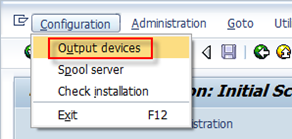
Most of the steps could be found here. Basically you need to start with creating an output device (the printer you selected when you trigger printing in SAP system).
image

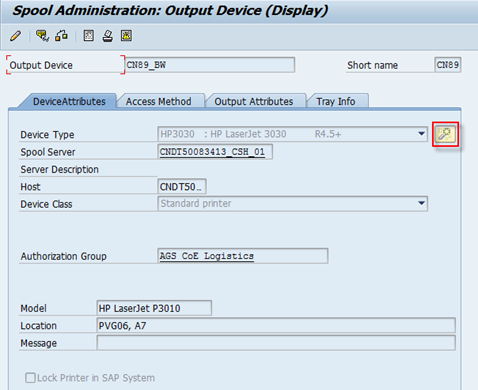
Then switch to change mode and choose “Create” to create a new printer in the SAP system.
image

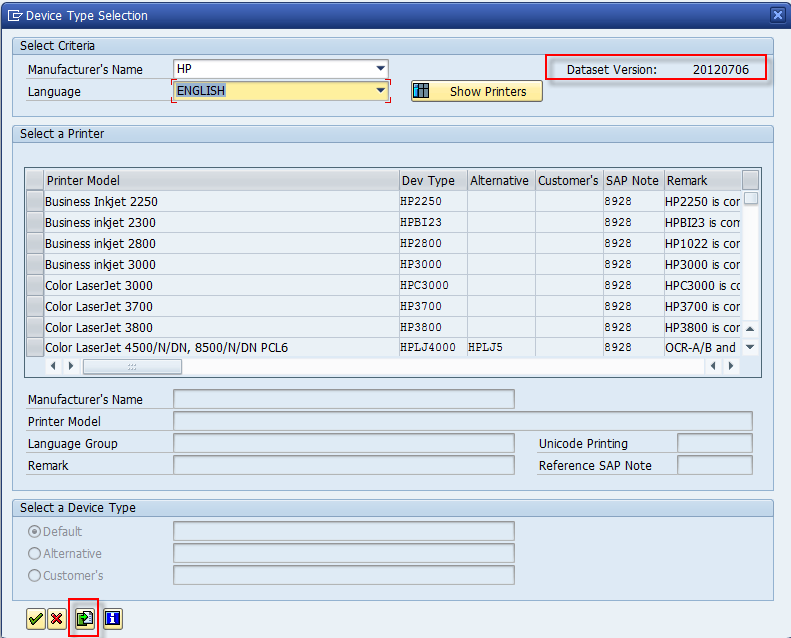
The device type is the printer’s type and the if the information is not maintained in the system, there is a wizard to help on the device type information. Note 1036961 provides how to get this information updated.
image

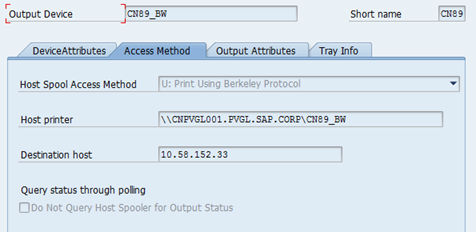
In the Access Method tab, you can maintain how the printer could triggered. And there are mainly two different ways.

Method 1 – Print remotely via network printer.

If you don’t maintain the printer locally on the client device, the system admin should be responsible to maintain the related server information.
image

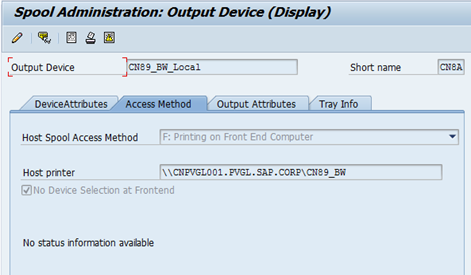
Method 2 – Print locally with the printer on your laptop.

In this way normally you could maintain the Host Printer as “__Default” so that the default printer on each client device could be matched. Here I maintain it as one of our office printer and that should work from most of my colleagues. So there is also no issue about the Host Printer name. However, if there is no proper printer maintained for other clients, spool requests using this printer will fail.
image

For the explanations of the terms above, you can see it at: http://www.way2sap.com/sap-article/how-to-configure-printer-on-sap-server-1495/

For trouble shooting, you could check SP01 the spool request status details and also you could check the dev_wp* trace for the SPO work process.

(The End)

Raymond Zhang
If you want to discuss with me about any idea, please contact me at raymond.zhang@sap.com