








See what's new in Copilot Studio, April 2026: updates to workflows, increased control over agent operations, and an expanded agent usage estimator.
As organizations scale their use of AI agents, IT teams face a familiar challenge: how do you expand automation without losing control? Individual agents can be powerful, but as they connect through workflows and integrate across systems, requirements for visibility, governance, and predictability become much more complex. And capability must be grounded in confidence.
The April 2026 updates in Microsoft Copilot Studio focus on building that confidence across the platform. From increasing visibility and governance for admins to expanding intelligent workflow capabilities, these features help you move from isolated automation to connected, reliable systems.
Build and scale agents with better visibility and control
As agents expand across organizations and business processes, admins need clear visibility into how they’re performing, how they’re secured, and what they’ll cost to run. These updates help you manage agents more effectively without adding more friction—or risk.
See agent performance and status more clearly
Copilot Studio now surfaces agent status directly in the authoring experience, giving you immediate insight into each agent’s security and protection posture. You can quickly identify issues like authentication gaps or policy impacts and investigate them at the source. This helps reduce guesswork and speed up resolution.
As you gain clearer visibility into agent performance, you can also share those insights more safely. The , now generally available, introduces read-only access to an agent’s Analytics page.
The Analytics Viewer role allows us to provide meaningful performance insights to business and operational stakeholders while maintaining strict production governance. It cleanly separates operational visibility from agent configuration and publishing rights.
—Mohamed Arhab, Solution Architect, City of Montreal
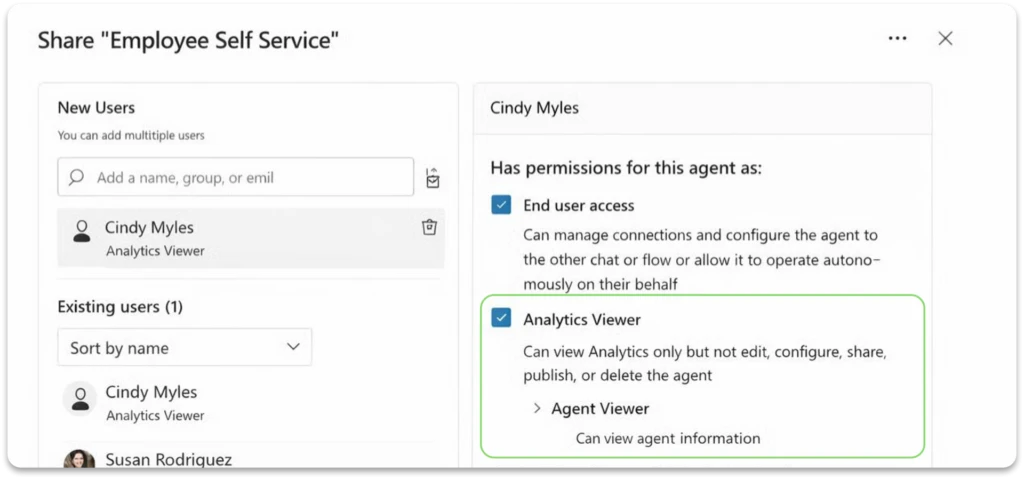
Allowing analysts and stakeholders to monitor performance, without giving them the ability to modify the agent, helps resolve a long-standing tradeoff between visibility and control. Now it’s easier to share insights broadly while maintaining clear separation of responsibilities.
Speaking of extending visibility and control, there’s more good news: Microsoft Agent 365 is now generally available. Agent 365 is the centralized control plane for managing agents across your environment. This brings together visibility into agent inventory, permissions, behavior, and activity in one place so that you can monitor and govern agents consistently, not just where they’re built.
For Copilot Studio customers, this means the agents you create can be managed alongside agents from Microsoft 365 and partner ecosystems, with shared policies, security controls, and lifecycle oversight. As Agent 365 continues to expand its integrations and multi-agent capabilities, it further strengthens Copilot Studio’s role as the place where agents are built—while governance scales across the full system. Learn more about Agent 365.
Plan and scale with clearer cost visibility
The expanded agent usage estimator now includes Dynamics 365 agents, such as Sales Qualification Agent and Customer Service Agent. By forecasting Copilot credit consumption across both Copilot Studio and Dynamics 365 scenarios in one place, you can model usage more accurately and scale deployments—helping avoid unexpected cost surprises.
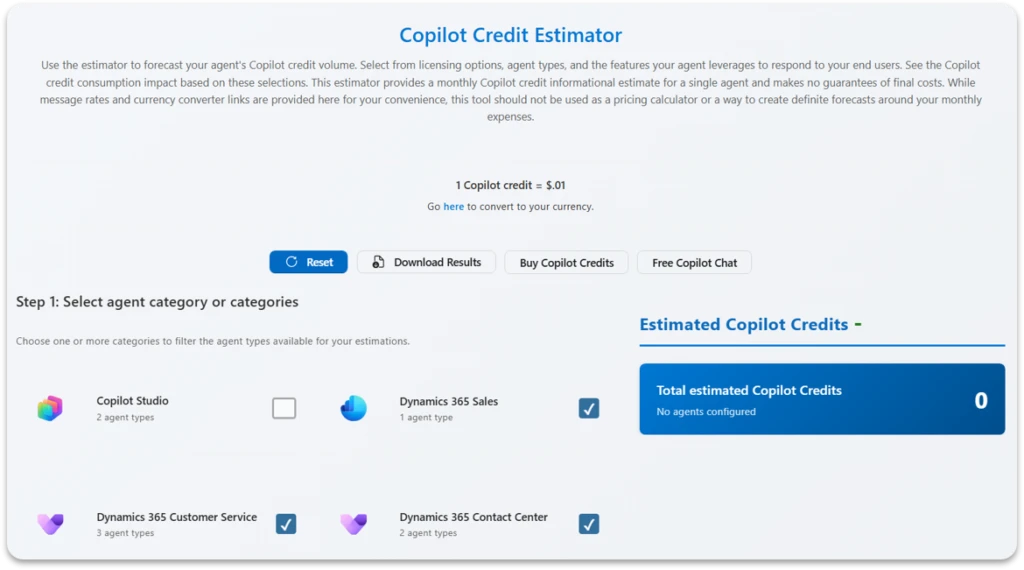
With these recent admin updates, the result is fewer bottlenecks, better-informed decisions, and a clearer path to scaling agents across your organization.
Expand workflows into intelligent, governed automation systems
In Copilot Studio, workflows are step-by-step automation processes that complete actions or tasks in a deterministic, reliable way. As workflows become the backbone of business automation, these new updates help you extend their capabilities—bringing in more AI-powered reasoning, centralized governance, and a growing ecosystem of tools in a way that’s reliable and secure by design.
Design and validate workflows with more clarity
One powerful way to make your workflows more adaptable and effective is by embedding Copilot Studio agents directly into them. Using agent nodes inside workflows means that instead of just performing the task with rigid logic, the workflow can delegate reasoning, decisions, or output generation to an agent at any prescribed step of the process.
This makes workflows more resilient to real-world situations—which have a lot of variability—while still following the defined structure that make IT teams less nervous.
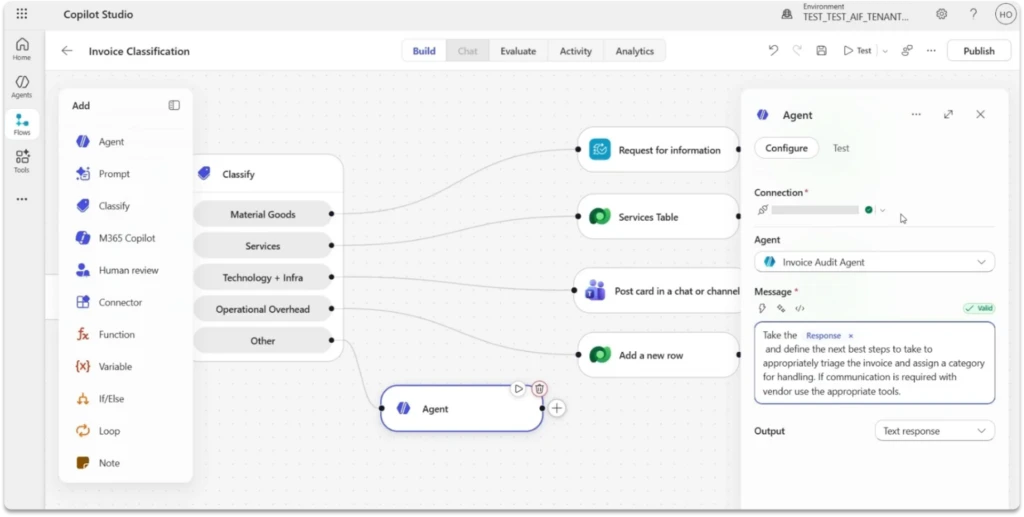
In addition to embedding agents, you can now also add and configure AI actions directly within the flow to understand requests, route work, and generate content dynamically. And with the ability to test individual steps using sample inputs, teams can validate behavior earlier, debug more effectively, and refine workflows before they’re deployed.
In practice: Unifi, North America’s largest provider of aviation ground handling services, used Copilot Studio and Power Platform to automate legal contract review by combining agents with deterministic workflows. Instead of relying on a single agent, they broke the process into coordinated steps that extract, classify, and validate key terms across documents. This system reduced contract processing from days to minutes and delivers the same level of performance as much more expensive, off-the-shelf products built specifically for the legal industry.
The result is a workflow experience that’s more adaptable and more predictable to operate. This helps give teams—both makers and administrators—more confidence in creating more sophisticated automation that doesn’t sacrifice clarity or control.
Scale workflows across systems with built-in governance
Speaking of clarity and control, there are also new updates to workflows that help you scale automation without introducing new governance risks.
Workflows can now connect to a broader ecosystem of tools, including model context protocol (MCP) server-enabled tools (preview), which makes it easier to take action across systems while staying within Microsoft security, permission, and compliance boundaries. This allows workflows to execute tasks and involve users for review and approval within governed processes.
We’ve also introduced a centralized, admin-controlled environment for Workflows Agent. This makes it easier to apply data loss prevention (DLP) policies consistently and maintain visibility across automation, so workflows remain compliant by design, even as they scale.
Together, these updates make it easier to move from isolated automations to connected, intelligent systems. With those systems, you can scale workflows across your organization with greater confidence, control, and flexibility.
Bring business apps directly into your agents
As agents become part of everyday work, a common gap emerges: they can generate insight, but acting on that insight often requires switching tools, re-creating context, or handing work off across systems. Support for apps in agents, now generally available, helps to close that gap.
Turn intent into action inside Copilot Chat
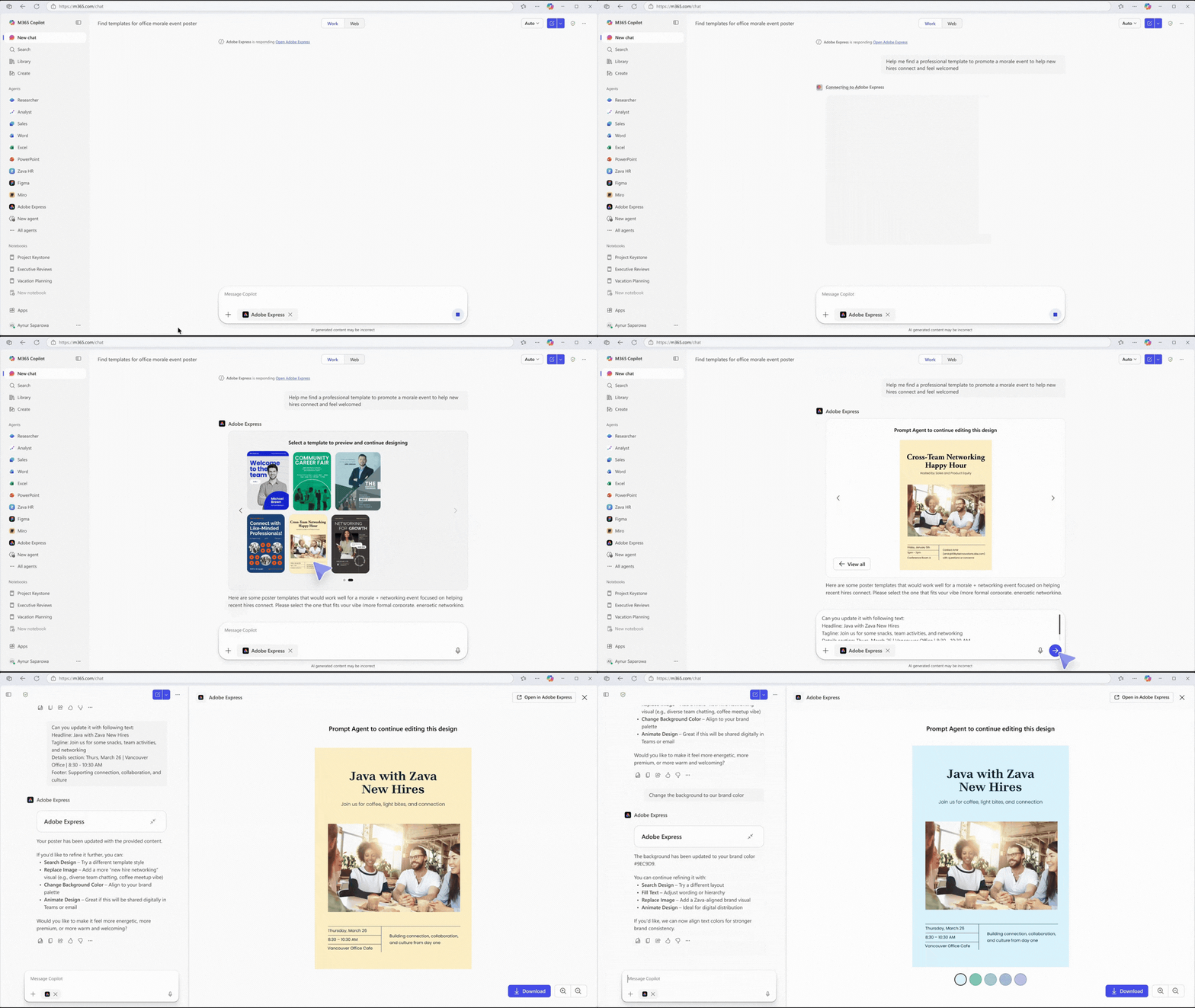
Agents built in Copilot Studio can now surface rich, interactive app experiences directly in Copilot Chat, allowing users to review data, update records, approve requests, or create assets in place. Instead of switching tools or re-creating context, work happens seamlessly within the flow of conversation. This helps reduce friction and empowers teams to move faster from insight to execution.
Work across the systems your business already runs on
Apps in agents bring together Microsoft and partner applications—from Power Apps to Dynamics 365 and beyond—so agents can take action across the systems your teams already use. These experiences are built and orchestrated in Copilot Studio, where you define how agents interact with apps, data, and workflows to support real business processes.
Extend and scale with trusted integrations
Through the Agent Store, you can adopt ready-made agent experiences or extend your own with partner-built integrations—while maintaining enterprise-grade security, permissions, and admin control. Options include:
- Adobe Express (seen above)
- Box
- Figma
- Monday.com
- Wix
These options (and more) make it easier to scale agent usage across your organization without losing oversight.
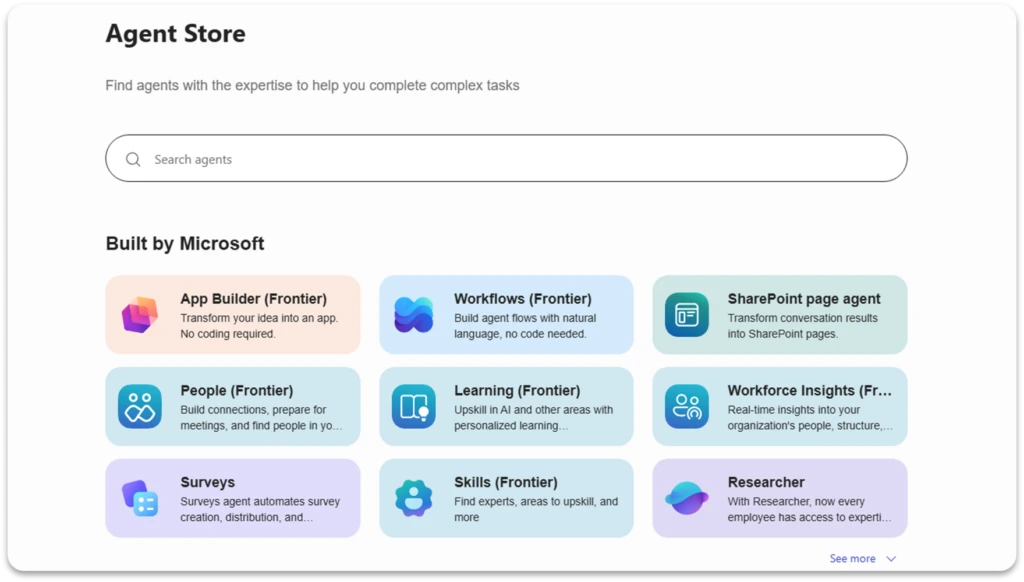
These capabilities, all generally available now, help teams shift agents from being informational tools to operational ones. They bring real business actions into Copilot Studio agents in a way that’s both more functional for users and manageable for IT—helping teams complete work efficiently while maintaining the governance needed to scale.
Learn more about apps in agents.
What else is new and improved in Copilot Studio
- Evaluation insights and automation updates now make it easier to generate test cases from analytics, simulate multi-turn interactions, and automate evaluations through APIs and connectors. You can turn real user conversations into targeted test sets, better reflect complex, real-world scenarios, and run evaluations programmatically. Together, these capabilities help you operationalize agent quality and maintain confidence as you scale.
- Custom metrics for outcome-based measurement help you track what actually matters to your business, not just usage. Define success in your own terms—like resolution rates or conversions—and automatically evaluate conversations against those outcomes, making it easier to understand impact, align stakeholders, and make data-driven decisions.
- Work IQ API is now available in public preview to bring Copilot’s intelligence layer—grounded in organizational context, memory, and signals—into your own agents and workflows. With built-in orchestration and enterprise-grade security, you can build agents that understand what’s happening across your business without managing raw data or complex integrations.
- Agent-to-agent (A2A) communication is now supported in Work IQ, allowing agents to collaborate as peers and delegate tasks using shared organizational context. This makes it easier to build multi-agent systems that can coordinate work, maintain context across interactions, and deliver more grounded, role-aware outcomes.
- GPT-5.5 Thinking is now available in Copilot Studio early release cycle environments as GPT-5.5 Reasoning, further expanding model choice with its more advanced analysis capabilities. This model is also rolling out across Microsoft 365 Copilot in Copilot Chat, Word, Excel, and PowerPoint.
Stay up to date on all things Copilot Studio
More is coming across voice channels, workflows, and the building experience. Check out all the updates as we ship them, as well as new features releasing in the next few months here: What’s new in Microsoft Copilot Studio.
To learn more about Microsoft Copilot Studio and how it can transform productivity within your organization, visit the Copilot Studio website or sign up for our free trial today.