

惯性聚合 高效追踪和阅读你感兴趣的博客、新闻、科技资讯
阅读原文 在惯性聚合中打开

推荐订阅源

爱范儿
爱范儿
博客园_首页
W
WeLiveSecurity
S
Secure Thoughts
S
Security @ Cisco Blogs
Recent Commits to openclaw:main
Hugging Face - Blog
Hugging Face - Blog
www.infosecurity-magazine.com
H
Hacker News: Front Page
Project Zero
Project Zero
cs.CV updates on arXiv.org
U
Unit 42
N
News and Events Feed by Topic
N
News and Events Feed by Topic
Hacker News - Newest:
Hacker News - Newest: "LLM"
Forbes - Security
Forbes - Security
T
Tor Project blog
I
Intezer
B
Blog
F
Full Disclosure
Security Archives - TechRepublic
F
Fortinet All Blogs
Schneier on Security
T
Threat Research - Cisco Blogs
AI
AI
Google DeepMind News
L
LINUX DO - 最新话题
Cloudbric
Cloudbric
L
Lohrmann on Cybersecurity
WordPress大学
WordPress大学
博客园 - 聂微东
雷峰网
雷峰网
P
Privacy International News Feed
让小产品的独立变现更简单 - ezindie.com
cs.AI updates on arXiv.org
PCI Perspectives
PCI Perspectives
Y
Y Combinator Blog
Spread Privacy
Spread Privacy
Simon Willison's Weblog
罗磊的独立博客
Vercel News
Vercel News
A
Arctic Wolf
The Register - Security
freeCodeCamp Programming Tutorials: Python, JavaScript, Git & More
Microsoft Azure Blog
H
Heimdal Security Blog
Know Your Adversary
Know Your Adversary
P
Proofpoint News Feed
C
Cybersecurity and Infrastructure Security Agency CISA
P
Proofpoint News Feed

博客园 - ProjectDD

NET 中 Async/Await 的演进:从状态机到运行时优化的 Continuation C# 指针用法小结 C# BinaryPrimitives 类 C# 内存对齐 linq 查询关于 from子句 关于C# await的一点新理解 关于排序算法 C# Dev Kit 经常导致崩溃 不太会用Span<T> 看文档上的优点估摸着试试 span,memory,ArrayPool,MemoryPool,等的性能对比 C# simd 性能雷点记录 C# 模式匹配里应该注意的几点 高中生理解梯度为何是方向导数极大值 概略 deep net 通过relu 进行函数逼近 C# 有多需要aot 24个希腊字母的中文拼音版 英语发音探讨 sagemath 9.x 下的 jupyter 工作路径设置 Serializing delegates is not supported on this platform
win10 下安装 rust 的 依赖配置,通过vs2022
ProjectDD · 2022-04-05 · via 博客园 - ProjectDD

通过 rust 官网 : 去下载最新的rust 版本在 windows 操作系统下,会要求安装一个c++的依赖,本人先嫌弃需要安装vs 太过庞大,就选择的另外一条方案,即自行配置 gcc ,通过rust 安装向导 选择自定义,再输入 x86_64-pc-windows-gnu 的方式去安装,但这条路径在接下来,通过学习rust官网示例代码时需要安装 cargo generate的时候遇到问题安装这个东西 即“cargo install cargo-generate” 本身需要10来分钟很消耗时间 ,我还失败好象三五次,虽然在gcc官网上下载了 gcc的压缩包,并且设置了环境路径,指向了所有exe所在的目录,依然如此,无奈只能放弃,走安装vs的路径,那么询问一些群友和查阅网上相关内容后发现一般来说,就是可以选择vs2019,或vs2022 然后在 工作负载(主要选项)页面 仅选择 “c++ 桌面开发”一项就可以了,对比vs2019,和vs2022, 安装大小有所不同一个是 约不到5g 一个是9g以上,那么经过我不断的尝试发现其实还是可以通过 单项安装来达到目的,下面是截图可供参考
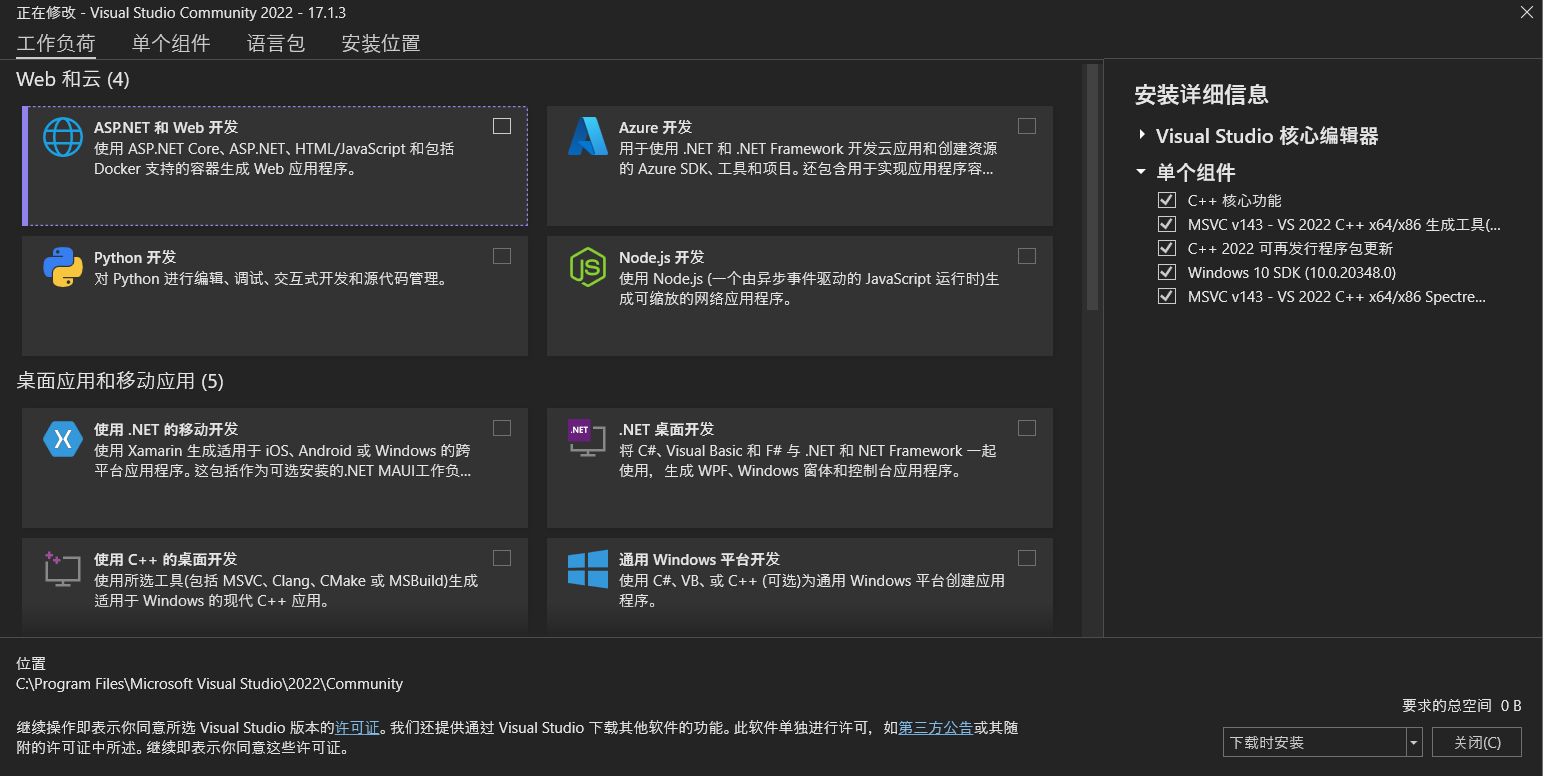
以上均为vs2022的单项安装图,并且安装前后在相关rust项目目录实验 cargo run 时表现出差异,之前为失败,并提示需要安装相关visual c++ 等信息,之后 cargo run 则可成功执行!,表明此单项安装具有一定可行性。特此分享此经验,以供大家参考!