







using System;
using System.IO;
using System.Text;
using System.Web.Security;

namespace HPZJ.Web.sys.excel
{
    public partial class hpd_api_weixin : System.Web.UI.Page
    {
        const string Token = "token";  //你的token
        protected void Page_Load(object sender, EventArgs e)
        {
            string postStr = "";

            Valid();
            if (Request.HttpMethod.ToLower() == "post")
            {
                Stream s = System.Web.HttpContext.Current.Request.InputStream;
                byte[] b = new byte[s.Length];
                s.Read(b, 0, (int)s.Length);
                postStr = Encoding.UTF8.GetString(b);
                if (!string.IsNullOrEmpty(postStr))
                {
                    ResponseMsg(postStr);
                }
                //WriteLog("postStr:" + postStr);
            }
        }

        /// <summary>
        /// 验证微信签名
        /// </summary>
        /// * 将token、timestamp、nonce三个参数进行字典序排序
        /// * 将三个参数字符串拼接成一个字符串进行sha1加密
        /// * 开发者获得加密后的字符串可与signature对比,标识该请求来源于微信。
        /// <returns></returns>
        private bool CheckSignature()
        {
            string signature = Request.QueryString["signature"].ToString();
            string timestamp = Request.QueryString["timestamp"].ToString();
            string nonce = Request.QueryString["nonce"].ToString();
            string[] ArrTmp = { Token, timestamp, nonce };
            Array.Sort(ArrTmp);     //字典排序
            string tmpStr = string.Join("", ArrTmp);
            tmpStr = FormsAuthentication.HashPasswordForStoringInConfigFile(tmpStr, "SHA1");
            tmpStr = tmpStr.ToLower();
            if (tmpStr == signature)
            {
                return true;
            }
            else
            {
                return false;
            }
        }

        private void Valid()
        {
            string echoStr = Request.QueryString["echoStr"].ToString();
            if (CheckSignature())
            {
                if (!string.IsNullOrEmpty(echoStr))
                {
                    Response.Write(echoStr);
                    Response.End();
                }
            }
        }

        /// <summary>
        /// 返回信息结果(微信信息返回)
        /// </summary>
        /// <param name="weixinXML"></param>
        private void ResponseMsg(string weixinXML)
        {
            //回复消息的部分:你的代码写在这里

        }

        /// <summary>
        /// unix时间转换为datetime
        /// </summary>
        /// <param name="timeStamp"></param>
        /// <returns></returns>
        private DateTime UnixTimeToTime(string timeStamp)
        {
            DateTime dtStart = TimeZone.CurrentTimeZone.ToLocalTime(new DateTime(1970, 1, 1));
            long lTime = long.Parse(timeStamp + "0000000");
            TimeSpan toNow = new TimeSpan(lTime);
            return dtStart.Add(toNow);
        }

        /// <summary>
        /// datetime转换为unixtime
        /// </summary>
        /// <param name="time"></param>
        /// <returns></returns>
        private int ConvertDateTimeInt(System.DateTime time)
        {
            System.DateTime startTime = TimeZone.CurrentTimeZone.ToLocalTime(new System.DateTime(1970, 1, 1));
            return (int)(time - startTime).TotalSeconds;
        }

        /// <summary>
        /// 写日志(用于跟踪)
        /// </summary>
        private void WriteLog(string strMemo)
        {
            string filename = Server.MapPath("/logs/log.txt");
            if (!Directory.Exists(Server.MapPath("//logs//")))
                Directory.CreateDirectory("//logs//");
            StreamWriter sr = null;
            try
            {
                if (!File.Exists(filename))
                {
                    sr = File.CreateText(filename);
                }
                else
                {
                    sr = File.AppendText(filename);
                }
                sr.WriteLine(strMemo);
            }
            catch
            {
            }
            finally
            {
                if (sr != null)
                    sr.Close();
            }
        }
    }
}
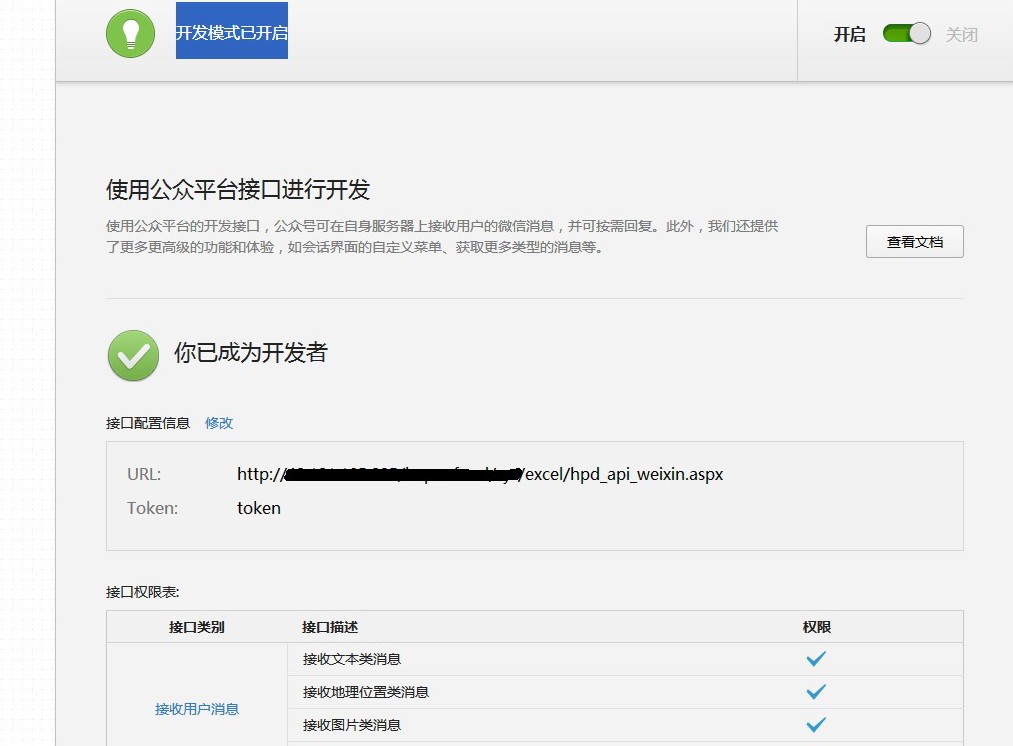
成功后显示下面截图
微信平台自定义菜单代码:
using System;
using System.Collections;
using System.Configuration;
using System.Data;
using System.Web;
using System.Web.Security;
using System.Web.UI;
using System.Web.UI.HtmlControls;
using System.Web.UI.WebControls;
using System.Web.UI.WebControls.WebParts;
using System.Xml;
using System.IO;
using System.Text;
using System.Collections.Generic;
using System.Net;


public partial class wx_weixin : System.Web.UI.Page
{
    protected void Page_Load(object sender, EventArgs e)
    {
//        首先根据微信的接口说明 获取你的 access_token 值

//然后 利用提供的文件直接上传运行,根据显示的返回 参考判断是否正确,如果返回的是 {"errcode":0,"errmsg":"ok"} 则成功。
//保证能用,有问题可以咨询

       //所有的 key 和name 都是可以自己定义,结合公众平台文档,根据自己需要调整

        string weixin1 = "";
        weixin1 += "{\n";
        weixin1 += "\"button\":[\n";
        weixin1 += "{\n";
        weixin1 += "\"type\":\"click\",\n";
        weixin1 += "\"name\":\"公司简介\",\n";
        weixin1 += "\"key\":\"jianjie\"\n";
        weixin1 += "},\n";
        weixin1 += "{\n";
        weixin1 += "\"type\":\"click\",\n";
        weixin1 += "\"name\":\"在线订房\",\n";
        weixin1 += "\"key\":\"order\"\n";
        weixin1 += "},\n";
        weixin1 += "{\n";
        weixin1 += "\"name\":\"我的菜单\",\n";
        weixin1 += "\"sub_button\":[\n";
        weixin1 += "{\n";
        weixin1 += "\"type\":\"click\",\n";
        weixin1 += "\"name\":\"子菜单1\",\n";
        weixin1 += "\"key\":\"zcd1\"\n";
        weixin1 += "},\n";
        weixin1 += "{\n";
        weixin1 += "\"type\":\"view\",\n";
        weixin1 += "\"name\":\"子菜单2\",\n";
        weixin1 += "\"key\":\"zcd2\"\n";
        weixin1 += "}]\n";
        weixin1 += "}]\n";
        weixin1 += "}\n";
        string i = GetPage("https://api.weixin.qq.com/cgi-bin/menu/create?access_token=改成你自己的access_token", weixin1);
        Response.Write(i);
    }
    public string GetPage(string posturl, string postData)
    {
        Stream outstream = null;
        Stream instream = null;
        StreamReader sr = null;
        HttpWebResponse response = null;
        HttpWebRequest request = null;
        Encoding encoding = Encoding.UTF8;
        byte[] data = encoding.GetBytes(postData);
        // 准备请求...
        try
        {
            // 设置参数
            request = WebRequest.Create(posturl) as HttpWebRequest;
            CookieContainer cookieContainer = new CookieContainer();
            request.CookieContainer = cookieContainer;
            request.AllowAutoRedirect = true;
            request.Method = "POST";
            request.ContentType = "application/x-www-form-urlencoded";
            request.ContentLength = data.Length;
            outstream = request.GetRequestStream();
            outstream.Write(data, 0, data.Length);
            outstream.Close();
            //发送请求并获取相应回应数据
            response = request.GetResponse() as HttpWebResponse;
            //直到request.GetResponse()程序才开始向目标网页发送Post请求
            instream = response.GetResponseStream();
            sr = new StreamReader(instream, encoding);
            //返回结果网页(html)代码
            string content = sr.ReadToEnd();
            string err = string.Empty;
            return content;
        }
        catch (Exception ex)
        {
            string err = ex.Message;
            Response.Write(err);
            return string.Empty;
        }
    }
}
原文地址:http://www.cnblogs.com/lhws/p/3324633.html
另一篇文章推荐:http://www.cnblogs.com/netyoulan/archive/2013/04/28/3049111.html