


惯性聚合 高效追踪和阅读你感兴趣的博客、新闻、科技资讯
阅读原文 在惯性聚合中打开

推荐订阅源

cs.AI updates on arXiv.org
C
CERT Recently Published Vulnerability Notes
C
Cybersecurity and Infrastructure Security Agency CISA
P
Proofpoint News Feed
Security Latest
Security Latest
P
Privacy International News Feed
Threat Intelligence Blog | Flashpoint
AI
AI
Cisco Talos Blog
Cisco Talos Blog
K
Kaspersky official blog
S
Secure Thoughts
PCI Perspectives
PCI Perspectives
Simon Willison's Weblog
D
DataBreaches.Net
GbyAI
GbyAI
让小产品的独立变现更简单 - ezindie.com
大猫的无限游戏
大猫的无限游戏
T
Tailwind CSS Blog
The Cloudflare Blog
阮一峰的网络日志
阮一峰的网络日志
CTFtime.org: upcoming CTF events
罗磊的独立博客
V
Visual Studio Blog
aimingoo的专栏
aimingoo的专栏
H
Hackread – Cybersecurity News, Data Breaches, AI and More
IT之家
IT之家
V
V2EX
Last Week in AI
Last Week in AI
有赞技术团队
有赞技术团队
月光博客
月光博客
酷 壳 – CoolShell
酷 壳 – CoolShell
T
Tenable Blog
T
Threat Research - Cisco Blogs
T
Troy Hunt's Blog
V2EX - 技术
V2EX - 技术
S
Security @ Cisco Blogs
Security Archives - TechRepublic
Project Zero
Project Zero
The GitHub Blog
The GitHub Blog
Recent Commits to openclaw:main
L
Lohrmann on Cybersecurity
F
Full Disclosure
H
Help Net Security
博客园 - Franky
Stack Overflow Blog
Stack Overflow Blog
N
Netflix TechBlog - Medium
Engineering at Meta
Engineering at Meta
A
Arctic Wolf
O
OpenAI News
S
Securelist

博客园 - 小水坝

使用双分派解决领域实体和外部机制通信问题 搞定thrift双向消息 读《软件需求最佳实践》有感 【thrift】vc中使用thrift中文字符串乱码问题解决 __declspec(dllimport)的小秘密(转) 跨线程send message 【boost】使用serialization库序列化子类 【boost】ptree 读写中文的问题 动态创建TeeChart的简便方法 【MFC】动态创建CMFCToolbar图标不显示问题 【boost】使用装饰者模式改造boost::thread_group 【boost】使用lambda表达式和generate_n生成顺序序列 【boost】BOOST_LOCAL_FUNCTION体验 【boost】MFC dll中使用boost thread的问题 【转帖】C++编译原理 资料 IE6,7下password框长度变短问题 dwz局部表格分页 dwz中combox的value问题 dwz中使用flot,js报表等js插件
【VC】VC工具栏图标合并工具(非tbcreator和visual toolbar)
小水坝 · 2013-08-20 · via 博客园 - 小水坝

VC开发难免会用到toolbar,在没有美工的时候,大部分时间我们只能自己上。

第一个方法:fireworks/photoshop平铺。现在的图片资源大多为背景透明的png图片,虽然fireworks工具可以直接平铺多个图片生成toolbar图片,但这是建立在每个图片实际大小一致前提上,由于背景透明,很多显示16x16的图片,用fireworks打开后会比实际小,这种情况下,平铺出来的图片自然会有差错。

第二个方法:使用TBCreator。这几乎是所有vc toolbar图标制作教程的推荐。的确,用TBCreator可以做出效果很好的toolbar图片,但是。。。。这货却不支持批量添加图片!!在图片比较多的情况下,多来几次可以点到你手抽筋。。。。

第三个方法:visual toolbar。在资源不为png时,这货还可以用,但是这是也完全可以使用fireworks的平铺功能,对于png,visual toolbar就有点力不从心了。

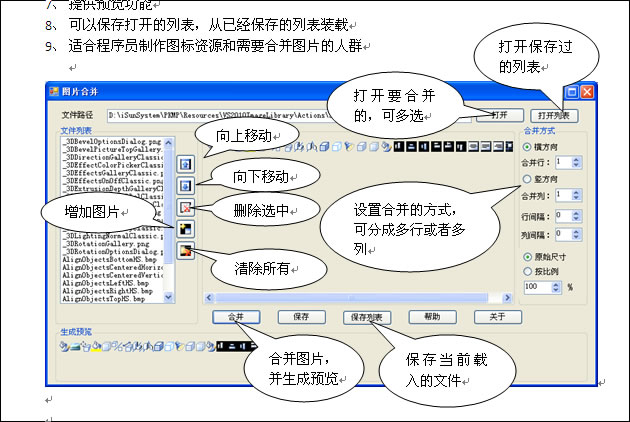
在网上逛了一上午,终于在css的一个论坛上,找到一个前端开发工程师推荐的软件,用了一下,还真有点不错,软件名就叫MergePic(果断个人作品,绝对不三包。。),软件功能和TBCreator差不多,但是胜在支持批量导入,还可以到处透明背景png,如下:
附下载地址:

注意:本程序需要DotNet运行库(已经安装运行库的可直接运行),请到以下地址下载安装:

http://www.onlinedown.net/soft/38669.htm

http://dl.pconline.com.cn/html_2/1/82/id=10637&pn=0.html