惯性聚合 高效追踪和阅读你感兴趣的博客、新闻、科技资讯
阅读原文 在惯性聚合中打开

推荐订阅源

I
Intezer
V
Vulnerabilities – Threatpost
Google Online Security Blog
T
The Exploit Database - CXSecurity.com
C
CXSECURITY Database RSS Feed - CXSecurity.com
AWS News Blog
AWS News Blog
G
GRAHAM CLULEY
P
Privacy & Cybersecurity Law Blog
www.infosecurity-magazine.com
C
Cybersecurity and Infrastructure Security Agency CISA
N
News | PayPal Newsroom
T
Tenable Blog
Spread Privacy
Spread Privacy
Threat Intelligence Blog | Flashpoint
S
Secure Thoughts
P
Privacy International News Feed
IT之家
IT之家
Project Zero
Project Zero
T
The Blog of Author Tim Ferriss
Engineering at Meta
Engineering at Meta
大猫的无限游戏
大猫的无限游戏
博客园_首页
GbyAI
GbyAI
奇客Solidot–传递最新科技情报
奇客Solidot–传递最新科技情报
量子位
雷峰网
雷峰网
Apple Machine Learning Research
Hacker News: Ask HN
Hacker News: Ask HN
Google DeepMind News
MongoDB | Blog
MongoDB | Blog
N
Netflix TechBlog - Medium
Martin Fowler
Martin Fowler
NISL@THU
NISL@THU
I
InfoQ
D
DataBreaches.Net
有赞技术团队
有赞技术团队
K
Kaspersky official blog
Security Latest
Security Latest
The Register - Security
Hugging Face - Blog
Hugging Face - Blog
S
Security @ Cisco Blogs
P
Proofpoint News Feed
M
MIT News - Artificial intelligence
H
Hackread – Cybersecurity News, Data Breaches, AI and More
让小产品的独立变现更简单 - ezindie.com
AI
AI
Exploit-DB.com RSS Feed
P
Proofpoint News Feed
Security Archives - TechRepublic
N
News and Events Feed by Topic

博客园 - Aricc

如何在已有内网网络中增加项目专用域名解析服务器(DNS) Windows使用命令行查看cpu的温度 从QNAP威联通NAS的Container Station中的容器中复制文件到本地Window电脑 sourcetree外部差异/合并工具设置 树莓派插入U盘自动拷贝系统日志到U盘或通过U盘升级程序 树莓派开通VPN服务端时IPTable设置 - Aricc 动态调用WebService的代理类 为Owin项目增加WebApi 如何一步一步新建一个Owin项目 WebApi Owin OAuth Sql Server查看死锁及堵塞脚本 路由表脚本 配电管家 数据绑定时(<%#Eval)单引号双引号嵌套问题 About SSDT BI 在Win8中用批处理创建Oracle数据库时报“Unable to open file” 收藏网址 SQL SERVER 2005 CLR存储过程调用WCF,64位操作系统。 TX-2B/RX-2B射频发送/接收电路
屌丝公司:设置服务器的时区、时间及时间同步
Aricc · 2021-09-01 · via 博客园 - Aricc

查看当前时区

[root@svr-dsdb01 ~]# date -R
Wed, 01 Sep 2021 09:37:21 +0800

设置时区

[root@svr-dsdb01 ~]# timedatectl set-timezone Asia/Shanghai

有两种方式都可以实现从时间同步服务器同步时间的目的。

1、使用ntpdate命令,配合crontab定时执行时间同步。

2、使用ntpd服务。网上说这种更好,但屌丝公司嘛,不用这种也可以理解。

下面讲一下第1种的实现方法。

ntpdate命令的使用比较简单

[root@svr-dsdb01 ~]# ntpdate 172.7.0.146
[root@svr-dsdb01 ~]# ntpdate time.ntp.org

crontab要稍微复杂一点

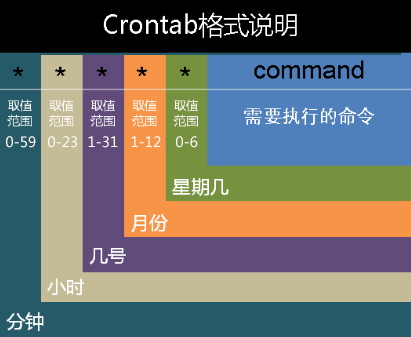
先看一下配置文件的格式:

5 * * * * ls 指定每小时的第5分钟执行一次ls命令
30 5 * * * ls 指定每天的 5:30 执行ls命令
30 7 8 * * ls 指定每月8号的7:30分执行ls命令
30 5 8 6 * ls 指定每年的6月8日5:30执行ls命令
30 6 * * 0 ls 指定每星期日的6:30执行ls命令[注:0表示星期天,1表示星期1,以此类推,也可以用英文来表示,sun表示星期天,mon表示星期一等。]
30 3 10,20 * * ls 每月10号及20号的3:30执行ls命令[注:“,”用来连接多个不连续的时段]
25 8-11 * * * ls 每天8-11点的第25分钟执行ls命令[注:“-”用来连接连续的时段]
*/15 * * * * ls 每15分钟执行一次ls命令 [即每个小时的第0 15 30 45 60分钟执行ls命令 ]
30 6 */10 * * ls 每个月中,每隔10天6:30执行一次ls命令[即每月的1、1121、31日是的6:30执行一次ls命令。]

 
 特殊字符  含义
 *(星号)  代表任何时刻都接受的意思。举例来说,0 12 * * * command 日、月、周都是*,就代表着不论何月、何日的礼拜几的12:00都执行后续命令的意思。
 ,(逗号)  代表分隔时段的意思。举例来说,如果要执行的工作是3:00与6:00时,就会是:0 3,6 * * * command时间还是有五列,不过第二列是 3,6 ,代表3与6都适用
 -(减号)  代表一段时间范围内,举例来说,8点到12点之间的每小时的20分都进行一项工作:20 8-12 * * * command仔细看到第二列变成8-12.代表 8,9,10,11,12 都适用的意思
 /x(斜线)  代表每隔x【单位】的意思,例如每五分钟进行一次,则:*/5 * * * * command用*与/5来搭配,也可以写成0-59/5,意思相同

现在开始设置服务器的时间同步:

 查看当前的定时任务

[root@svr-dsdb01 ~]# crontab -l
*/3 * * * * flock -xn /var/log/pg_iscsi_monitor.lock -c '/root/script/pg_iscsi_monitor.sh >/dev/null 2>&1'
*/3 * * * * flock -xn /var/log/pps_iscsi_monitor.lock -c '/root/script/pps_iscsi_monitor.sh >/dev/null 2>&1'

编辑定时任务,增加一条时间同步命令

[root@svr-dsdb01 ~]# crontab -e

进入了vi编辑器,在最后增加如下一行,注意最后-w后面要留一个空格

*/30 * * * * /usr/sbin/ntpdate 172.7.0.146 && /sbin/hwclock -w 

以上一行表示,每隔30分钟从授时服务器同步一次时间,并将系统时间同步到硬件时间(BIOS)

hwclock命令

hwclock -s 将硬件时间同步到系统时间
hwclock -w 将系统时间同步到硬件时间
hwclock -v 查看版本