惯性聚合 高效追踪和阅读你感兴趣的博客、新闻、科技资讯
阅读原文 在惯性聚合中打开

推荐订阅源

S
SegmentFault 最新的问题
The Last Watchdog
The Last Watchdog
C
Cisco Blogs
L
LINUX DO - 热门话题
T
Tenable Blog
D
Darknet – Hacking Tools, Hacker News & Cyber Security
Cyberwarzone
Cyberwarzone
O
OpenAI News
The Hacker News
The Hacker News
V
Vulnerabilities – Threatpost
A
Arctic Wolf
cs.AI updates on arXiv.org
cs.CL updates on arXiv.org
Vercel News
Vercel News
量子位
V2EX - 技术
V2EX - 技术
GbyAI
GbyAI
W
WeLiveSecurity
Recorded Future
Recorded Future
P
Proofpoint News Feed
Project Zero
Project Zero
P
Palo Alto Networks Blog
Microsoft Security Blog
S
Security Affairs
Stack Overflow Blog
Stack Overflow Blog
B
Blog
Y
Y Combinator Blog
月光博客
月光博客
K
Kaspersky official blog
Threat Intelligence Blog | Flashpoint
Latest news
Latest news
Forbes - Security
Forbes - Security
T
Troy Hunt's Blog
T
The Blog of Author Tim Ferriss
C
Check Point Blog
D
DataBreaches.Net
MyScale Blog
MyScale Blog
博客园 - 三生石上(FineUI控件)
博客园 - 聂微东
D
Docker
P
Privacy International News Feed
C
Cybersecurity and Infrastructure Security Agency CISA
OSCHINA 社区最新新闻
OSCHINA 社区最新新闻
C
Cyber Attacks, Cyber Crime and Cyber Security
S
Securelist
Cyber Security Advisories - MS-ISAC
雷峰网
雷峰网
SecWiki News
SecWiki News
腾讯CDC
博客园 - Franky

博客园 - 宏宇

C#中一个简单的Task C#中多线程Task详解 C#数据去重的5种方式 Automa – AI浏览器扩展工具 超好用的网页端自动化扩展工具-Automa HTTP 请求“报头”——Referer 和 Cookie 使用vs2022将.net8的应用程序发布为一个单独文件 Thread.Abort的.Net Core替代方法 元数据、数据元、数据源、源数据 IIS设置使某IP访问时,跳转到指定页面 IIS自定义错误页面 关闭PerfWatson2.exe 体验改善计划 C# 线程(Thread) 配置 sql server 最大内存 sqlserver内存最佳配置 Windows安装时调出系统的cmd功能 Shift+F10 windows无法安装到这个磁盘,选中的磁盘采用gpt分区 如何删除硬盘efi系统分区 site命令 不安装运行时运行.NET程序
win10系统图片打开方式为照片查看器的方法
宏宇 · 2024-08-25 · via 博客园 - 宏宇

众多win10用户都知道,当查看图片文件的时候,系统便会默认运行Metro风格的照片运用来打开图片。但是有许多用户更喜欢传统照片查看器来看图片,但是却不知道该怎么设置。小编今天这里就来为大家分享下设置win10系统图片打开方式为照片查看器的方法。  

工具/原料

  • 联想小新

  • Windows10

方法/步骤

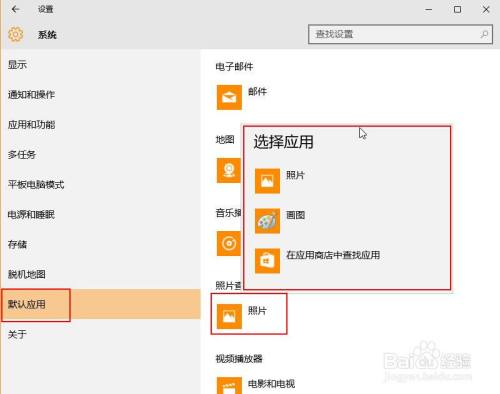
  1. 打开默认查看“照片”选项,可以看到“选择运用”上并没有照片查看器这一运用。

    设置win10系统图片打开方式为照片查看器的方法

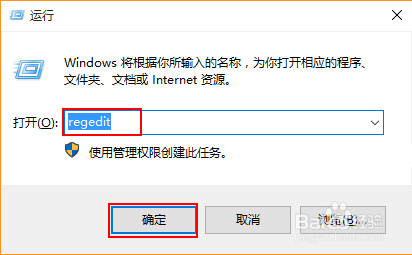
  2. 按下快捷键“win+r”,并在运行一栏中输入“regedit”命令。

    设置win10系统图片打开方式为照片查看器的方法

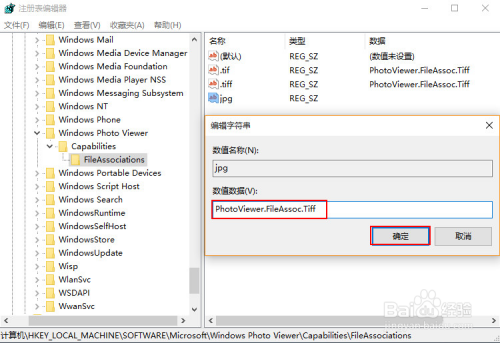
  3. 在“注册表编辑器”按序依次打开以下文档“HKEY_LOCAL_MACHINE\SOFTWARE\Microsoft\Windows Photo Viewer\Capabilities\FileAssociations”。
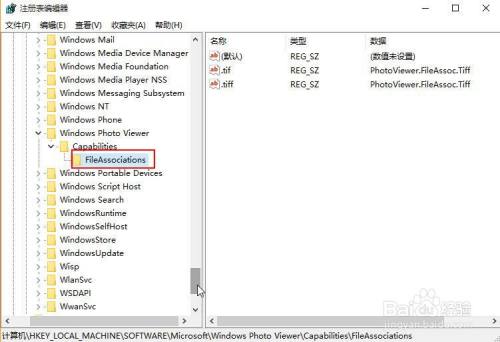
    设置win10系统图片打开方式为照片查看器的方法

  4. 在FileAssociations项右键新建“字符串值”将数值名称改为“.jpg”的文件拓展名,数值数据改为“PhotoViewer.FileAssoc.Tiff”。
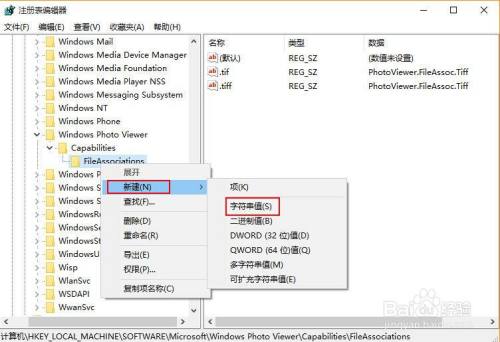
    设置win10系统图片打开方式为照片查看器的方法

    设置win10系统图片打开方式为照片查看器的方法

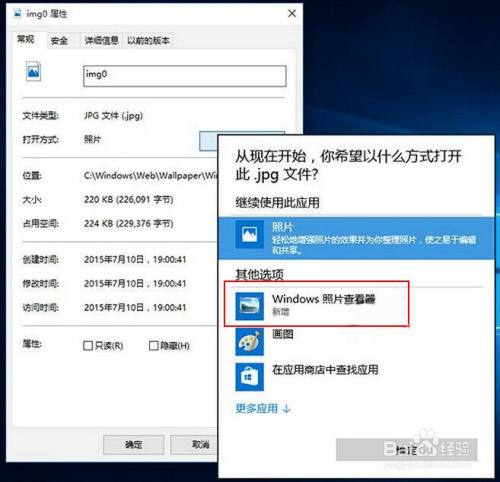
  5. 右键打开jpg文件,你就能看到windows照片查看器了。

    设置win10系统图片打开方式为照片查看器的方法

    END