惯性聚合 高效追踪和阅读你感兴趣的博客、新闻、科技资讯
阅读原文 在惯性聚合中打开

推荐订阅源

美团技术团队
D
DataBreaches.Net
OSCHINA 社区最新新闻
OSCHINA 社区最新新闻
D
Docker
N
Netflix TechBlog - Medium
Cyber Security Advisories - MS-ISAC
C
Check Point Blog
腾讯CDC
Stack Overflow Blog
Stack Overflow Blog
V
Visual Studio Blog
IT之家
IT之家
月光博客
月光博客
U
Unit 42
K
Kaspersky official blog
T
Threatpost
cs.AI updates on arXiv.org
GbyAI
GbyAI
P
Proofpoint News Feed
Last Week in AI
Last Week in AI
云风的 BLOG
云风的 BLOG
酷 壳 – CoolShell
酷 壳 – CoolShell
I
InfoQ
Engineering at Meta
Engineering at Meta
Recorded Future
Recorded Future
Exploit-DB.com RSS Feed
freeCodeCamp Programming Tutorials: Python, JavaScript, Git & More
S
Security @ Cisco Blogs
MyScale Blog
MyScale Blog
大猫的无限游戏
大猫的无限游戏
Security Archives - TechRepublic
Webroot Blog
Webroot Blog
cs.CV updates on arXiv.org
Hacker News - Newest:
Hacker News - Newest: "LLM"
S
Schneier on Security
S
Secure Thoughts
The Register - Security
B
Blog RSS Feed
The Last Watchdog
The Last Watchdog
P
Palo Alto Networks Blog
爱范儿
爱范儿
B
Blog
让小产品的独立变现更简单 - ezindie.com
N
News and Events Feed by Topic
阮一峰的网络日志
阮一峰的网络日志
L
LINUX DO - 热门话题
C
Cisco Blogs
Spread Privacy
Spread Privacy
F
Full Disclosure
博客园 - 聂微东
T
The Blog of Author Tim Ferriss

博客园 - KidYang

微信、支付宝个人收款码不能用于经营收款 - z 微信平台开发 微信小程序图表控件 微信小程序网络排查指引 小程序字体转换 - 转 小程序播放语音之wx.createInnerAudioContext() - 转 小程序隐藏scroll-view滚动条的实现 - 转 微信小程序scroll-view左右横向滑动 用vscode开发微信小程序,建议安装的插件 微信小程序wxs格式化日期 在 ios 端显示NaN问题及日期格式化工具 小程序涉及npm、vue的一些基础资料 小程序使用字体相关 大量Timer_MinBytesPerSecond,Timer_ConnectionIdle错误 - 转 微信小程序隐藏时动画效果 - 转载 System.Security.Cryptography.RSA.FromXmlString 系统找不到指定的文件和X509读取证书文件系统找不到指定的文件异常 - 转载 sqlserver 发送http请求 chrome浏览器直接打印 - z 解决webapi首次启动速度慢的问题 - z 使用第三方库(Senparc)完成小程序支付 - z
visual studio 关于 Updates were rejected because the remote contains work that you do
KidYang · 2020-05-05 · via 博客园 - KidYang

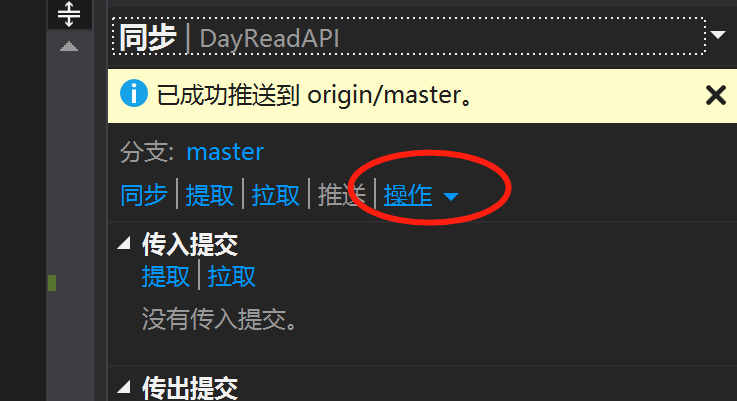
如新建项目后,出现此问题,可进行如下操作:

1.点击后,选择“打开命令提示符",并键入如下命令:

git pull origin master // 把本地仓库的变化连接到远程仓库主分支

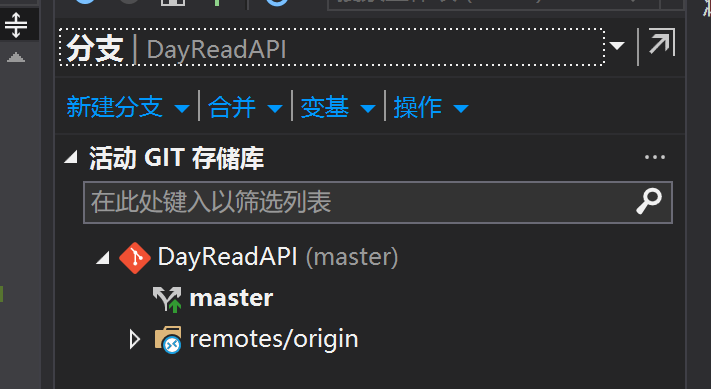
2.重置分支,使当前分支跟踪远程分支

3.重新提交