惯性聚合 高效追踪和阅读你感兴趣的博客、新闻、科技资讯
阅读原文 在惯性聚合中打开

推荐订阅源

Google DeepMind News
Jina AI
Jina AI
WordPress大学
WordPress大学
博客园 - 聂微东
OSCHINA 社区最新新闻
OSCHINA 社区最新新闻
月光博客
月光博客
博客园 - 司徒正美
J
Java Code Geeks
博客园 - 叶小钗
美团技术团队
Last Week in AI
Last Week in AI
让小产品的独立变现更简单 - ezindie.com
The Cloudflare Blog
腾讯CDC
人人都是产品经理
人人都是产品经理
T
Tailwind CSS Blog
I
InfoQ
博客园 - 【当耐特】
大猫的无限游戏
大猫的无限游戏
奇客Solidot–传递最新科技情报
奇客Solidot–传递最新科技情报
V
V2EX
博客园_首页
D
Docker
U
Unit 42
Attack and Defense Labs
C
CERT Recently Published Vulnerability Notes
Scott Helme
Scott Helme
P
Privacy & Cybersecurity Law Blog
Simon Willison's Weblog
钛媒体:引领未来商业与生活新知
钛媒体:引领未来商业与生活新知
H
Help Net Security
A
About on SuperTechFans
L
Lohrmann on Cybersecurity
Recent Announcements
P
Privacy International News Feed
P
Proofpoint News Feed
F
Full Disclosure
G
Google Developers Blog
小众软件
小众软件
Security Latest
Security Latest
The GitHub Blog
The GitHub Blog
T
The Exploit Database - CXSecurity.com
宝玉的分享
宝玉的分享
freeCodeCamp Programming Tutorials: Python, JavaScript, Git & More
MongoDB | Blog
MongoDB | Blog
P
Proofpoint News Feed
云风的 BLOG
云风的 BLOG
酷 壳 – CoolShell
酷 壳 – CoolShell
L
LangChain Blog
Vercel News
Vercel News

Cisco Blogs

Cisco Live 2026: Bringing the Future of Customer Experience to Las Vegas Edge opportunity for service providers: Turn infrastructure into new services MRC and SRv6: How Foundational Networking Innovations Are Enabling the Next Generation of AI Supercomputers The SMB Marketing Reset: Winning Customer Trust in a Digital-First Economy Inside the SOC: AI-powered DNS defense against ransomware Our Path Forward Securing the Federal Digital Experience with Cisco ThousandEyes for Government Cisco at ONUG Dallas 2026: Securing the AI Data Center in the Agentic Era Cisco and Red Hat are powering intelligent core to edge: Red Hat Summit insights Building the Capabilities That Win: How Cisco Partners Can Lead in the SMB & Mid-Market Era How Two Hours Felt Bigger Than My To-Do List Announcing Foundry Security Spec Ace the CCIE Collaboration Lab: Success Tips from a TAC Engineer Turned CCIE Protecting Agents with Cisco AI Defense and Google Agent Development Kit Powering an Inclusive Future: Your guide to the Purpose Pavilion at Cisco Live Las Vegas The Infrastructure Behind the Mission: SOF Week 2026 Cisco Networking App Marketplace Partners at Cisco Live 2026 Beyond the Pilot: Building the Clinical Data Fabric for the Agentic Era Benchmarking scale-out AI fabrics with Cisco N9000 + AMD Pensando™ Pollara 400 NICs Month of Developer Productivity: Build and Forget The race to autonomous transport networks: A new study Lean IT, future-ready: How to save time and simplify wireless management with AI Reading Between the Pixels: Failure Modes in Vision Language Models Biochar’s triple win: Healthier soils, improved crops, and decarbonization Designing a Proactive Customer Journey Modernize your data center operations with Cisco Nexus Dashboard Why your automation stack needs Cisco Agentic Workflows Try Cisco AI Defense Explorer Edition in this hands-on lab From Bandwidth to Intelligence: How Cisco is Powering AI-Ready Networks Spotlight on digital transformation | FY25 Purpose Report Galaxy Mode is live: A limited-time look at what your Cisco AI Assistant and AgenticOps can already do Securing the Agentic Workforce: Cisco Announces Intent to Acquire Astrix Security Understanding CISA BOD 26-02: Mitigating Risk from End-of-Support Edge Devices Digging Deeper: The Future of Mining with Automation and Ultra-Reliable Wireless Voices from the field: Helping farmers build resilient local economies across rural America Built like a startup, scaled like Cisco: Transforming data center cooling for the AI era Defining Model Provenance: A Constitution for AI Supply Chain Safety and Security Introducing Model Provenance Kit: Know Where Your AI Models Come From Security Insights: A Threat-First View for the Platform That Enforces Access How I Turned My Curiosity into a Patent From Strategy to Architecture: How Cisco is Building a Quantum-Safe Future Maximizing Managed Security Services: A Strategic Guide to Optimizing Your Portfolio (Part 1 of 2) Trust: Why security is your next growth engine Cisco IQ is generally available. Here’s what that actually means. From Vision to Reality: Intelligence in Action with Cisco IQ How connectivity is shaping the future of surgical care The power of your network: Solving a physical security incident on Vision portal 5 signs your data center is holding your AI strategy back Stop Overthinking OT Security: The Total Cost of Ownership and Being Smart with Refreshes AI-Ready, Simpler, and More Secure WAN: Cisco SD-WAN Innovations Scaling the digital future: Why AI and skills investments matter for business and society Expanding our Product Organization Recap Scaling the Future: Reddit AMA on Network Automation at Scale Bringing Professional-Level Skills to Cisco Networking Academy Announcing Cisco Availability in Google Cloud Marketplace: A New Path to Scalable, Partner-Led Growth The Innovation Paradox: How We Reduced Incidents by 25% While Deploying Faster Funding the AI-ready data center: Why flexibility wins The switch that quantum networking has been waiting for From a Message I Couldn’t Believe to a Stage I’ll Never Forget The Hidden Bottleneck Slowing Down Manufacturing Transformation 30 Years as a CCIE: Why Certifications Matter in the AI Era Securing Enterprise AI: Cisco AI Defense Expands to Google Cloud How ThousandEyes Closed the Cloud Visibility Gap by Solving It Themselves First Energy Will Define the Scale of AI Introducing the AI Agent Security Scanner for IDEs: Verify Your Agents Stop Overthinking OT Security: People, Process and Technology Powering the Future of Research: Join Cisco at NLIT 2026 Building the Digital Foundation for a Smarter West Lincoln Memorial Hospital How Cisco built an AI-RRM that maximizes your wireless solution From Automation to Autonomy: Cisco and Rockwell Power a New Era for Manufacturing Unlocking the Future of Fan Engagement: The Power of VisionEDGE Find Yourself in the Future: AI Is the New Baseline—Here’s How to Build Your Skills One Day with Our Customers: Driving better outcomes through customer centricity What It Really Takes to Build an AI-First Workforce From Connectivity to Security: How E80 Future-proofed its AGV Operations with Cisco The Infrastructure of a Floating City: AIDA Cruises’ CX-Led Digital Transformation Scaling your network for AI without a forklift upgrade Why modern networks are moving DDoS defense to the edge Evolve IP Media to AI-Driven Media Fabrics: Future-Proof Broadcast with Cisco and NVIDIA Cisco and Generation are scaling AI-powered pathways to employment Reading Between the Pixels: Assessing Prompt Injection Attack Success in Images Lean IT, future-ready: Why Wi-Fi is your AI growth strategy Cisco Modeling Labs: Bringing the Network Digital Twin to Life AI on the Factory Floor: Why Manufacturing Requires a New Architecture with Cisco Unified Edge Designing for What’s Next: Securing AI-Scale Infrastructure Without Compromise Scaling the Future: Join Our Reddit AMA on Network Automation at Scale 5 wireless trends retail IT teams can’t ignore in 2026 Can your infrastructure management tools do that? Sustainability 101: Let’s talk about energy efficiency From Chai Breaks to Checkpoints: A Day at Cisco Bengaluru Preparing for Post-Quantum Cryptography: The Secure Firewall Roadmap Non-Obvious Patterns in Building Enterprise AI Assistants Making AI Trustworthy and Observable in Real-Time: Cisco Announces Intent to Acquire Galileo A simpler path to unified, AI-ready network operations Cisco Celebrates The Smart Industry Industrial Transformation Award Winners Mobile World Congress 2026: AI-powered Network Security Powering MWC Barcelona – Building a Unified SOC and NOC with Splunk in Record Time How New Data Streams Transformed Cisco Store’s Decision-Making AI-powered Network Security at the Mobile World Congress 2026 SNOC Inside the Mobile World Congress 2026 SOC: Detecting Shadow Traffic with Firepower 6100
Simplify access control in five easy steps
Miriam Kung · 2026-04-29 · via Cisco Blogs

Running a global enterprise network takes a full roster. Between global IT teams, regional network teams, campus admins, and network operations centers (NOCs), there are often dozens of people interacting with your network every day. As those teams grow, so does the challenge of giving each user the right level of access without expanding risk.

Just like in any team sport, not every player should be able to fill every position or access everything.

That’s where site-based, role-based access control (RBAC) in Cisco Catalyst Center comes in. By allowing you to combine roles with specific locations through access groups, this new capability makes it easier to securely delegate operations and coordinate access while maintaining centralized control of your on-premises network.

Check out these five steps to get started with site-based RBAC in Catalyst Center.

Tip 1: Align access to your site hierarchy

Site-based RBAC in Catalyst Center ties user access to your network’s site hierarchy. This lets you control where users can operate in the network, in addition to what actions they can perform.

By aligning access with regions, campuses, and buildings, you can assign responsibilities with clearer boundaries and reduce the risk of changes outside a user’s scope.

How it works
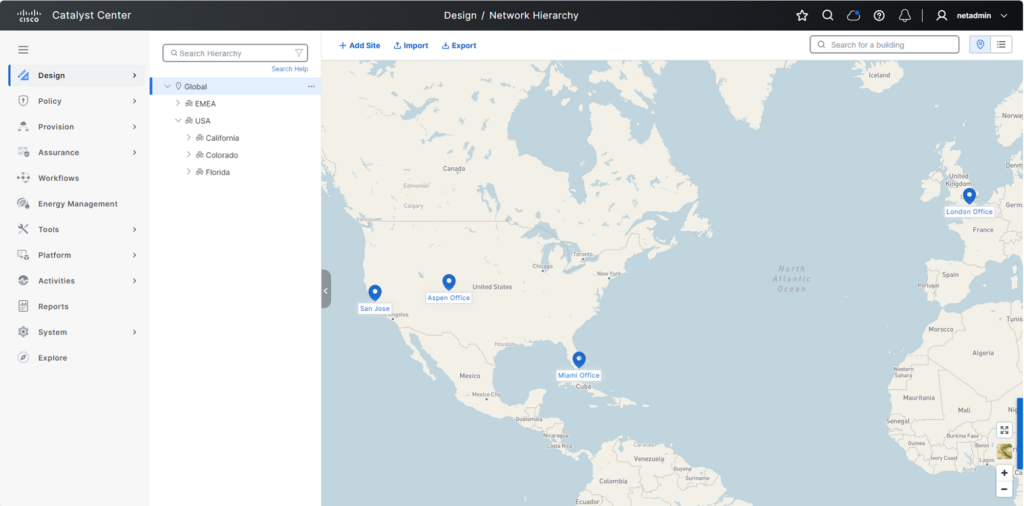
Start by reviewing your site hierarchy in Catalyst Center and ensure it reflects how your network is currently organized. For example:

Site level Example owner
Global Global network team
Region Regional network team
Campus or building Local IT admin

Cisco Catalyst Center design page showing a map with pins for the San Jose, Aspen, Miami, and London offices.

Figure 1. Align your Catalyst Center site hierarchy to how your network is organized

Once your site structure mirrors how your network is managed, you can assign roles tied to each of those sites. This creates clear operational boundaries and forms the foundation for secure site-based RBAC.

Tip 2: Build custom roles

With your site structure in place, the next step is to define what each user is allowed to do. Custom roles in Catalyst Center define which actions users can perform, such as configuring devices, deploying changes, or monitoring the network.

By aligning roles to real operational responsibilities, you can enforce least-privilege access and reduce the risk of unintended changes.

How it works
Catalyst Center includes several predefined roles, and you can also create custom roles to align with how your teams operate.

Figure 2. Create custom roles in Catalyst Center to define user access
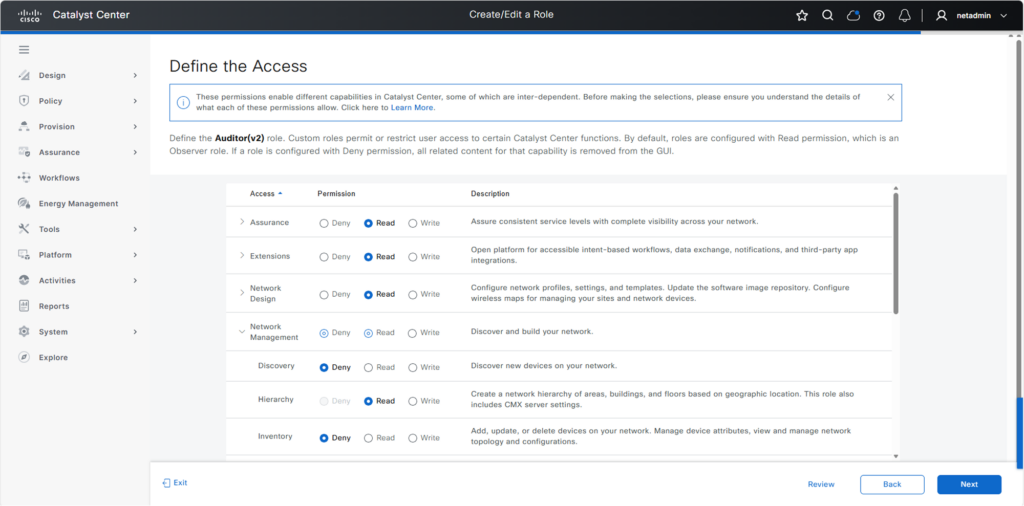
Figure 2. Create custom roles in Catalyst Center to define user access

Predefined roles include:

  • Super admin: Full administrative access to the Catalyst Center deployment
  • Network admin: Ability to manage network operations but cannot change system configurations
  • Observer: Read-only access for monitoring and visibility; no access to sensitive data in the system settings

You can use these roles or create custom roles that reflect real operational responsibilities. Once roles are defined, you can assign them to users globally or combine them with sites in access groups so users can perform those actions only in the parts of the network they manage.

Tip 3: Use access groups to combine role and site

Instead of configuring access by user, you can standardize permissions and scale more efficiently. Access groups in Catalyst Center combine a role with a site, defining what a user can do and where that access applies. This makes it easy to assign the right permissions across your network.

Key components

  • Site: An area, building, or floor within your Catalyst Center hierarchy
  • Custom role: A set of permissions that permit and/or deny access to network devices
  • Access group: An object that combines a custom role with a site, defining what a user can do and where they can do it

How it works
Access groups bring together the two elements defined previously: roles and sites.
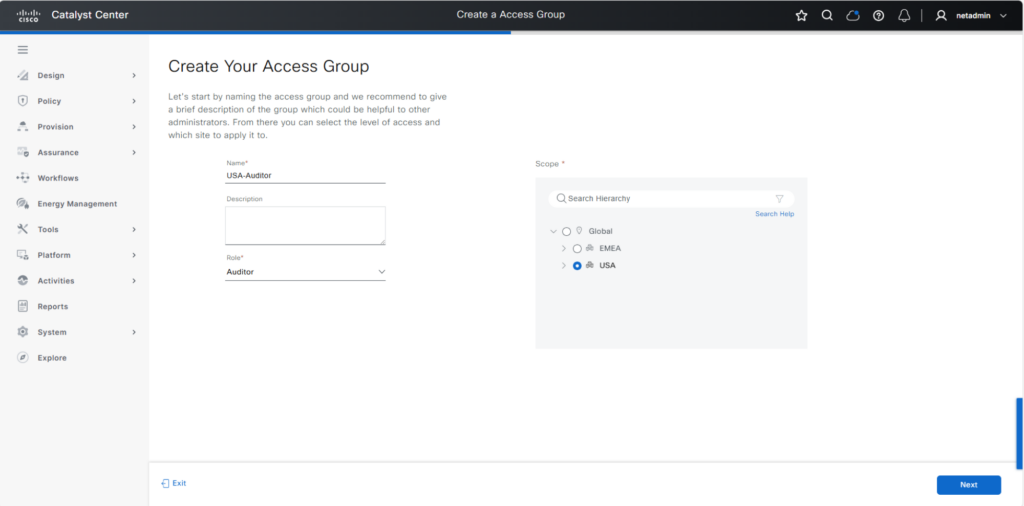
Figure 3. Create an access group in Catalyst Center to combine a user’s role with a site in your network

For example, you might create access groups like the following:

  • Campus admin: San Jose building 23
  • Regional operations: Americas
  • NOC observer: global

Once these access groups are created, assigning permissions becomes much easier because you can add users to the appropriate group instead of configuring access individually.

Tip 4: Integrate with your identity systems

After you’ve defined access groups, the next step is to streamline how that access is assigned. Catalyst Center can integrate with external identity systems such as Cisco Identity Services Engine (ISE) using RADIUS and/or TACACS+ to authenticate users and assign access automatically.

This reduces manual effort and improves security by ensuring access is aligned with your organization’s identity policies.

How it works
Instead of manually assigning access for each user, connect Catalyst Center to your identity system and map users to the appropriate roles and access groups.
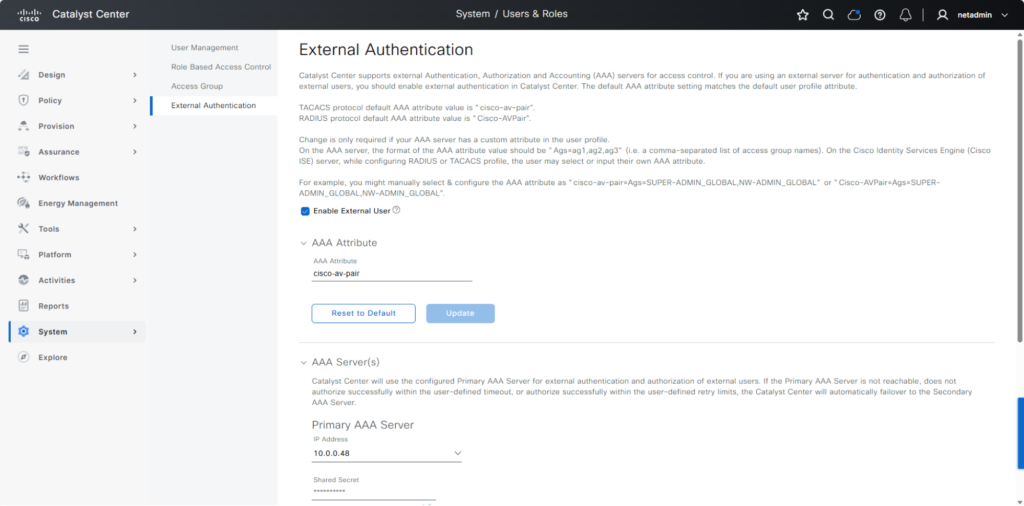
Figure 4. Integrate Catalyst Center with external identity systems like Cisco ISE to authenticate users and assign access automatically

For example, when a user logs in, their identity can automatically determine:

  • Which role they receive
  • Which sites they can access

This allows you to streamline onboarding and ensure users consistently receive access that matches their role and site, without additional configuration in Catalyst Center.

Tip 5: Validate access before rollout

As access assignment becomes more automated, it’s important to validate that users see and can do exactly what they should.

This helps prevent misconfigurations and strengthens security by ensuring least-privilege access is working as intended.

How it works
Test access from the user’s perspective by logging in with different roles or user types.
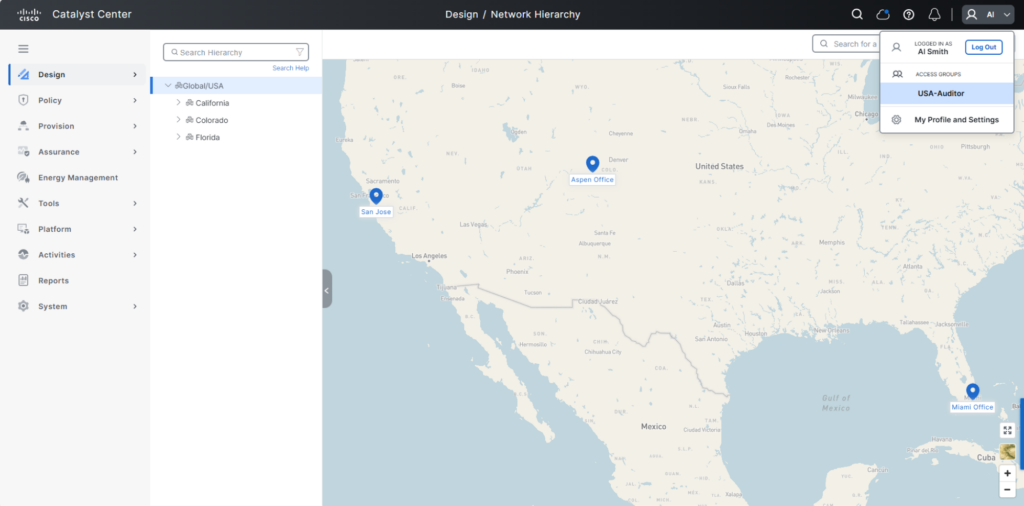
Figure 5. Validate that user USA-Auditor can see and can access only what they should

For example, verify that:

  • A regional admin only sees their assigned sites
  • A campus admin can manage local devices but not others
  • A NOC user has visibility without configuration access

A quick validation step helps ensure your RBAC model is working correctly before scaling it across your organization.

Orchestrate better team performance with site-based RBAC

Site-based RBAC in Catalyst Center helps distributed IT teams manage their part of the network with access that matches their responsibilities. By combining roles and locations through access groups, you can delegate operations more confidently while maintaining clearer control across your environment.

Get started with site-based RBAC in Catalyst Center

Additional resources:
Watch how to configure site-based RBAC