惯性聚合 高效追踪和阅读你感兴趣的博客、新闻、科技资讯
阅读原文 在惯性聚合中打开

推荐订阅源

A
About on SuperTechFans
小众软件
小众软件
WordPress大学
WordPress大学
Microsoft Azure Blog
Recent Announcements
博客园 - 三生石上(FineUI控件)
博客园_首页
N
Netflix TechBlog - Medium
IT之家
IT之家
H
Help Net Security
博客园 - 聂微东
Google DeepMind News
罗磊的独立博客
T
Tailwind CSS Blog
F
Fortinet All Blogs
Hugging Face - Blog
Hugging Face - Blog
MongoDB | Blog
MongoDB | Blog
V
V2EX
量子位
云风的 BLOG
云风的 BLOG
爱范儿
爱范儿
博客园 - 司徒正美
The Cloudflare Blog
Engineering at Meta
Engineering at Meta

博客园 - 范晨鹏

分省svg代码 noi数据分析工具 楼宇对讲自动开门的设计与实现 循*迹小车轨道识别算法 树莓派ssh卡顿之双机互联解决 ntfs 时间戳换算 安装 django 教程 利用 dns 实现 app简易抓包 安装django 框架 tensorflow 学习记记——环境安装 用pillow和 opencv做透明通道的两图混全(blend) centos升级gcc centos 7 中 tomcat 安装 centos中 mysql 5.7安装 xsocks 64位平台下编译问题小记 openwrt 编译newifi 应用程序 mingw 环境编译 liburl故障一例 szutsid youku.com awstats 日志分析工具linux下的安装和使用
unreal engine 5 移动到其它主机时的 epic games launcher 识...
范晨鹏 · 2022-11-10 · via 博客园 - 范晨鹏

unreal engine 5 安装后移动到其它主机,epic games launcher 不能主动识别。

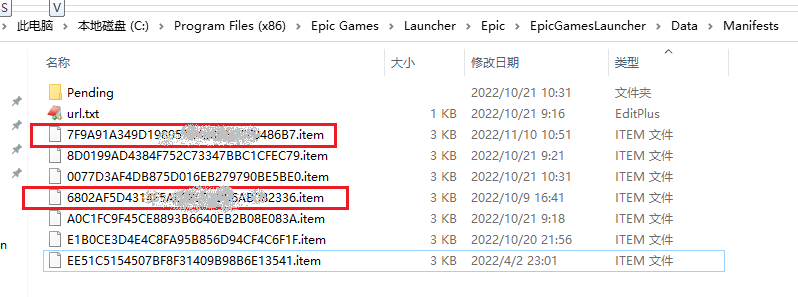
关键配置文件为:epic games launcher 的 manifests文件。该文件位于 C:\Program Files (x86)\Epic Games\Launcher\Epic\EpicGamesLauncher\Data\Manifests下, 文件名为unreal engine 5安装目录下 \.egstore文件夹中的文件名,扩展名为 item.

例如,我在A电脑安装了unreal engine 5。安装目录为F:\Epic Games\UE_5.1。

现在要在B 电脑使用该安装文件 。

1、把A电脑unreal engine 5安装目标全部复制到 B电脑。B电脑路径为:I:\Epic Games\UE_5.1

2、在B电脑安装epic games launcher 。默认安装路径为:

C:\Program Files (x86)\Epic Games\Launcher\Epic\

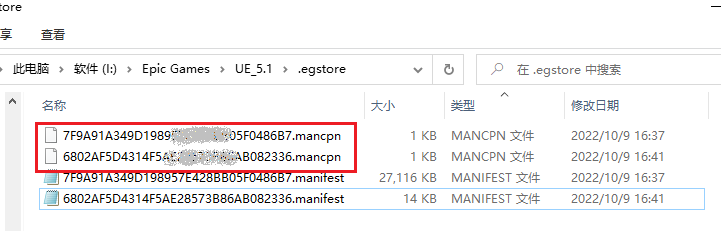
 2、在I:\Epic Games\UE_5.1\.egstore 目录中有 扩展名为 .mancpn 的文件,文件名为32个字母的字串。在A电脑 C:\Program Files (x86)\Epic Games\Launcher\Epic\EpicGamesLauncher\Data\Manifests 文件夹中,找到相同文件名,但扩展名为.item 的文件。复制到B电脑相同目录。
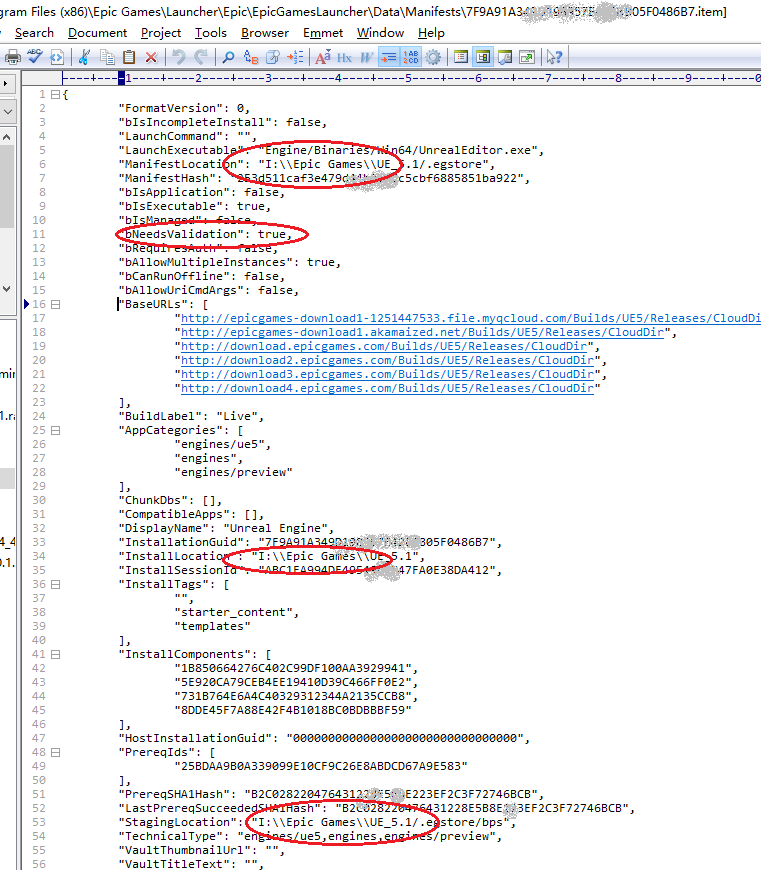
3、用记事本打开.item 文件,修改路径为B电脑  unreal engine 5的路径。