The Nvidia app is the essential companion for PC gamers and creators. Keep your PC up to date with the latest Nvidia drivers and technology.
Optimize games and applications with a new unified GPU control center, capture your favorite moments with powerful recording tools through the in-game overlay, and discover the latest Nvidia tools and software.
Features
Unified GPU Control Center
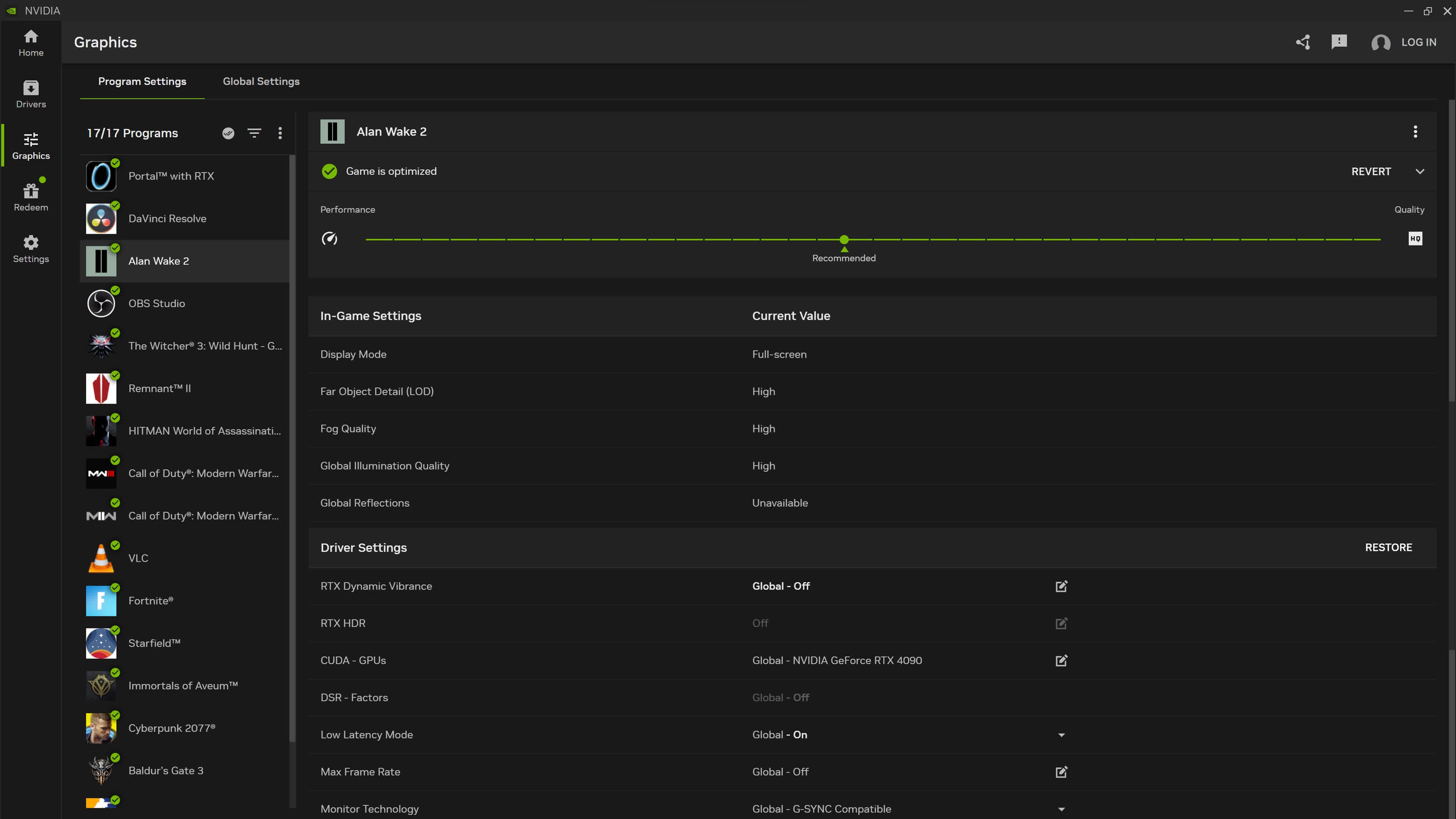
The Nvidia app integrates GeForce Experience's Optimal Game Settings and Nvidia Control Panel's 3D Settings into a unified interface. This becomes a centralized place to review or modify optimizations while adjusting driver settings. You can customize it on a per-applications basis, or use a global profile across all games and applications.
Improved Driver Information
When it comes to your favorite games or applications, Game Ready Drivers and Studio Drivers ensure the ultimate experience for gamers and creators. A popular request from GeForce Experience users is for a quicker, more straightforward way to understand what's included in the latest driver updates.
In the new Driver page, we've introduced easy-to-scan bullet points of "what's new" and "what's fixed," alongside quick callouts on game support. All driver related articles are accessible on a single carousel so you can read about game announcements or technologies associated with the driver.
Redesigned In-Game Overlay
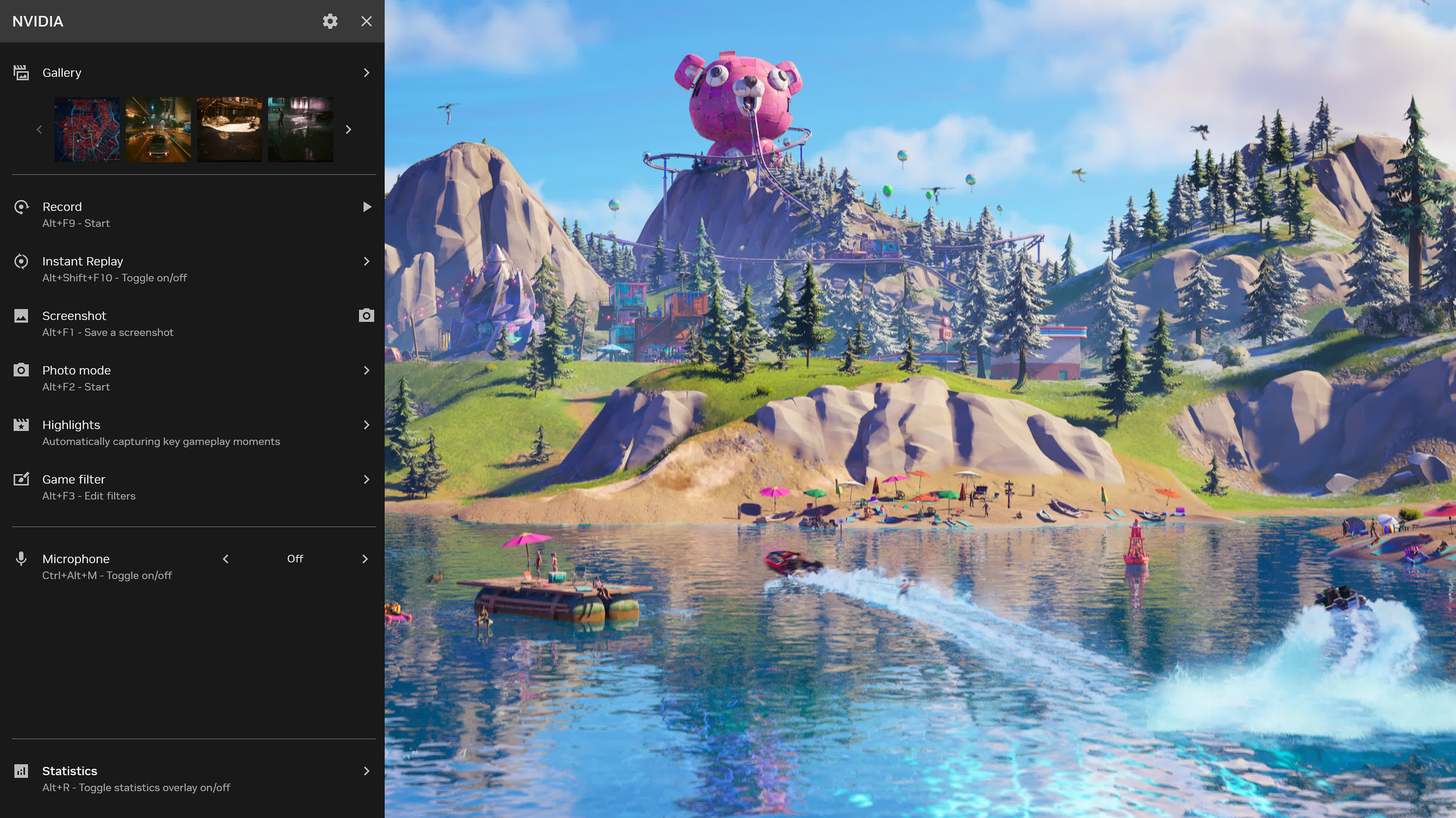
Our In-Game Overlay has undergone a comprehensive redesign. As before, use the convenient "Alt+Z" hotkey to swiftly access Shadowplay recording tools, Freestyle Game Filters, Nvidia Highlights, photo mode, and performance monitoring tools.
In the Nvidia app, we've improved the user interface, enabling quick access to features while playing your favorite game or using an application. And your captured content is now readily available in the gallery through user-friendly thumbnails.
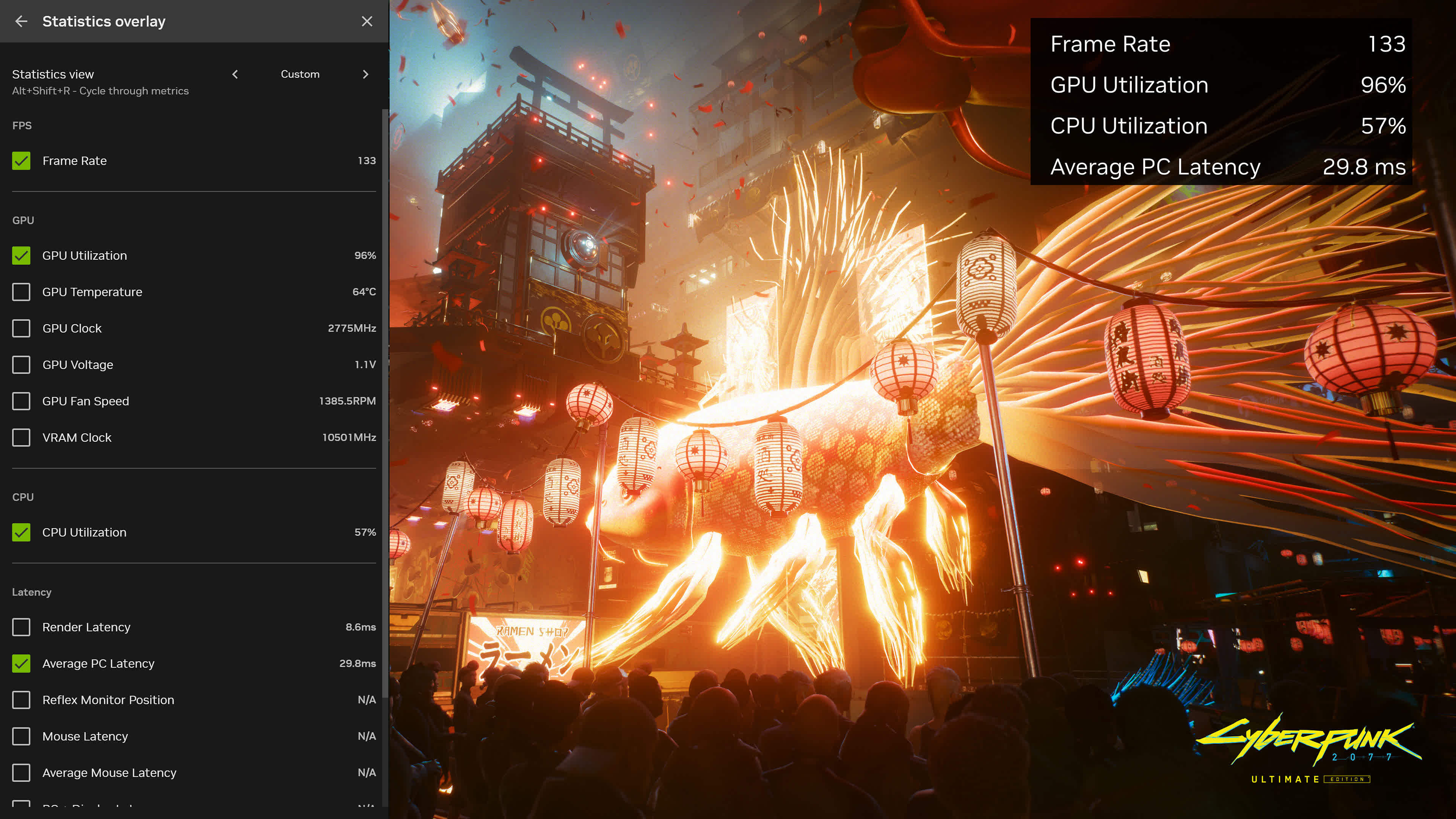
We've also enhanced performance monitoring with a new statistics overlay. Gamers can now customize how the performance overlay is displayed during their gaming session with options to minimize the footprint of the HUD.
Additionally, gamers can now customize which performance metrics they would like to see during their gaming session. Simply hit Alt + R to toggle performance monitoring statistics.
Nvidia app also introduces Shadowplay 120 FPS video capture which enables a new level of smoothness in recorded content.
New AI Freestyle Filters
Nvidia Freestyle empowers you to personalize the visual aesthetics of your favorite games through real-time post-processing filters. This feature boasts compatibility with a vast library of more than 1,200 games, and now NVIDIA app offers AI-powered filters, accelerated by Tensor Cores on GeForce RTX GPUs.
RTX Dynamic Vibrance is an AI-powered Freestyle filter that improves upon the beloved Digital Vibrance feature in the Nvidia Control Panel. RTX Dynamic Vibrance enhances visual clarity on a per app basis, providing players with a flexible and convenient way to tune their visual settings for each game. Colors pop more on screen, with perfect balance to minimize color crushing, preserving image quality and immersion.
RTX HDR, a new AI-powered Freestyle filter seamlessly brings the vibrant world of High Dynamic Range (HDR) to games that were not originally equipped with HDR support. Remarkably, only 10 of the top 50 most-played GeForce games offer HDR support and there are thousands of games that only support SDR. However, with the RTX HDR filter, you can now take advantage of your HDR-compatible monitor for a broad spectrum of games running on DX12, DX11, DX9, and Vulkan platforms.
Redeem GeForce Bundles & Rewards
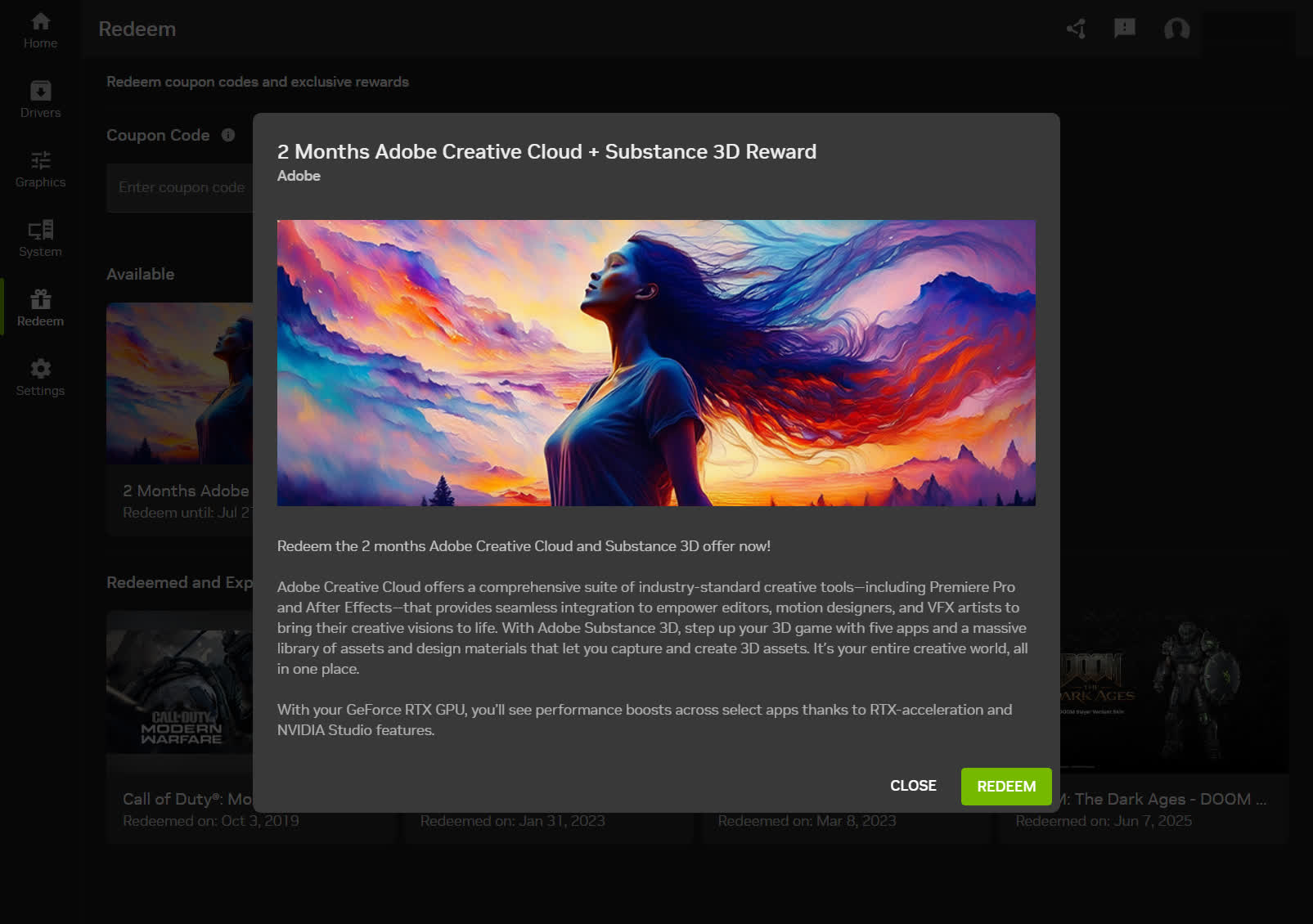
Nvidia app users get access to rewards, such as in-game content, exclusive GeForce Now premium membership offers, and more. Simply start the Nvidia app and visit the Redeem tab to check out the latest rewards.
For a limited time, users of the Nvidia app beta can redeem the GeForce Call of Duty: Modern Warfare III and Call of Duty: Warzone reward. Experience DLSS 3 in either game with a free 1 hour Double XP Boost and 1 hour Double Weapon XP Boost.
CPU: Intel Pentium G Series, Core i3, i5, i7, or higher, AMD FX, Ryzen 3, 5, 7, 9, Threadripper or higher
GPU: GeForce RTX 20, 30, 40 and 50 Series GPUs, GeForce GTX 800, 900, 1000, 1600 Series GPUs, GeForce MX100, MX200, MX300, 800M, and 900M GPUs
What's New
Nvidia App Beta 11.0.7:
New Updates
DLSS 4.5 Dynamic Multi Frame Generation Available Now
Update to DLSS 4.5 Dynamic Frame Generation on GeForce RTX 50 Series GPUs. Select "Dynamic" mode to intelligently adjust the number of generated frames during gameplay to a target frame rate, balancing frame rate, image quality, and responsiveness.
New DLSS 4.5 Multi Frame Generation 5X and 6X modes on GeForce RTX 50 Series GPUs increase 4K frame rates in path-traced titles. Paired with NVIDIA Reflex, they generate additional frames with minimal impact on responsiveness.
DLSS 4.5 Frame Generation model update on GeForce RTX 50 Series and GeForce RTX 40 Series GPUs enhances in-game user interfaces by incorporating additional engine data available for some games, improving visual quality and clarity of static UI elements.
For optimal image quality and peak performance when using ShadowPlay, the latest GeForce Game Ready Driver is required.
Access these DLSS features under Graphics > Program Settings > Driver Settings > DLSS Override – Frame Generation mode
Automatic Shader Compilation (Beta)
Rebuilds DirectX 12 shaders while your system is idle, reducing the frequency of game runtime compilation after driver updates
Control Panel Updates
Added Custom Resolution in System > Displays > Display Properties
DLSS Override Support Added For:
Arknights: Endfield
Black One Blood Brothers
Carmageddon: Rogue Shift
CODE VEIN II
Corsairs Legacy
Crimson Desert
DEATH STRANDING 2: ON THE BEACH
Demonologist
For Honor
Grounded 2
Half Sword
High On Life 2
John Carpenter's Toxic Commando
LET IT DIE: INFERNO
LORT
Marathon
Monster Hunter Stories 3: Twisted Reflection
Nightmare Frontier
Nioh 3
NORSE: Oath of Blood
Of Ash and Steel
Quarantine Zone: The Last Check
REANIMAL
Resident Evil Requiem
Star Trek: Voyager – Across the Unknown
StarRupture
Styx: Blades of Greed
The Gold River Project
The Legend of Heroes: Trails Beyond The Horizon
Vampires: Bloodlord Rising
Yakuza Kiwami 3 & Dark Ties.
Optimal Settings Support Added For:
Arknights: Endfield
Ashes of Creation
Highguard
StarRupture
The Last Caretaker
Squashed Bugs
Overlay
Fixed an issue where Statistics shows N/A after a client update
Fixed an issue where CPU stats could flicker in idle state
Fixed an issue where microphone selections would revert to default after switching devices
Fixed an issue that prevented the use of Numpad keys for overlay shortcuts
Graphics
Fixed an issue where NVIDIA Smooth Motion setting was missing in Global Settings
Fixed an issue where NVIDIA app resolution changes were not occurring in-game
Display
Fixed an issue where changing display modes caused flickering
Installation
Fixed an intermittent issue where NVIDIA app installation did not install if PC was offline
Removed redundant restart prompt after upgrading from GeForce Experience
Various stability fixes to improve overall app reliability
Project G-Assist
Adjusted the voice prompt shortcut to prevent overlapping voice prompts while a response is still processing various UI improvements for G-Assist
Nvidia App 11.0.6.383:
New updates DLSS 4.5 Super Resolution Models Available Now
Update to the latest DLSS 4.5 Super Resolution Models for your RTX Series GPU. Access these DLSS features under Graphics > Program Settings > Driver Settings > DLSS Override - Model Presets > "Recommended."
Replaces "Latest" with "Recommended" mode to better align with DLSS 4.5's new models: Model M (optimized for DLSS Performance) and Model L (optimized for 4K DLSS Ultra Performance), and Preset K for remaining DLSS modes.
Control Panel Updates
Added NVIDIA Surround features like Hotkey shortcuts and Bezel correction.
Added Debug Mode, and GPU Performance Counters in System > Advanced tab.
DLSS Override Support Added for 77 DLSS Games:
171
A Difficult Game About ROLLING - ReUpRise
A.I.L.A
AION 2
Anno 117: Pax Romana
Arc Raiders
Ashes of Creation
Assetto Corsa Rally
Astrometica
Automate It: Factory Puzzle
Bastide
Beyond Hanwell
Bum: Revenge
Call of Duty: Black Ops 7
Carpathian Survival
Chernobylite 2: Exclusion Zone
Chip 'n Clawz vs. The Brainioids
Cursed Deal
DAVY x JONES
DEADCAM | ANALOG • SURVIVAL • HORROR
Deathground
DREADZONE
DUET NIGHT ABYSS
Echoes of the End: Enhanced Edition
Electronic Market Simulator
EMOTIONLESS: The Last Ticket
ENTITY: THE BLACK DAY
Europa Universalis V
FINAL FANTASY VII REBIRTH
Firefighting Simulator: Ignite
Goofy Gorillas
Greedland
Heroic Kingdom: Origins
Infinity Nikki
Jurassic World Evolution 3
Keeper
Legend of Ymir
Little Nightmares III
Mother Machine
Night of the Dead
Night Project
Ninja Gaiden 4
Noble Legacy
Nowhere Near
Otherplane
Outbreak: Shades of Horror
Palworld
Park Studio
PERISH
Pizza Bandit
Project Motor Racing
Prologue: Go Wayback!
Real Life
Renovation Simulator
Rocket Squad: Infinity
RV There Yet?
Seafarer: The Ship Sim
Small Spaces
Sophonce
SpongeBob SquarePants: Titans of the Tide
Storage Hunter Simulator
TEKKEN 8
The Black Pool: Arena Survivors
The Bus
The Last Caretaker
The Outer Worlds 2
Tower of Fantasy
Trench Tales
Vampire: The Masquerade - Bloodlines 2
Violet
Wacky West
Where Winds Meet
Why don't they laugh?
Winter Survival
Wreckreation
Yakuza Kiwami 2
Zombie City
Optimal Settings Support Added For 10 New Games:
Anno 117: Pax Romana
ARC Raiders
Call of Duty: Black Ops 7
Digimon Story: Time Stranger
Escape From Duckov
Europa Universalis V
Football Manager 26
RV There Yet?
The Outer Worlds 2
Vampire: The Masquerade - Bloodlines 2
Squashed Bugs!
Fixed an issue where NVIDIA app overlay would disappear after changing display resolution.
Fixed an issue where the recording bitrate would incorrectly set to 150 Mbps after a system restart.
Fixed an issue preventing users from changing the destination folder for saved recordings.
Fixed an issue where images captured using Photo Mode > Super Resolution appeared blank for 50 Series GPUs
Previous Release Notes:
New Updates
DLSS Override Support Added for 6 DLSS Games:
FBC: Firebreak
Monster Energy Supercross 25 - The Official Video Game
REMATCH
Strinova
The Alters
Warhammer 40,000: Speed Freeks
Optimal Settings Support Added For 5 New Games:
Dune: Awakening
EA SPORTS F1 25
FBC: Firebreak
REMATCH
Stellar Blade
Squashed Bugs!
Addressed a bug where DLSS Overrides did not appear for manually added games.
Corrected an issue where DLSS Overrides were unavailable for certain supported titles.
Various stability fixes.
Previous Release Notes:
Redeem the 1 or 2 months Adobe Creative Cloud offer now!
Nvidia is currently offering a free Adobe Creative Cloud subscription to users with eligible RTX GPUs via the Nvidia App Rewards system:
Owners of GeForce RTX 30 or 40 series GPUs get 1 free month of Adobe Creative Cloud.
Owners of the newer RTX 50 series get 2 free months-plus access to Adobe Substance 3D apps like Sampler, Designer, and Painter, with a full asset library included
Adobe Creative Cloud offers a comprehensive suite of industry-standard creative tools, including Premiere Pro and After Effects, that provides seamless integration to empower anyone-from hobbyists to professionals--to bring their visions to life. You also get built-in templates to jump-start your designs and step-by-step tutorials to help you get up to speed quickly and sharpen your skills. It's your entire creative world, all in one place.
With your GeForce RTX GPU, you'll see performance boosts across select apps thanks to RTX-acceleration and Nvidia Studio features.
Previous Release Notes:
New Updates
User Accessibility Features
Added support for Light and Dark theme modes, with the option to automatically adapt based on Windows settings. Choose your preferred theme in Settings > Features > Theme.
Added support for Windows Narrator, allowing on-screen content to be read aloud for improved accessibility.
Optimal Settings Support Added For 12 New Games:
Assassin's Creed Shadows
Clair Obscur: Expedition 33
Deadlock
ELDEN RING NIGHTREIGN
Grand Theft Auto V Enhanced
Half-Life 2 with RTX
Indiana Jones And The Great Circle
inZOI
Monster Hunter Wilds
Split Fiction
The Last of Us Part II Remastered
The Elder Scrolls IV: Oblivion Remastered
Squashed Bugs!
Fixed an issue where DLSS-FG defaults to 2x irrespective of in-game setting when DLSS override model is set to "Latest" and Frame generation is set to "Use the 3D application setting".
Fixed an issue where the driver download could not be completed.
Fixed an issue where the recording bitrate setting was not saved.
Fixed an issue where HDR video colors were not encoded properly for HEVC and AV1 playback.
Fixed a bug where the in-game overlay was not accessible on the GeForce RTX 5070.
Fixed an issue where a PC reboot would reset microphone boost to an incorrect value.
Fixed an issue where Highlights summary window could not be disabled.
Various stability fixes.
Fast servers and clean downloads.
Serving tech enthusiasts for over 25 years.
Tested on TechSpot Labs.
Last updated:
Recent Nvidia App news
The neoclouds are burning cash by the billion. Nvidia just lined up the money to keep them building
A new SEC filing reveals a massive web of Nvidia's AI infrastructure investments
Nvidia's powerful cloud machines exploited to run custom AI models
Nvidia App is featured in...
6K Gaming Pushes Nvidia's $5,000 Flagship Past Its Limits
What Graphics Cards Cost Around the World
A Stunning Remake With Unexpected GPU Results
Software similar to Nvidia App 5
GeForce Now Instantly transforms nearly any laptop, desktop, Mac, Shield TV, Android device, iPhone, or iPad into the PC gaming rig you've always dreamed of.
Freeware
Windows, macOS, Android
RTX Voice is a plugin that leverages Nvidia GPUs and their AI capabilities to remove distracting background noise from your broadcasts, voice chats, and remote video conferencing meetings.
Freeware
Windows 10
Take your livestreams, voice chats, and video conference calls to the next level with AI-enhanced voice and video.