


With the expansion of Microsoft Sentinel UEBA (User and Entity Behavior Analytics) into new data sources, spanning multi-cloud (AWS, GCP), identity providers (Okta), and authentication logs (MDE DeviceLogon, Microsoft Entra ID Managed Identity, Service Principal sign-ins), defenders can now detect behavioral anomalies across hybrid environments from a single place.
We’ve also expanded AWS coverage with more anomalies, enrichments and insights, so CloudTrail events now arrive with more built-in context at ingestion time. This lets defenders triage suspicious activity faster without building and maintaining large baselines in KQL.
Many defenders analyze CloudTrail activity using thresholds or historical patterns to identify unusual behavior. In dynamic cloud environments, interpreting this activity can be challenging without additional behavioral context.
Microsoft Sentinel UEBA shifts the burden away from query authors by enriching raw AWS logs with simple binary insights (true/false) derived from user, activity, and device behavior patterns – such as first-time geography, uncommon ISP, unusual action, and abnormal operation volume. Detection authors can stack these binary signals or combine them with built-in UEBA anomalies to surface attacker behavior that would otherwise blend into routine CloudTrail activity.
In this post, you’ll learn how binary feature stacking works, how UEBA baselines AWS identities (human and non-human), and how to use UEBA enrichments and built-in anomalies to strengthen AWS detections and triage.
Defenders investigating AWS activity often rely on raw CloudTrail logs, static thresholds, or manually-engineered baselines to differentiate between normal operational patterns and adversary behavior. While CloudTrail captures rich activity data, defenders often need behavioral context – such as historical usage patterns, geography, and device signals – to distinguish routine operations from suspicious behavior. This is where Microsoft Sentinel UEBA adds value.
Microsoft Sentinel UEBA enriches raw AWS logs with simple, binary behavioral insights (true/false) derived from baseline user, peer, and device behavior patterns – such as first-time geography, uncommon ISP, unusual action, and abnormal operation volume. These clear binary signals help establish behavioral context and inform investigation and detection decisions. This post refers to this approach as binary feature stacking.
Microsoft Sentinel UEBA surfaces AWS behavioral context in two tables: BehaviorAnalytics and Anomalies.
The BehaviorAnalytics table is the primary investigation surface for UEBA-enriched AWS activity. EventSource field identifies the log source (for example, AWSCloudTrail), ActivityType maps to service level AWS EventSource (for example, S3, KMS, or IAM), and ActionType captures the AWS API name (for example, ConsoleLogin or CreateUser). Use these fields to filter and scope specific categories of AWS activity.
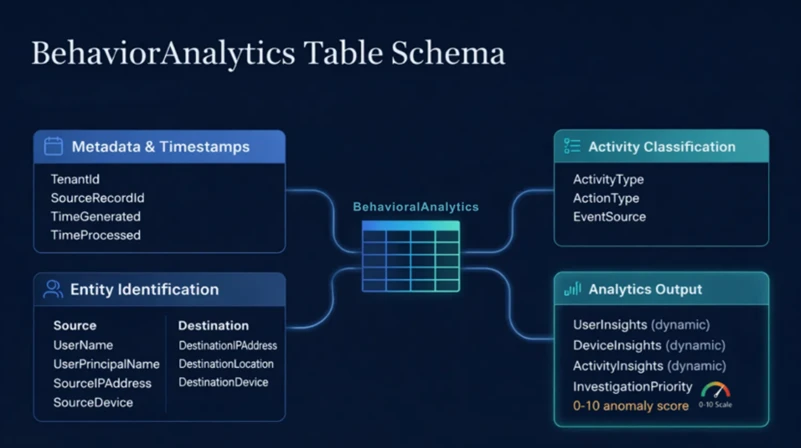
UEBA provides enrichments in three dynamic fields (UserInsights, DeviceInsights and ActivityInsights)– most importantly ActivityInsights, a JSON property bag that contains the binary behavioral features used for baseline-driven profiling. These enrichments are calculated at the user and tenant (AWS AccountId) level, as well as the activity level (for example, uncommon high volume of operations). Each enrichment uses a different baseline window, ranging from 7 days to 180 days.
This data is always available for hunting, even if no alert is fired. Each record includes key fields from the original CloudTrail event alongside enrichments derived from user, activity, and device behavior. The full list of available enrichments and their baseline lookback periods is documented in Entity enrichments – dynamic fields.
The Anomalies table contains outputs from Microsoft’s pre-trained anomaly detection machine learning models. Six built-in anomalies are currently available for AWS. For more information about these anomalies, see: Anomalies detected by the Microsoft Sentinel machine learning engine.
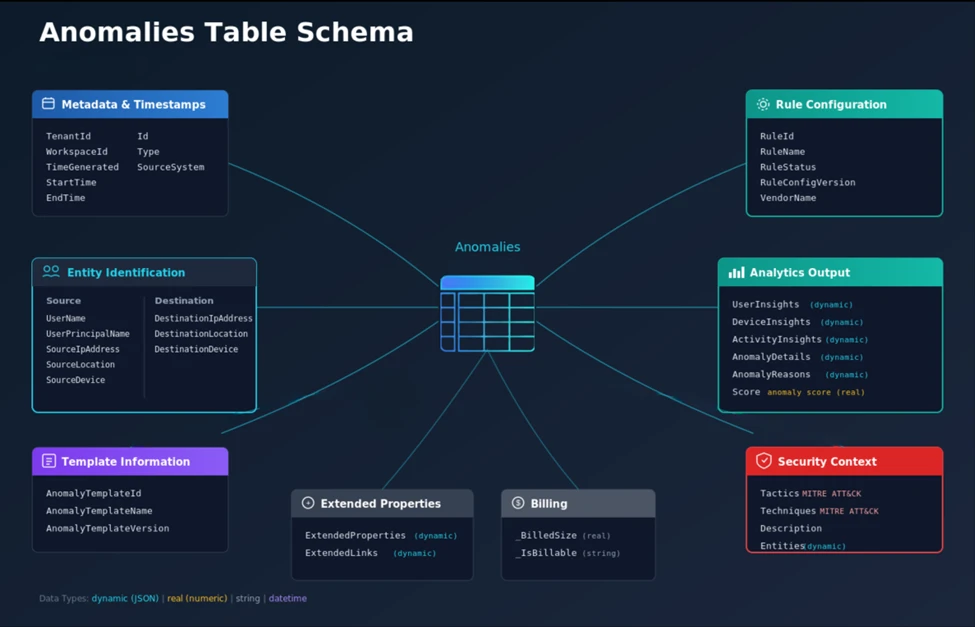
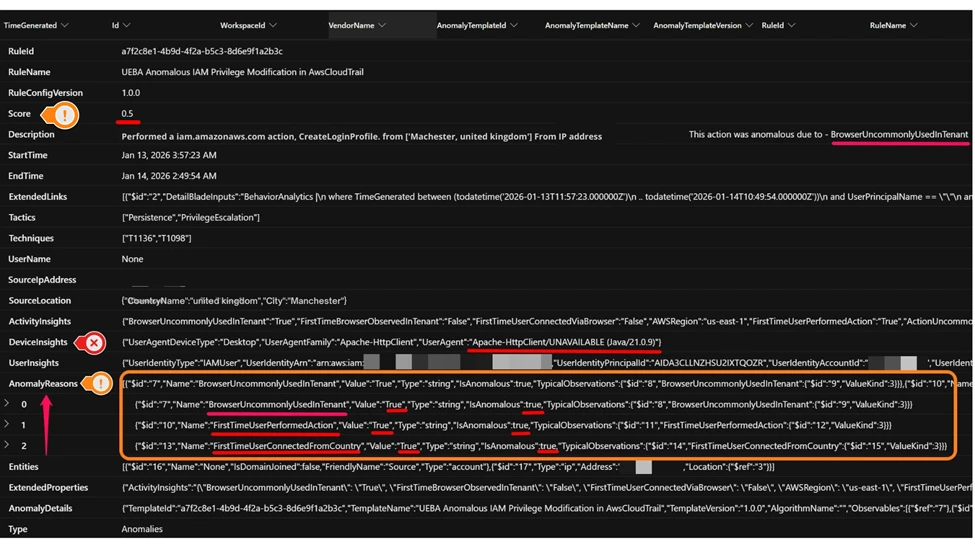
Each anomaly record includes MITRE ATT&CK mappings, behavioral enrichments, an AnomalyScore, and AnomalyReasons, which explains why an event was flagged as an anomaly.
Here’s an example of an AWS IAM Privilege Modification anomaly. In this case, the CreateLoginProfile API was invoked from a previously unseen user agent in a new country. The annotated screenshot illustrates how the anomaly is displayed and how the AnomalyReasons dynamic field provides binary insights that help investigation. In addition to FirstTimeUserPerformedAction and FirstTimeUserConnectedFromCountry, the BrowserUncommonlyUsedInTenant feature indicates a new user agent (Apache-HttpClient/UNAVAILABLE (Java/21.0.9)) not commonly seen in the tenant.
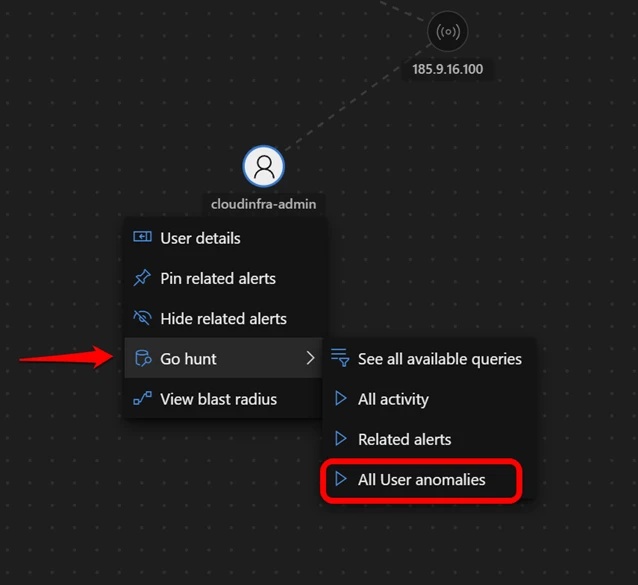
The Defender portal also surfaces UEBA anomalies on user entity pages and incident graphs.
This example highlights the Top UEBA anomalies section in an incident graph, where an Anomalous Logon event is displayed with an anomaly score of 0.8 for the account entity cloudinfra-admin.
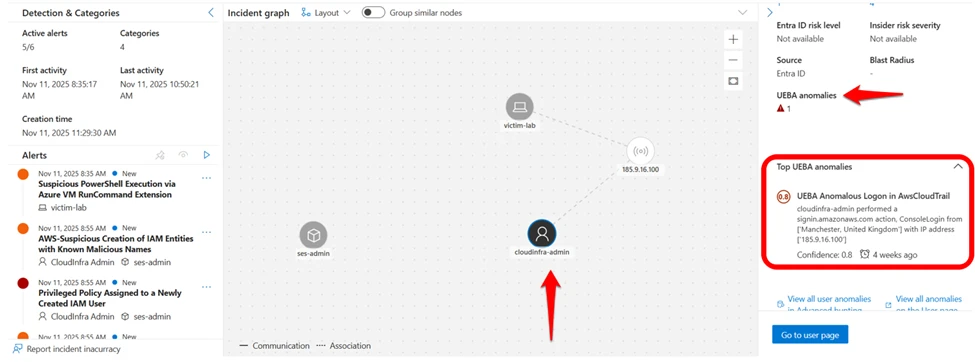
You can run built-in queries directly from incident graphs by selecting Go Hunt All User anomalies queries for immediate context-driven hunting based on UEBA outcomes. For more details, see UEBA integration with Microsoft Sentinel workflows.
Let’s look at a classic AWS scenario: Unusual anomalous AWS logons. You want to detect a user’s sign in from an unknown location compared to its historical sign-in patterns.
CloudTrail telemetry can be analyzed using historical baselines and enrichment logic to understand behavioral patterns such as first‑time sign‑ins from new locations. UEBA complements this approach by providing pre‑computed behavioral indicators that can accelerate investigation workflows.
Here is the KQL example on raw log showing necessary operations to add behavioral context.
// The "Hard Way" - baseline-heavy console sign-in analytics
let baselineStart = ago(14d);
let baselineEnd   = ago(1h);
let userBaseline =    AWSCloudTrail
    | where TimeGenerated between (baselineStart .. baselineEnd)
    | where EventName == "ConsoleLogin" and isempty(ErrorCode)
    | where isnotempty(SourceIpAddress)
    | extend geo = geo_info_from_ip_address(SourceIpAddress)
    | extend Country = tostring(geo["country"])
    | where isnotempty(Country)
    | summarize HistoricalCountries = make_set(Country) by UserIdentityPrincipalid;
AWSCloudTrail
| where TimeGenerated > ago(1h)
| where EventName == "ConsoleLogin" and isempty(ErrorCode)
| where isnotempty(SourceIpAddress)
| extend geo = geo_info_from_ip_address(SourceIpAddress)
| extend Country = tostring(geo["country"])
| where isnotempty(Country)
| join kind=leftouter (userBaseline) on UserIdentityPrincipalid
| extend FirstTimeUserConnectedFromCountry =    iif(isempty(HistoricalCountries) or not(set_has_element(HistoricalCountries, Country)), true, false)
| where FirstTimeUserConnectedFromCountry == true
The problem: This query is computationally expensive, hard to read, and requires you to manually enrich IP addresses with location data. Accurately mapping IP addresses to ASN and ISP often requires additional enrichments and up to date lookup databases. Because different user behaviors have different levels of variability, static thresholds and manually engineered baselines can still produce false positives or low-value alerts, especially in dynamic environments.
With Microsoft Sentinel UEBA, the profiling engine has already done the heavy lifting. It learns the user’s sign-in patterns, peer commonality, and tenant-wide behavioral patterns, and outputs the result to the BehaviorAnalytics table as a set of pre-calculated binary features (true/false flags).
KQL Code Snippet:
// The "Smart Way" - leveraging binary features
BehaviorAnalytics
| where ActionType == "ConsoleLogin" and ActivityType == "signin.amazonaws.com"
// The Binary Features
| where ActivityInsights.FirstTimeUserConnectedFromCountry == True
and ActivityInsights.CountryUncommonlyConnectedFromInTenant == True and ActivityInsights.FirstTimeConnectionViaISPInTenant == True
The advantages:
By relying on these binary features, detection authors stop writing code to discover behavioral signals and instead use UEBA features to express detection intent and how to respond based on severity.
Now let’s look at how these same signals appear during investigation and triage.
The table below summarizes four attack scenarios using a consistent set of fields:
Together, these scenarios illustrate how raw CloudTrail events provide foundational visibility into AWS activity. Combining this telemetry with behavioral enrichment from Sentinel UEBA can improve the interpretability of events during investigation. The same building blocks—successful sign-ins, IAM changes, Secrets or KMS access, and S3 reads—can represent either normal administration or active intrusion.
By combining CloudTrail activity with Sentinel UEBA enrichments in BehaviorAnalytics, defenders can stack multiple high-value signals to hunt for activity patterns that match attacker tradecraft.
This context accelerates investigations by making it easier to explain why an action is suspicious and to pivot directly to correlated entries in the Anomalies table, including risk scores and reasons. For detection engineers, UEBA signals also act as stable building blocks—simplifying KQL, reducing alert noise, and hardening detections over time.
Note: The UEBA signals column lists examples of relevant binary features, not the exact logic that triggers an anomaly. Anomalies are generated by ML models and don’t map one-to-one to individual features. Use AnomalyReasons in the Anomalies table to understand why a specific anomaly was flagged.
| Scenario | The attack | Common log view | UEBA signals (binary features) | Built-in anomaly surfaced |
| Initial Access (Federated / SAML Session Hijack) | An attacker gains access to a federated identity session – for example, through a compromised identity provider (IdP) – and uses a SAML or EXTERNAL_IDP flow to perform actions the user rarely performs, from a new location and at an unusual pace. | CloudTrail shows federated authentication activity (UserAuthentication / EXTERNAL_IDP, for example, Okta) followed by successful API calls under an assumed role session; each event is valid in isolation. | FirstTimeUserConnectedFromCountry = True ISPUncommonlyUsedInTenant = True ActionUncommonlyPerformedByUser = True ActionUncommonlyPerformedInTenant = True | UEBA Anomalous Federated or SAML Identity Activity in AwsCloudTrail |
| Initial Access and Persistence | An attacker compromises a developer’s access keys and logs in (for example, through uncommon user agent) to create a backdoor user. | CloudTrail shows a successful ConsoleLogin via SDK or CLI user agent and subsequent IAM action, such as CreateUser, all of which are valid API calls without behavioral context. | FirstTimeUserConnectedFromCountry = True BrowserUncommonlyUsedInTenant = True ActionUncommonlyPerformedByUser = True (CreateUser) ActionUncommonlyPerformedInTenant = True | Examples: UEBA Anomalous Logon in AwsCloudTrail; UEBA Anomalous IAM Privilege Modification in AwsCloudTrail |
| Credential Access & Collection (Secrets / KMS Key Discovery) | After establishing a foothold with valid credentials, an attacker queries Secrets Manager and KMS to list keys and retrieve secret values, often starting with discovery (ListSecrets/ListKeys) then access (GetSecretValue), sometimes at unusually high frequency. | CloudTrail shows a GetSecretValue, ListSecrets, or ListKeys activity which can look like legitimate automation and make static allowlists and thresholds brittle. | FirstTimeUserPerformedAction = True ActionUncommonlyPerformedInTenant = True UncommonHighVolumeOfOperations = True ISPUncommonlyUsedInTenant = True | UEBA Anomalous Secret or KMS Key Access in AwsCloudTrail |
| Data Exfiltration (the “low-and-slow” S3 drain) | A compromised admin account performs a burst of repeated S3 GetObject operations—representing a high volume of similar operations within the same service—often targeting multiple objects or prefixes in quick succession to stage data for exfiltration while staying below traditional volume thresholds. | If S3 data events are enabled, CloudTrail shows a high frequency of GetObject API calls across multiple objects or buckets in a short time window. Each request appears legitimate in isolation, and overall data transfer may remain below static thresholds, making the activity difficult to detect using traditional methods. | UncommonHighVolumeOfOperations = True CountryUncommonlyPerformedInTenant = True ActionUncommonlyPerformedByUser = True (S3 GetObject) ISPUncommonlyUsedInTenant = True | UEBA Anomalous Data Transfer from Amazon S3 |
Table 1: Examples of Microsoft Sentinel UEBA enrichments in real-world attack scenarios
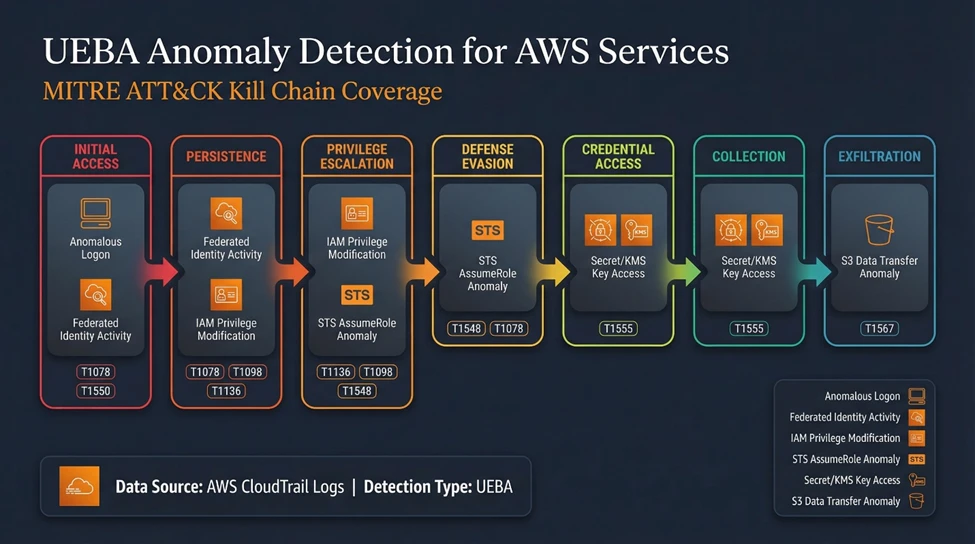
The visual below illustrates how Microsoft Sentinel UEBA’s AWS anomaly coverage maps across multiple stages of the kill chain:
Together, these anomaly detections provide defenders with end-to-end visibility – from suspicious authentication through sensitive access and data movement – with binary feature enrichments that add high-value behavioral context during investigations.
Before you begin
Before you run the queries, ensure the following are in place:
Baseline establishment period completed
Allow sufficient time for UEBA to establish user, activity, and device baselines. In most environments, this typically requires 7–14 days of steady telemetry.
AWS environment onboarded to Microsoft Sentinel UEBA
Ensure that AWS CloudTrail (management events and, where applicable, object-level data) is connected, and UEBA is enabled for the AWS data source.
CloudTrail data is flowing consistently
Confirm that AWS CloudTrail events are being ingested into Microsoft Sentinel and visible in Advanced Hunting.
Ready to start hunting? Open Advanced Hunting in Microsoft Sentinel and run the following query to explore the BehaviorAnalytics table and inspect enriched AWS behavioral signals. This query intentionally keeps the logic lightweight. The goal is not to “detect” anomalous activity immediately, but to understand how binary behavioral features surface in your environment.
// Starter query – explore UEBA-enriched AWS behavioral signals
BehaviorAnalytics
| where EventSource == "AWSCloudTrail" or ActivityType endswith "amazonaws.com"
| where isnotempty(ActivityInsights)
| where ActivityInsights.FirstTimeUserConnectedFromCountry == true
   or ActivityInsights.ActionUncommonlyPerformedByUser == true
   or ActivityInsights.UncommonHighVolumeOfOperations == true
| project
    TimeGenerated,
    UserName,
    ActionType,
    EventSource,
    ActivityType,
    ActivityInsights
| order by TimeGenerated desc
When reviewing the results, focus on:
Once you are comfortable interpreting enriched behavior:
This approach lets detection authors focus on behavioral intent, not baseline math – turning raw AWS telemetry into actionable security signals.
Microsoft Sentinel UEBA can substantially reduce detection complexity, but it’s important to account for coverage boundaries and the conditions under which enrichments and scores are most reliable:
Coverage is selective (not “every API”).
Enrichments vary by event type.
Cross-cloud identity baselines are calculated independently.
Use scores for prioritization, not direct alerting without retroactive lookup.
Anomaly support in the UI is currently for UPN-based entities.
Some insights depend on identity and user agent fidelity.
CloudTrail provides detailed activity data. Sentinel UEBA enhances this telemetry with behavioral context, such as first‑time geography or uncommon ISP usage, to support investigation and detection workflows. A single failed console login is often low signal on its own. That same event becomes far more meaningful when it’s paired with behavioral context, such as a first-time country, an unusual ISP, or activity on a rarely used admin account.
By shifting our focus from writing complex queries to leveraging Microsoft Sentinel UEBA’s binary feature stacking, we gain three practical advantages:
For the modern SOC, the goal is not only to collect logs—it’s to understand behavior. Use the BehaviorAnalytics table as your starting point to understand what “normal” looks like in your environment, then pivot to related Anomalies when you need model-driven prioritization. In practice, this shifts investigations from “What happened?” to “Is this consistent with expected behavior?”
Ready to start hunting? Onboard your AWS environment to Microsoft Sentinel UEBA, open Advanced Hunting, and run the starter query in the Practical implementation section to explore the BehaviorAnalytics and Anomalies tables in your environment.
Learn about the UEBA Behaviors Layer for AWS CloudTrail and other data sources.
The Microsoft Sentinel UEBA Essentials solution provides additional built-in queries.
此内容由惯性聚合(RSS阅读器)自动聚合整理,仅供阅读参考。 原文来自 — 版权归原作者所有。